
Hello! Welcome back to our series on Text-to-Speech architectures.
In the last lesson, we successfully completed the final piece of the TTS puzzle by using a pretrained HiFi-GAN vocoder to synthesize an audio waveform from a mel-spectrogram. This gave you hands-on experience with the inference side of a two-stage TTS system.
Today, we take a significant step forward, moving from being a user of these models to a builder. Our learning outcome is to train a complete TTS system (FastSpeech 2 + HiFi-GAN) using an ESPnet2 recipe. We will be using the End-to-End Speech Processing Toolkit (ESPnet), a powerful, open-source framework predominantly used in the speech research community. Given your goal to become an audio researcher and developer, mastering a toolkit like ESPnet is a crucial skill. It enforces a rigorous, reproducible, and scalable approach to experimentation that is standard in the field.
Let's get started.
1. The ESPnet Philosophy: Understanding Recipes
Before we dive into a specific command, it's essential to understand the philosophy behind ESPnet. The entire toolkit is built around the concept of a "recipe". A recipe is a self-contained directory with a collection of scripts that handles every step of an experiment, from data downloading and preparation to model training, decoding, and evaluation.
The goal is absolute reproducibility. By cloning the repository and running a single script within a recipe folder, anyone should be able to replicate the results of a published paper. You'll find that this structure is heavily influenced by the Kaldi toolkit, which has long been a standard in the ASR community.
While our focus is TTS, the fundamental structure of an ESPnet recipe is consistent across all tasks (ASR, STS, etc.). To get a feel for this structure, let's watch a brief segment from a tutorial that walks through an ASR recipe. The core concepts presented are directly applicable to our TTS task.
Fall2022-SpeechRecognition&Understanding (Lecture6 - ESPnet tutorial1 (Recipe))
This video from WAVLab at Georgia Tech provides an excellent walkthrough of a standard ESPnet recipe. Pay close attention to the explanation of the directory structure and the data preparation stages, as these concepts are fundamental to any task in ESPnet, including the TTS system we are about to train.
Please watch the sections on the directory structure (05:07 - 09:40) and data preparation (18:49 - 33:20). Focus on understanding: The layout of a recipe folder (egs2/<dataset>/<task>). The role of run.sh as the main entry point. The concept of Kaldi-style data directories (data/train, data/dev) and the key files within them (wav.scp, text, utt2spk).
As you saw, every recipe is a highly organized blueprint. The run.sh script orchestrates a series of stages, and data is meticulously formatted into a standardized structure. Now, let's see how this blueprint is adapted for Text-to-Speech.
2. Anatomy of a TTS Recipe: From Text to Waveform
The general principles are the same, but a TTS recipe has its own unique stages tailored to the task of speech synthesis. The official ESPnet documentation provides a clear overview of this process.
Text-to-Speech - ESPnet Documentation
This page from the official ESPnet documentation outlines the specific flow of a TTS recipe. It details the stages involved, from data preparation and tokenization to training and decoding.
Read the section 'Recipe flow' to understand the 9 main stages of an ESPnet TTS recipe. As you read, compare these stages to the ASR stages discussed in the video. Note the key differences, such as the Grapheme-to-Phoneme (G2P) conversion in Stage 5 and the specific 'TTS decoding' in Stage 8.
The key takeaway is that the recipe systematically prepares the data, collects necessary statistics, trains the model, and finally, synthesizes audio for evaluation.
3. The Target System: FastSpeech 2 + HiFi-GAN
Our goal is to train a system that combines the FastSpeech 2 acoustic model with the HiFi-GAN vocoder. Let's quickly visualize the architecture we're about to build.
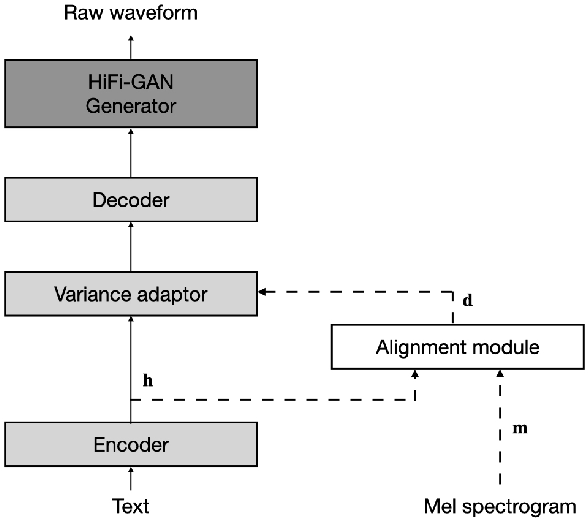
A crucial component here is the Variance Adaptor. FastSpeech 2 is a non-autoregressive model, which means it generates all frames of the mel-spectrogram in parallel. While this is fast, it also means the model doesn't know how long the output audio should be. To solve this, it must explicitly predict the duration of each input phoneme.
How does it learn to do that? By learning from a "teacher".
4. The Training Process: A Multi-Stage Approach
Training a FastSpeech 2 system isn't a single command. It typically involves two major steps, both of which are handled by stages within the run.sh script:
- Train a Teacher Model: An autoregressive model (like Tacotron 2) is trained first. Because of its sequential nature and attention mechanism, it learns an implicit alignment between the input text and the output spectrogram.
- Extract Durations: This trained teacher model is then used to process the training data and extract the alignments. These alignments are converted into explicit duration values for each phoneme.
- Train the Student Model (FastSpeech 2): Finally, FastSpeech 2 is trained to predict these durations, along with other variances like pitch and energy, and generate the final mel-spectrogram.
Modern ESPnet recipes streamline this even further with joint training, where the acoustic model (FastSpeech 2) and the vocoder (HiFi-GAN) are trained together in a GAN setup. This is the approach we'll focus on.
Let's examine the documentation that details this joint training procedure.
Text-to-Speech - ESPnet Documentation
This section of the ESPnet documentation provides the exact commands and procedure for joint training of a text2mel model (like FastSpeech 2) and a vocoder (like HiFi-GAN).
Please read the sections on 'FastSpeech2 training' and 'Joint text2wav training'. Focus on understanding: The commands to run the teacher model with use_teacher_forcing to get the duration information. The two cases for joint training: from scratch and fine-tuning. The key command-line arguments: --tts_task gan_tts and --train_config.
5. Executing the Recipe: A Practical Guide
Now, let's synthesize everything we've learned into a concrete set of steps to launch a training run. We will use the ljspeech/tts1 recipe as our example, as it's a standard single-speaker benchmark.
Assume you have successfully installed ESPnet and are in the main espnet directory.
Step 1: Navigate to the Recipe Directory
All work is done inside the specific recipe folder.
cd egs2/ljspeech/tts1/
Step 2: Prepare Data and Teacher Alignments
Before we can start the joint training, we need the data and, crucially, the duration alignments from a teacher model. The run.sh script handles this through its stages.
First, you would run the initial stages to download and prepare the LJSpeech dataset. These are typically stages 1 through 4.
# This would download data, format it, and remove short/long utterances.
# Note: You can run stages selectively.
./run.sh --stage 1 --stop-stage 4
Next, you need to train a teacher model (e.g., Tacotron 2) and extract alignments. This corresponds to stages 5, 6, 7, and 8 in a typical recipe. Stage 7 trains the teacher, and Stage 8 decodes with it to produce alignments.
# Train a teacher model (e.g. Tacotron 2, defined in the default config)
./run.sh --stage 7 --stop-stage 7


# Use the teacher model to extract durations for the train/dev sets
# This generates the alignment files needed for FastSpeech 2
./run.sh --stage 8 --stop-stage 8 --inference_args "--use_teacher_forcing true"
The output of Stage 8, specifically the directory exp/<teacher_exp_name>/decode_use_teacher_forcingtrue_..., contains the vital duration information.
Step 3: Launch the Joint Training
With the alignments ready, we can finally train our target system: FastSpeech 2 + HiFi-GAN. This corresponds to restarting the run.sh script, telling it to use the previously generated alignments and a new configuration file for joint training.
This single command orchestrates the training of the entire system shown in the diagram earlier.
# This example assumes you've already run the stages to produce durations
# from a teacher model named 'tts_train_raw_phn_tacotron_g2p_en_no_space'.

./run.sh \
    --stage 7 \
    --tts_task gan_tts \
    --train_config ./conf/tuning/train_joint_conformer_fastspeech2_hifigan.yaml \
    --teacher_dumpdir exp/tts_train_raw_phn_tacotron_g2p_en_no_space/decode_use_teacher_forcingtrue_train.loss.ave \
    --tts_stats_dir exp/tts_train_raw_phn_tacotron_g2p_en_no_space/decode_use_teacher_forcingtrue_train.loss.ave/stats
Let's break down these critical flags:
--stage 7: We are jumping directly to the training stage (tts_train).--tts_task gan_tts: This is the key. It tells ESPnet to use the GAN-based training loop, which manages the joint optimization of the text-to-mel generator (FastSpeech 2), the vocoder generator (HiFi-GAN G), and the vocoder discriminators (HiFi-GAN D).--train_config ...: This YAML file is the heart of your experiment. It defines the precise architectures for FastSpeech 2 and HiFi-GAN, the optimizer settings, loss weights, and all other hyperparameters. As a researcher, you will spend most of your time creating and modifying these files.--teacher_dumpdir ...: This points to the directory containing the duration files extracted by the teacher model in the previous step.--tts_stats_dir ...: This points to the statistics (like mean and variance of features) calculated from the teacher's output, ensuring consistency.
Step 4: Monitor the Training
Once launched, you can monitor the experiment by checking the log file and using TensorBoard.
- Log File:
tail -f exp/<your_new_exp_name>/train.logwill show you the progress, including loss values for each component (reconstruction loss, adversarial loss for G and D, etc.). - TensorBoard:
tensorboard --logdir expwill launch a server where you can visualize the loss curves for training and validation, which is indispensable for debugging and analysis.
Conclusion
In this lesson, you've learned the end-to-end process of training a complete, modern TTS system using an ESPnet2 recipe. We've moved beyond simply using APIs to understanding the structured, reproducible workflow required for serious speech research and development.
Key Takeaways:
- ESPnet Recipes: Provide a standardized, stage-based structure (
run.sh) for reproducible speech processing experiments. - Teacher-Student Training: Non-autoregressive models like FastSpeech 2 require alignments from an autoregressive "teacher" model (like Tacotron 2) to learn duration prediction.
- Joint Training: ESPnet's
gan_ttstask allows for the simultaneous, end-to-end training of an acoustic model (FastSpeech 2) and a vocoder (HiFi-GAN), which can improve quality by reducing mismatch. - Configuration is Key: The
.yamlconfiguration file is the central definition of your entire experiment, from model architecture to optimizer hyperparameters.
Preview of the Next Lesson:
We have now covered both autoregressive (Tacotron 2 as a teacher) and non-autoregressive (FastSpeech 2) text-to-mel models, combined with a GAN-based vocoder (HiFi-GAN). The next step in the evolution of TTS models is to merge these components even more tightly.
In our next lesson, we will explore the VITS architecture. VITS is a groundbreaking model that integrates a Variational Autoencoder (VAE), normalizing flows, and a GAN-based decoder into a single, fully end-to-end training framework. This will connect directly to your interest in the foundations of generative modeling and prepare you for the world of advanced TTS and voice cloning.