
Hello! Welcome to the next lesson in our journey through Text-to-Speech architectures.
In our last session, we conducted a deep dive into the theory behind the HiFi-GAN vocoder. We explored how its innovative architecture, featuring a Multi-Receptive Field (MRF) generator and a dual set of Multi-Period (MPD) and Multi-Scale (MSD) discriminators, solves the critical trade-off between synthesis speed and audio quality. You now have a solid theoretical foundation for why HiFi-GAN is a cornerstone of modern TTS systems.
Today, we transition from theory to practice. Our goal is to generate an audio waveform from a mel-spectrogram using a pretrained HiFi-GAN model. We will implement the final stage of a standard TTS pipeline, a process often called "mel-spectrogram inversion" or "vocoding." This hands-on exercise will solidify your understanding and demonstrate the practical power of the concepts we've discussed.
1. The Two-Stage TTS Pipeline: From Spectrogram to Waveform
As a quick refresher, most modern TTS systems operate in two main stages:
- Acoustic Model: Takes text as input and generates a time-aligned acoustic representation, most commonly a mel-spectrogram. Models like Tacotron 2 and FastSpeech 2 (which we will cover next) perform this role.
- Vocoder: Takes the mel-spectrogram from the acoustic model and synthesizes a raw audio waveform from it. This is the stage where HiFi-GAN operates.
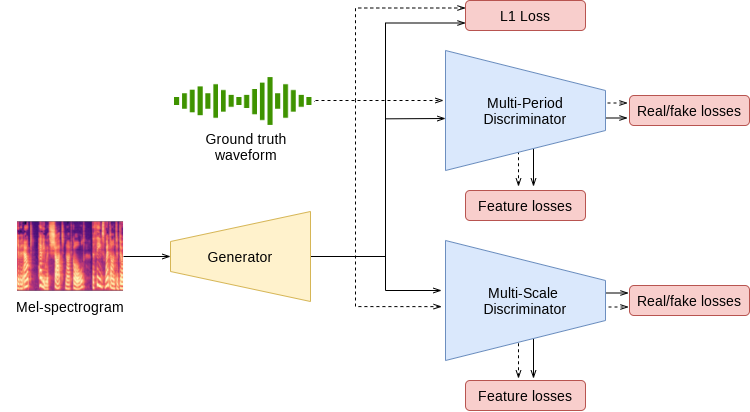
To perform inference, we need both components. We'll use a pretrained acoustic model to generate a mel-spectrogram and then feed that spectrogram into our pretrained HiFi-GAN vocoder.
The Hugging Face Audio Course provides an excellent tutorial that walks through this exact process using the SpeechT5 model as the acoustic model and a compatible HiFi-GAN model as the vocoder. Let's start by reading the relevant sections to get an overview of the process.
Pre-trained models for text-to-speech - Audio Course - Hugging Face
This reading from the Hugging Face Audio Course explains how a TTS model like SpeechT5 produces a spectrogram and requires a vocoder, like HiFi-GAN, to create the final audio. It sets the stage for the code we are about to write.
Please read the two sections. The first is near the top of the page, from the beginning down to 'Let’s see how you could do that.' The second is further down, starting from 'However, if we are looking to generate speech waveform...' down to '...and the outputs will be automatically converted to the speech waveform.' Focus on understanding the two-part process: generating a spectrogram first, then using the vocoder to convert it to audio.
2. Implementation: Synthesizing Speech with SpeechT5 and HiFi-GAN
Now, let's implement this pipeline step-by-step. Given your experience with PyTorch and the Hugging Face ecosystem, you'll find the process quite streamlined. Make sure you have the necessary libraries installed: transformers, torch, and datasets.
pip install transformers torch datasets
We will follow the process outlined in the Hugging Face guide you just read.
Step 1: Load the Acoustic Model and Processor
First, we load the SpeechT5 model, which will act as our acoustic model. We also load its associated SpeechT5Processor, which handles tokenizing the input text and preparing other necessary inputs.
from transformers import SpeechT5Processor, SpeechT5ForTextToSpeech
import torch


# Load the processor and the acoustic model from the Hugging Face Hub
processor = SpeechT5Processor.from_pretrained("microsoft/speecht5_tts")
acoustic_model = SpeechT5ForTextToSpeech.from_pretrained("microsoft/speecht5_tts")
Step 2: Prepare the Inputs
The SpeechT5 model requires three main inputs:
input_ids: The tokenized representation of the text we want to synthesize.speaker_embeddings: A vector that captures the vocal characteristics of a specific speaker. This allows the multi-speaker model to generate speech in a particular voice.- A vocoder: The HiFi-GAN model we will use to convert the spectrogram to a waveform.
Let's prepare the first two. We'll tokenize our desired text and download a pre-computed speaker embedding from a dataset on the Hub.
from datasets import load_dataset


# 1. Tokenize the input text
text = "Hello, today we are turning theory into practice with HiFi-GAN."
inputs = processor(text=text, return_tensors="pt")


# 2. Load a speaker embedding
embeddings_dataset = load_dataset("Matthijs/cmu-arctic-xvectors", split="validation")
speaker_embeddings = torch.tensor(embeddings_dataset[7306]["xvector"]).unsqueeze(0)


```grasp
{
  "type": "exercise",
  "id": "10888b28-f954-4b07-8b4d-472894d124d3"
}
The speaker embedding is a tensor of shape (1, 512)
print("Speaker embedding shape:", speaker_embeddings.shape)
#### **Step 3: Load the HiFi-GAN Vocoder**

This is the core of today's lesson. We load the pretrained HiFi-GAN vocoder. Note that this vocoder is specifically trained to work with the output of the `SpeechT5` model. Both models come from the same `microsoft/speecht5_*` family of checkpoints.

```python
from transformers import SpeechT5HifiGan


# Load the HiFi-GAN vocoder
vocoder = SpeechT5HifiGan.from_pretrained("microsoft/speecht5_hifigan")
Step 4: Generate the Waveform
With all components ready, we can now generate the audio. The generate_speech method of the SpeechT5ForTextToSpeech model conveniently handles the two-stage process:
- It first generates the mel-spectrogram internally.
- It then passes this spectrogram to the
vocoderobject you provide to produce the final waveform.
# Generate the speech waveform
speech_waveform = acoustic_model.generate_speech(
    inputs["input_ids"],
    speaker_embeddings,
    vocoder=vocoder
)

print("Generated waveform shape:", speech_waveform.shape)
The output speech_waveform is a PyTorch tensor containing the raw audio samples.
Step 5: Listen to the Output
The final step is to listen to our creation! If you are in a Jupyter or Colab environment, you can use IPython.display.Audio. We need to provide the waveform tensor and the correct sample rate, which for this model is 16,000 Hz.
from IPython.display import Audio


# The sample rate for the SpeechT5 model is 16kHz
sample_rate = 16000


# Play the audio
Audio(speech_waveform.numpy(), rate=sample_rate)
You should now hear the synthesized speech. Congratulations, you've successfully used a HiFi-GAN vocoder to generate an audio waveform from a mel-spectrogram!
3. Connecting the Code to the Theory
Let's briefly connect this practical exercise back to the architectural details from the previous lesson.
When you called acoustic_model.generate_speech(..., vocoder=vocoder), the vocoder object performed the mel-spectrogram inversion. This single function call encapsulates the entire forward pass of the HiFi-GAN generator.
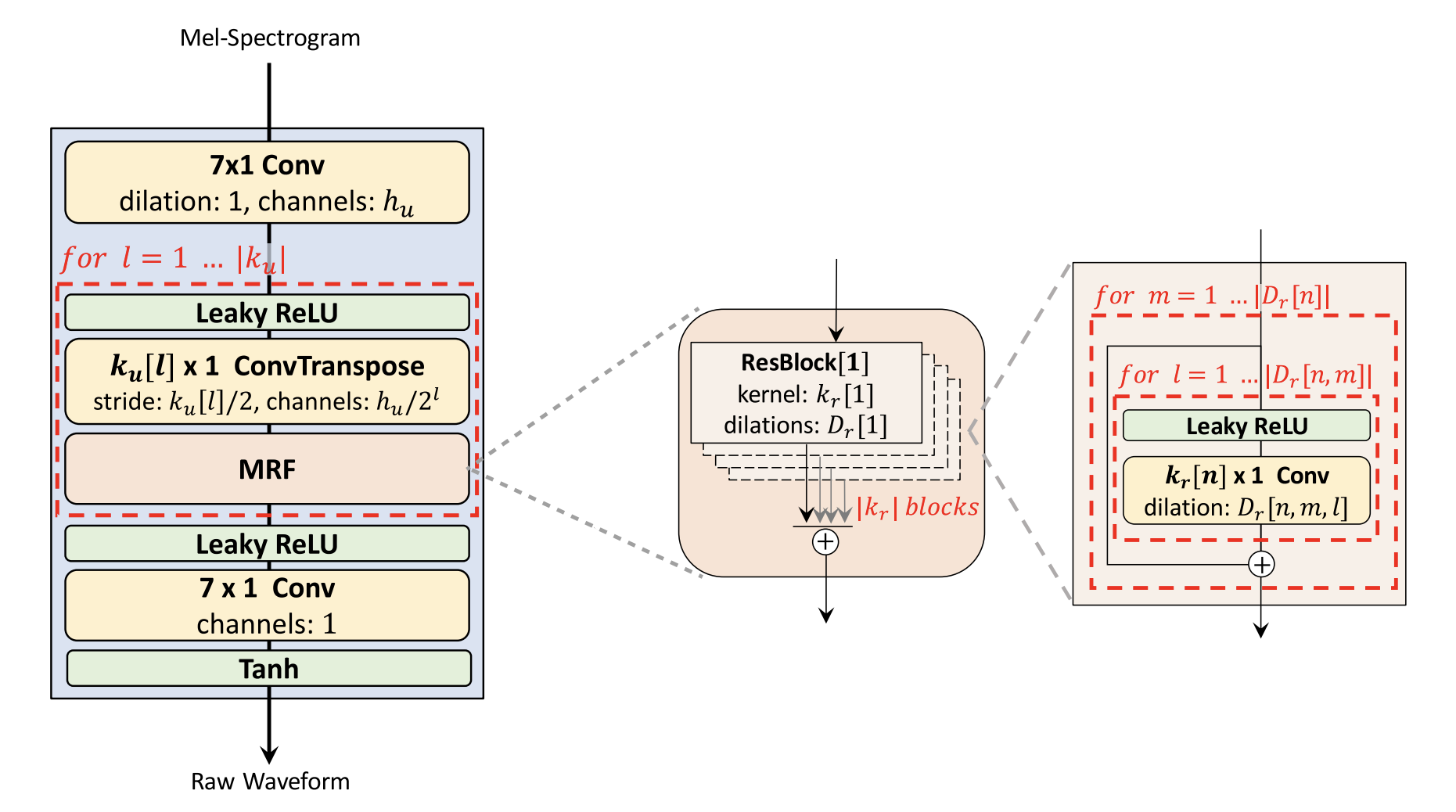
The vocoder.forward(spectrogram) method (which is called internally) implements exactly this process. The pretrained weights you downloaded contain the learned parameters of the convolutional filters in the upsampling layers and MRF blocks, enabling the network to translate the abstract frequency patterns of the spectrogram into a realistic, coherent waveform. The discriminators are not used at all during this inference stage; their only role is to help train the generator.
Conclusion
In this lesson, we bridged the gap between the complex theory of GAN-based vocoders and their practical application. You've seen how to construct a modern TTS inference pipeline using components from the Hugging Face Hub.
Key Takeaways:
- TTS inference is typically a two-stage process: an acoustic model generates a mel-spectrogram, and a vocoder converts it to a waveform.
- Pretrained models, like
SpeechT5and its correspondingHiFi-GANvocoder, can be easily loaded and combined using thetransformerslibrary. - For inference, only the generator part of the HiFi-GAN is needed. Its job is to perform mel-spectrogram inversion.
- Multi-speaker models like
SpeechT5use speaker embeddings to control the voice characteristics of the synthesized speech.
Preview of the Next Lesson:
You've successfully used a pretrained TTS system. The next logical step, and a crucial one for an aspiring researcher and developer, is to train your own. In the next lesson, we will train a complete TTS system (e.g., FastSpeech 2 + HiFi-GAN) using an ESPnet2 recipe. This will take you deep into the practicalities of data preparation, model configuration, and training, moving you from a user of these models to a builder.