
Good to see you again. In the previous lesson, you used if–elif–else chains to choose one outcome and learned why Python runs only the first true branch. Now we apply those decisions repeatedly across a collection: a list of scores, records, prices, or identifiers.
This is a core data-work pattern. Before pandas can transform an entire column, Python needs a precise rule for what happens to one value. A loop applies that rule one item at a time; a comprehension expresses a simple “build a new collection” loop compactly. By the end of this lesson, you will be able to write and trace both approaches, including conditional filtering and classification.
Repetition over a collection: the for loop
A for loop runs its indented body once for each item in a collection.
prices = [12.50, 20.00, 8.00]

for price in prices:
    print(price)
Output:
12.5
20.0
8.0
Read the header as:
“For each
priceinprices, run the indented code.”
price is the loop variable. During each pass through the loop, Python assigns it the next value from the collection.
The loop body must be indented, just as it was for conditional blocks:
for price in prices:
    discounted_price = price * 0.90
    print(discounted_price)

print("Discount calculation complete")
The two indented lines run once per price. The final print() is outside the loop, so it runs only once, after every price has been processed.
Python For Loops - Visually Explained
Watch “Python For Loops - Visually Explained” by Visually Explained for a visual walkthrough of loop headers, loop variables, and repeated execution.
Watch loop basics to see the loop variable take each value in turn and the loop body run repeatedly. Then watch using range for cases where Python needs to generate the values to iterate over rather than use an existing collection.
Trace a transformation, not just its output
Most data tasks do not merely print each item. They create a new collection from an existing one.
Suppose raw model scores are on a to scale, but a report requires a to scale:
raw_scores = [7, 10, 4]
scaled_scores = []

for score in raw_scores:
    scaled_score = score * 10
    scaled_scores.append(scaled_score)

print(scaled_scores)
Output:
[70, 100, 40]
There are three jobs here:
scaled_scores = []creates an empty destination list before the loop.- The loop takes one input score at a time and calculates
scaled_score. .append()adds that transformed value to the destination list.
A state trace makes the program predictable:
Current score | Calculated scaled_score | scaled_scores after .append() |
|---|---|---|
7 | 70 | [70] |
10 | 100 | [70, 100] |
4 | 40 | [70, 100, 40] |
The original collection remains unchanged:
print(raw_scores)
[7, 10, 4]
Creating a new collection is usually safer than changing the collection you are currently iterating over. It also makes the transformation easier to inspect and test.
A useful planning habit is to write the logic in plain language first:
Create an empty list for scaled scores.
For each raw score:
    multiply it by 10
    add the result to the new list.
Then translate each line into Python. This small pseudocode step will become particularly useful when tasks become more complex.
Common loop mistakes
| Mistake | What happens | Repair |
|---|---|---|
Creating scaled_scores = [] inside the loop | The list is reset on every iteration. | Initialize the output collection before the loop. |
| Forgetting indentation | Python raises an IndentationError, or code runs outside the loop. | Indent the entire loop body consistently. |
Writing scaled_scores = scaled_scores.append(...) | append() changes the list in place and returns None. | Call scaled_scores.append(...) by itself. |
| Printing inside the loop when you expected one final list | You see intermediate results repeatedly. | Print after the loop to inspect the completed result. |
| Appending the original item instead of the transformed value | Your program runs but produces the wrong data. | Trace the input, calculation, and appended value separately. |
range() when you need generated numbers
Usually, data work means looping directly over values:
customer_ids = ["C101", "C102", "C103"]

for customer_id in customer_ids:
    print(customer_id)
Use range() when you specifically need a sequence of numbers. The stopping value is excluded.
for number in range(5):
    print(number)
Output:
0
1
2
3
4
These forms are the most useful:
| Code | Values produced |
|---|---|
range(4) | 0, 1, 2, 3 |
range(3, 7) | 3, 4, 5, 6 |
range(0, 10, 2) | 0, 2, 4, 6, 8 |
A beginner-friendly guideline is:
- If you need the actual values in a collection, loop over the collection directly.
- If you need repeated numbered attempts or deliberately need positions, use
range().
For example, to make five placeholder labels:
labels = []

for number in range(1, 6):
    labels.append(f"batch_{number}")

print(labels)
['batch_1', 'batch_2', 'batch_3', 'batch_4', 'batch_5']
The f before the string lets Python insert the current value of number into the text.
Filter while you loop
The conditional logic from the previous lesson fits naturally inside a loop. A filter keeps only items that meet a requirement.
raw_scores = [7, 10, 4, 9, 3]
ready_scores = []

for score in raw_scores:
    if score >= 7:
        ready_scores.append(score)

print(ready_scores)
Output:
[7, 10, 9]
For every value, Python performs these actions:
- Assign the next value to
score. - Check whether
score >= 7. - Append the score only if the condition is
True. - Move on to the next score.
This pattern appears everywhere in data work:
- retaining transactions with an accepted status;
- selecting records in a date range;
- excluding invalid values;
- creating a smaller list for review.
You can also filter and transform in the same loop:
raw_scores = [7, 10, 4, 9, 3]
ready_percentages = []

for score in raw_scores:
    if score >= 7:
        ready_percentages.append(score * 10)

print(ready_percentages)
[70, 100, 90]
Notice that the if block holds the .append() call. Scores below 7 do not contribute any value to the output list.
List comprehensions: a compact transformation loop
When the loop’s only job is to build a list, Python offers a concise equivalent: a list comprehension.
Here is the earlier scaling loop:
raw_scores = [7, 10, 4]
scaled_scores = []

for score in raw_scores:
    scaled_scores.append(score * 10)
The same result as a list comprehension:
scaled_scores = [score * 10 for score in raw_scores]
Both produce:
[70, 100, 40]
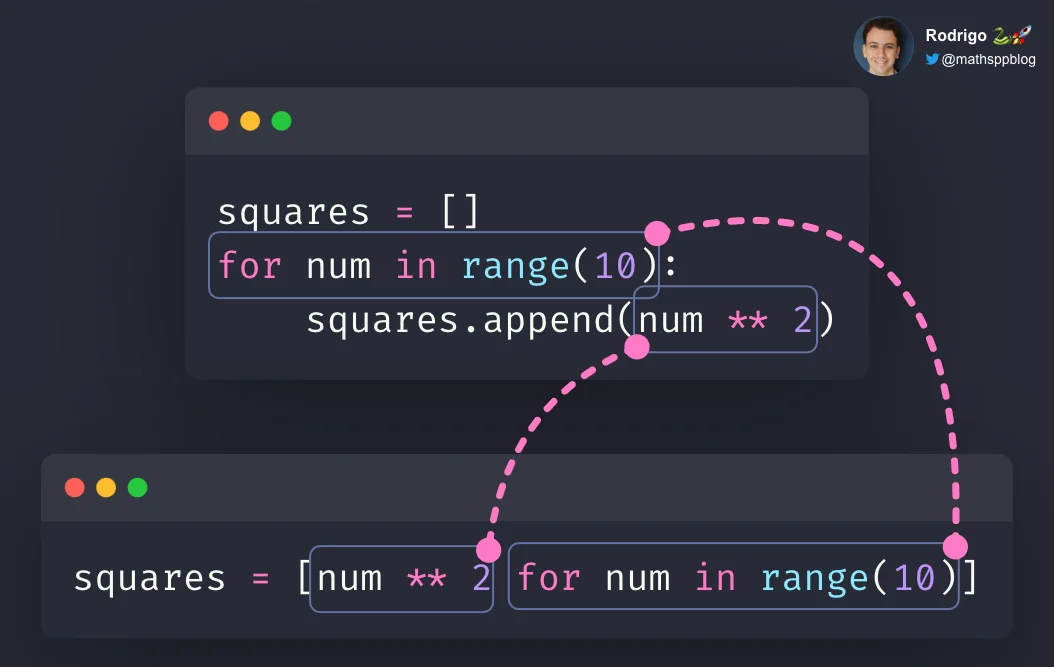
The structure is:
new_list = [output_expression for item in collection]
For this example:
| Part | Meaning |
|---|---|
score * 10 | The transformed output to place in the new list |
score | The temporary loop variable |
raw_scores | The source collection |
Although the output expression appears first in the written syntax, a useful way to read it is:
“Build
score * 10for everyscoreinraw_scores.”
Python Tutorial: Comprehensions - How they work and why you should be using them
Watch “Python Tutorial: Comprehensions - How they work and why you should be using them” by Corey Schafer to connect the familiar empty-list-plus-append loop to list-comprehension syntax.
Watch the basic form for a direct comparison between copying with a loop and copying with a comprehension. Continue with transforming values, which uses squared numbers, then filtering values to see how a trailing if condition changes which values are included.
Filter with a trailing if
A list comprehension can include an if condition at the end:
ready_scores = [score for score in raw_scores if score >= 7]
This produces:
[7, 10]
The general form is:
new_list = [output_expression for item in collection if keep_condition]
For a combined filter and transformation:
raw_scores = [7, 10, 4, 9, 3]

ready_percentages = [
    score * 10
    for score in raw_scores
    if score >= 7
]

print(ready_percentages)
[70, 100, 90]
Writing it over several lines is still one list comprehension. It can be easier to read than forcing a long expression onto one line.
The trailing if is a filter. It can make the output shorter than the input because some items are deliberately excluded.
Classify every item with if–else
Sometimes you need an output for every item rather than filtering some items out. For example, each score might need a label.
raw_scores = [7, 10, 4, 9, 3]

review_labels = [
    "ready" if score >= 7 else "review"
    for score in raw_scores
]

print(review_labels)
Output:
['ready', 'ready', 'review', 'ready', 'review']
This is a conditional expression. Its structure is:
value_if_true if condition else value_if_false
Placed in a comprehension, it means:
new_list = [
    value_if_true if condition else value_if_false
    for item in collection
]
The two uses of if in comprehensions have different meanings:
| Pattern | Purpose | Output length |
|---|---|---|
[item for item in values if condition] | Filter items out | Can be shorter than input |
[a if condition else b for item in values] | Assign one of two outputs per item | Same length as input |
This distinction matters later when you create machine-learning features. Filtering may remove rows; classification creates a feature value for each existing row.
Transform dictionary values
Data records are often represented with dictionaries, where each key has a related value. You can loop through key-value pairs with .items().
raw_regions = {
    "C101": " North ",
    "C102": "SOUTH",
    "C103": " north"
}

clean_regions = {}

for customer_id, region in raw_regions.items():
    clean_regions[customer_id] = region.strip().lower()

print(clean_regions)
Output:
{'C101': 'north', 'C102': 'south', 'C103': 'north'}
Here:
.items()supplies a key and its matching value on each loop iteration.region.strip()removes surrounding spaces..lower()standardizes capitalization.- The assignment preserves each customer ID while storing its cleaned region.
A dictionary comprehension expresses this particular transformation concisely:
clean_regions = {
    customer_id: region.strip().lower()
    for customer_id, region in raw_regions.items()
}
Use a comprehension when a reader can understand the operation in one pass. Use a regular loop when you need several steps, validation, intermediate variables, logging, or debugging output.
For now, avoid nested comprehensions that contain multiple for clauses or several conditions. They can be valid Python, but they are harder to trace. Clear, correct code is more valuable than compressed code.
A short coding lab: transform transaction records
Spend about 12 minutes in a notebook named loop_practice.ipynb. Type every line yourself. Use the expected outputs to validate your work rather than asking an AI assistant to generate the code.
Start with this data:
transactions = [
    {"transaction_id": "T001", "status": "paid", "amount_cents": 12500},
    {"transaction_id": "T002", "status": "refunded", "amount_cents": 4200},
    {"transaction_id": "T003", "status": "paid", "amount_cents": 8000},
]
1. Filter and transform with a loop
Create paid_amounts using an empty list and a for loop.
- Keep only transactions whose
"status"is"paid". - Convert
"amount_cents"into dollars by dividing by100. - Append each converted amount.
Your completed list should be:
[125.0, 80.0]
2. Rewrite the same task as a comprehension
Create paid_amounts_comp with one list comprehension. It should have the same result as paid_amounts.
Keep the loop version in the notebook. Being able to move from an explicit loop to a comprehension, and back again, is a practical way to verify that you understand the code rather than merely recognizing its syntax.
3. Create one label per transaction
Create amount_labels with a comprehension that gives every transaction one label:
"large"when"amount_cents"is at least10000;"standard"otherwise.
The expected result is:
['large', 'standard', 'standard']
If your output has fewer than three labels, you accidentally used a filtering condition rather than an if–else expression.
When something goes wrong, inspect these three values inside your loop:
print(transaction)
print(transaction["amount_cents"])
print(paid_amounts)
This is basic but effective debugging: observe the current record, the value extracted from it, and the accumulated output list.
Key takeaways
A for loop applies the same code to each item in a collection. To transform a collection safely and clearly:
- Create the destination list before the loop.
- Use the loop variable for the current item.
- Calculate a transformed value.
- Append that value to the destination collection.
- Put an
ifinside the loop to filter values conditionally.
List comprehensions are concise forms of simple list-building loops:
[expression for item in collection]
Add a trailing if to filter:
[expression for item in collection if condition]
Use an if–else expression before the for when every input item needs one output label:
[value_if_true if condition else value_if_false for item in collection]
Next, you will package repeated logic into single-purpose functions with parameters and return values. That will let you turn a transformation such as “clean a region” or “convert cents to dollars” into reusable, testable code rather than rewriting the same loop each time.
Can't find a good explanation? Sign up and we'll make it for you
Sign up