
Welcome back. In the previous lesson, you chose between lists, tuples, sets, and dictionaries based on what the data needs to represent. You also saw membership checks such as "north" in valid_regions, which produce a Boolean value.
Now we use those Boolean results to make programs choose one appropriate action. Conditional statements are essential in data work: flagging invalid records, assigning categories, selecting business rules, and deciding how software should respond to an input. By the end of this lesson, you will be able to write an if–elif–else chain that handles a set of mutually exclusive cases, trace which branch runs, and avoid a very common ordering bug.
A conditional chooses whether code runs
A program normally executes top to bottom. A conditional introduces a decision point: Python evaluates a condition, which has a Boolean outcome, and runs a block only when appropriate.
Here is the smallest useful form:
order_total = 175

if order_total >= 150:
    print("Free shipping")
The condition is:
order_total >= 150
Because 175 >= 150 is True, Python prints:
Free shipping
If order_total were 80, the condition would be False. Python would skip the indented print() line and continue with whatever follows the conditional.
Three syntax rules matter immediately:
- Begin the line with
if. - Put a colon (
:) after the condition. - Indent every line that belongs to the conditional block.
if order_total >= 150:
    print("Free shipping")
    print("Shipping charge: 0")
Both print() calls are part of the block because both are indented. Python treats indentation as structure, not merely visual styling.
A condition will usually use the operators from the earlier Python-values lesson:
| Purpose | Example | Meaning |
|---|---|---|
| Equal to | region == "north" | Does region have this exact value? |
| Not equal to | status != "cancelled" | Is it a different value? |
| Greater than or equal | score >= 80 | Is the score at least 80? |
| Less than | age < 18 | Is the age below 18? |
| Membership | region in allowed_regions | Is this value permitted? |
Notice the double equals sign in comparisons:
segment = "new"

if segment == "new":
    print("Apply onboarding workflow")
= assigns a value to a variable. == asks whether two values are equal. Mixing them up is a syntax error in a condition, but catching this distinction early will save debugging time.
Python Tutorial for Beginners 6: Conditionals and Booleans - If, Else, and Elif Statements
Watch “Python Tutorial for Beginners 6: Conditionals and Booleans - If, Else, and Elif Statements” by Corey Schafer for a compact visual walkthrough of conditionals, comparison operators, and branching.
Watch if basics to see how a condition controls an indented block. Then watch comparisons for the practical distinction between assignment and equality testing. Continue with else behavior and elif chains. Pay particular attention to the fact that an elif condition is considered only after earlier conditions have failed.
Two complete cases: if and else
Use if–else when there are exactly two possible actions. For example, an order is either approved for an automated workflow or requires review:
risk_score = 0.72

if risk_score < 0.80:
    print("Approve automatically")
else:
    print("Send for manual review")
For risk_score = 0.72, the first condition is True, so the first branch runs. The else branch is skipped.
For risk_score = 0.91, the condition is False, so Python runs the else block. Within one if–else structure, exactly one of these blocks runs.
else does not have a condition of its own. It means:
“If none of the preceding conditions in this chain were true, do this.”
It must align with the if, and it must come last:
if risk_score < 0.80:
    print("Approve automatically")
else:
    print("Send for manual review")

print("Decision recorded")
The final print() is not indented, so it runs after either decision. This is a useful state-tracing habit: distinguish code that belongs to a branch from code that always runs afterward.
More than two cases: if, elif, and else
Data rules often have more than two outcomes. Suppose a report needs to assign a customer-engagement label from a score:
80or above:"high"50through79:"medium"- below
50:"low"
A chained conditional expresses that decision cleanly:
engagement_score = 67

if engagement_score >= 80:
    label = "high"
elif engagement_score >= 50:
    label = "medium"
else:
    label = "low"

print(label)
Output:
medium
elif is short for “else if.” Python checks the branches in order:
- Is
engagement_score >= 80true? No. - Is
engagement_score >= 50true? Yes. - Assign
"medium"and end the chain. - Do not consider
else.
The else block is never “tested”; it is the fallback when every preceding test is false.
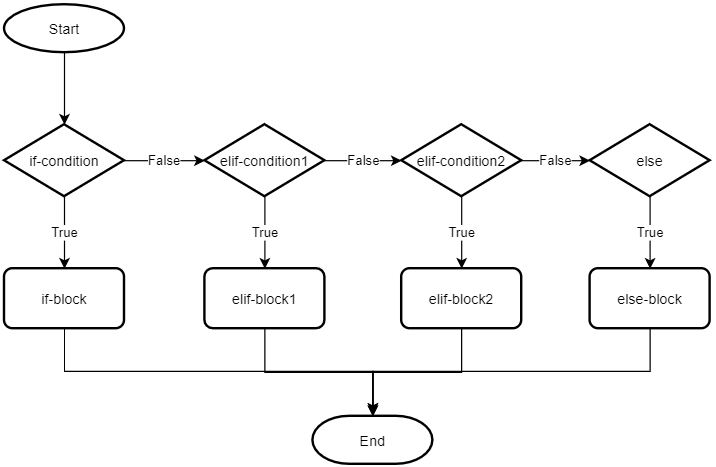
The diagram contains the central rule for this lesson:
In one
if–elif–elsechain, only the first true branch executes.
The conditions themselves do not have to be mathematically non-overlapping. In the engagement example, a score of 90 meets both >= 80 and >= 50. Yet only "high" is assigned because Python finds the first true branch and stops checking. The structure makes the actions mutually exclusive.
Python Programming, Interactivity and Ethics: The PreTeXt Interactive Edition
Read “Chained conditionals” from Runestone Academy. It reinforces the execution order of if, elif, and else with a small comparison example and flowchart.
In Section 6.9, “Chained conditionals,” begin with the opening example. Then continue through the explanation ending with the ordering rule. Focus on how this differs from treating every if as a separate decision.
Trace the state, not just the output
When reading or debugging a conditional, trace it line by line. Consider this code:
days_since_last_purchase = 12

if days_since_last_purchase <= 7:
    contact_plan = "recent_customer"
elif days_since_last_purchase <= 30:
    contact_plan = "follow_up"
else:
    contact_plan = "reactivation"

print(contact_plan)
A trace makes the result explainable:
| Step | Test or action | Result |
|---|---|---|
| 1 | days_since_last_purchase <= 7 | 12 <= 7 is False |
| 2 | days_since_last_purchase <= 30 | 12 <= 30 is True |
| 3 | Assign contact_plan | "follow_up" |
| 4 | Later branches | Skipped |
| 5 | Print contact_plan | follow_up |
The important question is not simply, “Which conditions are true?” Instead ask:
“What is the first condition that is true?”
For days_since_last_purchase = 3, both <= 7 and <= 30 are true, but "recent_customer" is correctly selected because it appears first.
This is not accidental. The rules have a priority: the most specific, highest-priority outcome comes first.
Order conditions from specific to broad
Because Python stops at the first true condition, a broad condition placed too early can make a later branch unreachable.
Here is a flawed attempt to classify an exam score:
score = 92

if score >= 50:
    grade = "pass"
elif score >= 80:
    grade = "strong pass"
else:
    grade = "not passed"

print(grade)
It prints:
pass
The code runs without errors, which makes this a logic error. The score 92 does meet the "strong pass" requirement, but Python never reaches that test: score >= 50 is already true.
Fix it by placing the more selective condition first:
score = 92

if score >= 80:
    grade = "strong pass"
elif score >= 50:
    grade = "pass"
else:
    grade = "not passed"

print(grade)
Now the output is:
strong pass
A dependable rule for numeric categories is:
- For lower-bound thresholds such as
>= 80, test from highest threshold to lowest. - For upper-bound thresholds such as
<= 7, test from lowest threshold to highest. - Put special cases, such as missing or invalid values, before ordinary numeric ranges.
For instance, a numeric score may be missing (None) or outside its permitted range. Handle those before performing ordinary classification:
model_score = None

if model_score is None:
    status = "missing score"
elif model_score < 0 or model_score > 100:
    status = "invalid score"
elif model_score >= 80:
    status = "ready for review"
elif model_score >= 60:
    status = "developing"
else:
    status = "foundation needed"

print(status)
This prints:
missing score
Here, model_score is None asks whether the value is specifically the absence-of-a-value object, None. It must come first: trying to evaluate None >= 80 would raise a TypeError, because Python cannot compare None with a number.
The condition
model_score < 0 or model_score > 100
is true if either invalid situation holds. or means at least one condition must be true. Parentheses are not required in this short expression, but can be useful when a longer condition needs to be made easier to read.
elif chains versus separate if statements
A frequent bug is writing separate if statements when the goal is to choose one category.
Compare these two versions.
Separate decisions: more than one action can run
temperature = 28

if temperature >= 25:
    print("Warm")

if temperature >= 20:
    print("Mild")
Output:
Warm
Mild
Both conditions are true, and this behavior is correct if the program genuinely needs to record two independent facts. A day can be both warm and mild according to these definitions.
One classification: only one action should run
temperature = 28

if temperature >= 25:
    print("Warm")
elif temperature >= 20:
    print("Mild")
else:
    print("Cool")
Output:
Warm
This is a classification system. The labels are intended to be mutually exclusive, so an if–elif–else chain is the right structure.
Before coding, write the decision in ordinary language:
-
Independent facts: “Is it warm?” and “Is it humid?”
Use separateifstatements; both answers may be yes. -
One label or action: “Which temperature category applies?”
Use anif–elif–elsechain; select one result.
This distinction will matter later when you clean data, create features, and apply business rules to rows in a DataFrame.
Use else deliberately
An else branch is optional. Choose it when one of these is true:
- Every possible input should get a fallback classification.
- You need to surface unexpected values.
- You need to guarantee that a variable is assigned.
For expected values that are known in advance, else can help catch data problems:
region = "central"
allowed_regions = {"north", "south", "east", "west"}

if region == "north":
    shipping_group = "group_a"
elif region == "south":
    shipping_group = "group_a"
elif region == "east":
    shipping_group = "group_b"
elif region == "west":
    shipping_group = "group_b"
else:
    shipping_group = "unknown"
    print(f"Unexpected region: {region}")

print(shipping_group)
The fallback does two things: it prevents the program from silently pretending "central" is valid, and it preserves a usable value, "unknown", for later inspection.
Do not use else to hide a situation you should understand. In professional data workflows, an "unknown" category often deserves monitoring because it may expose new source-system values, inconsistent spelling, or an upstream data-quality issue.
Build a decision-rule scratchpad
Spend about 12–15 minutes in a notebook called conditional_practice.ipynb. Write each line yourself, then run it. Do not ask an AI assistant to generate the code; use the execution results to strengthen the syntax and tracing habits you will need for larger data tasks.
1. Implement one ordered classification
Create a variable named readiness_score. Write an if–elif–else chain that assigns a readiness_status using these requirements:
| Input case | Required readiness_status |
|---|---|
Score is None | "missing" |
Score is below 0 or above 100 | "invalid" |
Score is at least 80 | "ready" |
Score is at least 60 but below 80 | "developing" |
| Any remaining valid score | "foundation" |
Use:
readiness_score is None
for the missing-value case, and ensure it is the first branch.
2. Trace before running
For each of these values, write a brief prediction in a Markdown cell before you execute your code:
None
-4
45
60
79
80
101
For each value, record:
- the first condition that becomes true;
- the resulting
readiness_status; - whether any later branch is evaluated.
3. Intentionally create and repair an ordering bug
Temporarily move the >= 60 branch above the >= 80 branch. Run the code with:
readiness_score = 85
Observe the incorrect result. Then restore the correct ordering and add this comment above your chain:
# Test special cases first, then numeric thresholds from highest to lowest.
That short comment captures the reasoning future you, a teammate, or a code reviewer needs in order to validate the rule.
Key takeaways
Conditional statements let Python select behavior based on Boolean expressions.
- Use
iffor an action that should occur only when a condition is true. - Use
if–elsewhen exactly one of two actions must occur. - Use
if–elif–elseto select one outcome from multiple cases. - Python evaluates an
if–elifchain in order and runs only the first true branch. - Order special cases first and threshold rules from most specific to broadest.
- Use separate
ifstatements only when multiple conditions may independently be true and multiple actions should run. - Use
elseas a purposeful fallback, often to safely handle unexpected input.
Next, you will apply these decisions repeatedly across collections with loops and comprehensions—an essential step toward transforming real lists of records and, later, tabular data.
Can't find a good explanation? Sign up and we'll make it for you
Sign up