
Hello! Welcome to the first lesson of our final module, "Pivoting, Reporting, & Professional Practice."
In the last module, you successfully navigated the entire lifecycle of an attack on a single machine—from exploitation to establishing persistence and finally, covering your tracks. You've owned the box. But in most real-world engagements, compromising one machine is just the beginning. The most valuable assets are rarely on the public-facing servers; they're buried deep within the internal network.
This lesson introduces the techniques you'll use to bridge that gap. We will focus on the foundational concepts of moving from a compromised external host to targets within a protected internal network. By the end of this lesson, you will be able to explain the concepts of pivoting, port forwarding, and tunneling in a compromised network, setting the stage for the practical application in our next session.
1. What is Pivoting? The Gateway to Hidden Networks
Pivoting is the art of using a compromised system as a stepping stone to attack other systems on a network that you cannot access directly. The compromised machine acts as a "pivot point," forwarding your traffic into otherwise isolated network segments.
Imagine you've compromised a public web server. This server likely has two network interfaces: one facing the public internet (which you used to attack it) and another connected to the company's internal network. This second, internal-facing interface is your gateway. A machine with network interfaces on more than one network is often called "dual-homed" or "multi-homed."
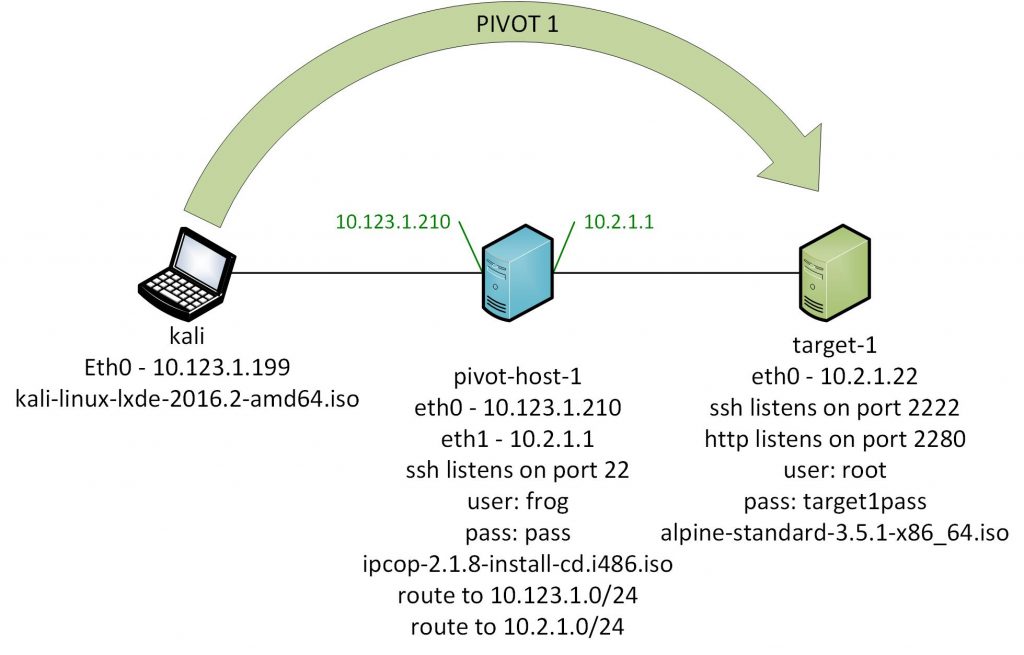
To see how this applies in a realistic environment, let's look at a common network topology you might encounter.
OSCP Guide 08/12 – Port Forwarding and Pivoting
The video 'OSCP Guide 08/12 – Port Forwarding and Pivoting' by hexdump provides an excellent conceptual overview of a typical target network and explains why pivoting is essential.
Watch the segment from 00:48 to 05:07. Focus on the network diagram presented. It shows an attacker, an external-facing machine (ms01), and internal machines (ms02, dc01). Understand why the attacker cannot directly access the internal machines and must use ms01 as a pivot point.
As the video explains, your attacker machine's routing table has no knowledge of the internal 10.x.x.x network. Any attempt to connect directly will fail. Pivoting solves this by creating a tunnel through the compromised machine, enabling you to route your attack traffic to the internal targets.
2. The Techniques: Tunneling and Port Forwarding
Pivoting is the overall strategy. The actual implementation relies on techniques like tunneling and port forwarding.
- Tunneling: The general principle of encapsulating network traffic of one protocol within another. For our purposes, we're creating a tunnel (e.g., over SSH) from our attacker machine to the pivot host to pass our malicious traffic through.
- Port Forwarding: A specific type of tunneling where we map a port on one machine to a port on another. This is the primary mechanism we'll use.
There are three main types of port forwarding we will discuss: Local, Remote, and Dynamic.
2.1. Local Port Forwarding: Accessing a Specific Service
Local port forwarding is used when you want to access a single, specific service on an internal machine directly from your attacker box. You "forward" a port on your local machine (localhost) through the pivot to the target's internal IP and port.
The flow: Attacker's Local Port -> Pivot Host -> Internal Target's Port
For example, you could map localhost:8080 on your Kali machine to port 80 on an internal web server at 10.1.2.5. You would then open your browser, navigate to http://localhost:8080, and your traffic would be tunneled through the pivot to the internal web server.
The classic tool for this is SSH. The following video provides a clear, practical demonstration.
OSCP Guide 08/12 – Port Forwarding and Pivoting
Let's return to the hexdump video for a hands-on demonstration of local port forwarding using SSH. This example perfectly illustrates how to make an inaccessible service available on your local machine.
Watch from 07:05 to 16:31. The demo uses a Docker container to simulate the 'internal' machine. Pay close attention to how the ssh -L command is constructed: ssh -L [local_port]:[destination_ip]:[destination_port] [user]@[pivot_host]. This is a fundamental pattern you will use often.
2.2. Remote Port Forwarding: Exposing an Internal Port
Remote port forwarding does the opposite of local forwarding. It is used to expose a port on your attacker machine to the pivot host or even the internal network.
The flow: Pivot Host's Port -> Attacker's Local Port
The most common use case is for receiving reverse shells. Imagine you find a command injection vulnerability on an internal server. That server cannot connect back to your public IP address. However, it can connect to the pivot host. With remote port forwarding, you can forward a port on the pivot host (e.g., 9001) back to a listener on your attacker machine (e.g., 9001). When you execute your reverse shell payload on the internal target, you tell it to connect to the pivot host on port 9001. The pivot then forwards that connection back to your waiting listener.
This is often called a "reverse" tunnel because the connection is initiated from the client (pivot) back to the server (attacker).
How To Pivot Through a Network with Chisel
The video 'How To Pivot Through a Network with Chisel' by John Hammond, while focused on a different tool, provides an excellent explanation of the reverse port forwarding concept.
Watch from 12:39 to 19:28. Hammond explains why he sets up the Chisel server in 'reverse' mode, which is conceptually similar to SSH remote forwarding. He demonstrates forwarding an internal web service (port 80 on 10.1.2.5) back to his attacking machine's port 8000. Focus on the data flow and the R:8000:10.1.2.5:80 syntax, which means 'forward remote port 8000 to the target's port 80.'
2.3. Dynamic Port Forwarding: Full Network Access via SOCKS Proxy
Local and remote forwarding are great for one-to-one port mapping. But what if you want to run nmap against the entire internal subnet, or use various tools against multiple hosts and ports? Setting up a new port forward for each one is inefficient.
This is where dynamic port forwarding comes in. Instead of mapping a single port, you create a SOCKS proxy. This turns your pivot host into a versatile proxy server. You can then configure applications on your attacker machine to send their traffic to this SOCKS proxy, which will dynamically forward it to any destination on the internal network.
The flow: Attacker App -> Local SOCKS Proxy -> Pivot Host -> Any Internal Target
To use a SOCKS proxy, you need two things:
- The command to create the tunnel (e.g.,
ssh -D 1080 user@pivot_host, which creates a SOCKS proxy on your local port 1080). - A tool on your attacker machine to force application traffic through that proxy. The most common tool for this is ProxyChains.
How To Pivot Through a Network with Chisel
John Hammond's video also has a great section that transitions from single port forwards to the much more powerful SOCKS proxy method.
Watch from 19:28 to 24:10. This section covers: The limitations of single port forwards and the advantages of a SOCKS proxy. How to set up the SOCKS proxy with Chisel (conceptually similar to ssh -D). How to configure /etc/proxychains.conf to use the new SOCKS proxy on port 1080. How to use the proxychains command to run tools like curl against the internal network.
Test your understanding!
You have compromised a pivot host and discovered two services on the internal network:
- An administrative web portal on
10.10.20.5:80. - A database server on
10.10.20.8:3306.
You want to scan the entire 10.10.20.0/24 subnet for other services and also explore the web portal in your browser. Which pivoting technique(s) would be most appropriate and why?
Show answer
The most appropriate technique would be dynamic port forwarding (SOCKS proxy).
Here's why:
- Scanning: To scan the entire subnet with a tool like
nmap, you need to be able to reach many different IPs and ports. A SOCKS proxy used withproxychainsallowsnmapto do this seamlessly. - Flexibility: While you could use local port forwarding for the web portal (
ssh -L 8080:10.10.20.5:80 pivot_host), a SOCKS proxy is more versatile. You can configure your browser (using an extension like FoxyProxy) to use the same SOCKS proxy, allowing you to browse directly tohttp://10.10.20.5. This one tunnel can then be used for scanning, browsing, connecting to the database, and any other activity, making it far more efficient than setting up multiple local port forwards.
3. A Summary of Common Pivoting Tools
While the concepts are universal, the tools you use may vary based on the target environment.
- SSH: The workhorse for pivoting. Native to all Linux systems and available for Windows. It provides secure, encrypted tunnels and supports local, remote, and dynamic forwarding.
- Chisel: A fast, modern alternative written in Go. It's a single binary you can easily upload to a target (including Windows, where SSH might not be enabled). It excels at reverse connections, which can be useful for bypassing firewalls. We'll explore Chisel in depth in the next lesson.
- Metasploit Framework: Has powerful, integrated pivoting capabilities. Once you have a Meterpreter session, you can use the
autoroutecommand to add routes to internal networks and thesocks_proxymodule to create a proxy, all within the framework.
For a concise summary of these techniques and tools, refer to the following article. It provides quick command-line references for the concepts we've discussed.
Read the sections 'Understanding Network Pivoting Fundamentals' and 'Essential Pivoting Tools and Techniques'. This will reinforce the definitions and show you the command syntax for proxychains, SSH tunneling, and Metasploit pivoting side-by-side.
Conclusion
You now have the conceptual framework for post-exploitation lateral movement. Pivoting is not just a technique; it's a mindset of using every foothold as an opportunity to move deeper into a target environment.
Key Takeaways:
- Pivoting is the strategy of using a compromised, multi-homed system to access unreachable internal networks.
- Tunneling is the underlying mechanism for encapsulating and routing traffic.
- Local Port Forwarding (
ssh -L) is ideal for accessing a single, specific internal service from your attacker machine. - Remote Port Forwarding (
ssh -R) is essential for catching reverse shells from internal machines that cannot connect back to you directly. - Dynamic Port Forwarding (
ssh -D) creates a flexible SOCKS proxy, allowing you to use tools likenmapandproxychainsto interact with the entire internal network.
Next Lesson Preview:
In our next lesson, we will move from theory to practice. You will learn how to use chisel, a powerful and popular pivoting tool, to establish a tunnel into a private network. You will then use that tunnel to perform discovery and access services, putting all of today's concepts into action.