
Hello! Welcome to the next lesson in our journey to master production-ready microservices.
In our recent lessons, we've explored sophisticated zero-downtime deployment strategies like blue-green and canary releases. These are excellent for deploying new versions of your stateless application code. However, they share a critical assumption: that the database schema remains compatible. What happens when your new feature requires a database change that would break the currently running version of your application? This is a common and challenging scenario in real-world systems and a frequent topic in senior engineering interviews.
Today, we'll confront this challenge directly. Your learning outcome is to describe strategies for handling database schema migrations in a zero-downtime deployment context, with a special focus on the powerful expand/contract pattern. Mastering this decouples your application deployments from your database changes, enabling true continuous delivery even when your data model evolves.
1. The Fundamental Challenge: The Tyranny of a Shared Database
When you perform a rolling or canary deployment, you temporarily have two different versions of your microservice (let's call them V1 and V2) running at the same time and talking to the same database.
This creates a conflict:
- If you apply a "breaking" schema change (e.g., renaming a column) before deploying your new code, the old
V1instances will fail because they don't know about the change. - If you deploy your new
V2code before applying the schema change, theV2instances will fail because the database schema they expect doesn't exist yet.
This leads us to the Golden Rule of Zero-Downtime Database Migrations: application and database deployments must be decoupled and managed in a way that ensures both backward and forward compatibility at all times.
- Backward Compatibility: A new schema change must not break the old version of the application.
- Forward Compatibility: A new version of the application must be able to work with the old database schema.
To achieve this, we need a methodical, multi-step approach.
2. The Expand-Contract Pattern (Parallel Change)
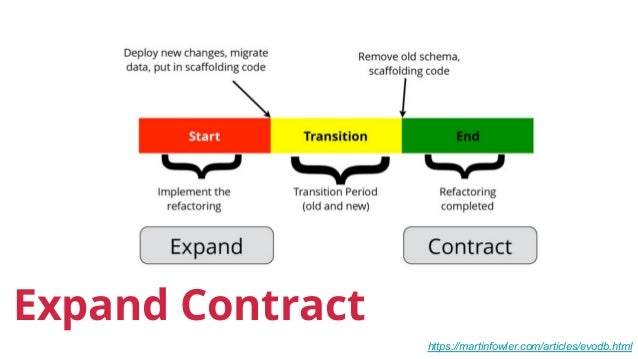
The most robust and widely used strategy for handling breaking schema changes is the Expand-Contract Pattern. Instead of making a destructive change in one step, you break it down into a sequence of safe, non-breaking steps.
The process has three major phases: Expand, Transition, and Contract.
Let's make this concrete with a common interview scenario: renaming a column. Imagine we need to rename the user_name column to username in our users table.
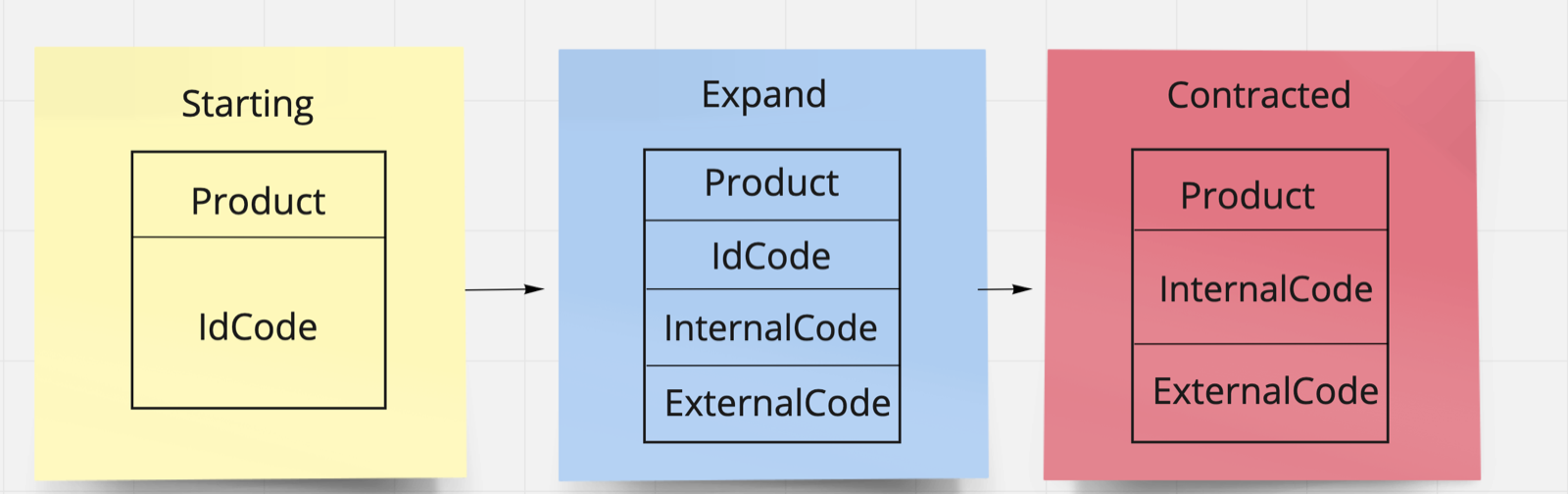
Here is a step-by-step breakdown of how to apply the pattern.
Phase 1: Expand (Additive Schema Change)
The first step is to expand the database schema so it can support both the old and new application versions.
- Action: Add the new
usernamecolumn, making itNULL-able.ALTER TABLE users ADD COLUMN username VARCHAR(255) NULL; - State: The
userstable now has bothuser_nameandusernamecolumns. - Compatibility: This is a safe, backward-compatible change. The
V1application code is completely unaware of the newusernamecolumn and continues to read from and write touser_namewithout issue.
Phase 2: Transition (Application & Data Migration)
This is the most complex phase, involving changes to the application code and migrating the data.
- Action (Application Code): Deploy a new version of the application (
V2) that understands both columns.- Writes: Any code that creates or updates a user now writes to both
user_nameandusername. This is often called a "dual write." - Reads: Code that reads user data is changed to prioritize the new
usernamecolumn but falls back to the olduser_namecolumn if the new one isNULL. This ensures it can read both old and new records correctly.
// Simplified Spring Boot Entity logic public class User { // ... private String userName; // old column private String username; // new column public String getEffectiveUsername() { // Prioritize new column, fall back to old return (this.username != null) ? this.username : this.userName; } public void setUsername(String name) { // Dual write this.username = name; this.userName = name; } } - Writes: Any code that creates or updates a user now writes to both
- Action (Data Migration): While
V2is running, run a background script to backfill the data for existing records. To avoid locking the table and impacting performance, this should be done in small batches.-- Run this repeatedly in batches until all rows are updated UPDATE users SET username = user_name WHERE username IS NULL LIMIT 1000; - State: At this point, all new writes are populating both columns, and old data is being progressively migrated. The system is fully functional, supporting both
V1(which might still be running during the rollout) andV2.
Phase 3: Contract (Cleanup)
Once the V2 application is fully rolled out and all historical data has been backfilled, you can begin removing the old structures. This is also done in multiple steps.
- Action (Application Code): Deploy a new version (
V3) that only reads from and writes to the newusernamecolumn. The code's dependency onuser_nameis now completely removed. The dual-write logic and read fallback are gone. - State: The application logic is now clean and only references the new schema. The old
user_namecolumn is no longer being read from or written to by the application. - Action (Schema Cleanup): After
V3is verified to be stable in production, you can safely run the final schema migration to drop the old column.ALTER TABLE users DROP COLUMN user_name; - Final State: The migration is complete. The application and database are in a new, consistent state with zero downtime.
To see these steps laid out clearly, including an alternative method for syncing data with database triggers, please review the following resource.
Database Migration Strategies for Zero-Downtime Deployments
The article 'Database Migration Strategies for Zero-Downtime Deployments' provides an excellent step-by-step guide for the Expand-Contract pattern.
Please read the section 'Strategy 1: The Expand-Contract Pattern', focusing on the 'Example: Renaming a Column'. Pay attention to the four distinct phases and the SQL/trigger logic used to achieve the migration safely.
Test your understanding!
In Phase 2 of the Expand-Contract pattern, why is it critical for the application to perform "dual writes" (writing to both the old and new columns)? What could go wrong if the new application version (V2) only wrote to the new column?
Show answer
Dual writes are critical to support seamless rollbacks and concurrent versions. If V2 only wrote to the new column, any data it creates would be invisible to the old application version (V1), which might still be serving traffic during a rolling update. Furthermore, if you needed to roll back from V2 to V1 due to a bug, all the data created by V2 would be effectively lost from the perspective of the now-active V1 code. By writing to both columns, you ensure data is preserved and visible to all running application versions.
3. Other Key Strategies and Considerations
The Expand-Contract pattern is your go-to for complex changes, but other techniques are essential parts of a robust migration toolkit.
Additive-Only Migrations
The simplest migrations are purely additive. Adding a new table or a new nullable column doesn't break old code. For adding a new NOT NULL field, you can use a multi-step "nullable column trick," which is essentially a mini expand-contract pattern:
- Add the column as nullable.
- Deploy code that starts writing to it.
- Backfill the column for all existing records.
- Add the
NOT NULLconstraint.
Online Schema Migration Tools
For tables with billions of rows, even a simple ALTER TABLE command can lock the table and cause an outage. For these scenarios at scale, specialized tools are used.
- How they work: They create a "ghost" table with the new schema, copy data in small chunks, use triggers or the database's replication log to capture live changes, and finally perform an atomic swap of the original and ghost tables.
- Examples:
pt-online-schema-changeandgh-ostfor MySQL, or usingCREATE INDEX CONCURRENTLYin PostgreSQL to avoid locking on index creation.
Blue-Green Database Deployments
This is a heavyweight strategy for major changes, like upgrading a database version.
- You set up a complete, replicated "Green" database alongside your "Blue" production one.
- You stop replication and apply the breaking schema changes to the Green database.
- You verify Green, and then switch application traffic over.
- This is very safe but also very expensive, as it requires duplicating your entire database infrastructure.
The Power of Feature Flags
You can enhance the Expand-Contract pattern with feature flags. In our example, the read behavior in V2 could be controlled by a flag:
if (featureFlags.isEnabled("use-new-username-schema")) {
    return user.getUsername();
} else {
    return user.getUserName();
}
This gives you an "emergency brake." If you discover a problem with the new column's logic, you can instantly flip the flag to force the application to read from the old column, mitigating the issue without needing a full rollback deployment.
Database Migration Strategies for Zero-Downtime Deployments
To round out your knowledge, let's explore these other strategies. The same article provides concise explanations for each.
Please read the sections on 'Additive-Only Migrations', 'Online Schema Migration Tools', 'Blue-Green Database Deployments', and 'Feature Flags for Database Changes'. This will give you a broader perspective on the available tools and techniques.
4. Interview Practice: Putting It All Together
Let's simulate an interview question that requires you to apply these concepts.
Senior Engineer Interview Question
"Our e-commerce platform stores product prices in a DECIMAL column in the products table. We've decided to switch to storing prices as an INTEGER representing cents to avoid floating-point inaccuracies. This is a critical, high-traffic table. Outline the exact steps you would take to migrate this price column from DECIMAL to INTEGER with zero downtime."
Show detailed answer
"This is a classic breaking schema change, and I would use the Expand-Contract pattern to handle it safely with zero downtime. Here are the precise steps I'd follow, broken down into distinct deployments:
Deployment 1: Expand the Schema
- Create and run a schema migration to add a new nullable integer column named
price_in_centsto theproductstable.
This change is backward compatible. The current application is unaffected.ALTER TABLE products ADD COLUMN price_in_cents INTEGER NULL;
Deployment 2: Transition the Application and Data
- Modify the application code to handle both price representations.
- Write Path: When a product price is updated, the application will write to both columns. It will save the integer value to
price_in_centsand convert the cents value back to a decimal for the oldpricecolumn. - Read Path: The application will be updated to read from
price_in_cents. If that value isNULL(for an old record not yet migrated), it will read from thepricecolumn and convert it to cents in memory.
- Write Path: When a product price is updated, the application will write to both columns. It will save the integer value to
- Deploy this new application version.
- Once deployed, start a background job to backfill the
price_in_centscolumn for all existing products. This must be done in small, throttled batches to avoid overloading the database.
We would monitor this job until it has processed all rows.UPDATE products SET price_in_cents = price * 100 WHERE price_in_cents IS NULL LIMIT 500;
Deployment 3: Contract the Application Logic
- Once the backfill is 100% complete and the application has been stable for a period, we'll do a cleanup deployment.
- The application code is modified again to only read from and write to the
price_in_centscolumn. All references and logic related to the oldpricecolumn are removed. - Deploy this simplified application version.
Deployment 4: Contract the Schema
- After the final application version is confirmed to be stable and running correctly, we can run the last migration.
- Create and run a schema migration to drop the old
pricecolumn.ALTER TABLE products DROP COLUMN price;
This multi-phase process, while complex, guarantees that at no point during the migration is there an incompatibility between the running code and the database schema, thus achieving zero downtime."
Conclusion
Handling database migrations gracefully is a hallmark of a mature engineering organization and a skill expected of senior engineers. You can't achieve true continuous delivery without it.
Key Takeaways:
- The core challenge of database migrations is maintaining compatibility while multiple application versions are live.
- The Expand-Contract Pattern is the most reliable strategy for handling breaking schema changes. It involves three phases:
- Expand: Additively change the schema to support both old and new versions.
- Transition: Deploy code that can handle both schemas (dual writes, read fallbacks) and migrate data.
- Contract: Clean up the code to remove dependency on the old schema, then clean up the database by dropping the old structures.
- Simpler changes can often be purely additive.
- Feature flags provide a critical safety net, allowing you to quickly toggle between old and new data paths without a full deployment.
- For very large tables, online schema migration tools are necessary to avoid database locks.
In this lesson, we discussed using feature flags as a safety mechanism for database migrations. But feature flags are much more powerful—they can be used to decouple feature releases from deployments entirely. In our next lesson, we will dive deep into this topic and implement feature flags within a Spring Boot application to decouple feature releases from deployments.
Can't find a good explanation? Sign up and we'll make it for you
Sign up