
Hello. In the previous lesson, you separated a gold CFD from a fixed-time OTC trade: a CFD has variable profit or loss and can be managed with an entry, stop, and target. Now we need the practical information that makes those controls meaningful.
This lesson is about finding—not guessing—the exact specifications of the gold symbol in your TradeLocker account. Before using any breakout setup, you must know what one lot represents, how finely the price can move, the smallest trade you can place, when the symbol can be traded, and how much margin the broker requires.
By the end, you will have a one-page specification card for your gold symbol. Keep this on demo only; do not place an order.
Your TradeLocker screen is not the contract
TradeLocker is the platform interface. The broker connected to your TradeLocker account defines the actual instrument specifications.
That distinction matters because “gold” is not one universal retail trading contract. One broker may offer XAUUSD, another may offer XAUUSD.a, GOLD, or a different gold symbol. They may differ in:
- units per lot;
- minimum and permitted volume increments;
- price precision and tick size;
- leverage or margin requirement;
- spreads, commissions, swaps, and trading hours.
The screenshot below shows XAUEUR selected, rather than XAUUSD. It is still gold, but it is quoted in euros and its displayed leverage is only an example from that particular account. Do not copy its numbers into your own notes.
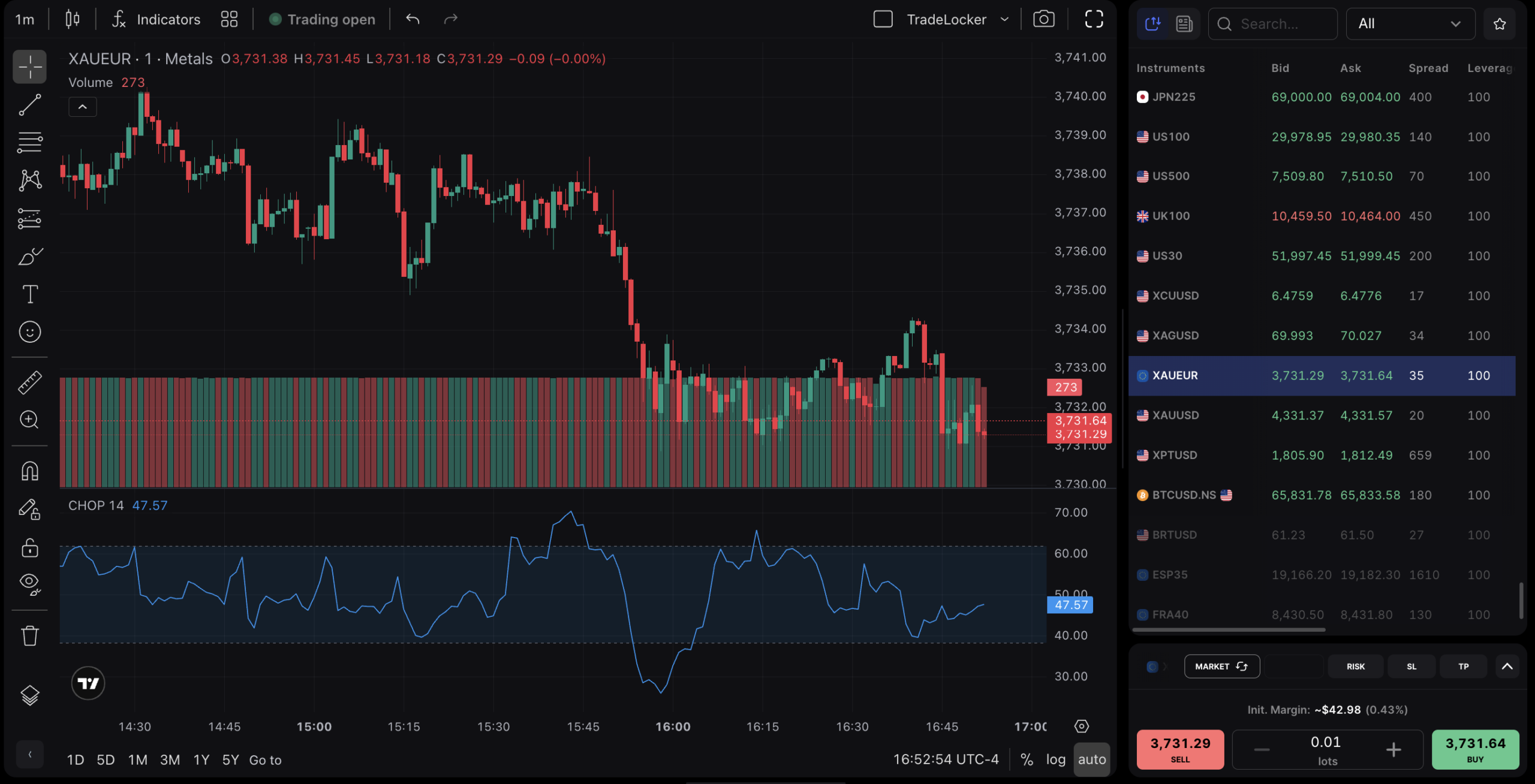
For this course, use the symbol you genuinely intend to test—most likely your broker’s XAUUSD-type symbol if it is available. Write its name exactly, including any suffix.
Here are the five facts you are locating:
| Specification | What it tells you | Why it matters later |
|---|---|---|
| Lot size / contract size | Number of gold units represented by 1.00 lot | Determines the money gained or lost from a price move. |
| Quote increment / tick size | Smallest permitted price movement | Lets you measure stops, targets, spreads, and slippage precisely. |
| Minimum position size | Smallest volume you may trade | Tells you whether your risk plan can actually be executed. |
| Volume step | Smallest increment by which you can change size | Determines how you round a calculated size later. |
| Margin requirement | Funds the broker requires to open and maintain a position | Affects whether an order can be opened, but does not decide whether a setup is good. |
| Trading hours | Exact periods when the symbol is open | Prevents planning a trade during a closure or maintenance window. |
Notice that minimum size and volume step are separate facts. A symbol might have a minimum of lots and allow changes of lots; another might require a larger minimum or use a different step. Record both.
Open the instrument-details window
TradeLocker’s View Details menu is the first place to look. On desktop, you right-click the exact symbol in the instrument list. On mobile, you long-press it.
How to view more instrument details - TradeLocker
Read TradeLocker’s short guide before opening your own symbol. It shows where the View Details menu is and defines the main fields you will encounter.
In “Accessing Instrument Details on Desktop,” follow the desktop procedure: select your exact gold symbol from the instrument list, right-click it, and choose “View Details.” If using a phone, use the “Accessing Instrument Details on Mobile” subsection and long-press the symbol instead. Then read the definitions after “It’s important to understand what the additional information represents.” Focus on the field definitions, especially “Lot size,” “Margin requirement,” and “Leverage.” Do not worry about swap or fee calculations yet; record them if visible, but we will handle trade costs later.
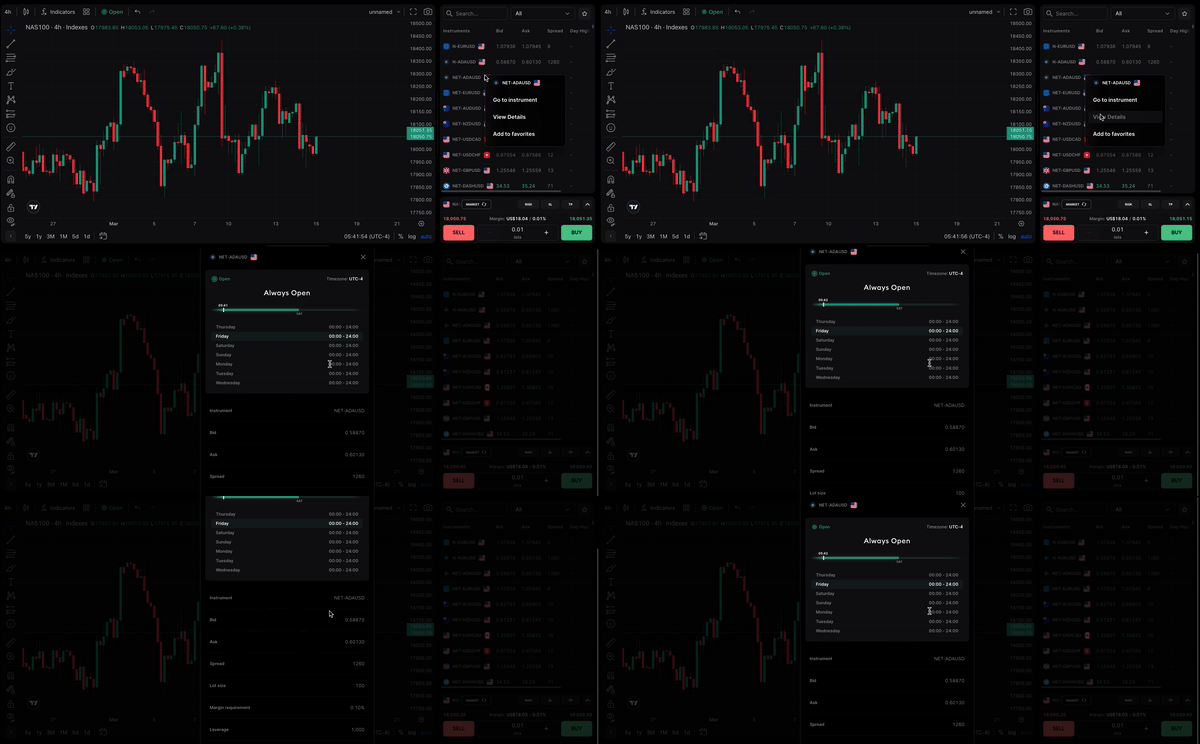
While looking at the instrument list, do not rely only on the visible Leverage column. It is useful, but the full details panel is where you should look for the contract’s lot size, trading status, and other specifications.
If you cannot find the gold symbol:
- Use the instrument-list search bar and search
XAU,gold, or the exact symbol your broker advertises. - Select the symbol you intend to use on the demo account.
- Right-click or long-press that exact symbol.
- Open View Details.
- Take a screenshot before closing the window.
Do not substitute values from a YouTube trader, TradingView, MetaTrader, a friend’s account, or an online calculator. Those may use a different broker contract.
How to read the numbers without mixing them up
The details window may use slightly different labels depending on the broker, but the meanings are consistent.
1. Lot size is your contract size
TradeLocker calls this Lot size. It means the number of instrument units represented by one full lot.
For many retail gold CFDs, 1.00 lot is often associated with 100 ounces of gold. But “often” is not a specification. Your broker may use a different contract size, so write down the number displayed in your details panel.
For now, record it in this form:
1.00 lot of [exact symbol] = [broker-displayed number] units
Later, this number will allow you to calculate the dollar effect of a gold move. Until then, avoid saying things such as “0.01 lot is always one dollar per move.” It may be true on one contract and wrong on another.
2. Quote increment is not a vague “pip” label
A quote increment, often called tick size or minimum price increment, is the smallest valid movement in the instrument’s price.
For example, if a hypothetical gold symbol has a tick size of , prices can move from to . A movement to would not be a valid quoted step for that specification.
This is cleaner than relying on the word “pip.” Gold traders use “pip” inconsistently:
- some call a move one pip;
- some use “points” instead;
- some platforms display an extra decimal place;
- different brokers can quote the symbol differently.
For your journal, write price distances in actual price terms, such as , until you have verified the contract and your platform’s tick size. Your later risk calculations will use the exact price distance between entry and stop, not a social-media definition of a gold pip.
Do not confuse digits displayed with tick size. A chart showing two decimal places suggests prices may be quoted to , but the specification field is the authoritative source.
3. Minimum volume and volume step protect you from accidental oversizing
Look for labels such as:
- Minimum volume
- Min lot
- Minimum trade size
- Volume step
- Lot step
- Volume increment
Suppose a broker’s hypothetical rules were:
- minimum volume: lots;
- volume step: lots.
Then , , and would be permissible sizes, while would not be.
If your eventual risk calculation produces a size below the broker’s minimum, that is not a reason to increase the risk. It means one of three things must change: the account size, the permitted risk amount, or the trade must be skipped. We will formalize that decision in the position-sizing module.
4. Margin requirement is an account-access condition, not a risk setting
Margin requirement is money the broker requires you to have committed or available to open and maintain a position. It may be shown as a percentage, a cash amount, or indirectly through leverage.
If the detail window lists leverage such as , that generally corresponds to an initial margin rate near , because:
But record the broker’s stated margin requirement whenever it is visible rather than relying on that shortcut. Margin policies can differ by symbol, account type, and market conditions.
Most importantly, do not treat available margin as permission to use a large position. Margin answers, “Can the platform open this exposure?” Your risk rule will answer, “How much money am I deliberately willing to lose if the stop is hit?” Those are different questions.
Find the exact gold trading schedule
Gold CFDs are commonly available for much of the weekday, but that does not mean they are continuously tradable at every hour. A broker can have daily maintenance breaks, a different server-time schedule, holiday changes, or special conditions around market closures.
TradeLocker provides two useful checks:
- The color of the symbol in the instrument list and the current Open/Closed indicator above the chart.
- The expanded weekly schedule, available by clicking the market-hours indicator or through View Details.
Understand trading hours - TradeLocker
Use TradeLocker’s trading-hours guide to locate the live status indicator and the complete schedule for your specific gold symbol.
In “How to know if the market is open or closed,” first read the closed market cue. Then follow Step 3: find the market-hours label above the chart and click it to expand the weekly schedule. Read the schedule instructions through the end of Step 4, which explains that View Details can also show session information without changing the chart. Write down every open period and closed break shown for your exact gold symbol. Also record the time zone displayed by your platform. Do not assume it is New York time merely because you are in New York; broker server time and daylight-saving changes can make a schedule look different.
For your own routine, the important immediate question is not “Is gold generally open?” It is:
Is my broker’s exact gold symbol open during my intended chart-check window, in the time zone currently shown by TradeLocker?
Your normal times around 3:00 a.m. and 8:30–9:00 a.m. New York time will be assessed properly when we cover sessions and daylight-saving conversion. Today, simply capture the broker’s raw schedule accurately.
Build your gold specification card
Spend about 15 minutes now completing this card from the details window and market-hours schedule. Save it with a screenshot of the panel. Blank fields are better than guessed fields.
| Field | Your recorded value |
|---|---|
| Broker/account label shown in TradeLocker | |
| Account type | Demo |
| Exact symbol | |
| Quote currency | |
| Lot size / contract size | |
| Tick size / minimum price increment | |
| Minimum volume | |
| Volume step / increment | |
| Maximum volume, if displayed | |
| Margin requirement | |
| Leverage, if displayed | |
| Current Bid | |
| Current Ask | |
| Current spread | |
| Market status right now | Open / Closed |
| Weekly trading hours exactly as displayed | |
| Platform schedule time zone | |
| Screenshot saved? | Yes / No |
A few checks before you treat the card as complete:
- The symbol on the card exactly matches the symbol you selected.
- The lot-size value comes from View Details, not an assumption about XAUUSD.
- You recorded a price increment or tick size, not merely the number of decimal places you happened to see.
- You recorded both minimum volume and volume step if both are available.
- The trading schedule includes any daily pause or maintenance break.
- You captured the platform’s stated time zone.
If the details window does not show one required item, do not invent it. Check the broker’s own instrument-specification page or client portal for the same exact symbol and account type, then record where you found it. If it remains unclear, ask the broker’s support team this precise question:
“For my [account type] account, what are the contract size, minimum volume, volume step, tick size, margin requirement, and trading hours for [exact gold symbol]?”
That wording prevents a vague response about “gold” in general.
Common mistakes to avoid
| Mistake | Why it causes trouble | Better rule |
|---|---|---|
| Copying “100 ounces per lot” from a video | It may not match your broker’s contract. | Use the lot size displayed for your exact symbol. |
| Calling every gold movement a “pip” | Gold pip language is inconsistent. | Record actual price increments and price distances. |
| Seeing high leverage and using the largest size allowed | Margin capacity is not acceptable trade risk. | Size from a planned stop and fixed cash risk later. |
| Checking only whether the chart says “Open” now | A daily closure or holiday schedule may still affect the trade. | Open and record the complete weekly schedule. |
| Assuming XAUUSD and XAUEUR are identical | They are both gold, but use different quote currencies and may have different conditions. | Record the exact tradable symbol. |
| Filling in missing specifications from memory | One false number breaks later profit, loss, and sizing calculations. | Leave it blank until verified by the broker. |
Key takeaways
Your chart pattern is only one part of a trade. The broker’s contract specifications determine what that pattern means in money and whether your desired position can be placed safely.
- TradeLocker is the platform; the connected broker defines the gold contract.
- Record the exact symbol, not merely “gold” or “XAUUSD.”
- Lot size is the contract size behind 1.00 lot.
- Tick size is the smallest valid price movement; avoid ambiguous gold “pip” language for now.
- Minimum volume and volume step tell you the smallest and permitted position sizes.
- Margin requirement affects whether a position can be opened, but it does not define sensible risk.
- Trading hours must be checked on your broker’s schedule and in the platform’s displayed time zone.
Next, you will use the numbers from this specification card to calculate profit or loss from a stated gold price move and position size.
Can't find a good explanation? Sign up and we'll make it for you
Sign up