
Hello. In the last lesson, you defined a validated boundary for an AI service: clients submit a constrained request, and the service returns a typed answer or safe fallback without exposing internal data. Once that request is inside the service, it will often trigger several remote operations: loading conversation context, retrieving authorized documents, calling a model provider, or recording an event.
This lesson focuses on doing independent I/O work concurrently with Python’s asyncio. The goal is not to make a single model call faster. It is to avoid making a user wait for unrelated network or database waits one at a time. This is a core latency skill for an AI engineer building responsive services.
Concurrency is about using waiting time
A request to a model API or database has two broad phases:
- Your application briefly uses the CPU to construct a request or process a response.
- It waits, usually much longer, for a network or storage operation to complete.
During that wait, a synchronous program sits idle. An asynchronous program can let another ready operation use the event loop instead.
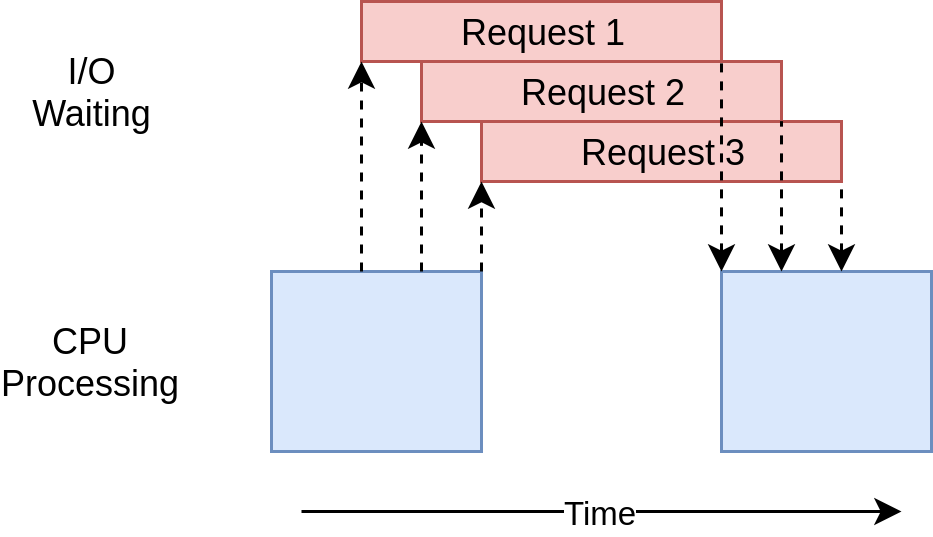
Suppose an AI endpoint must:
- load a prior conversation summary in seconds; and
- retrieve authorized chunks for the new question in seconds.
If it performs them serially, its waiting time is roughly:
If both calls are genuinely independent and use non-blocking clients, the time is closer to:
There is overhead, so these are approximations. Still, overlapping I/O waits is often a meaningful improvement in an AI service whose latency is dominated by retrieval, provider APIs, and enterprise integrations.
Two terms need to stay distinct:
- Concurrency means multiple operations make progress during the same period of elapsed time.
- Parallelism means multiple CPU operations execute literally at the same time on separate cores.
Typical asyncio applications are concurrent, often with one event loop on one thread. They excel at I/O-bound work, not CPU-intensive work such as local embedding generation, large dataframe transformations, or expensive image processing.
To build the right mental model, watch the opening of Corey Schafer’s animated AsyncIO guide.
Python Tutorial: AsyncIO - Complete Guide to Asynchronous Programming with Animations
Watch Python Tutorial: AsyncIO - Complete Guide to Asynchronous Programming with Animations by Corey Schafer for a visual explanation of why asynchronous code helps when work is dominated by I/O waiting.
Watch the motivation to distinguish synchronous execution, concurrency, and I/O-bound work. Then watch the vocabulary for the event loop, coroutines, tasks, futures, and awaitables. Focus on the fact that a coroutine must yield control before other work can proceed.
Coroutines, await, and the event loop
A function declared with async def is a coroutine function:
import asyncio


async def fetch_status() -> str:
    await asyncio.sleep(0.2)
    return "ready"
Calling it does not run the work by itself:
coroutine_object = fetch_status()
At this point, coroutine_object is only a description of work that could run. It needs an event loop. In a standalone script, asyncio.run() starts an event loop and runs a top-level coroutine:
async def main() -> None:
    status = await fetch_status()
    print(status)


asyncio.run(main())
Inside main(), await fetch_status() means:
- begin or continue
fetch_status(); - suspend
main()untilfetch_status()has a result; - let the event loop run other ready tasks while waiting.
The essential point is that await creates a suspension point only when the awaited work is non-blocking and has to wait. A network client built for asyncio can yield while it waits for a response. asyncio.sleep() yields intentionally, which makes it useful for demonstrations but not for real remote work.
The official Python documentation is concise on the distinction between creating a coroutine and scheduling it, and on the behavior of gather().
Read the relevant portions of Coroutines and Tasks in the official Python documentation. It establishes the exact scheduling behavior that prevents a common production mistake: writing async def code that still executes requests one at a time.
In the “Coroutines” section, find the discussion immediately after the first hello and world example. Read the scheduling distinction and the surrounding list of ways to run a coroutine. Then go to “Running tasks concurrently” and read the definition of asyncio.gather() through its explanation of result order: gather semantics. Notice that output order is based on input order, not on which operation finishes first.
await alone can still be sequential
The following code is asynchronous in syntax, but it is sequential in behavior:
async def prepare_inputs(question: str, conversation_id: str | None) -> tuple[str, list[str]]:
    summary = await load_conversation_summary(conversation_id)
    chunks = await retrieve_chunks(question)
    return summary, chunks
retrieve_chunks() does not begin until load_conversation_summary() has completed. This is appropriate only if retrieval actually requires the summary result.
For independent calls, start both before waiting for their results:
import asyncio


async def prepare_inputs(question: str, conversation_id: str | None) -> tuple[str, list[str]]:
    summary, chunks = await asyncio.gather(
        load_conversation_summary(conversation_id),
        retrieve_chunks(question),
    )
    return summary, chunks
asyncio.gather() schedules the supplied coroutines concurrently and waits until all have completed successfully. It returns results in the same positional order as its inputs:
summary, chunks = await asyncio.gather(
    load_conversation_summary(conversation_id),
    retrieve_chunks(question),
)
Even if retrieval finishes first, summary still receives the first result and chunks receives the second. This stable order is useful, but it means that swapping the two input calls without updating the assignment can create a subtle bug.
Determine independence from data dependencies, not from function names
“Database call” and “model call” are not automatically independent merely because they are different calls. Ask one precise question:
Does this operation need the result of the other operation in order to construct a correct, authorized request?
Consider this request flow:
| Operation | Can start immediately? | Reason |
|---|---|---|
| Authenticate the caller | Yes | It begins from the incoming signed identity token. |
| Load a conversation summary | Usually yes | It can use the trusted user identity and conversation_id. |
| Retrieve authorized chunks | Usually yes | It can use the trusted user identity, tenant scope, and question. |
| Generate the final answer | No | It needs the summary and retrieved chunks to construct grounded model context. |
| Retrieve with filters derived from an entitlement lookup | No | The retrieval filter depends on the entitlement result. |
The final two rows matter for AI systems. Never make data access concurrent in a way that lets unverified or unauthorized scope reach retrieval. Trusted identity and tenant context should already have been established before launching concurrent data calls.
A service-shaped example with TaskGroup
For a new Python 3.11+ service, prefer asyncio.TaskGroup when a group of related operations should succeed or fail together. It gives the work a clear lifetime: the service waits for every task when leaving the async with block.
Here is a simplified application-layer function. The Pydantic request validation from the previous lesson has already completed, and user_id and tenant_id come from trusted authentication middleware rather than the JSON request body.
import asyncio
from uuid import UUID


async def load_conversation_summary(
    conversation_id: UUID | None,
    user_id: UUID,
) -> str:
    # Uses an asynchronous database client in real code.
    if conversation_id is None:
        return ""

    return "Earlier conversation summary"


async def retrieve_authorized_chunks(
    question: str,
    tenant_id: UUID,
    user_id: UUID,
) -> list[str]:
    # Uses an asynchronous database or search client in real code.
    # tenant_id and user_id constrain retrieval at the data boundary.
    return ["VPN access requires an approved MFA challenge."]


async def generate_answer(
    question: str,
    conversation_summary: str,
    chunks: list[str],
) -> str:
    # Calls an asynchronous model-provider SDK in real code.
    return "Reconnect to the VPN and complete the approved MFA challenge."


async def answer_question(
    question: str,
    conversation_id: UUID | None,
    user_id: UUID,
    tenant_id: UUID,
) -> str:
    async with asyncio.TaskGroup() as group:
        summary_task = group.create_task(
            load_conversation_summary(conversation_id, user_id),
            name="load-conversation-summary",
        )
        retrieval_task = group.create_task(
            retrieve_authorized_chunks(question, tenant_id, user_id),
            name="retrieve-authorized-chunks",
        )

    conversation_summary = summary_task.result()
    chunks = retrieval_task.result()

    return await generate_answer(
        question=question,
        conversation_summary=conversation_summary,
        chunks=chunks,
    )
The first two operations overlap because both have all the inputs they need at the start. The model call remains after the task group because it depends on both results. That is the usual shape of a grounded-answer service: concurrent preparation, followed by dependent generation.
TaskGroup is deliberately stricter than gather():
- It waits for all tasks on exit.
- If one child task raises a non-cancellation exception, it cancels the remaining tasks in that group.
- It raises the resulting failure to the caller rather than quietly continuing with incomplete prerequisites.
That default is usually appropriate when the answer must not be generated without all required inputs. In a later module, you will add explicit timeout, retry, and safe-fallback policies around model and integration failures. For now, the important design decision is that failures are visible rather than being silently converted into partial context.
Read the TaskGroup section of the same official documentation before adopting this pattern.
Return to the official Python documentation to learn the failure behavior of TaskGroup, the recommended structured-concurrency primitive for related service calls.
In the “Task groups” section, begin with the introductory paragraph and read the task group contract. Continue through the paragraph beginning “The first time any of the tasks” to see why one failed prerequisite cancels the remaining related work.
When gather() remains a good fit
Use asyncio.gather() when its result-list behavior is the most direct expression of the work, particularly for a small fixed set of independent calls:
profile, preferences = await asyncio.gather(
    load_profile(user_id),
    load_preferences(user_id),
)
Be aware of its default failure behavior: if one awaitable raises, gather() propagates that exception to its caller, but it does not cancel the other submitted awaitables. They may continue running. That may be acceptable if independent outcomes are useful; it is often surprising if all operations are prerequisites for one response.
Avoid setting return_exceptions=True simply to suppress errors. With that option, exceptions appear in the results list alongside ordinary values, so every result must be inspected deliberately. Otherwise, a failed retrieval can be mistaken for valid context.
Real network calls need an asynchronous client
The concurrency patterns above only help if the underlying client yields control while waiting.
For outbound HTTP calls, httpx.AsyncClient is one common asynchronous client. The important structure is:
- create or receive one async client;
awaitits network method;- create multiple coroutines or tasks before awaiting the group.
import asyncio
import httpx


async def fetch_account(client: httpx.AsyncClient, account_id: str) -> dict:
    response = await client.get(f"/accounts/{account_id}")
    response.raise_for_status()
    return response.json()


async def fetch_open_tickets(
    client: httpx.AsyncClient,
    account_id: str,
) -> list[dict]:
    response = await client.get(f"/accounts/{account_id}/tickets")
    response.raise_for_status()
    return response.json()


async def load_customer_context(account_id: str) -> tuple[dict, list[dict]]:
    async with httpx.AsyncClient(
        base_url="https://integration.example.internal",
        timeout=5.0,
    ) as client:
        account, tickets = await asyncio.gather(
            fetch_account(client, account_id),
            fetch_open_tickets(client, account_id),
        )

    return account, tickets
The async with block manages the client’s network resources, including connections. In an actual web service, the client is commonly created during application startup and reused, rather than recreated for every individual upstream call. The key point for this lesson is that client.get() is awaited and the two calls are passed to gather() together.
Watch this short HTTPX demonstration for the contrast between an incorrect loop that awaits each request serially and a concurrent task-based implementation.
HTTPX Tutorial - A next-generation HTTP client for Python
Watch Patrick Loeber’s HTTPX Tutorial - A next-generation HTTP client for Python for the concrete mechanics of asynchronous HTTP requests.
First watch AsyncClient basics to see the async with httpx.AsyncClient() and await client.get() pattern. Then watch wrong versus right, which shows why placing await client.get() directly inside a loop is still serial, and how task creation plus gather() overlaps requests.
What blocks the event loop
Adding async to a function does not magically make its contents non-blocking. These operations can block the event loop if called directly inside an async endpoint:
import requests
import time


async def bad_service_code() -> None:
    response = requests.get("https://provider.example.com")  # Blocks
    time.sleep(1)  # Blocks
    process_large_local_file()  # May block
While requests.get() or time.sleep() is blocking, the event loop cannot switch to another coroutine. One slow operation can therefore degrade every request sharing that event-loop worker.
Prefer these choices:
| Work type | Preferred approach |
|---|---|
| HTTP request to a model provider or external API | An async-capable SDK or httpx.AsyncClient |
| Database query | The asynchronous driver supported by the database library |
| Blocking I/O library with no async alternative | await asyncio.to_thread(blocking_function, ...) as a bridge |
| CPU-heavy local computation | A process worker, job system, or a carefully designed process pool |
asyncio.to_thread() is useful for integrating a legacy synchronous I/O library without freezing the event loop:
import asyncio


def legacy_document_lookup(document_id: str) -> str:
    # A synchronous library call
    return "document text"


async def lookup_without_blocking_event_loop(document_id: str) -> str:
    return await asyncio.to_thread(legacy_document_lookup, document_id)
It moves the blocking function to a thread so the event loop can continue handling other tasks. It is not a general solution for CPU-bound computation; CPU-heavy work needs a design that protects the API process from saturation.
Finally, concurrency must be bounded in real systems. Launching thousands of simultaneous retrievals can exhaust database connections or trigger model-provider rate limits. For this lesson’s fixed pair of calls, a task group is appropriate. Later, when calls are dynamic or batched, set limits based on connection pools, provider limits, and the service’s latency budget.
Key takeaways
Asynchronous Python reduces elapsed latency when multiple independent, I/O-bound operations spend time waiting.
async defdefines a coroutine function; calling it alone does not schedule execution.awaitsuspends the current coroutine while it waits, allowing the event loop to run other ready work.- Sequential
awaitstatements execute calls one after another, even inside an async function. asyncio.gather()runs supplied awaitables concurrently and returns results in input order.- In Python 3.11+,
asyncio.TaskGroupis a strong default for related prerequisite calls because failures cancel the remaining work and remain visible. - Only run operations concurrently when neither needs the other’s result, especially where authorization or retrieval filters are involved.
- Async concurrency requires non-blocking dependencies. A synchronous HTTP client,
time.sleep(), or CPU-heavy work can block the whole event loop. - Do not use
asyncio.run()inside a web endpoint; the web framework will already be running the event loop.
Next, you will place the schemas from the previous lesson and this async service logic behind a FastAPI endpoint that validates input and returns a typed response.
Can't find a good explanation? Sign up and we'll make it for you
Sign up