
Hello! Welcome to your third lesson in the Creational Design Patterns module.
In our last lesson, we focused on the Factory Method pattern, which allows us to delegate the creation of a single product to subclasses. This is great for decoupling our code from specific product implementations. But what happens when we need to create not just one object, but a whole family of related objects that must be compatible with each other?
This brings us to today's topic: the Abstract Factory pattern. Your learning goal is to apply this pattern to create families of related objects without specifying their concrete classes. This pattern is a step up in complexity from the Factory Method and is essential for designing systems that need to support multiple "themes" or "platforms" consistently.
The Problem: Creating Consistent Families of Objects
Imagine you are developing a UI toolkit that needs to run on both Windows and macOS. A user interface is composed of multiple elements: buttons, checkboxes, text fields, etc. When your application runs on Windows, you want it to render a WindowsButton and a WindowsCheckbox. When it runs on macOS, it should render a MacButton and a MacCheckbox.
The challenge is ensuring consistency. You must never accidentally mix a MacButton with a WindowsCheckbox in the same UI. How do you enforce that all UI elements created for a screen belong to the same operating system family?
Using multiple Factory Methods could get messy. Your client code would need to manage different factories for different elements and ensure it's using the right ones, which increases coupling and the chance of errors.
// A potential problem without Abstract Factory
Button windowsButton = new WindowsButtonFactory().createButton();
// Oops! A bug is introduced by mixing factories.
Checkbox macCheckbox = new MacCheckboxFactory().createCheckbox();
This is precisely the problem the Abstract Factory pattern is designed to solve.
The Solution: A Factory for Factories
The Abstract Factory pattern introduces an extra layer of abstraction. Instead of having a factory for each product, you have a factory for each family of products. This master factory is, in essence, a "factory of factories."
To understand how this is structured, let's explore the main components of the pattern.
The Refactoring.guru article provides an excellent explanation of the Abstract Factory pattern's intent and structure. It uses a furniture shop analogy to illustrate the problem of ensuring created objects (like chairs and sofas) belong to the same style (Modern, Victorian).
Please read the 'Intent', 'Problem', 'Solution', and 'Structure' sections. Focus on how the pattern introduces interfaces for both products (e.g., Chair) and factories (AbstractFactory) to solve the problem of creating compatible object families.
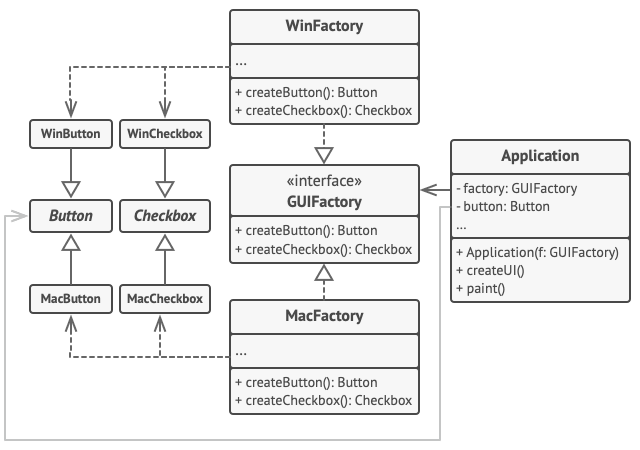
As you've read, the pattern involves five key roles:
- Abstract Products: These are interfaces for a set of distinct but related products that make up a family. (e.g.,
Button,Checkbox). - Concrete Products: These are the specific implementations of the abstract products, grouped by variants. (e.g.,
WindowsButton,MacButton). - Abstract Factory: This is an interface that declares a set of creation methods for each of the abstract products (e.g.,
createButton(),createCheckbox()). - Concrete Factories: These classes implement the Abstract Factory interface. Each concrete factory corresponds to a specific variant and creates a family of products belonging to that variant. (e.g.,
WindowsFactorycreatesWindowsButtonandWindowsCheckbox). - Client: The client code works with factories and products only through their abstract interfaces (
GUIFactory,Button,Checkbox). This decouples the client from the concrete implementations.
Here is a UML diagram that visualizes this structure for our UI toolkit example:
A Practical Java Example: GUI Toolkit
Let's now translate this structure into Java code. We'll implement the cross-platform GUI toolkit we've been discussing.
Abstract Factory Design Pattern in Java: Complete Guide ...
The following article provides a clean, complete Java implementation of this GUI toolkit example. Seeing the code will solidify your understanding of how the different components interact.
Study the code under the 'Java Example: GUI Toolkit' section. Trace the execution flow from the 'Application Runner' (Demo class) where a specific factory is chosen, to the 'Client Code' (Application class) which uses the factory to render the UI. Note how the Application class has no knowledge of 'Windows' or 'Mac'.
Let's summarize the key parts of the code you just reviewed:
- Abstract Products:
public interface Button { void paint(); } public interface Checkbox { void paint(); } - Abstract Factory:
public interface GUIFactory { Button createButton(); Checkbox createCheckbox(); } - Concrete Factories:
public class WindowsFactory implements GUIFactory { public Button createButton() { return new WindowsButton(); } public Checkbox createCheckbox() { return new WindowsCheckbox(); } } public class MacFactory implements GUIFactory { public Button createButton() { return new MacButton(); } public Checkbox createCheckbox() { return new MacCheckbox(); } } - Client Initialization:
// In the main application entry point
String osName = System.getProperty("os.name").toLowerCase();
GUIFactory factory;
if (osName.contains("mac")) {
    factory = new MacFactory();
} else {
    factory = new WindowsFactory();
}
Application app = new Application(factory); // The client gets the factory
app.render();
The crucial insight here is that the selection of the concrete factory (MacFactory or WindowsFactory) happens once at the beginning. The rest of the application (Application class) is then passed this factory and operates completely through the abstract interfaces, guaranteeing that all created UI elements are from the same family.
Abstract Factory vs. Factory Method
A common point of confusion—and a favorite system design interview question—is the difference between Factory Method and Abstract Factory.
- Factory Method is about creating a single object. It uses inheritance to delegate the instantiation to subclasses.
- Abstract Factory is about creating a family of related objects. It uses composition (the client has a factory object) to produce objects that are designed to work together.
In fact, you can think of an Abstract Factory as a container for several Factory Methods. In our example, createButton() and createCheckbox() in the GUIFactory interface are essentially factory methods.
Abstract Factory Design Pattern in Java: Complete Guide ...
To make this distinction crystal clear, let's review a detailed comparison.
Read the section titled 'Factory Method vs Abstract Factory Detailed Comparison'. The tables in this section summarize the key differences in intent, scale, and complexity. Internalizing this is key to choosing the right pattern for a design problem.
Test your understanding!
You are designing a data access layer for an application that needs to support multiple database systems (e.g., PostgreSQL, MySQL). For each database, you need a Connection object and a Command object to execute queries. You want to ensure that you never use a MySqlConnection with a PostgresCommand.
How would you apply the Abstract Factory pattern to this problem? Identify the four key roles (Abstract Products, Concrete Products, Abstract Factory, Concrete Factories).
Show answer
- Abstract Products:
DBConnectioninterface andDBCommandinterface. - Concrete Products:
PostgresConnection,PostgresCommand,MySqlConnection,MySqlCommand. - Abstract Factory:
DBFactoryinterface withcreateConnection()andcreateCommand()methods. - Concrete Factories:
PostgresFactory(implementsDBFactoryto returnPostgresConnectionandPostgresCommand) andMySqlFactory(implementsDBFactoryto returnMySqlConnectionandMySqlCommand).
The client code would be initialized with either a PostgresFactory or MySqlFactory based on application configuration.
Pros, Cons, and Applicability
Like any design pattern, Abstract Factory has its trade-offs.
When to Use It:
- When your system needs to be independent of how its products are created, composed, and represented.
- When you need to create families of related products designed to be used together.
- When you want to provide a class library of products, exposing only their interfaces, not their implementations.
Pros:
- Guarantees Compatibility: Products from a single factory are guaranteed to be compatible.
- Decoupling: You avoid tight coupling between concrete products and client code. The client only depends on abstract interfaces.
- SOLID Principles: It supports the Single Responsibility Principle (product creation is moved to one place) and the Open/Closed Principle (you can introduce new variants/families without breaking client code).
Cons:
- Increased Complexity: The pattern introduces many new interfaces and classes, which can feel like over-engineering for simpler problems.
- Rigidity in Adding New Products: If you need to add a new type of product to the family (e.g., a
ScrollBarto our GUI toolkit), you have to modify theAbstractFactoryinterface. This change then cascades down to all of its subclasses, violating the Open/Closed principle in that dimension.
Conclusion
Today, we've taken a significant step forward in our study of creational patterns. The Abstract Factory pattern provides a robust solution for creating families of related objects, ensuring consistency and decoupling your client code from concrete implementations.
Key Takeaways:
- Purpose: To provide an interface for creating families of related or dependent objects without specifying their concrete classes.
- Core Idea: A "factory of factories" where each concrete factory is responsible for creating a complete "theme" or "variant" of products.
- Key Difference from Factory Method: Factory Method creates one product; Abstract Factory creates a family of products.
- Primary Benefit: Enforces that products created together are compatible with each other.
In our previous lessons, we've seen how to control the number of instances (Singleton), how to delegate creation of a single object (Factory Method), and now how to create consistent families of objects (Abstract Factory).
In our next lesson, we will explore the Builder pattern. It tackles a different creational problem: how to construct a single, but highly complex, object step-by-step. This is particularly useful when an object has many optional configuration parameters.