
Hello. In the previous lesson, you learned to distinguish deterministic automation, an AI copilot, and an autonomous agent by decision authority. An agent is not simply a chat interface with APIs attached: it is a system that can pursue a delegated goal through a variable sequence of permitted actions.
This lesson makes that behavior concrete. You will trace the observe–reason–act loop through a simple access-support agent, identify what happens inside each stage, and learn what evidence a PM should expect in an agent trace. This loop is the foundation for later work on system design, safety controls, and evaluation.
An agent is a loop, not a single model response
A conventional LLM interaction is usually single-turn:
- A user provides a prompt.
- The model produces text.
- The interaction ends.
An agent has a different operating structure. It receives a goal, sees the relevant current situation, chooses a next step, takes a permitted action through software tools, receives the result, and decides whether to continue.
The basic cycle is:
- Observe the goal and current evidence.
- Reason about the next best permitted step.
- Act by requesting a tool call, asking a question, or returning a final answer.
- Observe the outcome of that action.
- Repeat until a completion, stopping, or escalation condition is met.
The word reason here means the model selects or plans a next step based on its instructions and available context. It does not mean the model has direct access to the world, nor that every internal model thought should be exposed to users. For product purposes, what matters is whether the system can provide a concise, inspectable decision record: what it knew, what it did, why that action was permitted, and what happened.
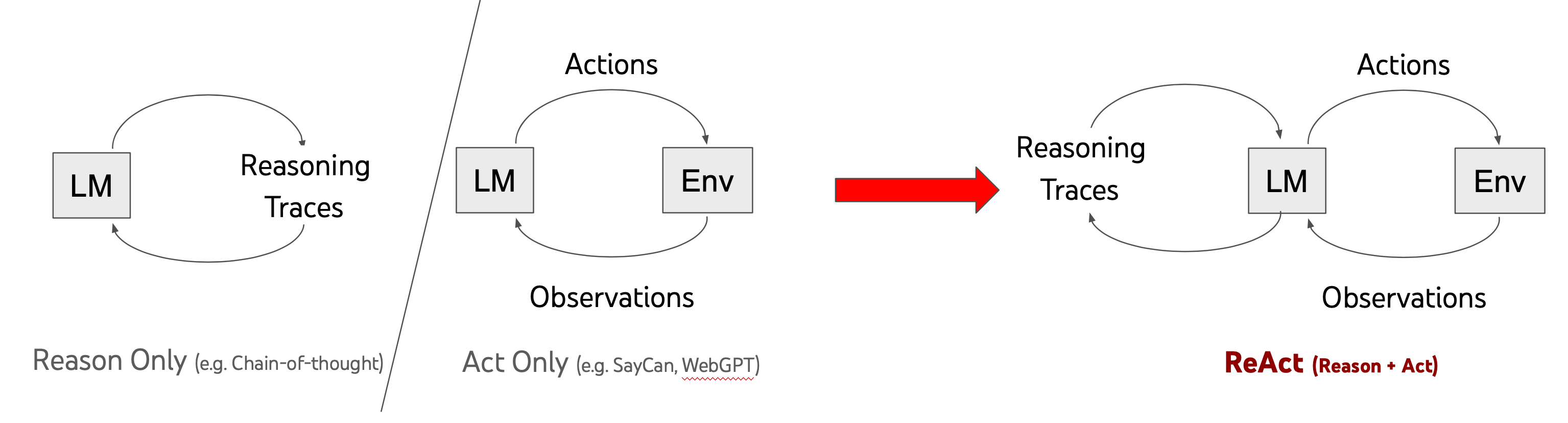
The term ReAct is often used for this style of system: reasoning plus acting. It is a useful mental model, but not a requirement that every product reveal long written reasoning traces. Many production agents record structured plans, tool calls, policy checks, and status events instead.
ReAct: Synergizing Reasoning and Acting in Language Models
Read Google Research's explanation of ReAct to establish the formal idea behind the loop: reasoning determines useful actions, while actions obtain evidence that changes subsequent reasoning.
In “Model Overview,” read the core explanation. Focus on the distinction between a reasoning trace, which changes the model's working context, and an action, which can change or query the external environment. Then read all of “ReAct Prompting.” In particular, use the examples of reasoning to see why an agent may need more than one cycle.
What each part of the loop actually does
It helps to separate the four elements precisely. Otherwise, product teams often call any tool-enabled response “agentic,” even when it never learns from the outcome of its own action.
| Element | What it is | Typical inputs or outputs | PM question |
|---|---|---|---|
| Observation | New evidence available to the agent | User request, ticket details, tool result, system status, approval status, user reply | What information can the agent rely on, and is it current? |
| Reasoning / decision | Selecting the next step in light of the goal, rules, and evidence | A plan, a tool choice, a request for clarification, a decision to stop | What choices may the agent make independently? |
| Action | A request to do something through an allowed interface | Search a knowledge base, read a record, run a diagnostic, update a ticket | What can it do, under which permissions and limits? |
| Outcome | The externally determined result of the action | Search results, success response, error, changed status, no matching records | How will the agent know whether its action actually worked? |
Two distinctions are especially important.
Observations are evidence, not assumptions
Suppose an agent says, “The employee’s account is active.” That statement is merely a model claim unless the agent has a trustworthy observation, such as a result from an identity-system lookup.
A professional agent product makes evidence explicit where it matters:
- A tool result says the account is active.
- A policy lookup says a standard-access change is allowed under specified conditions.
- A diagnostic confirms that the employee can now access the application.
- A tool error says the requested change did not occur.
This is why a final fluent answer is not adequate proof of task completion. The system must inspect outcomes rather than declare success because the model’s wording sounds confident.
An action is a controlled software operation
The model itself does not browse a company system, edit a ticket, or reset an account. It produces a structured request such as:
Tool: check_identity_status
Input: employee_id = E-1042
An agent harness—the surrounding application code—checks that request, invokes the actual tool, receives the tool result, and adds it to the next model call as an observation. The harness is also where product controls can be enforced: permissions, approval requirements, spending limits, timeouts, and maximum iterations.
AI Agents Explained - What Is an AI Agent and how to build one? (Real Examples, Not Hype)
Watch Tech With Tim’s “AI Agents Explained” for a compact explanation of how the model, tools, context, and repeated execution fit into one operating loop.
Watch the agent loop. Focus on the handoff: the model chooses a tool, the surrounding software executes it, the tool result returns to the model, and the model decides whether to take another step or finish.
Trace a simple agent: restoring standard application access
Consider a bounded internal IT-support agent. An employee submits this ticket:
“I cannot access the Analytics Portal. Please restore my standard access.”
The agent’s defined goal is:
Restore standard Analytics Portal access when policy conditions are met; otherwise explain the blocker and escalate to an IT specialist.
Its permitted tools are intentionally narrow:
| Tool | What it can do | Authority level |
|---|---|---|
read_ticket | Read the request and approval information | Read-only |
check_identity_status | Check account and authentication status | Read-only |
get_access_policy | Retrieve the applicable access policy | Read-only |
add_standard_portal_group | Add a user to the preapproved standard group | Limited write action |
verify_portal_entitlement | Confirm whether access is active | Read-only |
update_ticket | Record actions and status | Limited write action |
The agent is not allowed to grant administrator access, override policy, modify privileged accounts, or close security-related tickets. Those are boundaries, not implementation details: they define the product’s level of autonomy.
Now trace its work.
Cycle 1: establish the situation
Observation
The agent receives the user’s request plus the ticket identifier. It knows neither the cause of the problem nor whether a standard-access change is allowed.
Reason / decision
Several causes are possible: an inactive identity, failed authentication setup, a missing portal group, or a request for access beyond the employee’s role. The appropriate first step is to inspect the account state rather than assume the missing permission is the cause.
Action
The model requests:
Tool: check_identity_status
Input: employee_id = E-1042
New observation
The identity system returns:
Account: active
Authentication: healthy
Analytics Portal group: absent
The loop has produced a fact that the original user request did not provide: the account itself is healthy, but the required group is absent.
Cycle 2: determine whether the agent may remedy the issue
Reason / decision
The agent has evidence of a missing group, but it should not immediately add one. A capable agent does not mean an unrestricted agent. It must establish whether the requested access is standard and whether the required approval exists.
Action
The agent requests:
Tool: read_ticket
Input: ticket_id = IT-8821
New observation
The ticket contains the employee’s job role and a recorded manager approval for standard Analytics Portal access.
The agent still needs the policy rule rather than interpreting the approval in isolation.
Action
The agent requests:
Tool: get_access_policy
Input: application = Analytics Portal, role = Sales Analyst
New observation
The policy states that Sales Analysts with manager approval may be assigned the standard Analytics Portal group. Privileged portal roles require a human access administrator.
At this point, the agent can make a bounded decision: the requested remedy matches the user’s role, approval, and allowed tool permission.
Cycle 3: act, then verify rather than assume success
Reason / decision
The policy conditions are satisfied. Adding the standard group is permitted, reversible, and within scope.
Action
The agent requests:
Tool: add_standard_portal_group
Input: employee_id = E-1042, group = analytics_standard
New observation
The access system returns:
Status: accepted
Change reference: CHG-4918
Notice that accepted is not the same as completed. A common agent failure is to treat a tool acknowledgement as proof that the user outcome has been achieved.
Reason / decision
Because the goal is restored access—not merely submitting a group-change request—the agent needs verification.
Action
The agent requests:
Tool: verify_portal_entitlement
Input: employee_id = E-1042
New observation
The entitlement system returns:
Analytics Portal access: active
Standard role: assigned
The agent now has evidence that the requested outcome is complete.
Cycle 4: document and conclude
Reason / decision
The task has succeeded, and updating the ticket is within the agent’s authority. No further diagnostic or remediation is needed.
Action
The agent requests:
Tool: update_ticket
Input: status = resolved,
summary = "Verified active account; assigned approved standard portal group; entitlement confirmed active."
New observation
The ticket update succeeds.
The agent can now provide a concise user-facing response:
Your standard Analytics Portal access has been restored and verified. Please sign in again. Ticket IT-8821 has been updated with the completed change.
The user sees a result; the operations team can inspect the trace; and the agent stops because its explicit completion condition has been met.
The same interaction as an agent trace
A PM should be able to read an execution trace like a structured operational narrative, even without writing the code. Here is a simplified version:
| Step | Observation available | Decision | Tool action | Result |
|---|---|---|---|---|
| 1 | User reports lost portal access | Check whether the account or portal membership is the problem | check_identity_status | Account active; portal group absent |
| 2 | Group is absent | Check whether standard access is requested and approved | read_ticket | Manager approval recorded |
| 3 | Role and approval known | Confirm policy permits the change | get_access_policy | Standard group allowed |
| 4 | Conditions satisfied | Add only the authorized standard group | add_standard_portal_group | Change accepted |
| 5 | Change accepted, but outcome unverified | Verify actual entitlement | verify_portal_entitlement | Access active |
| 6 | Access verified | Record evidence and complete task | update_ticket | Ticket updated |
This trace reveals something that a final response hides: why the system took a particular action and whether each transition was justified by evidence.
For an agent PM, a trace should usually capture:
- the task or goal;
- relevant inputs and contextual state;
- the tool selected and permitted parameters;
- tool results and errors;
- policy or approval checks;
- status changes, including completion or escalation;
- duration, number of iterations, and relevant costs.
The trace should avoid unnecessarily storing sensitive user content or raw private reasoning. The product need is accountable operation, not indiscriminate logging.
Completion, failure, and escalation are all valid loop exits
An agent loop does not run forever, and it should not treat every situation as something to “solve.” Product requirements need explicit exit conditions.
In the portal-access example, the agent can stop in at least three ways:
| Exit type | Trigger | Appropriate behavior |
|---|---|---|
| Completed | Entitlement check confirms standard access is active | Update ticket and inform the user |
| Escalated | Request is for privileged access, approval is missing, or policy is unclear | Preserve evidence and route to a human specialist |
| Failed safely | A tool is unavailable, change is rejected, or verification cannot confirm access | Explain the limitation, avoid unsupported claims, and create a follow-up path |
For example, if verify_portal_entitlement reports that access is still inactive after the group addition, the correct next move is not automatically to retry the same action indefinitely. The agent might inspect a known propagation delay, retry once within a defined limit, and then escalate with the change reference and diagnostic result.
This is where product design becomes visible in the loop:
- Tool scope determines what the agent can attempt.
- Policies determine when it may attempt it.
- Verification determines what counts as success.
- Iteration limits prevent wasteful or harmful looping.
- Escalation rules protect users when the agent cannot safely proceed.
The loop therefore represents bounded autonomy, not free-form independence.
A PM shorthand for tracing any proposed agent
When reviewing an agent concept, use this compact pattern:
Goal:
Initial observations:
Decision needed:
Permitted action:
Expected observation after action:
Completion evidence:
Escalation or stop condition:
Applied to the access agent:
Goal: Restore standard portal access.
Initial observations: User request, ticket ID, employee ID.
Decision needed: Is the employee eligible for an authorized standard-group change?
Permitted action: Add only the standard portal group after approval and policy validation.
Expected observation after action: Current entitlement status.
Completion evidence: Entitlement check reports active access.
Escalation or stop condition: Privileged request, missing approval, tool failure, or unverified access.
If a proposed “agent” cannot answer these fields, it may be a vague automation idea rather than a product capability ready for scope, design, or implementation.
Key takeaways
- An agent operates through repeated observation, decision, action, and outcome cycles rather than a single model response.
- Observations are externally grounded evidence: user inputs, tool results, system state, approvals, and errors.
- The model chooses a next step, but an agent harness executes the actual tool call and returns the result to the model.
- A successful tool call is not necessarily successful task completion. Agents need explicit verification.
- A useful product trace records the goal, evidence, decisions, actions, outcomes, and safe exit condition.
- Completion, escalation, and safe failure are all legitimate endpoints of an agent loop.
Next, you will examine why the model’s decisions in this loop are inherently probabilistic—and how that uncertainty changes the way an agent PM defines product behavior, quality, and trust.
Can't find a good explanation? Sign up and we'll make it for you
Sign up