
Hello, and welcome to the first lesson in your AI Agent Product Management course.
This first module establishes the product vocabulary you will use throughout discovery, prototyping, evaluation, and launch. The term agent is used loosely in the market, so a professional PM needs a more useful standard: classify a capability by who controls decisions and actions, not by whether it has a chat interface, uses an LLM, or is marketed as “AI-powered.”
By the end of this lesson, you will be able to distinguish deterministic automation, an AI copilot, and an autonomous agent—and explain why a particular capability belongs in one category rather than another.
Start with the decision structure, not the interface
A chat window does not make a product an agent. Nor does connecting a model to an API. Conversely, a capability can be an autonomous agent even if users never see a chat interface.
The meaningful distinction is the system’s decision authority:
- Does software follow rules and a path that people specified in advance?
- Does it help a person interpret information and recommend or draft work while the person remains in control?
- Or does it receive a goal, decide how to pursue it, take permitted actions, inspect results, and continue independently?
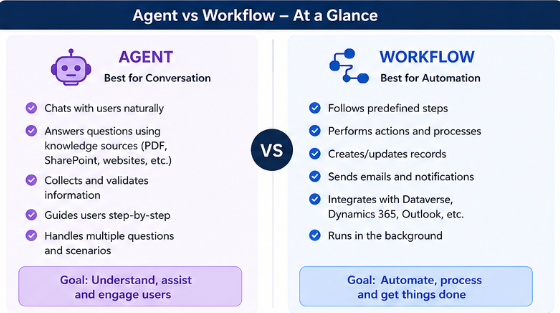
The following image offers a useful first contrast between an agent and a predefined workflow. But treat it as a starting point, not a complete classification system: conversation alone does not imply agency, and an autonomous agent may use workflows internally.
A practical hierarchy is:
| Capability type | Primary value | Who chooses the path? | Who authorizes consequential action? |
|---|---|---|---|
| Deterministic automation | Reliable execution of a known process | Designers and business-rule owners, in advance | The process executes rules already authorized |
| AI copilot | Interpretation, drafting, recommendations, and assistance | The user, with model support | Usually the user |
| Autonomous agent | Completing a delegated goal despite variable paths | The agent, within explicit boundaries | The agent for permitted actions; a human at defined checkpoints |
This is not a ranking from “basic” to “advanced.” It is a fit decision. A reliable automation can be much more valuable than an agent if the work is standardized. An agent is justified only when model-led judgment and flexible execution solve a real problem.
Deterministic automation: a predefined process executed reliably
Deterministic automation applies explicit rules to structured inputs and performs a known sequence of steps. Given the same valid inputs and system state, it should follow the same path and produce the same outcome.
Think of familiar software logic:
- When an employee submits an approved expense under a threshold, route it to the finance queue.
- When a customer’s subscription payment fails three times, send a specified notification.
- When an incident is marked “critical,” page the on-call engineer and create a standard incident channel.
- Every Friday, compile a report from named data sources and email it to a distribution list.
The process can have branches. “If amount exceeds , require director approval” is still deterministic because the condition and the two possible routes are explicitly defined.
The core PM test is simple: can the business describe the relevant decisions and paths in advance, including the exceptions that matter? If yes, automation is likely the right foundation.
EXPLAINED: Copilot Studio Agents vs. Power Automate Flows
Watch “EXPLAINED: Copilot Studio Agents vs. Power Automate Flows” from Citizen Developer for a platform-specific but broadly useful distinction: structured, predefined logic suits a flow, while ambiguity and changing inputs may require an agent.
Watch the core distinction for the contrast between judgment and predefined logic. Continue with agent fit to see why messy inputs and exceptions change the design choice, then watch flow fit for the characteristics of repeatable, structured automation. Treat “flow” here as a general term for deterministic automation, not as a recommendation for a particular vendor product.
What deterministic automation is not
Deterministic automation is not “anything without a chat UI,” and it is not necessarily simple. A payroll process may involve many systems, approvals, and error-handling rules; it can still be deterministic if the route is defined.
Equally important: do not describe a workflow as deterministic merely because it has a fixed-looking diagram. If an LLM is allowed to interpret ambiguous data and its interpretation decides which branch runs, the control structure may be predefined while a key decision remains probabilistic. That is an AI-assisted workflow, and it needs model evaluation and safeguards.
For now, the central insight is this: deterministic automation is optimized for consistency, speed, auditability, and scale, not flexible judgment.
AI copilot: model judgment under user direction
An AI copilot helps a person do work. It can understand natural language, retrieve information, summarize, draft, analyze, recommend, and sometimes carry out a discrete action that the user directly requests. But the user retains ownership of the task: they decide the objective, direct meaningful next steps, and review important outputs or actions.
A copilot might:
- summarize a customer’s account history before a support representative responds;
- draft a project brief from notes and a template;
- retrieve relevant policy passages and recommend an answer to an HR question;
- suggest spreadsheet formulas and explain discrepancies;
- prepare a support-ticket reply, which an agent reviews and sends.
The model contributes interpretation and generation, which are valuable precisely because real language and real documents are often ambiguous. However, the user is still the active operator.
A helpful operational definition is:
A copilot produces information, options, or user-requested work that helps a human make and carry out decisions.
The word copilot is apt because the human remains responsible for directing the journey. A good copilot reduces effort without quietly taking over authority.
Read the opening of IBM Think’s “AI Agents vs. AI Assistants” to anchor the distinction between user-directed assistance and delegated autonomous work. The celebrity assistant-versus-agent analogy is imperfect but memorable: one responds to requests, while the other acts toward an ongoing mandate.
In the opening section, read from the movie-star comparison beginning the assistant analogy. Then continue through the subsection “AI assistants: Awaiting your instructions,” especially “How AI assistants work” and the “Key features of AI assistants” bullets. Focus on the role of the user prompt, recommendations, and user review; do not treat a conversational interface or tool access by itself as proof that a capability is autonomous.
Tool access does not make something an agent
This distinction prevents a common product mistake. Consider a support copilot that can create a ticket. If the user asks, “Create a ticket with this information,” reviews the draft, and presses Submit, that is still a copilot experience. The tool call carries out a human-directed action.
Likewise, a copilot may have excellent company knowledge, a specialized prompt, and a consistent output format. Those design choices make it more useful, but they do not grant it independent authority over a multi-step objective.
For a PM, the copilot framing is often preferable when:
- correctness requires human expertise or accountability;
- the task involves judgment but the cost of model error is meaningful;
- users need help, not delegation;
- adoption depends on preserving user control and trust;
- the best user outcome is a recommendation, draft, or analysis rather than autonomous completion.
Autonomous agents: delegated goals, flexible plans, permitted action
An autonomous agent receives a goal and has authority to make bounded decisions while pursuing it. It can decide what to do next, choose among available tools, act, inspect the result, and revise its approach without requiring the user to direct every step.
A concise operational definition is:
An autonomous agent is a system that plans and executes a variable sequence of permitted actions toward a delegated goal, using feedback from its environment to determine what to do next.
This definition has several parts that all matter:
-
Delegated goal
The user or system states the desired outcome, not every procedure. For example: “Resolve eligible account-access issues,” rather than “Open these three pages, run this diagnostic, and send this exact message.” -
Variable path
The correct sequence cannot be fully hardcoded in advance. Different cases require different evidence, tool calls, retries, or escalation. -
Tool use and action
The agent can access controlled capabilities beyond text generation, such as searching knowledge, checking account status, updating a record, or running a restricted diagnostic. -
Environmental feedback
It checks what actually happened. A tool result, system status, or user reply becomes evidence for the next decision. -
Bounded autonomy
Autonomy is never unlimited. The product specifies permissions, spending or iteration limits, stopping conditions, and human approval points.
Anthropic’s framing is particularly useful here: it separates prescriptive workflows from agents that need flexible, model-led decision making.
Read Anthropic’s “Building Effective AI Agents” for an engineering-grounded explanation of the workflow-versus-agent boundary. It reinforces an important PM principle: begin with the simplest solution that can credibly deliver the outcome.
First, in “What are agents?” and “When (and when not) to use agents,” read the simplicity principle. Then go to the later “Agents” subsection and read from the agent execution description. Focus on planning, tool use, ground-truth feedback, checkpoints, and stopping conditions. These are the product behaviors that distinguish an autonomous agent from a chat interface or a fixed LLM workflow.
Autonomy is bounded, not unsupervised
A system does not cease to be an agent because it requests approval at a high-risk moment. In fact, a well-designed agent often should pause before irreversible, sensitive, or high-consequence actions.
For example, an IT-resolution agent might independently:
- inspect a ticket and relevant identity records;
- retrieve approved troubleshooting guidance;
- run read-only diagnostics;
- ask the user for missing non-sensitive information;
- select and attempt a permitted remediation;
- verify whether the issue is resolved;
- update the ticket with an evidence-based summary.
But it might need explicit human approval before:
- disabling an account;
- changing privileged permissions;
- accessing sensitive logs;
- applying a costly system change;
- closing a security-related incident.
The agent’s autonomy exists between those boundaries. The PM’s role is to define them precisely rather than making the false choice between total automation and no automation.
One workflow, three different product capabilities
Use a single scenario to make the categories concrete. Imagine a company’s internal IT support operation handling employee access problems.
| Capability | Product behavior | Classification | Why |
|---|---|---|---|
| Critical-ticket alerting | When a ticket has severity “critical,” page the on-call rotation, create an incident channel, and post a predefined message. | Deterministic automation | The trigger, conditions, recipients, and actions are all specified in advance. |
| Support response assistant | A technician asks for help. The system summarizes the ticket, retrieves approved troubleshooting guidance, drafts a response, and suggests next diagnostic steps. | AI copilot | The model interprets unstructured information, but the technician directs the work and decides what to send or do. |
| Access-resolution agent | The system receives the goal “restore this employee’s standard access.” It checks identity status, consults policy, runs permitted diagnostics, tries authorized remediations, verifies results, and escalates if it cannot resolve the issue. | Autonomous agent | The agent selects a path and continues through several actions based on tool results, within defined permissions and escalation rules. |
Notice that all three could be part of one product. A mature agent product is often a hybrid system:
- deterministic automation handles reliable triggers, notifications, and rule-based routing;
- a copilot supports employees or operators where review and judgment matter;
- an agent handles a bounded, variable, multi-step objective.
The right unit of analysis is therefore not “Is our product an agent?” It is: “Which capability receives which level of decision authority?”
A PM classification method you can reuse
When evaluating a proposed capability, capture these five fields before naming it:
| Field | What to document |
|---|---|
| User outcome | The result the user wants, stated without assuming a solution |
| Trigger | Whether a user explicitly starts it, a system event starts it, or it runs on a schedule |
| Decision path | Fixed rules, user-directed model assistance, or agent-selected steps |
| Action authority | What the system can recommend, draft, execute, or escalate |
| Evidence and stop conditions | How completion is verified, when it pauses, and when it fails safely |
Then classify using the strongest applicable evidence:
- Choose deterministic automation when the path can be specified as business rules and structured process logic.
- Choose an AI copilot when model interpretation is useful but the user remains the task owner and decision-maker.
- Choose an autonomous agent when a goal requires the system to choose and revise a multi-step path using environmental feedback and permitted actions.
Two cautions will keep your classifications credible:
-
Do not mistake initiation for autonomy.
A scheduled process can still be deterministic. A user-started experience can still be an autonomous agent after the user delegates a goal. -
Do not confuse an LLM with an agent.
An LLM can generate text in a copilot, extract a field in an AI-assisted workflow, or serve as the reasoning component of an agent. The product behavior around the model determines the classification.
A useful product-note format is:
Capability:
Classification:
User outcome:
Decision authority:
Permitted actions:
Human approval or escalation boundary:
Why this classification fits:
This short artifact makes an implicit product decision visible to engineering, design, operations, legal, and leadership. It also exposes when a proposal is being called an “agent” without a genuine need for agent autonomy.
Key takeaways
- Deterministic automation executes predefined rules and paths reliably. It is the best fit for structured, repeatable, high-volume work with limited exceptions.
- AI copilots use model judgment to help users understand, create, analyze, and decide. The human remains responsible for directing the task and approving consequential work.
- Autonomous agents pursue delegated goals through a variable sequence of decisions and permitted actions, using feedback from tools or the environment to continue, adapt, stop, or escalate.
- Tool use, a chat interface, an LLM, and a scheduled trigger do not independently determine the category.
- Most real products combine these patterns. Classify the specific capability and its decision authority—not the marketing label for the whole product.
Next, you will trace the observe–reason–act loop through a simple agent interaction. That loop will make the behavior of an autonomous agent concrete: what it sees, how it chooses a next step, how it acts, and how the result changes what it does next.
Can't find a good explanation? Sign up and we'll make it for you
Sign up