
Welcome back. In our previous lesson, we explored how HTMX revitalizes the HATEOAS principle, allowing any HTML element to trigger server interactions and receive HTML in response. This server-driven model keeps the application's state and rendering logic on the backend, a significant departure from the client-centric world of React.
Today, we will dissect the client-side consequences of this architectural divide. We'll contrast the two fundamental mechanisms for updating the user interface: React's sophisticated virtual DOM reconciliation process and HTMX's straightforward HTML-over-the-wire swap model. Understanding the mechanics and trade-offs of these two approaches is critical for evaluating where and why a migration from React to HTMX makes sense for your CRUD applications.
React's Update Mechanism: The Virtual DOM and Reconciliation
As a seasoned React developer, you are intimately familiar with the concept of the Virtual DOM (VDOM). It serves as an in-memory representation of the UI. The core problem it solves is the performance cost of direct, frequent manipulation of the actual browser DOM.
Let's briefly formalize the process you know well:
- State Change: An interaction triggers a state update, for example, via a
useStatehook. - Virtual Re-render: React calls the render functions for the affected components and their children, building a new VDOM tree in memory.
- Diffing: React's reconciliation algorithm compares this new VDOM tree against the previous one, identifying the specific nodes that have changed.
- Batch Update: It calculates the most efficient batch of operations (e.g.,
setAttribute,appendChild,removeChild) needed to bring the real DOM in sync with the new VDOM. - DOM Mutation: Finally, this minimal set of changes is applied to the real DOM.
A crucial, and costly, part of this model is hydration. When a React application is server-rendered, the initial HTML sent to the browser is static. For the page to become interactive, React must run on the client, build its initial VDOM from the component tree, and "attach" itself to the existing DOM elements, wiring up event listeners.
The following video provides a concise explanation of this entire process, including the performance implications of hydration.
React vs HTMX - A Fascinating War
This clip from Theo - t3.gg offers a sharp analysis of React's core update mechanism.
Watch the segment from 12:07 to 12:53, where he breaks down how the VDOM works and why the hydration step is a necessary but computationally expensive part of the SPA model.
This entire system is a sophisticated piece of engineering designed to abstract away direct DOM manipulation and enable a declarative, component-based programming model. However, it requires a substantial JavaScript runtime and a complex client-side process to function.
HTMX's Update Mechanism: HTML Over the Wire
HTMX operates on a fundamentally simpler principle. It doesn't use a virtual DOM or a diffing algorithm. Instead, it directly leverages the browser's highly optimized HTML parsing and DOM manipulation capabilities.
The process is as follows:
- Event Trigger: An event occurs on an element with
hx-*attributes. - Request: HTMX sends an AJAX request to the server.
- Server Response: The server processes the request and returns a string of HTML—a "fragment."
- DOM Swap: HTMX takes this HTML fragment and swaps it into the DOM at the specified target element, typically using the
innerHTMLproperty, though other strategies are available.
This workflow is elegantly simple. The "rendering" work is done by the server's templating engine. The client's only job is to replace a part of the DOM with a new string of HTML, a task browsers are exceptionally good at.
This diagram clearly illustrates the difference in data flow between the two models.
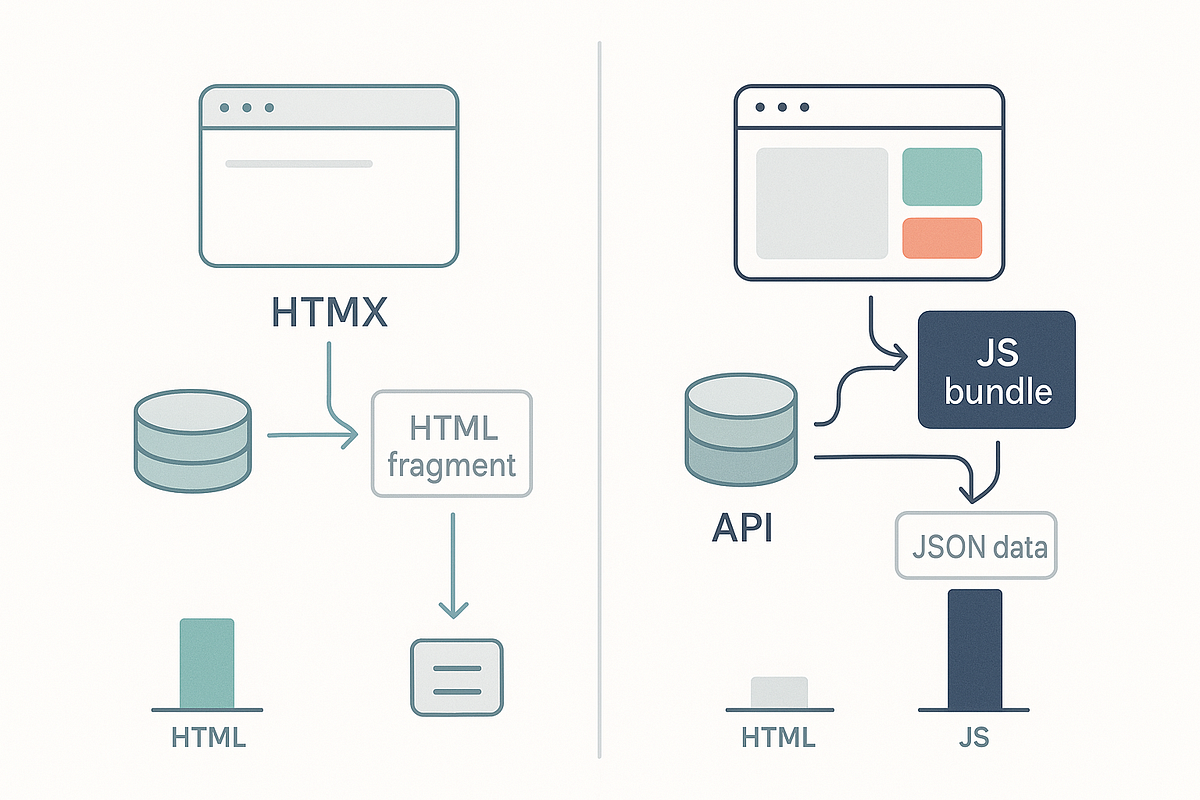
The key takeaway is that HTMX completely sidesteps client-side rendering. There is no VDOM, no diffing, and, crucially, no hydration. The HTML that arrives is the final product.
A Head-to-Head Comparison
The difference between these two models has profound implications for performance, complexity, and developer experience. Let's break down the comparison point by point.
This infographic provides a fantastic high-level overview of the technical differences.

Let's dive into the most critical points from this comparison.
1. Payload: JavaScript vs. HTML
In a React application, an interaction that fetches data results in a small JSON payload. However, the initial page load requires a large JavaScript bundle containing React, other libraries, and all your component code.
In an HTMX application, every interaction fetches a larger HTML payload compared to JSON. But the initial JavaScript payload is minuscule—just the 14KB HTMX library. Once loaded, it never grows, regardless of your application's size.
Jack Herrington demonstrates this with a practical example in the following video.
HTMX For React Developers in 10 Minutes
In this clip, you'll see a side-by-side comparison of the network payloads for equivalent React and HTMX applications.
Watch from 07:38 to 08:39. Pay attention to the "over the wire" data format (JSON vs. HTML) and, more importantly, the total JavaScript weight for the initial page load (145KB for React vs. a fixed 49KB for HTMX in his unminified example).
This trade-off is central to the HTMX value proposition: accept slightly larger per-request payloads in exchange for a dramatically smaller, fixed initial JavaScript bundle.
2. Client-Side Processing and Time to Interactive (TTI)
This is where HTMX has a decisive advantage, especially for the content-rich CRUD applications you're targeting.
- React: Suffers from the "hydration" problem. Even with SSR, the page is not truly interactive until the large JS bundle is downloaded, parsed, and executed to attach event listeners. This can lead to a noticeable delay, particularly on slower devices or networks.
- HTMX: Has no hydration phase. The HTML delivered by the server is fully functional from the moment it is parsed. TTI is near-instantaneous.
The following article offers a detailed explanation of this performance difference.
htmx vs React: When Hypermedia Beats JavaScript Frameworks
This article provides concrete metrics comparing the performance of HTMX and React.
Read the section titled Performance. Focus on the paragraphs explaining why HTMX's architecture leads to a near-instant Time-to-Interactive, directly contrasting it with React's hydration phase. The Lighthouse score comparison (94 vs. 34) is particularly telling.
3. Complexity and Developer Workflow
The two models also engender entirely different development workflows.
With React, you operate within a complex client-side runtime. You manage state, side effects, and rendering lifecycles. Debugging often involves tracing state changes through React DevTools and understanding component re-renders.
With HTMX, the mental model shifts back to the server. State is managed on the server. The workflow revolves around crafting server-side templates. Debugging a UI issue often simplifies to inspecting the HTML fragment returned by a network request.
HTMX vs React: Why 14KB Beats 200KB+ JavaScript Bundles
This resource from Strapi's blog does an excellent job of describing the philosophical and practical shifts in workflow when moving from a SPA framework to HTMX.
Read the section on Workflow Changes. The author's point that "You debug by inspecting returned HTML, not tracing component lifecycles" succinctly captures the change in mindset.
Conclusion
We've established a clear contrast between React's VDOM and HTMX's swapping model.
- React optimizes for complex, stateful client-side interactions. It uses a Virtual DOM and reconciliation to efficiently manage DOM updates triggered by state changes. The cost is a significant JavaScript payload, client-side complexity, and a performance hit from hydration.
- HTMX optimizes for simplicity and fast initial loads. It uses an HTML-over-the-wire model where the server sends pre-rendered fragments that are directly swapped into the DOM. This eliminates the VDOM, client-side rendering, and hydration, at the cost of more server rendering and slightly larger network payloads per interaction.
For the CRUD-style applications you're planning to migrate, the trade-offs offered by HTMX—eliminating the entire client-side rendering toolchain in exchange for a simpler, server-centric request/response model—are often extremely compelling.
In our next lesson, we will build on this understanding. We'll move from the "how" to the "what" by identifying which categories of UI features in a typical React application map cleanly to HTMX patterns and which might still require supplementary client-side scripting. This will be our first step toward building a practical migration playbook.
Can't find a good explanation? Sign up and we'll make it for you
Sign up