
Welcome. This first module builds the mathematical vocabulary behind nearly every ML model: vectors represent features or activations; matrices represent datasets, weight layers, and linear transformations; tensor operations carry computations across batches.
In this lesson, you will compute the essential vector and matrix operations and, just as importantly, track their shapes. For ML interviews and production debugging alike, most linear-algebra errors reduce to one question: what is the shape of every input and output?
Shapes are the contract
A scalar is one number, such as a learning rate . A vector is an ordered list of numbers, such as one example’s features:
A matrix is a rectangular array. If , it has rows and columns. Its entry in row , column is .
In an ML setting, rows commonly represent examples and columns represent features:
Here, is the batch size and is the number of input features. For example, means a batch of 32 examples, each represented by 128 features.
2.3. Linear Algebra — Dive into Deep Learning 0.17.6 documentation
Read the opening of Linear Algebra from Dive into Deep Learning. It establishes the notation for scalars, vectors, matrices, and tensors, while connecting matrix rows and columns to ML data.
In Sections 2.3.1 through 2.3.4, read the foundational progression from scalars through tensors. Pay particular attention to the distinction between a vector's length and a tensor's number of axes, the shape notation m \times n, and the convention that tabular ML datasets usually put examples in rows.
Mathematical orientation versus PyTorch shapes
Mathematically, vectors are often treated as column vectors. In PyTorch, a one-dimensional tensor has shape (d,); it is neither explicitly a row nor a column. The operation determines its role.
That distinction matters when reading equations:
| ML object | Mathematical shape | Typical PyTorch shape | Meaning |
|---|---|---|---|
| One input example | (d,) | features | |
| Batch of inputs | (B, d) | examples | |
| Layer weights | (d, h) | maps inputs to hidden units | |
| Bias | (h,) | one offset per hidden unit | |
| Layer output | (B, h) | hidden activations for a batch |
A useful habit is to read each shape aloud:
means “ rows of examples, each with features.”
Elementwise operations and reductions
Some operations act independently on each corresponding entry. They do not mix information across positions.
For same-shaped vectors :
For a scalar :
For same-shaped matrices , addition is also elementwise:
The Hadamard product, written , is elementwise multiplication:
This is not ordinary matrix multiplication. In PyTorch, A * B denotes elementwise multiplication.
For example,
Elementwise operations preserve the shape: two matrices yield an matrix.
A reduction combines values along an axis. Given a batch matrix :
- Summing with
dim=0collapses the batch axis, yielding one total per feature: shape(d,). - Summing with
dim=1collapses the feature axis, yielding one total per example: shape(B,). - Summing all entries yields one scalar.
This is fundamental in training code. For example, a loss may be computed per example, then reduced with a mean over the batch to obtain one scalar for backpropagation.
2.3. Linear Algebra — Dive into Deep Learning 0.17.6 documentation
Continue with Dive into Deep Learning for the tensor operations that directly correspond to common PyTorch expressions.
In Section 2.3.5, read the discussion of elementwise arithmetic, then follow the Hadamard-product example and scalar operations. In Section 2.3.6, read the reduction section. Focus on how reducing axis 0 versus axis 1 changes both the meaning and the output shape.
Broadcasted bias: a controlled exception
In a neural-network layer, you will often see:
Suppose has shape and has shape . Strictly speaking, these shapes differ. PyTorch applies broadcasting: it treats as if it were copied across all rows.
Conceptually:
Broadcasting is convenient, but it should never replace a shape check. Know which dimensions are being aligned and which are being repeated.
Dot products: turning two vectors into one number
The dot product takes two equal-length vectors and returns a scalar:
For example:
The key shape rule is:
In ML, a dot product is a weighted sum. A linear model with input , weights , and bias computes:
The input contributes one value per feature; the model weights determine how strongly each feature contributes to the score.
The dot product has geometric meaning as well, but for now treat it operationally: multiply matching entries, then sum. In the next lesson, you will interpret it through lengths, angles, similarity, and projection.
Do not confuse three products
These are frequent interview and implementation traps:
| Operation | Inputs | Output | Meaning |
|---|---|---|---|
| Dot product | two length- vectors | scalar | multiply matching entries, then sum |
| Outer product | length-, length- vectors | matrix | every entry |
| Hadamard product | same-shaped matrices | same-shaped matrix | multiply matching entries |
| Matrix product | , matrices | matrix | row-column dot products |
For instance, if
then the outer product is:
Its shape is . Unlike the dot product, the input vectors do not need the same length.
Matrix-vector and matrix-matrix multiplication
A matrix-vector product applies one linear transformation to one input vector:
If , then must have entries:
Each output entry is the dot product of one row of with .
Let
Then:
The input has three values, matching the three columns of . The output has two values, matching the two rows of .
Linear transformations and matrices | Chapter 3, Essence of linear algebra
Watch “Linear transformations and matrices” from 3Blue1Brown. It gives the most useful intuition for matrix-vector multiplication: a matrix stores where the basis vectors land, and multiplying by a vector combines those transformed basis vectors.
Watch basis-vector reasoning to see why knowing the transformed basis vectors determines the transformation of every vector. Then watch the matrix encoding, focusing on the fact that matrix columns represent transformed basis vectors and that multiplication forms the appropriate linear combination.
This column-based view is worth retaining:
where is column of . Thus, matrix-vector multiplication can be read in two complementary ways:
- Row view: each output value is a row-vector dot product.
- Column view: the output is a weighted combination of the matrix columns.
The row view is typically fastest for hand calculation. The column view is often better for understanding a matrix as a transformation.
Matrix-matrix multiplication
For:
the product is:
The inner dimensions must match: columns of , rows of . The output keeps the outer dimensions: rows and columns.
Each entry is a row-column dot product:
Let:
The shapes are:
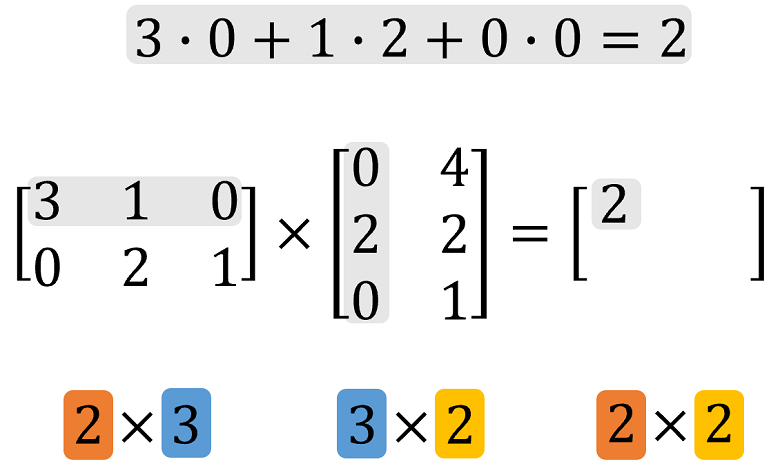
Computing all four entries:
Matrix multiplication is generally not commutative:
In this example, has shape , while would have shape . They cannot be equal even before computing their entries.
2.3. Linear Algebra — Dive into Deep Learning 0.17.6 documentation
Return to Dive into Deep Learning for a concise formal treatment of the operations just computed by hand, including their PyTorch forms.
In Section 2.3.7, read the dot-product discussion; focus on its weighted-sum interpretation. In Section 2.3.8, read matrix-vector products and connect each output component to a row dot product. Finally, read Section 2.3.9 from “If you have gotten the hang of dot products and matrix-vector products” through the matrix-multiplication example. Verify the inner-dimension rule against every displayed shape.
The batch computation behind a dense layer
A dense neural-network layer applies the same transformation to every example in a batch:
with:
The matrix product is:
So the layer maps a batch of examples with input features into output features per example.
The following PyTorch code makes each operation explicit:
import torch

# Two examples, each with three input features
X = torch.tensor([
    [2.0, 1.0, -1.0],
    [0.0, 3.0,  2.0],
])                           # shape: (2, 3)

# One linear model's weights
w = torch.tensor([0.5, -1.0, 2.0])  # shape: (3,)

# One score per example: two row-vector dot products
scores = X @ w                       # shape: (2,)
# tensor([-2., 1.])

# A layer with four output features
W = torch.randn(3, 4)                # shape: (3, 4)
b = torch.zeros(4)                   # shape: (4,)

H = X @ W + b                        # shape: (2, 4)

assert X.shape[1] == W.shape[0]      # inner dimensions match
assert H.shape == (2, 4)

feature_totals = X.sum(dim=0)        # shape: (3,)
example_totals = X.sum(dim=1)        # shape: (2,)
Three operational rules are especially worth memorizing:
X * Wmeans elementwise multiplication and requires compatible elementwise shapes.X @ Wmeans matrix multiplication and requires matching inner dimensions.X.sum(dim=0)andX.sum(dim=1)mean different things because they reduce different axes.
When debugging a model, write the expected shape beside each intermediate tensor before changing code. This catches incorrect transposes, accidental reductions, and wrong weight layouts faster than inspecting numerical values.
The central ideas are now in place:
- Shapes describe the valid inputs and outputs of every operation.
- Elementwise operations preserve structure; reductions collapse chosen axes.
- Dot products produce weighted sums.
- Matrix-vector multiplication applies a transformation to one vector.
- Matrix-matrix multiplication composes transformations or processes many vectors at once.
- A dense layer is the compact expression , with shape flow .
Next, you will go beyond calculation and interpret dot products geometrically through vector length, angle, cosine similarity, and projection—concepts that reappear in embeddings, retrieval, attention, and optimization.
Can't find a good explanation? Sign up and we'll make it for you
Sign up