
Hello, and welcome to the first lesson in your Java foundations module. Over the next few lessons, you will move from Java’s execution model into writing, organizing, and debugging small Java programs—the foundation needed before Spring Boot can feel like more than framework magic.
This lesson resolves three acronyms you will encounter constantly in Java documentation and job discussions: JVM, JRE, and JDK. By the end, you should be able to explain what each one does, identify which one you need for a task, and describe what happens between writing a .java file and running an application.
The three layers: execution engine, runtime, development kit
The names are similar because the technologies are nested conceptually:
- The JVM executes Java bytecode.
- The JRE provides a complete environment for running Java applications, including the JVM and standard libraries.
- The JDK provides what you need to develop Java applications, including the runtime plus tools such as the compiler and debugger.
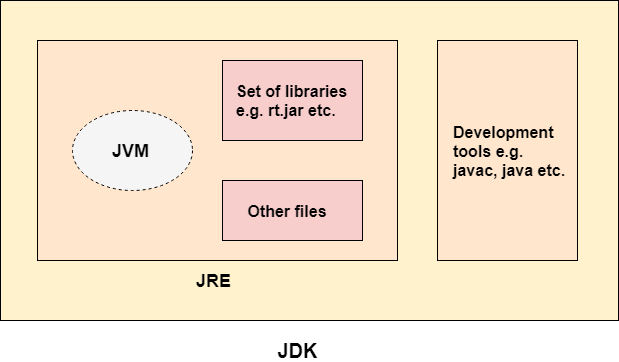
A compact way to remember the distinction is:
| Term | Full name | Primary job | Typical contents |
|---|---|---|---|
| JVM | Java Virtual Machine | Execute compiled Java bytecode | Class loading, bytecode execution, memory management, garbage collection |
| JRE | Java Runtime Environment | Run an existing Java application | JVM, Java standard library, runtime support |
| JDK | Java Development Kit | Build, test, debug, and run Java applications | JRE-like runtime capabilities plus javac, debugging, packaging, and diagnostic tools |
For your backend path, the practical answer is simple: install a JDK. An IDE such as IntelliJ IDEA uses its compiler and runtime tools, Maven will use it to build projects, and Spring Boot applications require it during development.
From Java source code to a running program
When you write Java, you create human-readable source code in files ending in .java.
public class HelloBackend {
    public static void main(String[] args) {
        System.out.println("Hello, backend!");
    }
}
The computer does not execute that source file directly. Java uses a two-stage model:
- The Java compiler,
javac, readsHelloBackend.java. - It checks the code for syntax and type errors, then produces
HelloBackend.class. - The
.classfile contains bytecode, an intermediate instruction format defined for the JVM. - The
javalauncher starts a JVM. - The JVM loads the bytecode, verifies it for safety, and executes it on the current machine.
The key boundary is this:
javacis a development tool supplied by the JDK.- The JVM runs the resulting
.classbytecode. - The JRE supplies the JVM and the Java libraries the program relies on while running.
This is why a machine that only needs to run a prebuilt application does not conceptually need compiler tooling. But the developer creating that application does.
Here is a precise comparison to a model you may have encountered in C# and Unity:
| Java ecosystem | Rough C#/.NET parallel | Important distinction |
|---|---|---|
Java bytecode in .class files | Intermediate Language, or IL | Both are intermediate representations rather than direct CPU instructions |
| JVM | CLR, Common Language Runtime | Both execute managed code and handle services such as memory management |
| JDK | .NET SDK | Both include build and development tooling |
| JRE | Runtime installation | A runtime environment aimed at executing already-built applications |
The analogy is useful, but do not assume all deployment and tooling details match exactly. In particular, Unity may use different runtime and compilation strategies depending on its target platform.
The JVM: the machine that runs bytecode
The Java Virtual Machine is not a physical computer. It is an abstract machine specification, with concrete implementations for Windows, macOS, Linux, and other platforms.
Its core responsibility is to load and execute compiled Java classes. In practice, a JVM also handles several essential runtime concerns:
- Class loading: Finding and loading your application classes and library classes when they are needed.
- Bytecode verification: Checking bytecode before execution to enforce important safety rules.
- Memory management: Allocating memory for objects.
- Garbage collection: Reclaiming memory for objects that are no longer reachable.
- Execution optimization: Interpreting bytecode and, for frequently used code, compiling it into efficient native machine instructions at runtime.
You do not need to master those internals yet. The useful working model is:
The JVM makes compiled Java bytecode executable on a particular operating system and hardware platform.
Java source code and Java bytecode are designed to be portable. The JVM implementation is platform-specific. A JVM on Windows ultimately produces instructions appropriate for Windows and its hardware; a JVM on Linux does the equivalent job for Linux.
That is the basis of Java’s famous portability claim: you can distribute the same Java bytecode to different platforms provided that each platform has a compatible runtime. It does not mean every application is magically portable in every circumstance—native libraries, filesystem assumptions, environment variables, and external services can still make an application platform-dependent.
JVM, JRE, and JDK - Fully Explained in 5 Minutes
Watch “JVM, JRE, and JDK - Fully Explained in 5 Minutes” by Coding with John for a concise visual walkthrough of the nested relationship and the journey from source code to bytecode execution.
Watch from the JRE overview to see why standard-library classes are part of a runtime, then continue through the JVM role for bytecode loading, execution, and runtime services. Finish with the JDK explanation, focusing on why javac belongs to the development kit rather than the runtime.
The JRE: everything needed to run an application
The Java Runtime Environment is the execution environment for a Java application. At a conceptual level:
The JVM alone can execute bytecode, but most useful applications depend heavily on Java’s built-in APIs. Even our tiny example uses several library types:
Systemis a standard Java class.Stringis a standard Java class.System.out.println(...)uses output facilities provided by Java’s libraries.
Later, a Spring Boot application will use standard APIs for collections, dates and times, files, networking, concurrency, database access, and much more. These are not copied into every .class file you compile; they are made available by the runtime.
A useful distinction:
- Your code is what your team writes.
- Libraries are reusable code supplied by the Java platform or external dependencies.
- The JVM executes your compiled code and the compiled library code.
- The runtime environment makes those pieces available together.
A modern Java terminology note
Many tutorials, including older official documentation, describe the JRE as a separate install that users download solely to run Java programs. That model remains conceptually accurate, and it is still useful for understanding the roles.
However, in modern Java distributions, particularly from Java 11 onward, a separate, general-purpose standalone JRE download is less common. Developers normally install a JDK, and production systems often use either:
- a JDK to run the application, or
- a smaller custom runtime image containing only the runtime modules required by the application.
So in a modern backend job, treat JRE primarily as a role: the runtime capabilities required to execute Java software. Do not be surprised if you see only JDK downloads on a vendor’s website.
Read Oracle’s “Java SE 8 Platform Overview” for the official conceptual definitions of the JRE, JDK, and JVM. Although it refers to Java 8, the core role distinctions remain useful.
In the “JRE and JDK” section, read the JRE definition, then continue through the JDK paragraph ending with the JDK definition. Next, in “Java Virtual Machines,” read the JVM explanation. Focus on the distinction between portable bytecode and JVM implementations that are adapted to different operating systems.
The JDK: the toolkit a backend developer installs
The Java Development Kit is the complete developer-facing package. Conceptually:
Its best-known tools include:
| Tool | Purpose |
|---|---|
javac | Compiles .java source files into .class bytecode files |
java | Launches a Java application by starting a JVM |
javadoc | Generates API documentation from source-code comments |
jar | Packages compiled classes and resources into Java archive files |
| Debugging and diagnostic tools | Help investigate behavior, performance, threads, and memory |
Your IDE hides much of this. When you press Run, IntelliJ commonly compiles the project, chooses the right classpath, launches the JVM, and shows your application’s output. Those steps still happen; the IDE simply orchestrates them for you.
In backend work, higher-level tools build on the JDK rather than replacing it:
- Maven will compile, test, and package your code using the JDK.
- Spring Boot will run as a Java process inside a JVM.
- Docker images for Java services include a Java runtime, even if the image does not contain all development tools.
- A
.jarfile may package your application classes and dependencies, but it still needs a compatible Java runtime to execute.
This gives you a practical installation rule:
Writing, compiling, debugging, testing, or building Java: use a JDK.
Only executing a prebuilt Java application: use a runtime environment.
For the rest of this course, assume you are working with a current long-term-support JDK rather than a separate JRE installation.
A diagnostic checklist
When the terms blur together, ask what action is failing:
| Situation | Likely missing or relevant component |
|---|---|
javac is “not recognized” or unavailable | A JDK is absent or not configured on your system path |
An application has compiled .class files but will not start | The Java runtime or launch configuration may be missing or incompatible |
| Code compiles on one machine and runs on several operating systems | The shared artifact is bytecode; each system uses its own JVM implementation |
A Java program cannot find List, String, or date/time classes | The runtime libraries or project configuration are incorrect |
| An IDE asks you to select a “Project SDK” | It is asking which installed JDK should compile and run the project |
Avoid saying “the JDK runs the code” when precision matters. A JDK contains the ability to run code, but the component performing execution is the JVM, supported by the broader runtime environment.
Key takeaways
- A Java source file, such as
OrderService.java, is compiled byjavacinto JVM bytecode, usually stored in a.classfile. - The JVM loads and executes that bytecode. It also provides important runtime services such as class loading and garbage collection.
- The JRE is the environment for running Java applications: JVM plus standard libraries and runtime support.
- The JDK is the development kit: runtime capabilities plus tools for compiling, debugging, testing, and packaging.
- Java bytecode is portable, while the JVM that executes it is implemented for a particular platform.
- For Java and Spring Boot development, install and configure a modern JDK.
Next, you will make this model concrete by compiling and running a small Java application from both an IDE and the command line.
Can't find a good explanation? Sign up and we'll make it for you
Sign up