
Welcome back! In our last lesson, we explored multi-source BFS, a powerful technique for high-level graph traversals. As promised, today we are switching gears dramatically, moving from abstract graph structures to the very foundation of how numbers are represented in memory.
This lesson delves into the world of bitwise operators. While not as frequently used in day-to-day front-end development, they are a vital tool in the context of algorithms and systems programming. They allow for highly efficient, low-level manipulation of data, which can be the key to unlocking optimal solutions for certain interview problems. You'll learn how these operators behave on numbers in JavaScript and, most importantly, how to use them to perform the four fundamental bit manipulation tasks: setting, clearing, toggling, and checking individual bits.
The Foundation: Numbers as Bits
At the lowest level, computers store all data as sequences of bits—zeros and ones. Bitwise operators work directly on this binary representation. In JavaScript, a crucial detail is that whenever you use a bitwise operator, the JavaScript engine temporarily converts the number operand(s) into 32-bit signed integers using a format called two's complement. This can lead to some surprising results if you're not aware of it, especially with the bitwise NOT operator.
For a quick primer on how numbers are represented in binary and how the basic bitwise OR and AND operators function, the following video provides a clear and concise explanation.
This video by Programming with Mosh will set the stage for our discussion.
Watch the segment from the beginning up to the point where the bitwise and is explained, which covers the binary representation of numbers and the core idea behind the OR and AND operators. Pay attention to how the operators compare the bits at each position. You can stop at the end of the basic explanation.
The Operators: A Visual Guide
The primary bitwise operators are AND (&), OR (|), XOR (^), NOT (~), Left Shift (<<), and Right Shift (>>). Each performs a unique operation on the bits of a number.
The image below provides a fantastic visual analogy using lightbulbs for the logical operators, which can make their behavior more intuitive.
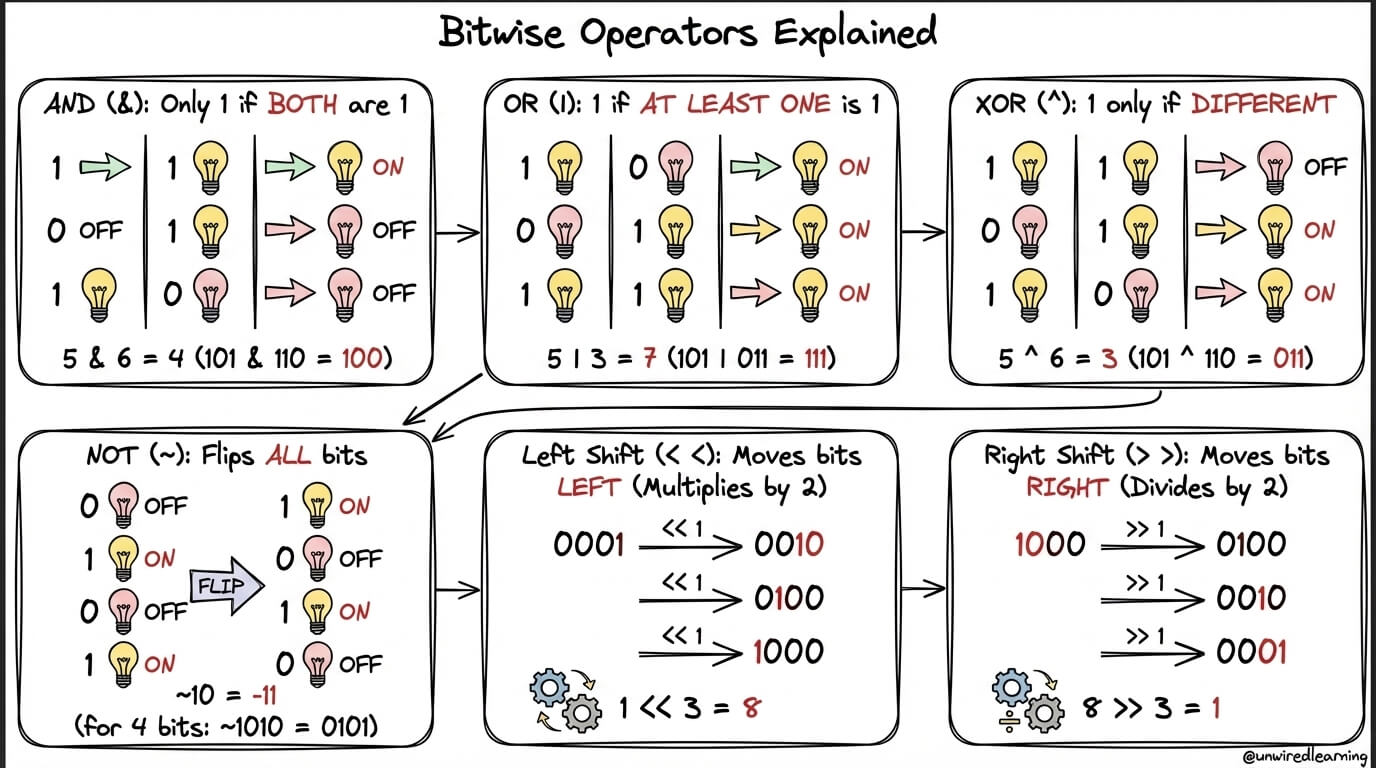
Let's briefly review them:
- AND (
&): The result bit is 1 only if both input bits are 1. - OR (
|): The result bit is 1 if at least one of the input bits is 1. - XOR (
^): The result bit is 1 only if the input bits are different. - NOT (
~): This is a unary operator; it flips every bit of its operand (0 becomes 1, and 1 becomes 0). - Left Shift (
<<): Shifts all bits to the left by a specified number of positions, filling the empty spots on the right with zeros. Shifting left bykpositions is equivalent to multiplying by . - Right Shift (
>>): Shifts all bits to the right. In JavaScript, this is a sign-propagating shift, meaning the empty spots on the left are filled with the original sign bit. Shifting right bykpositions is approximately equivalent to dividing by and flooring the result.
For a more detailed breakdown of each operator, including the JavaScript-specific behavior of the 32-bit signed integer representation, the following guide is an excellent resource.
A guide to JavaScript bitwise operators - LogRocket Blog
This LogRocket article provides a thorough explanation of all the JavaScript bitwise operators and their nuances.
Please read the sections on the Bitwise NOT (~) operator, the left shift (<<) operator, the sign-propagating right shift (>>) operator, and the zero-fill right shift (>>>) operator. Start with the section titled The JavaScript Bitwise NOT. Pay close attention to the explanation of the 32-bit signed integer format and the ~A = -(A + 1) formula. Continue to the section on the left shift (<<) operator. Note its relationship to multiplication by powers of 2. Finally, read through the sections on the sign-propagating right shift (>>) and the zero-fill right shift (>>>). Understanding the difference between these two is key to avoiding bugs with negative numbers.
The Core Techniques: Bit Masking
Now we get to the heart of today's learning outcome: using these operators to manipulate individual bits within a number. This process is called bit masking. The general idea is to construct a special number, the "mask," which has bits set in a specific way to achieve a desired effect when combined with our target number using a bitwise operator.
The four fundamental operations are Check, Set, Clear, and Toggle.
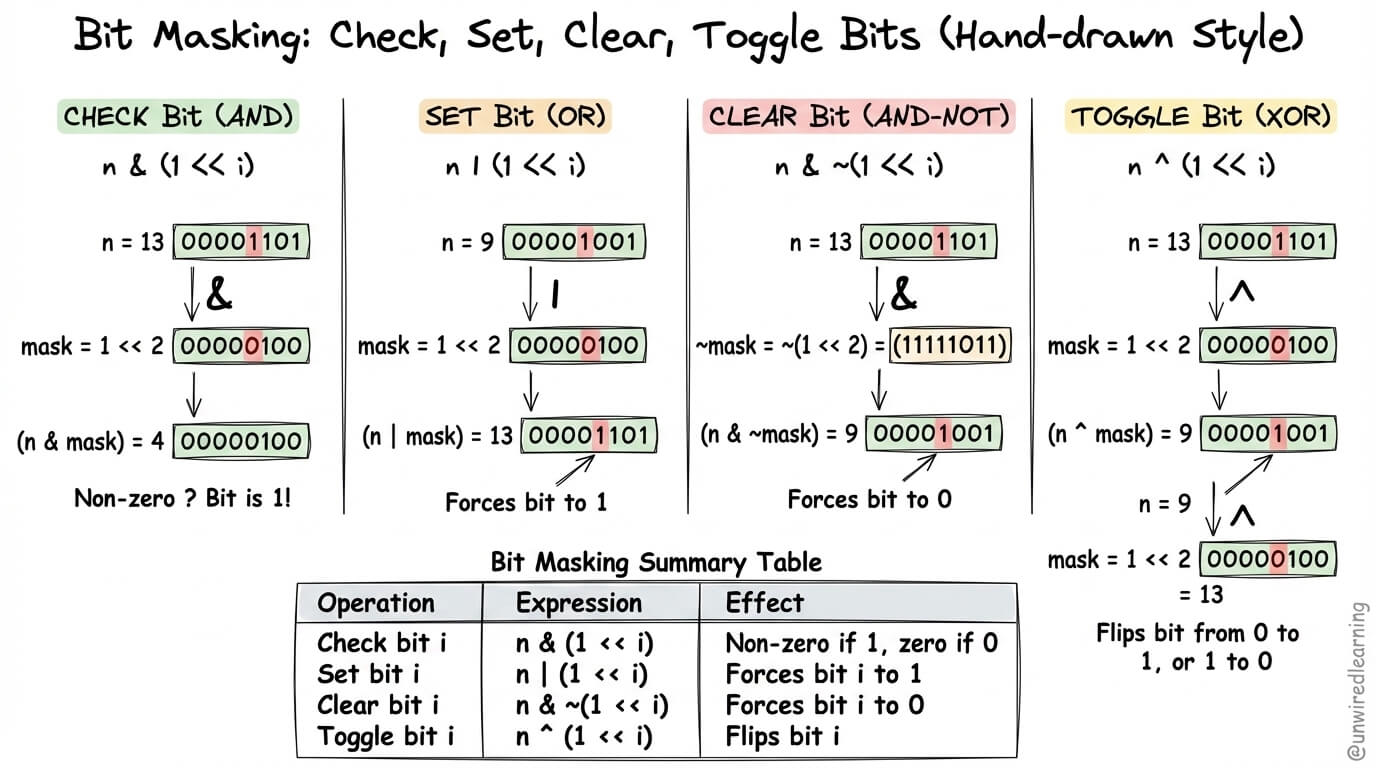
Let's break down each operation, assuming we want to manipulate the i-th bit (from the right, 0-indexed) of a number n.
1. Check if a Bit is Set
To check if the i-th bit is set, we use the AND operator. The expression is (n & (1 << i)) !== 0.
- Mask:
1 << icreates a number where only thei-th bit is 1 (e.g.,1 << 2is...00100). - Operation: When we AND this mask with
n, all bits other than thei-th bit will become 0. Thei-th bit of the result will be 1 if and only if thei-th bit ofnwas also 1. - Result: A non-zero result means the bit was set; a zero result means it was not.
Introduction to Bitwise Algorithms - GeeksforGeeks
The "Practice Problems" section in this GeeksforGeeks article provides concise, actionable code for these techniques.
Find practice problem #4, titled Checking if the bit, and review the JavaScript code provided. It shows exactly this pattern.
2. Set a Bit
To force the i-th bit to 1 (set it), we use the OR operator. The expression is n = n | (1 << i).
- Mask:
1 << i. - Operation: ORing with this mask forces the
i-th bit to become 1 (x | 1is always 1). All other bits innremain unchanged because they are OR'd with 0 (x | 0is alwaysx).
Introduction to Bitwise Algorithms - GeeksforGeeks
Now, let's look at how to set a bit.
Refer back to the GeeksforGeeks article and find practice problem #1, Set a bit in the number. Examine the JavaScript implementation.
3. Clear a Bit
To force the i-th bit to 0 (clear it), we use the AND and NOT operators. The expression is n = n & ~(1 << i).
- Mask: This is a two-step process. First, we create
1 << i. Then, we use the NOT operator~to flip all the bits. This results in a number that is all 1s, except for a 0 at thei-th position. - Operation: When we AND this inverted mask with
n, the 0 at thei-th position forces the corresponding bit innto become 0 (x & 0is always 0). All other bits innremain unchanged because they are AND'd with 1 (x & 1is alwaysx).
Introduction to Bitwise Algorithms - GeeksforGeeks
Clearing a bit is slightly more complex but follows the same principles.
Look at practice problem #2 in the same article, unset/clear a bit. The combination of ~ and & is the key pattern here.
4. Toggle a Bit
To flip the i-th bit (0 to 1, or 1 to 0), we use the XOR operator. The expression is n = n ^ (1 << i).
- Mask:
1 << i. - Operation: XORing with this mask flips the
i-th bit, because1 ^ 1 = 0and0 ^ 1 = 1. All other bits are unchanged, becausex ^ 0 = x.
Introduction to Bitwise Algorithms - GeeksforGeeks
Finally, let's see how to toggle a bit.
Review practice problem #3, Toggling a bit, to see the XOR operator in action.
A Practical Application: Configuration Flags
A classic use case that ties these concepts together is managing a set of boolean options, or flags. Instead of passing a large object of booleans to a function, you can represent multiple on/off states within a single integer.
The video you watched earlier touched on this with user permissions. Let's watch that part now to see how bitwise OR (|) is used to grant permissions and bitwise AND (&) is used to check them.
Let's revisit the Programming with Mosh video to see a real-world example.
Watch the segment on implementing an access control system, from this point to the end. Observe how he defines readPermission, writePermission, and executePermission and then combines and checks them using bitwise operators.
This pattern is extremely common in low-level APIs and is a great way to understand the power of bit masking. It directly leads into the topic of our next lesson, where we will treat an integer not as a value, but as a set of up to 32 boolean flags.
Conclusion
In this lesson, we've taken a deep dive into the world of bitwise operators. While they might seem obscure at first, they offer a level of control and efficiency that is indispensable for certain types of algorithmic problems.
Here are the key takeaways:
- JavaScript's 32-Bit Rule: Bitwise operations in JavaScript temporarily convert numbers to 32-bit signed integers.
- The Core Operators:
&(AND),|(OR),^(XOR),~(NOT),<<(Left Shift), and>>(Right Shift) are your fundamental tools. - Bit Masking Patterns: You can reliably manipulate individual bits using a combination of a shift and a logical operator.
- Check bit
i:(n & (1 << i)) !== 0 - Set bit
i:n | (1 << i) - Clear bit
i:n & ~(1 << i) - Toggle bit
i:n ^ (1 << i)
- Check bit
- Practical Use: These techniques are foundational for managing sets of flags or states compactly within a single integer.
In our next lesson, we will build directly on this foundation. We will learn how to formally represent a small set of Boolean choices as a bitmask and enumerate its subsets. This will enable you to solve a class of problems related to combinations and state spaces with remarkable elegance and efficiency.
Can't find a good explanation? Sign up and we'll make it for you
Sign up