Introduction
In the last module, we built and refined a high-performance, single-GPU inference engine, culminating in a sophisticated scheduler that uses policies like preemption to optimize user-perceived latency. You've now pushed the boundaries of what a single GPU can achieve. However, this raises a critical question: how do we serve models like Llama-3 70B or Mixtral 8x22B that are far too large to fit into a single device's VRAM?
The answer is to scale out. We must transition from optimizing a single node to orchestrating a distributed system of multiple GPUs. This lesson is the first and most fundamental step in that journey. Your goal is to set up a PyTorch distributed process group using the NCCL backend for multi-GPU communication. This process group is the communication channel that will allow our GPUs to work together on a single problem, forming the backbone of all distributed inference techniques we'll explore.
1. The Language of Distributed Systems in PyTorch
Before writing any code, we need to establish a clear vocabulary for distributed computing. While the concepts may be familiar from your computer science background, PyTorch uses specific terminology.
- Process: An independent execution of our Python script. In a typical multi-GPU setup, we launch one process for each GPU we intend to use.
- Process Group: A collection of processes that can communicate with each other. A job can have multiple groups for different tasks, but we'll start with a single, all-encompassing group.
- World Size: The total number of processes in a process group.
- Rank: A unique integer ID assigned to each process within the group, ranging from 0 to
world_size - 1. The process with rank 0 is often called the master or root process and sometimes has special responsibilities. - Local Rank: The rank of a process relative to its host machine. If a machine has 4 GPUs, the processes running on it will have local ranks 0, 1, 2, and 3.
- Backend: The communication library that performs the low-level data exchange. For distributed operations on NVIDIA GPUs, the NVIDIA Collective Communications Library (NCCL) is the standard choice due to its high performance and optimization for GPU interconnects.
To solidify these concepts, the following article provides a concise and clear explanation.
Multi node PyTorch Distributed Training Guide
The article 'Multi node PyTorch Distributed Training Guide' from Lambda gives an excellent overview of the key environment variables that PyTorch uses to manage distributed processes.
Read the section 'Distributed PyTorch Under the Hood', specifically the part that introduces WORLD_SIZE, WORLD_RANK, and LOCAL_RANK. This will clarify how processes are identified globally and locally.
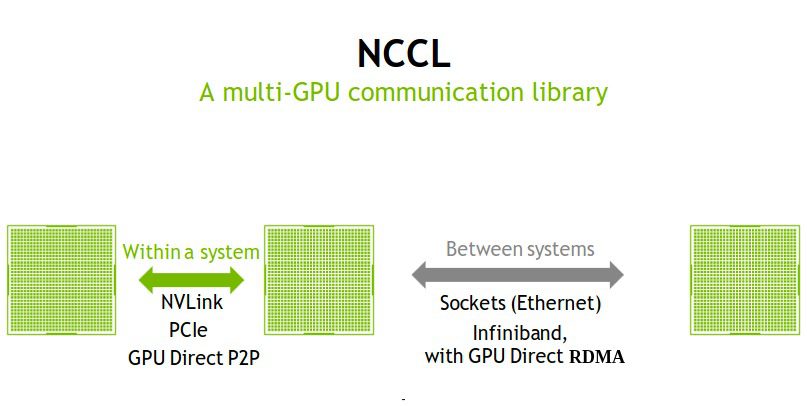
The NCCL backend abstracts away the underlying hardware communication paths, whether it's ultra-fast NVLink for GPUs on the same motherboard or Ethernet/Infiniband for GPUs in different server chassis.
2. Initializing the Process Group
The entry point into the torch.distributed world is the init_process_group function. This function is a collective call, meaning every process in the group must call it to establish a connection.
torch.distributed.init_process_group(backend, init_method=None, ...)
backend='nccl': We explicitly tell PyTorch to use NCCL.init_method: This specifies how the processes should find each other to perform the initial handshake. The most common method relies on a set of environment variables:MASTER_ADDR: The IP address of the machine hosting the rank 0 process.MASTER_PORT: An open network port on the rank 0 machine for coordination.WORLD_SIZE: The total number of processes.RANK: The global rank of the current process.
Manually setting these for every process would be tedious and error-prone. Fortunately, PyTorch provides a launcher utility, torchrun, that automatically manages this for us. When you use torchrun, it launches the specified number of processes and injects the correct environment variables into each one before your script starts.
3. Collective Communication: A Symphony of GPUs
Once the process group is initialized, the GPUs can communicate. Communication typically happens through collective operations, where all processes in the group participate in a synchronized data exchange.
A few fundamental collectives are:
- Broadcast: One process sends the same data to all other processes.
- All-Gather: Each process contributes its own data, and all processes receive the concatenated data from everyone.
- Reduce-Scatter: Each process contributes data, a reduction (e.g., sum) is performed, and each process receives a unique chunk of the result.
- All-Reduce: This is a combination of a reduction and a broadcast. Each process contributes data, a reduction is performed on all the data, and the final result is distributed back to all processes. This is crucial for synchronizing gradients in data-parallel training and for aggregating partial results in tensor parallelism.
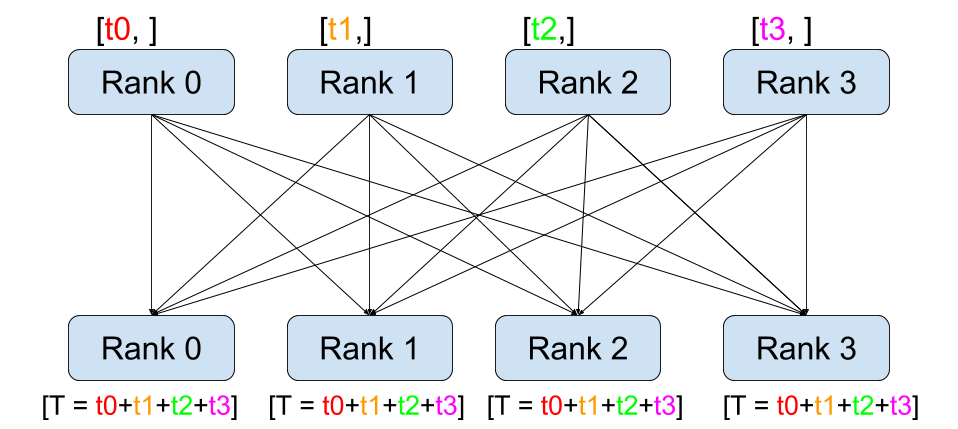
For a more detailed look at these primitives and the clever algorithms NCCL uses to implement them (like the ring algorithm for All-Reduce), the following video provides excellent visualizations.
The 'Lecture 17: NCCL' video from GPU MODE explains the most important collective operations with clear diagrams and connects them to their use in deep learning.
Watch the segment from 00:38 to 04:27 to understand the key collective operations (all-gather, broadcast, all-reduce). For a deeper dive into how an efficient all_reduce is implemented, you can optionally watch the explanation of the ring algorithm from 37:06 to 44:10.
4. Hands-On: Your First Distributed Script
Now, let's put theory into practice. You will write a simple Python script to initialize a process group and use the all_reduce collective to verify that the communication is working correctly.
The following resource provides a minimal, self-contained example that does exactly this.
A Practical Journey into Distributed Training with PyTorch and Ray
The blog post 'A Practical Journey into Distributed Training with PyTorch and Ray' contains a concise, runnable example for demonstrating the All-Reduce primitive.
Read the subsections 'Gradient Synchronization: The All-Reduce Primitive' and the code block for dist_all_reduce.py. This is the core logic we will implement. Pay attention to how init_process_group is called and how the tensor is created on the correct device.
Based on that example, here is the complete script. Save it as distributed_hello.py. We will assume you are running this on a machine with at least 2 GPUs.
import os
import torch
import torch.distributed as dist

def run():
    """
    Initializes the process group and performs a simple All-Reduce operation.
    """


    # 1. Get rank and world size from environment variables
    rank = dist.get_rank()
    world_size = dist.get_world_size()
    local_rank = int(os.environ['LOCAL_RANK'])


    # 2. Pin the process to a specific GPU
    # This is crucial for performance. Each process should manage one GPU.
    torch.cuda.set_device(local_rank)


    # 3. Create a tensor on this process's GPU.
    # The tensor's value is dependent on its rank, so each process has different data.
    tensor = torch.tensor([rank + 1], dtype=torch.float32).cuda()

    print(f"[Rank {rank}] Before all_reduce: {tensor.tolist()}")


    # 4. Perform the All-Reduce operation.
    # `dist.all_reduce` operates in-place, modifying the tensor.
    # The `op` specifies the reduction operation (SUM, PRODUCT, MIN, MAX, etc.).
    dist.all_reduce(tensor, op=dist.ReduceOp.SUM)


    # After this call, the tensor on every GPU should hold the sum of all initial tensors.
    # For 2 GPUs: rank 0 had [1.], rank 1 had [2.]. Sum is [3.].
    # For 4 GPUs: ranks 0-3 had [1.], [2.], [3.], [4.]. Sum is [10.].
    print(f"[Rank {rank}] After all_reduce: {tensor.tolist()}")


def main():
    """
    Main entry point. `torchrun` will launch this script on multiple processes.
    """


    # Initialize the process group. `torchrun` provides the necessary env vars.
    # The 'env://' init_method is the default and reads from these env vars.
    dist.init_process_group(backend='nccl')

    run()


    # Clean up the process group
    dist.destroy_process_group()


if __name__ == "__main__":
    main()
Running the Script
To execute this on a machine with, for example, 4 available GPUs, you would run the following command from your terminal:
torchrun --nproc_per_node=4 distributed_hello.py
torchrun: The PyTorch distributed launcher.--nproc_per_node=4: Instructstorchrunto launch 4 processes on the current machine (node). It will automatically assignLOCAL_RANKfrom 0 to 3, andRANKfrom 0 to 3.
You will see output similar to this (the order of lines is not guaranteed, as the processes run in parallel):
[Rank 2] Before all_reduce: [3.0]
[Rank 0] Before all_reduce: [1.0]
[Rank 3] Before all_reduce: [4.0]
[Rank 1] Before all_reduce: [2.0]
[Rank 2] After all_reduce: [10.0]
[Rank 1] After all_reduce: [10.0]
[Rank 3] After all_reduce: [10.0]
[Rank 0] After all_reduce: [10.0]
The key result is that after the all_reduce call, every single rank holds the same value: 10.0, which is the sum of 1+2+3+4. This confirms your process group is initialized and communication is working correctly.
Conclusion
You have successfully taken the first step into distributed model serving. You learned how to define and launch a group of communicating processes, assign each to a GPU, and use collective operations to synchronize data between them. This is the bedrock upon which all large-scale model parallelism is built.
Key Takeaways:
- A process group is a collection of communicating processes, managed by PyTorch's
torch.distributedlibrary. - The NCCL backend is the high-performance choice for communication between NVIDIA GPUs.
- The
torchrunlauncher simplifies distributed execution by automatically managing environment variables likeRANK,WORLD_SIZE, andLOCAL_RANK. dist.init_process_group(backend='nccl')is the key function to establish the communication group.- Collective operations like
all_reduceare used to perform synchronized data exchange across all processes in the group.
Preview of the Next Lesson:
Now that our GPUs can talk to each other, it's time to give them a task. We will begin implementing our first distributed inference strategy: tensor parallelism. You will learn how to shard the weight matrices of a transformer block across multiple GPUs and implement the necessary communication steps (all-reduce) to compute a single forward pass in parallel.