
Welcome back. In the last lesson, you defined acceptance criteria for a credible RNA-seq run and a defensible differential-expression analysis. Those criteria now need a stable home: a repository should make it obvious where the sample sheet lives, where parameters are changed, where the Bash and R code run, where evidence is documented, and where each run writes its outputs.
For a portfolio project, repository structure is not cosmetic. A reviewer should be able to clone the repository and quickly answer: What is the analysis? Which files can I edit? Which files are generated? Where are the tests? This lesson gives your existing Bash-based RNA-seq project a layout that supports those answers without requiring a workflow-engine migration.
Organize by provenance and responsibility
A useful repository does not sort files only by extension. A .tsv, for example, may be metadata written by you, a count matrix generated by the pipeline, or an imported annotation file. Those three files have different origins and should not automatically share a directory.
Instead, classify a file using two questions:
-
Who created it?
Was it supplied externally, written by a person on the project, or produced by a command? -
What is it allowed to do?
Is it an input that should remain unchanged, editable project logic, documentation for users, a test fixture, or a disposable/generated output?
The Turing Way frames this as a research compendium: a project that contains the components needed to understand and reproduce computational work. Its central principle is separation of data, methods, and outputs.
Research Compendia - The Turing Way
Read this short section from The Turing Way to see the reproducibility logic behind a conventional repository layout. Focus on the distinction between the project’s inputs, human-authored work, and generated artifacts rather than copying its directory names literally.
In “Structure of a Research Compendium,” read the three principles. Then, in “Basic Compendium” and “Executable Compendium,” compare the two example layouts. Finish with “Separating Methods, Data, Output,” reading the file categories. Notice that a file’s category depends on its provenance and role, not merely its format.
For your RNA-seq project, this gives several practical rules:
- Raw inputs are read-only. Do not trim, rename, or overwrite original FASTQ files in place.
- Metadata is a project input, but is human-maintained. It should be version controlled if it contains no restricted information.
- Code and configuration are different. Code describes how the analysis runs; configuration states which dataset, reference, parameters, and resources it should use.
- Generated files should never be mixed with source files. An HTML MultiQC report should not sit beside the script that runs MultiQC.
- Tests must have an identifiable home. A future reviewer should not have to guess whether
test_script.shis an unfinished analysis or a deliberate check.
A particular file format may appear in more than one category:
| File | Correct location depends on provenance |
|---|---|
sample_01.bam supplied by a collaborator | data/raw/ or an externally documented input location |
sample_01.bam created by your aligner | results/<run-id>/alignment/ |
counts.tsv downloaded from a public repository | data/raw/ or documented as an external input |
counts.tsv created by feature counting | results/<run-id>/counts/ |
samples.tsv defining condition and batch | metadata/ |
config.yaml setting threads and reference paths | config/ |
This distinction prevents a common bioinformatics failure mode: manually editing an output file and later being unable to tell whether it is still reproducible.
A practical layout for your bulk RNA-seq repository
The structure below is deliberately modest. It suits an RNA-seq project currently automated with Bash and analyzed in R, while leaving room for later testing, environment capture, and workflow improvements.
rnaseq-project/
├── README.md
├── LICENSE
├── .gitignore
│
├── config/
│   ├── config.yaml
│   └── paths.example.yaml
│
├── metadata/
│   ├── samples.tsv
│   ├── contrasts.tsv
│   └── data_dictionary.md
│
├── scripts/
│   ├── bash/
│   │   ├── run_pipeline.sh
│   │   ├── qc.sh
│   │   ├── align.sh
│   │   └── count.sh
│   └── r/
│       ├── 01_validate_counts.R
│       ├── 02_deseq2.R
│       └── 03_enrichment.R
│
├── docs/
│   ├── acceptance_criteria.md
│   ├── methods.md
│   └── decisions.md
│
├── tests/
│   ├── bash/
│   ├── r/
│   └── fixtures/
│
├── data/
│   └── raw/
│
├── resources/
│   ├── references.md
│   └── reference_checksums.tsv
│
├── results/
│   └── run_2026_03_15/
│
├── logs/
│   └── run_2026_03_15/
│
├── work/
│
└── environment/
    └── environment.yml
You do not need every directory to be full on day one. The point is that each directory has one clear responsibility. Empty directories are normally not tracked by Git, so add a short README.md only where it helps explain an otherwise empty directory.
What belongs in each location?
config/: editable run settings, not analysis logic
Put values here that you may reasonably change between runs without rewriting the pipeline:
- paths or identifiers for input data;
- genome assembly and annotation release;
- thread count;
- trimming settings;
- aligner or counting parameters;
- expected output run identifier.
For example, config/config.yaml might state that the project uses a particular reference release and a fixed number of threads. Your Bash script reads those values; it should not contain a hidden reference path or a hard-coded sample list.
Keep sensitive or machine-specific values out of the committed configuration. A useful pattern is:
- commit
paths.example.yaml, containing placeholders; - keep your real
paths.local.yamlonly on your machine or HPC storage; - add
paths.local.yamlto.gitignore.
This preserves reproducibility without publishing your local username, storage path, token, or credential.
metadata/: the authoritative description of samples
This is where samples.tsv belongs. It should contain the identifiers that connect raw inputs, count matrix columns, biological conditions, batches, and other covariates. The data dictionary explains every column and its permitted values.
Your contrast definition can also live here. For example, a compact contrasts.tsv can state the treatment, reference condition, and biological question being tested. Doing this makes the comparison inspectable without opening an R script.
Do not store generated sample-level QC summaries here. They belong under results/ because the pipeline produced them.
scripts/: human-authored executable logic
Keep Bash and R separate enough that a reader can immediately find the code for each part of the workflow.
scripts/bash/contains pipeline orchestration and tool invocations.scripts/r/contains validation, DESeq2 analysis, plotting, and enrichment logic.
Use filenames that describe a task, not a temporary state. For instance, 02_deseq2.R is preferable to new_analysis_final_v4.R. Numbering is acceptable when scripts must run in a documented order, though eventually a single pipeline entry point should control that order.
A script should write to results/, logs/, or work/. It should not write output beside itself in scripts/.
docs/: explanations and decisions for a human reader
This directory is where the project becomes more than a collection of commands. Move the acceptance criteria from the previous lesson into:
docs/acceptance_criteria.md
Other useful documents include:
methods.md: a readable description of processing and statistical decisions;decisions.md: dated explanations of decisions such as a chosen reference release, trimming decision, or sample exclusion review;data_dictionary.md: possibly kept inmetadata/, since it directly documents the sample sheet.
The root README.md remains the landing page: it should orient someone before they enter any subdirectory. The detailed material can live in docs/.
tests/: checks that protect the project from regressions
Tests are executable evidence that a small part of the pipeline behaves as intended. Keep them distinct from production scripts and generated data.
For now, reserve:
tests/bash/for checks of Bash functions or argument validation;tests/r/for R validation and analysis-function tests;tests/fixtures/for tiny, non-sensitive input files designed to trigger predictable behavior.
Do not put a full sequencing dataset in tests/fixtures/. Later, you will build a deliberately small test dataset that exercises the pipeline without distributing restricted or oversized raw data.
data/raw/, work/, results/, and logs/: generated or external operational material
These locations represent different stages of the file lifecycle:
| Directory | Purpose | Should you edit files manually? | Usually tracked by Git? |
|---|---|---|---|
data/raw/ | Original downloaded or received inputs | No | No |
work/ | Regenerable temporary or intermediate files | No | No |
results/ | Preserved generated outputs: counts, QC reports, figures, DE tables, reports | No | Usually no |
logs/ | Tool and pipeline logs for each run | No | Usually no |
resources/ | Human-maintained records of reference sources, releases, and checksums | Yes | Yes |
The distinction between work/ and results/ is especially helpful. Put files that are safe to delete and regenerate in work/. Put artifacts you need to inspect, report, or compare across runs in results/.
Use a run-specific directory for results and logs, such as run_2026_03_15 or a more informative identifier based on your configuration. This aligns with the run-specific acceptance summary you defined previously. It also prevents one run from silently overwriting another run’s DESeq2 table or MultiQC report.
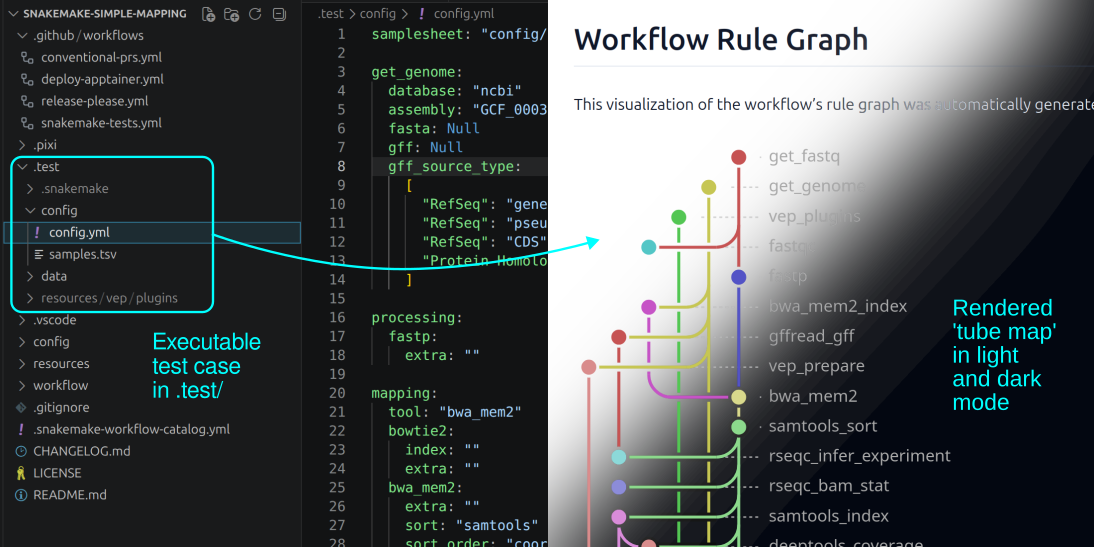
The Snakemake project-structure image illustrates the same separation in a workflow-oriented repository: configuration is isolated from workflow logic, and the workflow graph makes dependencies visible. You are not required to replace your Bash automation with Snakemake now; the organizational principle applies equally to both approaches.
Keep configuration, code, and tests independent
Configuration is often scattered through early Bash projects: a sample list in one script, thread count in another, an annotation path in an R script, and a hard-coded output folder in a command copied from a terminal. That makes a project fragile because changing one run setting requires searching through the whole codebase.
Centralize run-specific settings in config/, then pass them explicitly to Bash and R scripts. This gives every analysis run a visible contract.
7 Tips To Structure Your Python Data Science Projects
Watch these two short excerpts from “7 Tips To Structure Your Python Data Science Projects” by ArjanCodes. Although the examples use Python, the design principles apply directly to Bash and R: parameters should not be scattered through analysis logic, and tests should be treated as part of the project rather than as an afterthought.
Watch centralized configuration for the rationale behind keeping values separate from program logic. Then watch why tests matter and translate the point to your pipeline: a successful-looking plot does not prove that identifiers, paths, or sample labels were handled correctly.
For your project, the separation should be visible in practice:
| If you need to change... | Change it in... | Do not change it by... |
|---|---|---|
| Number of threads | config/config.yaml | Editing several tool commands |
| Reference release or location | config/config.yaml plus resources/references.md | Replacing paths across scripts |
| Which samples are analyzed | metadata/samples.tsv | Deleting filenames from a loop |
| How FastQC or STAR is called | scripts/bash/ | Editing a results file |
| DESeq2 filtering rule | R analysis code and documented configuration | Hand-filtering an exported table |
| Acceptance threshold or decision rationale | docs/acceptance_criteria.md | Leaving an unexplained comment in code |
A clean repository does not eliminate judgment. It makes judgment visible and localizes it to the right place.
Prevent generated files from entering source control accidentally
Git is excellent for source code, text documentation, configuration templates, metadata, and small test fixtures. It is not a general-purpose store for raw FASTQ files, large BAM files, temporary files, or every output from every run.
Start with a cautious .gitignore:
# Large or externally supplied inputs
data/raw/

# Pipeline-generated material
results/
logs/
work/

# Local machine or HPC settings
config/paths.local.yaml

# Common temporary files
*.tmp
*.swp
.DS_Store
Ignoring a directory does not make it unimportant. It means its provenance and storage need to be handled differently. Your README should explain how to obtain the input data, and your configuration plus reference manifest should make a run reproducible without bundling large files in the repository.
For a job-ready project, you may later publish a small, deliberate set of final figures or an example report. That publication decision should be explicit rather than the accidental consequence of running git add ..
Refactor your existing project without breaking it
Avoid a large untracked reshuffle. First create the structure, then move one category at a time and run the pipeline after each meaningful change.
From the repository root, create the main locations:
mkdir -p config docs metadata scripts/{bash,r} \
  tests/{bash,r,fixtures} data/raw resources \
  results logs work environment
Then use this short migration sequence:
-
Move documentation first.
Place your acceptance criteria indocs/acceptance_criteria.md. Add a concise rootREADME.mddescribing the biological question and repository map. -
Move the sample sheet and other manually curated tables.
Put them inmetadata/. Confirm that all scripts now refer to their new paths. -
Move Bash and R files into
scripts/bash/andscripts/r/.
If the files are already tracked by Git, usegit mvrather than copying them. Git can then recognize the change as a move. -
Create
config/config.yaml.
Begin with parameters currently repeated in scripts: reference paths, thread count, input directory, and output run identifier. -
Redirect outputs.
Update pipeline commands so run-specific outputs go toresults/<run-id>/, logs go tologs/<run-id>/, and disposable intermediates go towork/. -
Add
.gitignorebefore committing generated material.
Rungit statusand read the result carefully. You should see code, configuration, metadata, tests, and documentation ready to commit, not FASTQs, BAMs, or a large results directory. -
Run a small known case.
The goal is not a complete biological analysis yet. Confirm that paths resolve correctly and that outputs appear only in their intended locations.
A useful manual check after the refactor is simple: if you deleted results/, logs/, and work/, would the repository still contain everything a collaborator needs to understand the project and reproduce a run after obtaining the documented inputs? If yes, the separation is working.
A repository map belongs in the README
Add a small map near the top of your root README.md:
config/     Run parameters and example local-path settings
metadata/   Sample sheet, contrast definitions, and data dictionary
scripts/    Bash pipeline code and R analysis code
docs/       Acceptance criteria, methods, and recorded decisions
tests/      Test scripts and small test fixtures
data/raw/   Local or externally managed original inputs; not tracked
resources/  Reference-release records and checksums
results/    Run-specific generated analysis outputs; not tracked
logs/       Run-specific command and tool logs; not tracked
work/       Regenerable intermediate files; not tracked
This is a small addition with high value in a portfolio review. It signals that the apparent complexity of an RNA-seq workflow has been organized intentionally rather than accumulated through ad hoc reruns.
Key takeaways
A professional repository makes file provenance and responsibility visible.
- Organize files according to whether they are external inputs, human-authored project material, or generated outputs.
- Keep configuration separate from Bash and R code, so run settings can change without editing workflow logic.
- Keep sample sheets and contrast definitions in
metadata/; keep explanations and acceptance decisions indocs/. - Give tests their own
tests/location, even before the test suite becomes extensive. - Preserve generated results and logs in run-specific directories, while keeping disposable intermediates in
work/. - Use
.gitignoreto prevent accidental commits of raw data, large outputs, logs, and local machine settings. - Apply one consistent layout across future projects; consistency is more valuable than finding a universally perfect directory tree.
This completes the project-definition module. Next, you will begin the R data-workflow module by inspecting imported tabular data for incorrect types, missing values, duplicate identifiers, and parsing failures.
Can't find a good explanation? Sign up and we'll make it for you
Sign up