
Hello, and welcome to the first module of the course. We will use Python as an engineering tool for AI systems rather than treating it as an isolated language exercise: every later component—data processing, model clients, retrieval pipelines, evaluations, and APIs—will live in projects that others can recreate.
This lesson establishes that baseline on macOS. You will create a small application project with an isolated Python environment, an explicitly selected Python version, a pyproject.toml manifest, and exact dependency pins backed by a committed lockfile.
Reproducibility is project state, not a one-time installation
In a Node project, package.json tells collaborators what your application depends on, while a lockfile records the exact resolved dependency graph. A modern Python project follows the same useful separation:
| Artifact | Responsibility | Commit to Git? |
|---|---|---|
pyproject.toml | Project metadata and the direct dependencies you deliberately chose | Yes |
.python-version | The Python interpreter version selected for this project | Yes |
uv.lock | Exact resolved versions of direct and transitive dependencies | Yes |
.venv/ | The local, installed virtual environment | No |
An isolated environment prevents dependencies from one project from silently affecting another. Your upcoming AI projects may need packages with native extensions, constrained compatibility ranges, or particular model-client versions. Installing those globally is an invitation to ambiguous failures.
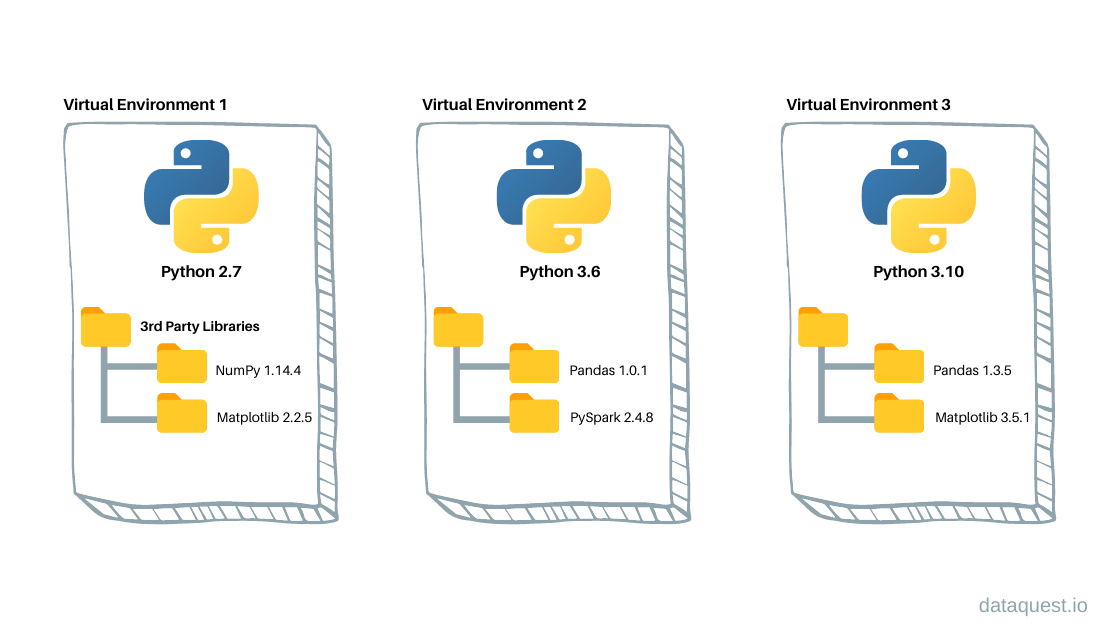
The important distinction is that .venv is disposable output, while the three committed files are the project’s reproducible specification. If .venv is deleted, a teammate—or CI—should be able to recreate it from the repository.
uv is the tool we will use to manage this workflow. It unifies Python installation, virtual environments, dependency resolution, locking, and running commands. You will generally run programs with uv run rather than manually activating an environment.
Python Tutorial: UV - A Faster, All-in-One Package Manager to Replace Pip and Venv
Watch “Python Tutorial: UV - A Faster, All-in-One Package Manager to Replace Pip and Venv” from Corey Schafer for a compact orientation to uv and its macOS installation route.
Watch the overview to see which traditional Python tools uv consolidates. Then watch macOS installation, focusing on the Homebrew installation and the simple verification step.
On a Mac with Homebrew installed, run:
brew install uv
uv --version
The first command installs the tool; the second confirms that your shell can find it. If uv is not found after installation, open a new terminal first; Homebrew may have updated your shell path.
For the full project layout and the relationship among the manifest, interpreter file, environment, and lockfile, consult the relevant uv documentation now.
Read Astral’s uv project guide to establish the mental model for the files you will create. It is especially useful for separating the declared requirements in pyproject.toml from the resolved dependency state in uv.lock.
In “Project structure,” read the overview from the project map, then read the subsections “pyproject.toml,” “.python-version,” “.venv,” and “uv.lock.” Pay particular attention to the lockfile explanation: it is generated state, not a hand-maintained config file. Finally, in “Managing dependencies,” read the dependency workflow through the upgrade discussion. The rendered command examples show the normal uv add, uv remove, and targeted-upgrade pattern.
Create a small AI-oriented application scaffold
Use a workspace directory you normally keep under source control. The following example creates an application project called ai-foundations; it is an application rather than a distributable Python library because our early work will consist of runnable scripts and services.
First, install a specific Python version managed by uv. Python is a pragmatic baseline for contemporary AI tooling.
uv python install 3.12.8

mkdir -p ~/Code/ai-foundations
cd ~/Code/ai-foundations

uv init
uv python pin 3.12.8
These commands have distinct jobs:
uv python install 3.12.8makes that interpreter available to uv. It does not alter macOS’s system Python.uv initcreates the basic application scaffold, includingpyproject.toml,README.md, andmain.py.uv python pin 3.12.8writes.python-version, recording the interpreter selected for this project.
Inspect the initial project:
ls -la
cat .python-version
cat pyproject.toml
You should see .python-version containing 3.12.8. Your generated pyproject.toml will have a [project] table similar to this:
[project]
name = "ai-foundations"
version = "0.1.0"
description = "Add your description here"
readme = "README.md"
requires-python = ">=3.12"
dependencies = []
Two version concepts are deliberately separate:
.python-versiontells uv which interpreter to build the local environment with.requires-pythonstates the Python versions your project claims to support.
For this internal learning project, pinning the local interpreter to 3.12.8 gives you a stable development target. The requires-python = ">=3.12" declaration leaves the application’s compatibility claim broader. Do not casually claim support for versions you have not tested.
Declare exact dependencies and generate the lockfile
For the project’s first dependencies, add:
pydantic, which we will use later for structured validation;httpx, an asynchronous HTTP client useful for model-provider and service calls;pytestandruffas development-only tools.
Use exact version constraints for this lesson:
uv add "pydantic==2.10.6" "httpx==0.28.1"
uv add --dev "pytest==8.3.4" "ruff==0.9.2"
uv add does several things as one intentional operation:
- updates
pyproject.toml; - resolves compatible transitive dependencies;
- creates or updates
uv.lock; - creates
.venv/if it does not yet exist; - synchronizes the environment to the resolved dependencies.
Your pyproject.toml should now contain a structure like this:
[project]
name = "ai-foundations"
version = "0.1.0"
description = "Add your description here"
readme = "README.md"
requires-python = ">=3.12"
dependencies = [
    "httpx==0.28.1",
    "pydantic==2.10.6",
]

[dependency-groups]
dev = [
    "pytest==8.3.4",
    "ruff==0.9.2",
]
The ordering may differ; that does not matter. The essential feature is the == exact-version constraint on each direct dependency.
Development tools belong in the dev dependency group because production code does not need a test runner or linter at runtime. Later, CI can install that group to run quality checks, while deployment environments can omit it.
Now inspect the resulting state:
ls -la
uv tree
uv tree distinguishes your direct choices from packages pulled in on their behalf. For example, httpx brings its own lower-level networking dependencies. You pin direct dependencies in pyproject.toml; uv.lock captures the complete resolved graph, including those transitive packages.
Do not edit uv.lock manually. To change a dependency deliberately, use commands such as:
uv add "httpx==0.28.1"
uv remove httpx
uv lock --upgrade-package pydantic
The final command is the controlled upgrade pattern: it attempts to upgrade only pydantic while keeping the rest of the lockfile stable.
Python Tutorial: UV - A Faster, All-in-One Package Manager to Replace Pip and Venv
Continue with the same Corey Schafer tutorial to watch the end-to-end uv workflow: project initialization, automatic environment creation, locking, and restoration.
Watch project initialization for the generated application layout and the purpose of .python-version and pyproject.toml. Then watch adding dependencies, noting that uv updates the manifest, environment, and lockfile together. Finish with running and restoring to see why uv run and uv sync remove the need for routine manual activation.
Run inside the project environment without activating it
Replace the generated contents of main.py with a small environment check:
import sys
from importlib.metadata import version

print(f"Python executable: {sys.executable}")
print(f"Pydantic version: {version('pydantic')}")
print("Project environment is ready.")
Run it through uv:
uv run --locked python main.py
The --locked flag is significant. It tells uv not to revise the lockfile during the command. If the manifest and lockfile disagree, the command fails rather than silently changing dependency state. This is a good default for CI and for repeatable commands you expect a teammate to run.
The output should show:
- a Python executable whose path ends in
.venv/bin/python; - Pydantic version
2.10.6; - your readiness message.
You can also run a formatter or linter inside the same environment:
uv run --locked ruff check .
There is no need to activate .venv for these commands. Manual activation with source .venv/bin/activate remains possible, but it is easy to forget which terminal is activated. uv run makes the environment choice explicit in the command itself.
Prove that the environment can be rebuilt
A project is not reproducible merely because it works once on your machine. Verify the claim by deleting only the generated environment, then rebuilding it from committed project state:
rm -rf .venv
uv sync --locked
uv run --locked python main.py
uv sync --locked reconstructs .venv strictly from pyproject.toml and uv.lock. If this succeeds and the version check still prints 2.10.6, you have demonstrated the core reproducibility property.
There are limits to what a lockfile controls. A lockfile does not eliminate every operating-system concern: native dependencies, macOS version, CPU architecture, and external services can still matter. But for Python and its dependency graph, this workflow makes the installed environment explicit, reviewable, and repeatable.
Finally, commit the durable project state. Assuming this is a new repository and uv init has created an appropriate .gitignore, verify before committing:
git status
git add .
git status
git commit -m "Initialize reproducible Python project"
The second git status should include files such as pyproject.toml, uv.lock, .python-version, main.py, and README.md. It should not include .venv/. Never commit a virtual environment, and be cautious with broad git add . in a non-new project where secrets or local data might be present.
Completion checklist
At this point, your repository should satisfy all of the following:
uv --versionworks on your Mac..python-versionrecords3.12.8.pyproject.tomldeclares your project and exact direct dependency versions.uv.lockexists and is committed..venv/exists locally but is ignored by Git.uv run --locked python main.pyuses.venv/bin/python.- Deleting
.venv/followed byuv sync --lockedrestores a working environment.
The key idea is simple: commit the specification, regenerate the environment. pyproject.toml captures intent, uv.lock captures the exact resolution, and .venv is a local build artifact.
Next, you will use this reproducible project to transform nested application data with Python collections, comprehensions, slicing, and unpacking—the kinds of data-shaping operations that appear constantly around model inputs and outputs.
Can't find a good explanation? Sign up and we'll make it for you
Sign up