
Hello, and welcome to the first lesson. This course will take you from the foundations of user-centered product design through Figma, research, wireframing, visual design, prototyping, testing, and presenting work professionally.
People often use UI/UX as one label, but UI design, UX design, and product design emphasize different responsibilities. Learning to separate them now will help you understand job descriptions, collaborate effectively, and explain the reasoning behind your design work later in the course. By the end of this lesson, you should be able to look at a design activity and identify its primary focus: the interface, the user’s end-to-end experience, or the product’s strategic success.
Three lenses on the same digital product
Consider a food-ordering app. A customer wants to order dinner, select a delivery time, pay, and know when their food will arrive. That single task can be viewed through three connected lenses:
- UI design (user interface design): What do the screens, controls, text, and feedback look like and how do they behave?
- UX design (user experience design): Can a person understand the choices, complete the task confidently, and recover if something goes wrong?
- Product design: Is this the right problem to solve, for the right users and business, with a solution that can be built, measured, and improved over time?
The word interface refers to the point of interaction: a mobile screen, website, dashboard, form, menu, button, or notification. Experience is broader. It includes what happens before someone opens the app, while they use it, and how they feel about the outcome afterward. Product is broader still: it includes the offering’s users, purpose, business model, constraints, feature priorities, and long-term direction.
Watch this concise overview before going further. It focuses specifically on digital product design, which is the meaning of “product design” throughout this course.
UI/UX Design vs Product Design
“UI/UX Design vs Product Design” by Relab Studios gives a useful high-level map of the three roles and explains why their boundaries often change across companies.
Watch UI design for the interface designer’s visual, interactive, responsive, and accessibility concerns. Then watch UX design, focusing on the role of research, journeys, flows, information architecture, and usability testing. Continue through role scope to see why smaller teams combine roles and why product design adds adoption, retention, and growth concerns.
A helpful shorthand is to identify the main question behind a piece of work:
| Discipline | Its central concern | Typical question |
|---|---|---|
| UI design | The interface’s presentation and interaction | “How should this control look, communicate, and respond?” |
| UX design | A person’s ability to achieve a goal | “Can the intended user understand and complete this task?” |
| Product design | The product’s value and direction | “Which problem and solution are worth pursuing within our constraints?” |
These are not rigid borders. For example, a “Continue” button is a UI element, but its label and placement affect usability, so it is also a UX concern. If adding that button improves checkout completion, it can also matter to product goals. The labels tell you where the primary responsibility lies, not that the other disciplines are irrelevant.
UI design: making the interaction concrete
UI designers shape the digital surface that people directly see and use. Their work is not merely “making things pretty.” A visually polished interface can still fail if text is difficult to read, controls are inconsistent, or the layout hides the next action.
A UI designer commonly makes decisions about:
- Layout and hierarchy: placement, alignment, spacing, and what the eye notices first.
- Typography and color: readable type choices, meaningful color roles, brand consistency, and contrast.
- Components and states: buttons, fields, menus, cards, icons, and what each does when hovered, selected, disabled, loading, or in error.
- Responsive behavior: how the interface adapts across screen sizes.
- Design systems: reusable rules and components that make a product coherent as it grows.
- High-fidelity prototypes and handoff: detailed screens, interaction behavior, specifications, and assets that support implementation.

Imagine that research has already shown customers abandon the food-ordering app when they cannot tell whether an item is available. A UI designer might create a clear availability badge, use a consistent muted style for unavailable options, ensure the contrast remains accessible, and define what happens when a user taps an unavailable item.
Those choices matter because the interface communicates the product’s current state. But determining whether availability is actually the cause of abandonment requires UX evidence, and deciding whether improving this issue is the most valuable investment right now is a product-level decision.
UX design: designing for successful use
UX design is the practice of understanding people’s goals and designing an experience that helps them meet those goals effectively. It is concerned with usefulness, clarity, control, accessibility, and confidence—not simply a smooth sequence of attractive screens.
UX work usually begins before high-fidelity UI screens exist. A UX designer may investigate questions such as:
- Who is trying to use this product, in what context, and for what goal?
- What frustrates them in their current process?
- What information do they need before acting?
- What is the simplest path through an important task?
- Where might they hesitate, make an error, or need help?
- Does a proposed design actually work when tested with representative users?
Common UX activities and outputs include user interviews, competitor reviews, research notes, journey maps, user flows, information architecture, low-fidelity wireframes, prototypes, and usability-test findings. Much of the rest of this course develops those skills step by step.
The Interaction Design Foundation’s role guide is useful here because it treats job titles as flexible while giving concrete responsibilities and deliverables.
UX Roles: The Ultimate Guide – Who Does What and ...
Read the relevant role profiles from the Interaction Design Foundation. They distinguish the user-problem-solving scope of UX design, the visual-and-interaction focus of UI design, and the added strategic scope often expected of product designers.
In the “UX Designer: The All-Rounder” section, read the role and task list. Notice that UX can span research, ideation, prototyping, and testing. Next, in “UI Designer: Where Aesthetics and Usability Meet,” read the UI responsibilities, especially the references to accessibility, design systems, and developer collaboration. Finally, in “Product Designer: Upgrade to Business Class,” read the product designer profile, focusing on its roadmap and long-term business responsibilities.
A crucial correction to a common misconception: UX is not just wireframing, and UI is not just decoration. UX makes sure the structure and interaction make sense for users; UI makes that structure legible, consistent, accessible, and satisfying to use.
Product design: balancing user value, business value, and feasibility
In many companies, a product designer is a broad, end-to-end designer who does substantial UX and UI work. What distinguishes the role is its emphasis on the product as a continuing business offering, not only on an individual screen or isolated user flow.
A product designer might help determine:
- which customer problem is worth solving now;
- which user segment or market the team should prioritize;
- which features belong in the next release and which should wait;
- how a design supports business goals such as activation, conversion, retention, or trust;
- whether a solution is feasible within technical, time, legal, and budget constraints;
- what metrics indicate that a change improved the product;
- how the product should evolve over the coming months.
For the food-ordering example, suppose the business wants more first-time customers to place a second order. A product designer does not simply ask, “Can we add a loyalty banner?” They frame a broader decision: Why are customers failing to return? Which evidence supports that explanation? Would improving order tracking, resolving availability problems, changing pricing, or introducing a loyalty feature have the strongest impact? Can the team build and measure the chosen approach?
That means product design involves trade-offs. A delightful feature may not be feasible this quarter. A revenue-generating feature may harm trust if it makes an important action deceptive or difficult. A product designer’s responsibility is to participate in balancing these competing concerns rather than optimizing only one of them.
Do not assume every organization uses titles consistently:
- In a large organization, UX research, UX design, UI design, content design, product management, analytics, and engineering may be separate specialties.
- In a small company or startup, one UI/UX or product designer may conduct research, create flows, design final interfaces, prototype, test, and work directly with developers.
- Some organizations use product designer almost interchangeably with UX designer; others expect stronger responsibility for product strategy and roadmaps.
Therefore, when evaluating a role, look past the title. Read the actual responsibilities, team structure, decision-making authority, and expected deliverables.
How the roles collaborate in a workflow
Digital products are not made by passing a design from one isolated role to another. The work is iterative: evidence changes the team’s understanding, which changes the design, which creates new questions to test.
The Product Design Process diagram gives a broad visual summary. Its categories are useful, but treat them as overlapping activities rather than a strict sequence or a universal division of labor.
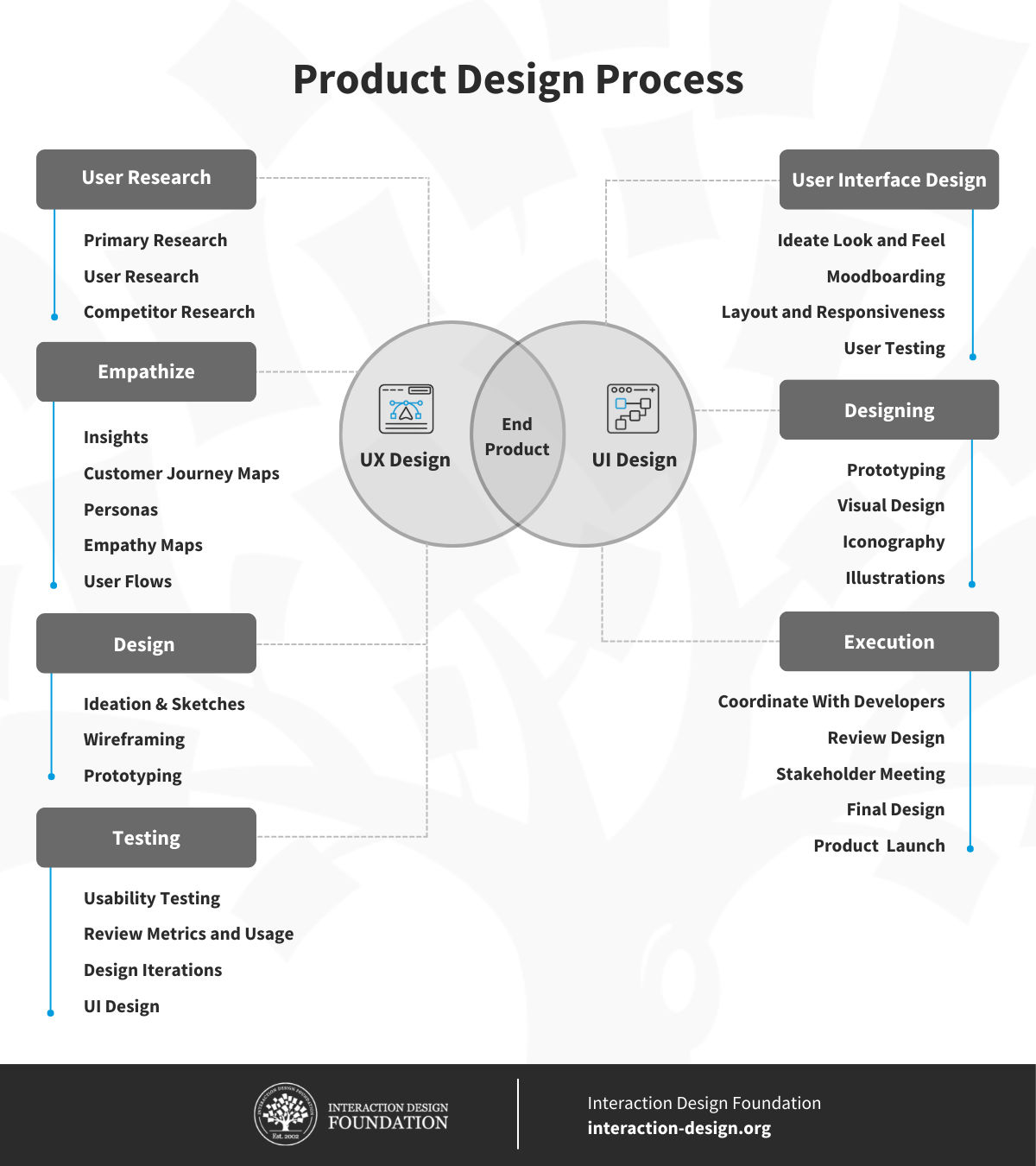
Here is how a typical workflow might unfold for the food-ordering app.
1. Frame the opportunity
The team notices that many people leave before submitting an order. A product designer helps connect this signal to a business goal, such as improving completed orders, while also questioning whether the data tells the whole story.
A UX designer helps turn vague concern into learnable questions: Are people confused by delivery fees? Are unavailable items appearing too late? Is payment failing? Engineers explain technical realities, such as the reliability of availability data.
2. Understand users and define the problem
UX work becomes central: interviews, observation, support-ticket analysis, usability testing, or other research methods reveal needs and pain points. The team should distinguish facts—“five participants looked for delivery cost before adding items”—from interpretations—“the checkout process may hide costs too late.”
The product designer helps decide which validated problem best aligns with business priorities and available resources. This is where user needs, organizational goals, and technical constraints must be considered together.
3. Structure a solution
The UX designer may map the user flow from browsing through payment and order tracking, define the information architecture, and create low-fidelity wireframes. The goal is to make the task understandable before polishing visual details.
The product designer keeps the proposed solution connected to the desired outcome: Which version should be built first? What has to be true for the feature to succeed? What can be deferred?
4. Create the interface
The UI designer turns the underlying structure into a coherent interface. They establish hierarchy, spacing, typography, colors, components, responsive layouts, and interaction states. They make essential actions clear and ensure screens are accessible.
At this stage, UX and UI work closely together. If the UI makes key information difficult to notice, UX suffers. If the UX flow requires too many choices at once, visual refinement alone cannot rescue it.
5. Validate, build, and release
UX designers test prototypes or live experiences with users. UI designers refine designs and provide detailed components, assets, and behavior specifications. Engineers identify implementation constraints and build the product. Product designers coordinate trade-offs and define how success will be assessed after release.
A release is not proof that a design succeeded. The team reviews both quantitative signals, such as task completion or repeat orders, and qualitative evidence, such as user comments and observed confusion.
6. Learn and iterate
If customers still abandon checkout, the team investigates why rather than assuming its first solution was correct. UX research may uncover a new issue, UI may be adjusted to communicate more clearly, and product priorities may shift based on the evidence.
This loop is why a good designer does not treat a Figma file as the final product. The real product is the working service and the outcome it produces for people and the organization.
A practical way to classify design responsibilities
When you encounter a task, classify it by asking three questions:
-
Is the main decision about visual or interactive expression on a screen?
It is primarily UI work. Example: defining error-field styling and ensuring the error message is readable. -
Is the main decision about understanding users or helping them complete a task?
It is primarily UX work. Example: testing whether people can find and change a delivery address before payment. -
Is the main decision about what the product should prioritize and why?
It is primarily product-design work. Example: choosing whether to invest the next development cycle in delivery tracking or in a loyalty program, based on user and business evidence.
Some tasks genuinely sit in the overlap. Designing a checkout screen is UI work; designing the checkout flow is UX work; deciding whether a simplified checkout is the best investment is product work. In a small team, one person may do all three. The quality of their reasoning matters more than the label on the role.
Key takeaways
UI, UX, and product design are complementary perspectives on the same digital product:
- UI design creates the visual and interactive layer people directly use.
- UX design investigates and improves the end-to-end experience of achieving a goal.
- Product design connects user experience and interface decisions to product strategy, business outcomes, constraints, and long-term evolution.
- Real teams overlap. Job titles vary, especially between large companies and startups.
- A reliable way to distinguish responsibilities is to identify the core decision: interface expression, user success, or product direction.
Next, you will examine the stages of an iterative user-centered design process in more detail: how teams move from research and problem framing to design, testing, release, and evidence-based improvement.
Can't find a good explanation? Sign up and we'll make it for you
Sign up