
Hello again. In the previous lesson, you separated UI design (the interface people use), UX design (how successfully people achieve a goal), and product design (the broader balance of user value, business goals, and feasibility). Now we turn to the workflow that connects those responsibilities: an iterative user-centered design process.
A design process is not a checklist that guarantees a good product. It is a disciplined way to reduce uncertainty: learn what people need, define the right problem, explore possible responses, make ideas concrete, and evaluate them with evidence. This lesson uses a common framework—Empathize, Define, Ideate, Prototype, Test—and adds the essential real-world activity of implementation and ongoing learning.
By the end, you should be able to name each stage, explain its purpose, and recognize why designers regularly return to earlier stages rather than proceeding in one fixed line.
User-centered does not mean “users decide everything”
User-centered design (UCD) means keeping the people who will use a product and their real contexts central throughout design and development. It does not mean asking users to invent the product for you, nor does it mean every request becomes a feature. Designers still make professional judgments and work within business and technical constraints.
What changes is the basis for decisions. Instead of beginning with “We should add feature X because it sounds useful,” a user-centered team begins with questions such as:
- Who is trying to do what?
- In what situation are they doing it?
- What obstacles, needs, and motivations shape their behavior?
- Which problem is meaningful enough to solve now?
- Does our proposed solution actually help people accomplish their goal?
Watch this short overview to establish the central idea of UCD as a cycle rather than a one-time phase.
What is user-centred design (UCD)?
“What is user-centred design (UCD)?” by Jadene Designs introduces UCD, its focus on user needs, and the broad research-design-evaluation-implementation cycle.
Watch the definition for the core meaning of user-centered design. Then watch the principles and cycle, focusing on early user involvement, continual feedback, and why work after release can generate the next round of research.
The term user-centered is important because a visually attractive interface can still be a poor solution. Imagine an appointment-booking service with a stylish calendar but no clear indication of which appointments are covered by insurance. The interface may look polished, yet users cannot make a confident choice. A user-centered process would treat that uncertainty as something to investigate and solve.
The five core modes of design work
The five-stage design-thinking model gives useful names to the main kinds of work. Think of the stages as modes: the team may spend more time in one mode, revisit another, or carry out several at once.
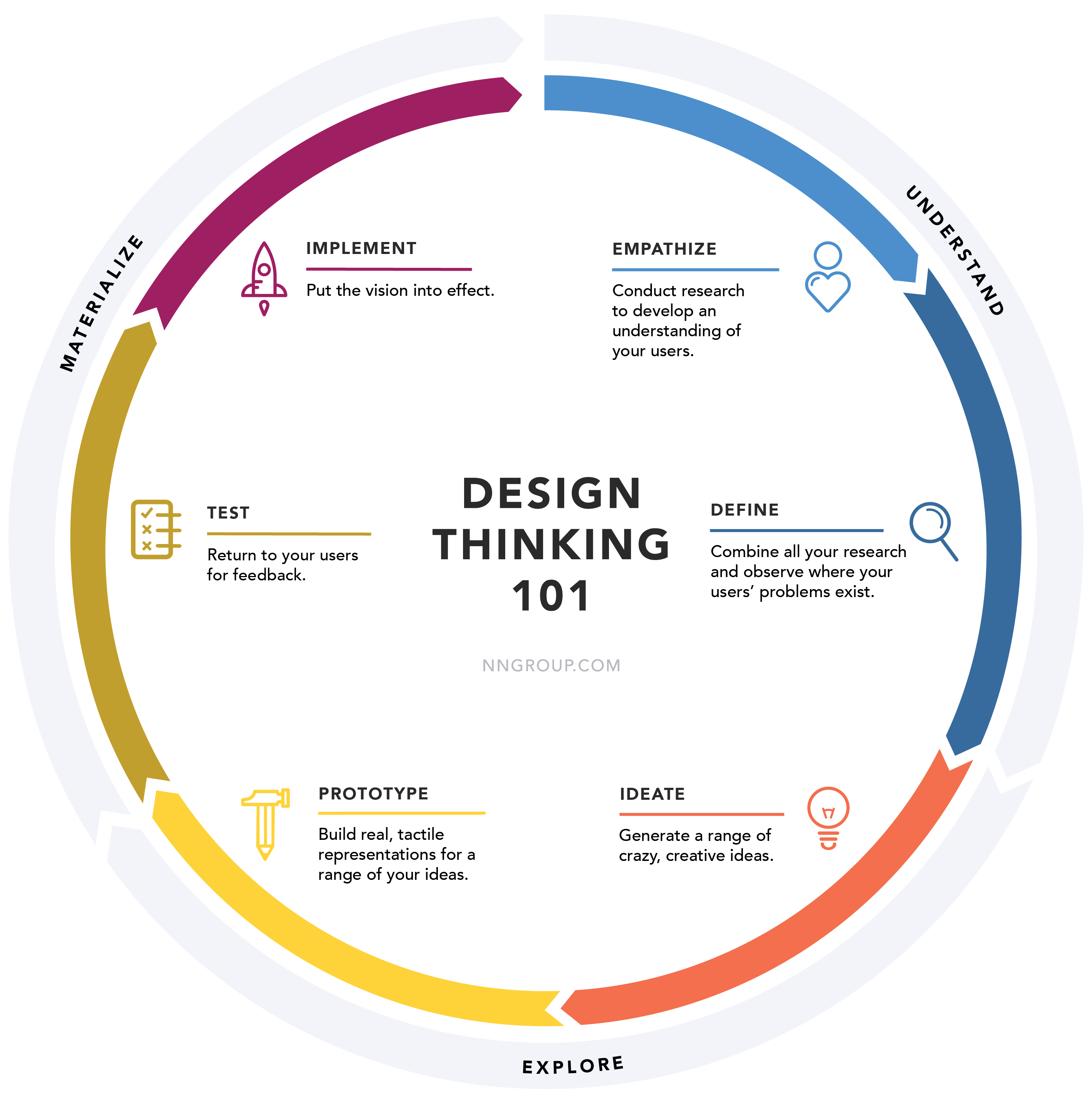
The NN/g study guide presents the same overall process in six phases by making Implement explicit. Read it now for a compact, reliable overview of the stages and their purposes.
Design Thinking: Study Guide - NN/G
Read NN/g’s “Design Thinking: Study Guide” for a concise description of the process from empathy through implementation.
In “Design Thinking: An Overview,” read the six-phase overview and use the diagram to orient yourself. Then read the short sections “Empathize and Define,” “Ideate,” and “Prototype, Test, and Implement.” Focus on the distinction between learning and framing, the purpose of ideation, and how prototypes, testing, and iteration connect.
1. Empathize: learn about people and their context
The purpose of Empathize is to develop an evidence-based understanding of the people affected by a problem. This means learning about their goals, behavior, context, language, frustrations, workarounds, and motivations.
For the appointment-booking service, a team might learn that patients often schedule appointments between meetings, are uncertain about insurance coverage, and fear being charged unexpectedly. Possible activities include interviews, observation, analysis of support requests, surveys, existing analytics, or conversations with domain experts.
The key output is not “users want a better app.” It is usable evidence, such as:
- Several participants looked for cost information before selecting a time.
- Participants used different words for the same medical specialty.
- Staff reported that insurance-related calls are a frequent support burden.
At this stage, separate what you observed or heard from what you think it means. “Four of five participants asked about cost” is an observation. “Cost uncertainty prevents bookings” is a hypothesis that needs further evidence.
Empathy is not guessing how users feel based on your own habits. It is deliberately replacing assumptions with research.
2. Define: turn scattered findings into a focused problem
Research creates many facts, comments, and possible issues. The purpose of Define is to synthesize that material, identify a meaningful opportunity, and articulate the problem in human terms.
A weak, solution-led framing might be:
“We need an insurance filter on the booking screen.”
This prematurely assumes both the cause and solution.
A stronger, user-centered framing might be:
“Patients booking a first appointment need to understand whether a provider is likely to be covered before choosing a time, because uncertainty about cost makes them hesitant to book.”
This statement identifies:
- Who experiences the problem: patients booking for the first time.
- What they need: understandable coverage information before they commit.
- Why it matters: uncertainty creates hesitation and may prevent task completion.
The Define stage also requires prioritization. A team may uncover ten genuine pain points but cannot responsibly solve all of them at once. Product goals and constraints matter here: perhaps reducing booking abandonment is a current goal, while accurate insurance data is technically available for only certain providers. The defined problem should be grounded in user evidence while being specific enough to guide a realistic next step.
Later in the course, you will create affinity maps, problem statements, “How might we” questions, and success measures. For now, remember the central distinction:
- Empathize gathers and deepens understanding.
- Define interprets that evidence into a focused design problem.
3. Ideate: explore multiple ways to respond
The purpose of Ideate is to generate a range of possible responses to the defined problem before committing to one. It is a divergence stage: expand the solution space rather than defending the first plausible idea.
For the coverage-uncertainty problem, a team might generate options such as:
- Show an estimated coverage status beside each provider.
- Ask for insurance details early and filter available providers.
- Offer a short explanation of what “in network” means.
- Provide a comparison view for likely out-of-pocket costs.
- Let users request help from a scheduling specialist.
- Make uncertainty explicit when coverage cannot be confirmed.
These ideas differ in interaction, information, implementation effort, and risk. The purpose is not to produce a long list for its own sake. Multiple ideas make the team less likely to confuse its first idea with the only answer.
At the end of ideation, teams narrow options using criteria such as:
| Question | Why it matters |
|---|---|
| Does it address the defined user need? | A clever idea may solve the wrong problem. |
| Can users understand it? | Complex explanations can increase uncertainty rather than reduce it. |
| Is it feasible now? | Data quality, technical effort, and legal constraints are real. |
| Does it support product goals? | The work needs a justified outcome, such as more confident bookings. |
| What must we test? | Promising ideas are still hypotheses until evaluated. |
Ideation is not limited to brainstorming in a room. It can include sketching, reviewing competing products, working through task flows, or exploring alternative wording. The important habit is to create alternatives before attachment.
4. Prototype: make assumptions tangible and testable
The purpose of Prototype is to turn selected ideas into representations that people can react to. A prototype is not necessarily a polished Figma screen. It is a learning tool whose level of detail should match the question you need to answer.
For example:
| Question to learn | Suitable prototype |
|---|---|
| Can people find coverage information before choosing a provider? | A quick paper sketch or low-fidelity wireframe |
| Do users understand the difference between “confirmed” and “estimated” coverage? | A clickable screen with realistic wording |
| Can users complete the complete booking flow? | A multi-screen interactive prototype |
| Does the live integration return reliable coverage data? | An implemented feature or technical proof of concept |
A common beginner mistake is to add visual polish too early. Polished screens can make an unfinished idea feel more final than it is, both to the team and to participants. When the question is about navigation or comprehension, simple wireframes usually enable faster, cheaper revision.
Prototyping also reveals issues before formal testing. When you attempt to represent a flow, you may notice missing states: What happens when a patient has no insurance? What if coverage cannot be checked? What if no providers are available? These are not minor details; they are part of whether the experience supports real people.
5. Test: evaluate with people, not internal opinions
The purpose of Test is to learn whether the proposed design helps representative users accomplish a goal, and to discover why it succeeds or fails.
For an appointment-booking prototype, a realistic task could be: “You want to schedule a first appointment with a dermatologist next week. Find an option you would feel comfortable booking.” The researcher then observes whether the participant notices the coverage information, understands its meaning, and can decide what to do.
Testing is not asking, “Do you like this design?” People’s preferences can be informative, but behavior is often more revealing:
- Did the participant find the next action without help?
- Where did they pause, backtrack, or misunderstand a label?
- Did they complete the task?
- What did they say they expected to happen?
- Did the design introduce a new concern or error?
A test result may challenge any earlier assumption. Perhaps users see the coverage badge but distrust it because it lacks an explanation. That is a useful result, not a failure. It tells the team what to revisit.
Iteration: returning to the right question
The word iterative means that learning from one version informs the next version. It does not mean “keep changing the layout until it looks nicer.” Each iteration should have a reason: a new insight, a failed task, an unresolved question, a changed constraint, or evidence from use after release.
The Interaction Design Foundation’s account of the five-stage model is especially useful for understanding this non-linear aspect.
The 5 Stages in the Design Thinking Process - IxDF
Read the Interaction Design Foundation’s explanation of the five-stage model to consolidate each stage and, especially, to see why the model is not a fixed sequence.
Begin with the introductory list of stages, then read “Stage 1: Empathize—Research Your Users’ Needs” through “Stage 5: Test—Try Your Solutions Out.” Focus on how research challenges assumptions, how findings become a human-centered problem, and why prototypes are deliberately experimental. Finally, in “Did You Know Design Thinking is a Non-Linear Process?”, read the explanation of flexible iteration and the concluding account of repeated and parallel stages.
Here are several legitimate reasons a team might loop back:
| What happens | Where the team may return | Why |
|---|---|---|
| Testing shows that users do not understand an insurance term. | Ideate and Prototype | The team needs different language or a different explanation. |
| Testing reveals that cost anxiety was not the main reason for abandonment. | Empathize and Define | The original problem framing may be wrong or incomplete. |
| Engineering cannot access live insurance data reliably. | Define and Ideate | The solution must be reconsidered within real technical constraints. |
| A released feature improves booking completion but increases support contacts. | Empathize, Define, and Test | Live behavior exposes a new trade-off to understand. |
Notice that feedback does not always require returning all the way to the beginning. A confusing button label may need a quick prototype revision and another test. But if the team discovers it misunderstood users’ underlying goal, it must return to research and problem framing rather than merely adjust the UI.
This is also why implementation is not the end of design. Once a feature is built and released, teams can monitor outcomes such as task completion, cancellations, support contacts, accessibility issues, or user feedback. These signals do not replace research, but they show where another cycle of learning may be needed.
A practical mental model
When you are unsure what to do next in a project, use the current uncertainty to choose the design mode:
| If the team is uncertain about… | Prioritize… | The purpose |
|---|---|---|
| People, context, behavior, or needs | Empathize | Gather evidence rather than assume. |
| Which issue matters most | Define | Focus the problem and opportunity. |
| Possible ways to address a problem | Ideate | Generate and compare alternatives. |
| Whether an idea can work in interaction | Prototype | Make the idea concrete enough to examine. |
| Whether people can use the design successfully | Test | Observe real use and uncover weaknesses. |
| Whether the solution creates value in the real product | Implement and monitor | Deliver, measure, and begin the next learning cycle. |
In practice, teams often research while prototyping, ideate while defining, and test small pieces throughout. The labels should guide your thinking, not trap you in ceremony.
Key takeaways
A user-centered design process centers design decisions on evidence about people and their goals:
- Empathize investigates users, their context, needs, and motivations.
- Define synthesizes research into a focused, human-centered problem.
- Ideate creates multiple potential responses rather than immediately committing to one.
- Prototype makes selected ideas tangible at an appropriate level of detail.
- Test evaluates proposed solutions with representative users through observed behavior and feedback.
- Implement and monitor puts the solution into real use and creates new evidence for improvement.
- The process is iterative and non-linear: findings can require a return to any earlier mode, including research and problem definition.
Next, you will practice extracting the three forces that shape every design project: user needs, business goals, and technical constraints from a design brief.
Can't find a good explanation? Sign up and we'll make it for you
Sign up