
Hello. In the previous lesson, you verified that your primary lead event represents a real completed enquiry and can be reported for Organic Search sessions. That gives this lesson a trustworthy conversion metric. Now the task is to stop treating “organic performance” as one global number.
For a multi-location, international service business, organic traffic can look healthy overall while a priority service, market, or location page is underperforming—or while a smaller segment produces a disproportionate share of leads. By the end of this lesson, you will have a repeatable segmentation method and a concise set of findings across service, physical location, visitor country, and landing page for one defined period.
Plan for roughly 40 minutes: establish a consistent scope, collect Search Console and GA4 views, classify pages, then identify differences that are substantial enough to inform a decision.
1. Define the question before opening a report
Segmentation is useful only when every segment answers a business question. Start with this working question:
“During the defined analysis period, which services, locations, countries, and organic landing pages generated meaningful search visibility, engaged visits, and validated lead events—and where are the material gaps or opportunities?”
This question deliberately joins two tools with different roles:
| Tool | Best used for | Core metrics in this lesson |
|---|---|---|
| Google Search Console | Google Search visibility and click performance | Impressions, clicks, CTR, average position |
| GA4 | What organic visitors did after arriving | Organic sessions, engaged sessions, generate_lead events, session lead rate |
Google’s documentation makes the same distinction: Search Console is the source of truth for Google Search performance, while Google Analytics is the source of truth for on-site behavior and conversions.
Using Search Console and Google Analytics Data for SEO
Read Google Search Central’s guidance to establish the division of labor between Search Console and GA4, then see how page and country views support investigation.
In the section beginning “Clicks and CTR over time,” read the page and country guidance. Focus on why an aggregate change should lead you to inspect the affected pages, queries, and countries. Then read the section “Investigate more deeply in Google Analytics and Search Console,” from the tool distinction through the descriptions of the Traffic acquisition and Landing page reports. Retain one practical rule: use Search Console to explain search visibility, and GA4 to assess the usefulness and lead generation of the visits that followed.
Fix one analysis window
Choose a window before looking at individual segments. For this first baseline, use:
- Search type: Web
- Period: the last 90 complete days
- End date: ideally three days before today, allowing for Search Console processing delay
- GA4 channel filter: Session default channel group equals Organic Search
- Lead metric: the validated
generate_leadkey event from the previous lesson
Use exactly the same start and end dates in both tools. If the site has very low lead volume, extend the window to 180 days, but state that you did so. A longer period makes small segments more interpretable, though it can conceal recent changes.
Do not compare a current 90-day period with a previous 28-day period. When you add a time comparison later, compare equal-length periods. Search Console recommends weekly or monthly granularity for longer comparisons because it reduces day-of-week noise.
Keep three meanings of “location” separate
International SEO reporting often becomes misleading because one word can describe three different things.
| Segment | Meaning | Typical source |
|---|---|---|
| Physical location | The office, branch, city, or service area represented by a page | URL classification and landing-page analysis |
| Country of searcher | Where the search occurred | Search Console Country dimension; GA4 geographic dimensions |
| Country or market version | The version of the site, such as /uk/ or /au/ | URL classification |
A person searching from Germany may visit a London location page. That is a legitimate cross-border pattern, not necessarily a reporting error. Therefore, never label Search Console’s Country tab as “location performance.” It represents the searcher’s country, whereas a location-page report describes the page’s intended physical market.
2. Build a page taxonomy that makes segmentation possible
Neither Search Console nor GA4 automatically knows which service a URL supports or which office it represents. Before analysing, create a small page taxonomy: a spreadsheet that assigns meaningful labels to priority organic landing pages.
Start with the top 20 to 50 organic landing pages by clicks or sessions. Do not try to classify every URL on the site in this first pass.
Use this structure:
| Landing-page path | Primary service | Physical location | Market version | Page type | Include in lead analysis? |
|---|---|---|---|---|---|
/uk/services/consulting/ | Consulting | None | UK | Service | Yes |
/uk/locations/london/ | General | London | UK | Location | Yes |
/au/services/consulting/ | Consulting | None | Australia | AU | Service |
/insights/... | Informational | None | Global | Article | Usually separate |
/careers/... | None | None | Global | Careers | No |
The actual labels should reflect your site architecture, not this example. The key is that your categories are defined and mutually understood.
A page may legitimately have more than one label. For example, a page called “Tax advisory in Manchester” belongs to a service category and a physical-location category. That is fine when you analyze each view separately. It becomes a problem only if you add totals across overlapping categories and present them as a site total.
Use these rules:
- Assign each URL one primary service, based on its intended commercial purpose rather than every topic it mentions.
- Use a controlled list of location names. For example, use “New York” consistently rather than alternating between “NYC,” “New York City,” and “New York.”
- Separate commercial service and location pages from blogs, careers, legal pages, and support content.
- Record pages that do not fit your taxonomy as
OtherorUnclassified; do not silently discard them. - Note any ambiguous page. Ambiguity itself can signal a weak information architecture or unclear page purpose.
If GA4 content groups have already been deliberately configured, they can accelerate this analysis. The GA4 Pages and screens report by content group illustrates how an implemented grouping can aggregate performance beyond individual URLs. Do not assume that a (not set) group is meaningful, and do not treat an unconfigured content group as a substitute for your page taxonomy.

3. Segment search visibility in Search Console
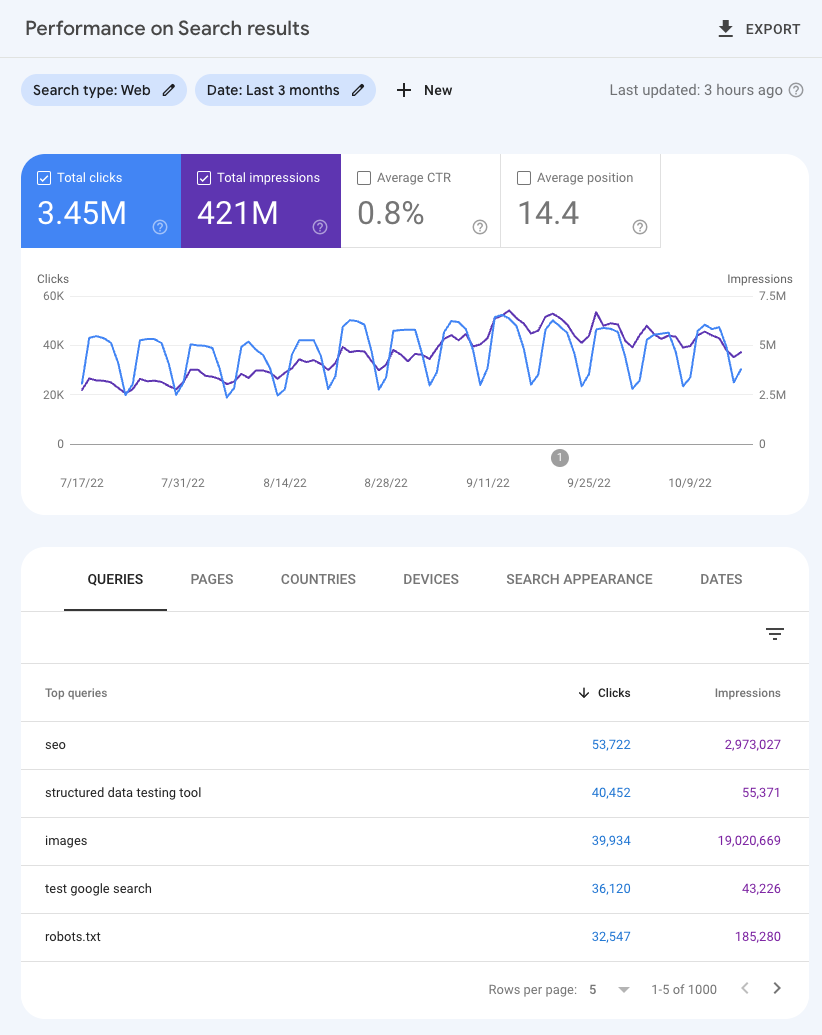
Search Console is where you find whether Google Search is showing and sending visitors to each page group. Its Performance report gives you four linked measures:
- Impressions: how often an eligible site result appeared.
- Clicks: visits from Google Search results.
- CTR: clicks divided by impressions.
- Average position: a broad diagnostic indicator, not a page-quality score.
Watch the following short section from Google Search Central before applying filters. It establishes the difference between metrics and dimensions, then demonstrates using dimensions and filters to investigate a narrower segment.
Performance reports in Search Console - Google Search Console Training
In “Performance reports in Search Console,” Google Search Central explains the building blocks of the report and then demonstrates filters that make segmentation practical.
Watch metrics and dimensions to distinguish clicks, impressions, CTR, and position from dimensions such as country and page. Then watch table segmentation for the report-table workflow. Finish with filters in practice, focusing on filtering to a country and then inspecting the pages and queries inside that filtered view.
Start at landing-page level
In Search Console > Performance > Search results:
- Apply your fixed date range and choose Web search.
- Turn on Clicks, Impressions, CTR, and Average position.
- Open the Pages tab.
- Export the leading rows, or record the priority commercial pages in your worksheet.
- Flag pages with high impressions but low CTR, high clicks but weak GA4 lead results, and pages whose click volume does not match their strategic importance.
The Pages tab is your base layer. Every other group should be traceable to these URLs.
Filter by service and physical location
If your URL structure is consistent, Search Console URL filters can aggregate related pages. A simple URLs containing filter is usually safer than regex when one stable path fragment identifies the group.
For example, if every consulting page includes /consulting/, a URL-containing filter can reveal its combined Search Console performance. If your site uses several URL patterns, regex can group them more flexibly.
Performance report (Search results): Advanced filtering and comparison - Search Console Help
Read Search Console Help’s filtering and comparison guidance before applying page-family filters. It is particularly useful when service or location pages follow more than one URL pattern.
Read the opening section “Filtering data,” noting that Search Console can apply multiple filters at once. Then, in “Filter by multiple items,” read from URL containing filters before using a stable service or location fragment. Continue through the subsection “Regular expression search,” beginning the regex workflow. Focus on the fact that matching is partial by default, and use start or end anchors only when you need a more restrictive match. Finally, read “Comparing groups” for the Difference column and the equal-period comparison rule.
Use filters as a controlled method, not as an opportunity to search until you find a favorable result.
| Desired view | Practical Search Console method | Interpretation |
|---|---|---|
| One service | URLs containing a stable service path, or a tested regex | Search demand and visibility for that service-page group |
| One location | URLs containing the location-page path | Visibility for pages serving that physical location |
| One searcher country | Click a row in the Countries tab or add a Country filter | Search behavior occurring in that country |
| One page | Click a row in the Pages tab | Queries, countries, and devices associated with that canonical page |
| Country plus service | Country filter plus service URL filter | Whether service visibility differs within a target country |
Search Console uses canonical URLs in its Pages dimension. If a page you expect to see is absent, first check the canonical URL rather than assuming it received zero visibility.
Use comparisons sparingly
Compare two countries only when both are business-relevant and have enough data. Good comparisons include:
- UK searchers versus Australian searchers for the same core service.
- London-location pages versus Manchester-location pages where the offer and market maturity are comparable.
- The selected 90-day period versus the immediately previous 90-day period for the same segment.
A country comparison can reveal a genuine strategic difference, but it can also reflect different search demand, language, competition, or brand awareness. A lower click count alone does not prove weak SEO execution.
4. Connect landing pages to organic leads in GA4
Search Console shows what happened on Google. GA4 tells you whether visitors who entered through search proceeded toward a commercial outcome.
In GA4, use the Landing page report or an Exploration. Apply the filter:
Session default channel group exactly matches Organic Search
Then use Landing page as the primary dimension. Include, where available:
- Sessions
- Engaged sessions or engagement rate
generate_leadkey events- Session key-event rate, or a documented equivalent calculation
The relevant rate is:
This is not a qualified-lead rate. Qualification belongs in CRM or sales data. At this stage, call it a recorded lead rate or organic session lead rate.
GA4 for SEO: 5 Reports for Organic Traffic and Lead Generation
In “GA4 for SEO: 5 Reports for Organic Traffic and Lead Generation,” Orbit Media Studios shows why landing-page reporting becomes more actionable after organic filtering and conversion metrics are added.
Watch organic landing pages to see the landing-page report filtered to organic traffic and compared over time. Then watch conversion by page. Focus on the decision logic: pages with different organic conversion outcomes should not receive the same SEO priority, even if their traffic volumes look similar.
Roll the page data up to service and location
GA4 may not have a built-in “service” or “physical location” dimension. Use your page taxonomy to aggregate the landing-page export:
- Export the GA4 organic landing-page view.
- Standardize the URL path so it matches the taxonomy. Remove query parameters unless they genuinely distinguish pages.
- Join each page to its service, location, market version, and page-type labels.
- Sum sessions and recorded leads by each label.
- Calculate the group rate from totals, rather than averaging page-level percentages.
For a service group with three pages, calculate:
Do not average the three individual page conversion rates. A low-traffic page with one lead could otherwise distort the conclusion.
Do not force Search Console and GA4 totals to match
Search Console clicks and GA4 sessions are related, but they are not interchangeable. Differences can arise from consent settings, tracking blockers, reporting definitions, timing, redirects, and users who leave before GA4 records a session.
Use the tools together in this way:
| Pattern | What it may mean | First follow-up |
|---|---|---|
| High GSC impressions, low CTR | Snippet, ranking, intent, or SERP-feature issue | Inspect queries, position, and actual results |
| Good GSC clicks, low GA4 engagement | Landing page may not meet the visitor’s need | Review relevance, page speed, content, and location fit |
| Good sessions, low recorded leads | Conversion path or commercial intent issue | Review CTA, form, trust signals, and lead quality |
| Modest sessions, high lead rate | Strong commercial fit but limited visibility | Consider a visibility or content opportunity |
| High leads but almost no tracked sessions | Possible tagging, attribution, or reporting issue | Recheck the event audit and GA4 setup |
5. Decide what counts as a material difference
A segment is not important merely because its percentage is highest. A page with two organic sessions and one lead has a 50% rate, but that is not a stable basis for a major investment decision.
Use a three-part materiality test.
1. Is there enough volume?
Set a minimum threshold that suits the site’s scale. As a starting guardrail for a 90-day review:
- Treat a landing page with fewer than 100 organic sessions as directional rather than conclusive.
- Treat a segment with fewer than three recorded leads as insufficient for strong conversion-rate claims.
- For Search Console CTR or position observations, seek a meaningful impression base rather than reacting to a handful of searches.
These are not universal SEO laws. If the business normally receives hundreds of leads per month, the threshold should be higher. If it is a specialist B2B service where one qualified enquiry is commercially significant, preserve low-volume findings but label them clearly.
2. Is the absolute difference meaningful?
Ask whether the gap changes a decision. A 30% conversion-rate increase from 0.2% to 0.26% may be mathematically large but commercially minor at low traffic. Conversely, a location page generating five additional recorded leads may matter greatly to a local office.
State both numbers:
“The UK consulting pages generated 18 recorded organic leads from 620 sessions, a 2.9% rate, compared with 5 leads from 540 sessions, a 0.9% rate for the Australian consulting pages.”
That statement is much more useful than “the UK converted better.”
3. Is there a plausible explanation?
A difference is a finding, not yet a diagnosis. For every material gap, write one evidence-based hypothesis and one next action.
| Observed difference | Plausible hypothesis | Next action |
|---|---|---|
| Location A has strong impressions but weak CTR | Titles, snippets, rank, or local intent differ | Inspect top queries and the country-specific results page |
| Service B has traffic but weak lead rate | Informational intent or weak conversion path | Review target queries, competitors, and landing-page CTA |
| Country C has little visibility for a priority service | Limited localized content, weak relevance, or low demand | Compare queries, ranking pages, and competitor coverage |
| A commercial page converts strongly but has low sessions | Search demand exists but the page is underexposed | Prioritize keyword and ranking opportunity analysis |
| Most organic leads land on the homepage | Service pages may not match demand or may be poorly linked | Assess service-page visibility, content, and internal links |
Avoid using average position as the sole explanation. It is aggregated across queries and can change because the query mix changed. Pair it with clicks, impressions, specific queries, and actual landing-page performance.
Your segmentation output
Create a one-page Organic Performance Segmentation Summary. It will feed directly into the baseline scorecard in the next lesson.
Use a table like this, limiting it to the most decision-relevant segments:
| Segment type | Segment | GSC clicks | GSC impressions | CTR | GA4 organic sessions | Recorded leads | Lead rate | Finding | Next action |
|---|---|---|---|---|---|---|---|---|---|
| Service | |||||||||
| Physical location | |||||||||
| Searcher country | |||||||||
| Landing page |
Add these notes below the table:
- Analysis period: exact start and end dates
- Search Console scope: Web search and property used
- GA4 scope: Session default channel group equals Organic Search
- Lead definition: validated
generate_leadevent - Page-classification rule: how services, locations, and market versions were assigned
- Materiality threshold: your volume and business-significance rule
- Data limitations: low volume, incomplete country data, consent effects, pages not classified, or other constraints
A strong first finding might read:
“Organic traffic is concentrated in informational content, while the
/uk/services/[service]/landing page has comparatively low Search Console impressions but a materially higher recorded-lead rate than other commercial entry pages. Priority: investigate ranking and keyword coverage for that service before expanding broad informational content.”
That connects evidence to a decision without claiming more certainty than the data supports.
Key takeaways
Segmentation turns an aggregate organic total into a set of actionable commercial patterns.
- Fix the date range, Search Console scope, GA4 channel definition, and lead definition before analysing.
- Use landing pages as the base unit, then roll them up with a documented service, physical-location, and market taxonomy.
- Keep searcher country, physical location, and country-specific site version distinct.
- Use Search Console for impressions, clicks, CTR, and query/page visibility; use GA4 for sessions, engagement, and recorded leads.
- Treat small samples as directional, and judge materiality through volume, absolute business impact, and a plausible explanation.
- Record both the finding and the next action; a metric without a decision is not yet an SEO insight.
Next, you will turn this evidence into a one-page baseline SEO scorecard that communicates current performance, major opportunities, and measurement limitations clearly enough for a stakeholder—or a Marketing Manager interview audience—to act on.
Can't find a good explanation? Sign up and we'll make it for you
Sign up