
Hello! Welcome back to your go-to-market journey.
In our last few lessons, you've developed powerful, platform-specific strategies for content creation. You learned how to craft high-engagement threads for the fast-paced environment of Twitter/X and how to structure authority-building posts for the professional world of LinkedIn. You now have the "what" and "how" of content creation.
Today, we transition from content creator to content strategist. Manually posting, tracking, and optimizing across multiple platforms is inefficient and doesn't scale—a critical problem for a founder aiming to build multiple companies. This lesson tackles that challenge head-on.
The learning outcome is to use Taplio or Hypefury to schedule, analyze, and optimize Twitter/X and LinkedIn content. We will turn your content strategies into a unified, scalable, and data-driven machine.
The Founder's Dilemma: Time vs. Impact
As a founder, your most valuable resource is time. Manually posting content at optimal times for different time zones, trying to remember which posts performed well, and constantly brainstorming new ideas is a surefire way to burn out.
This is where social media management tools specifically designed for growth come in. Unlike basic schedulers, tools like Hypefury and Taplio are built around a continuous feedback loop:
- Schedule: Create and queue up content in batches, ensuring a consistent presence without being tied to your screen.
- Analyze: Access clear, actionable data on what's working (and what's not), moving beyond simple vanity metrics.
- Optimize: Use the data and built-in AI features to double down on successful formats, repurpose your best content, and generate new ideas.
For someone with a computer science background, you can think of this as moving from writing individual scripts to building an automated, observable system with a feedback controller. You input content, the system executes it, you observe the output (analytics), and then adjust the system's parameters (your strategy) for better performance.
Choosing Your Engine: Hypefury vs. Taplio
Hypefury and Taplio are two of the most popular tools for this purpose. They are owned by the same company and share a similar philosophy, but they have different origins and strengths.
- Hypefury: Started as a Twitter-first growth tool. It has incredibly powerful automation features for Twitter/X and has since expanded to offer strong cross-posting capabilities for LinkedIn, Instagram, and Facebook.
- Taplio: Built from the ground up as an all-in-one growth tool for LinkedIn. It has a deep, specialized feature set focused entirely on creating content, engaging, and generating leads on LinkedIn.
We'll explore both so you can make an informed decision for your first SaaS venture.
Deep Dive 1: Hypefury — The Twitter/X Growth Engine
Hypefury is ideal if you see Twitter/X as your primary channel for audience building and rapid idea validation, while using LinkedIn to syndicate your authority.
Hypefury Review: The Best Twitter Growth Tool?
For a quick tour of the Hypefury interface and its core functions, let's watch this review from StartupWise. It will give you a good visual grounding for the features we're about to discuss.
Watch the following segments: Composing & Scheduling: 01:47 - 04:43 Analytics: 05:06 - 05:30 Content Inspiration: 06:19 - 07:03 Focus on how the queue works, where to find analytics, and how the inspiration panel helps with writer's block.
Now, let's connect that walkthrough to a strategic workflow.
Hypefury Review 2025: My Deep Dive into the AI-Powered ...
To understand the strategic application of these features, let's turn to a detailed review on Skywork AI. It provides a more structured look at Hypefury's 'killer features'.
Read the sections 'Hypefury's Core Arsenal: A Deep Dive into its Killer Features' and 'How to Master Hypefury: A Step-by-Step Practical Guide'. Pay close attention to the concepts of 'Evergreen Queue', 'Auto-Plugs', and 'Thread-to-LinkedIn Carousel'.
Hypefury Workflow: Schedule, Analyze, Optimize
-
Schedule (Batch & Automate):
- The Queue: As shown in the video and article, you don't schedule individual posts. You add content to your queue, and Hypefury publishes it at pre-set optimal times. Your job becomes filling the queue, not watching the clock.
- Cross-Platform Magic: When composing a Twitter thread, you can simply check a box to post it to LinkedIn. The "Thread-to-LinkedIn Carousel" feature is particularly powerful, as it automatically converts your thread into a PDF carousel, a high-engagement format on LinkedIn. This directly leverages the content you created in our previous lessons.
-
Analyze (Find Your Winners):
- Hypefury's analytics dashboard is clean and to the point. You can quickly see which tweets are getting the most impressions and engagement.
- The goal here isn't just to admire big numbers. It's to identify patterns. Are your threads about a specific topic performing best? Do posts with images get more clicks? This data is your feedback mechanism.

- Optimize (Scale Your Impact):
This is where Hypefury truly shines and saves you immense time.- Evergreen Queue: Identify your all-time best-performing posts from the analytics tab. Instead of letting them die, add them to your "Evergreen" list. Hypefury will automatically retweet them to fill gaps in your schedule, ensuring your best content is constantly being discovered by new followers.
- Auto-Plugs: This is a killer feature for a SaaS founder. You can set a rule: "If this tweet gets over 100 likes, automatically post a reply linking to my SaaS waitlist/newsletter." It turns viral engagement directly into leads without you having to monitor it manually.
Deep Dive 2: Taplio — The LinkedIn Command Center
If your primary audience consists of B2B decision-makers and your main goal is to build authority and generate leads on LinkedIn, Taplio is the more specialized tool.
Taplio Review: Best LinkedIn Tool For Growing Your Business?
Let's get a feel for the Taplio dashboard with another review from StartupWise. Notice how the features are all laser-focused on the LinkedIn ecosystem.
Watch the following segments: AI-Powered Composer: 03:23 - 06:13 Content Inspiration & Analytics: 06:13 - 09:52 Engagement & Outreach: 09:52 - 10:50 Focus on the AI writing assistants, the different ways to find viral content, and the tools for managing your network.
Taplio's entire workflow is designed to master LinkedIn.
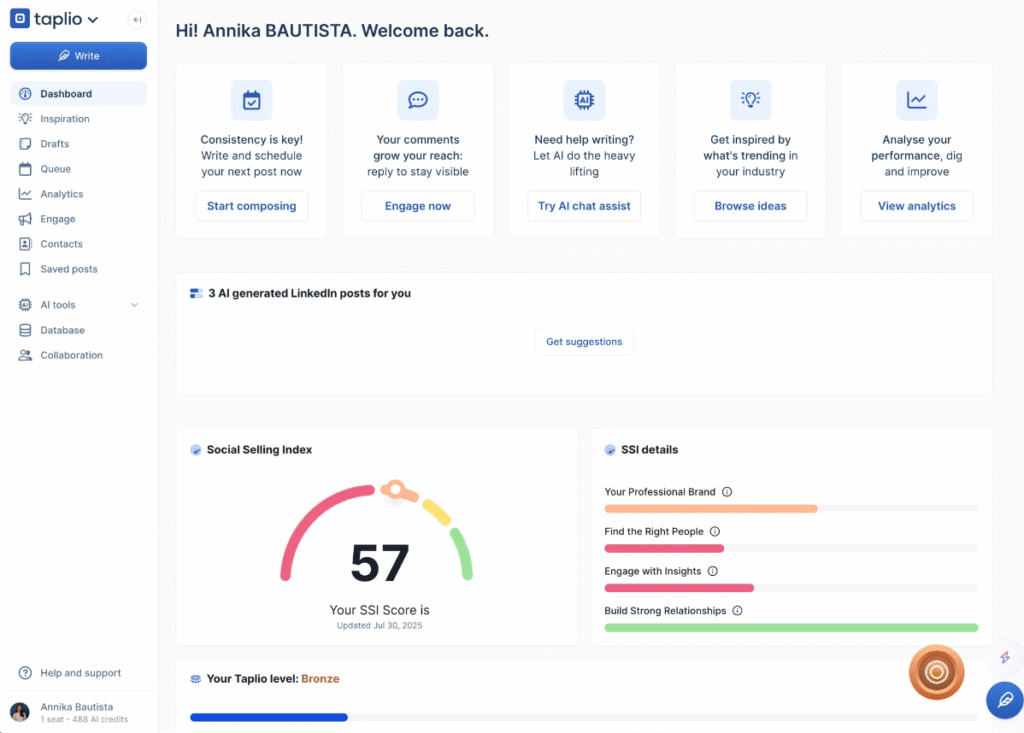
Taplio Workflow: Schedule, Analyze, Optimize
-
Schedule (AI-Assisted Creation):
- Taplio's composer is supercharged with AI. As you write, you can ask the AI to generate hooks, expand on a point, or suggest a call-to-action. This directly complements the Hook-Body-CTA framework from our last lesson, helping you overcome writer's block and structure your posts effectively.
- Like Hypefury, it uses a queue-based system. You define your posting schedule, and then you just focus on filling the queue.
-
Analyze (Go Beyond Likes):
- Taplio's analytics track followers, engagement, and impressions, but also a key LinkedIn metric: the Social Selling Index (SSI). This measures your effectiveness at establishing your brand, connecting with the right people, and building relationships. For a B2B founder, this is a vital health metric for your networking efforts.
- You can easily identify your best posts to understand which topics and formats are establishing you as a thought leader.
-
Optimize (Never Run Out of Ideas):
- Content Inspiration: This is Taplio's superpower. It offers multiple ways to find proven content ideas:
- AI-Generated Posts: Gives you daily ideas tailored to your niche.
- Viral Post Library: Search a database of millions of top-performing LinkedIn posts by topic or keyword. You can see what's already working and adapt it to your voice.
- Industry News: Pulls in recent news relevant to your field, giving you timely topics to comment on.
- Engagement & Outreach: Taplio includes tools to build lists of target contacts (e.g., people who engaged with your posts) and find relevant conversations to join. This bridges the gap between content marketing and active sales/networking.
- Content Inspiration: This is Taplio's superpower. It offers multiple ways to find proven content ideas:
Test your understanding!
Imagine you've written a successful LinkedIn post about "3 Costly Mistakes SaaS Founders Make in Their First Year." Now, let's put these tools into practice.
-
Using Hypefury: How would you use the "Evergreen" and "Auto-Plug" features for this post to maximize its long-term value and drive sign-ups for a free "Founder's Financial Checklist" you created?
-
Using Taplio: How would you use the "Viral Post Library" and "AI Post Writer" to create a follow-up post on the same topic?
Show answer
-
Hypefury Workflow:
- Evergreen: After seeing the post perform well in your analytics, you would add it to your Evergreen queue. Hypefury would then automatically retweet it weeks or months later, exposing it to your new followers.
- Auto-Plug: You would set up an auto-plug: "If this tweet gets 50+ likes, automatically reply with: 'Glad this was helpful! I've created a detailed financial checklist for founders to avoid these mistakes. Grab it for free here: [link]'."
-
Taplio Workflow:
- Viral Post Library: You would search the library for keywords like "founder mistakes" or "SaaS finance." You'd find other high-performing posts on the topic to see what angles you missed or what resonated most.
- AI Post Writer: Inspired by your research, you could give the AI a prompt like: "Write a LinkedIn post in a 'Contrarian View' format about the biggest financial mistake founders make. Argue that it's not overspending, but under-investing in marketing." The AI would generate a draft based on a proven structure, which you would then edit with your own stories and voice.
The Verdict: Which Tool Is Right For You?
Both tools offer free trials, and I strongly encourage you to use them. The choice depends on your primary growth strategy for your first SaaS.
- Choose Hypefury if... your strategy is Twitter-centric. You want to build a large audience quickly, engage in rapid-fire conversations, and use that momentum to build authority on LinkedIn. Its automation for Twitter/X is second to none.
- Choose Taplio if... your strategy is LinkedIn-centric. You are selling a B2B product to a specific professional audience and your primary goal is to build deep authority, generate high-quality leads, and network with decision-makers directly on LinkedIn.
Given your goal of building multiple B2B SaaS companies, starting with Taplio might be the more direct path to connecting with customers and potential acquirers. However, Hypefury's powerful Twitter automation and excellent cross-posting make it a very close contender.
Conclusion
You now have the knowledge to build a scalable content engine. By moving beyond manual posting and embracing a strategic workflow of scheduling, analyzing, and optimizing, you can save dozens of hours a month and make data-driven decisions that accelerate your growth.
Key Takeaways:
- Systemize Your Content: Use tools like Hypefury and Taplio to automate your posting schedule and create a consistent presence.
- Hypefury Excels at Twitter/X: Its strength lies in deep Twitter automation (Evergreen posts, Auto-Plugs) with excellent cross-posting to LinkedIn.
- Taplio Masters LinkedIn: It's an all-in-one suite for LinkedIn with powerful AI writing and content inspiration features tailored for B2B professionals.
- The Workflow is Key: The goal is a continuous loop: Schedule your content in batches, Analyze performance to find what works, and Optimize your strategy by repurposing winners and generating new ideas based on data.
Preview of the Next Lesson:
Broadcasting your content is just one piece of the puzzle. The most successful founders also go to where their customers are already gathered. In the next lesson, you will learn how to develop a playbook for providing value in relevant Facebook, Slack, and Discord communities without being spammy. This is where you'll turn brand awareness into genuine relationships.