
Good to see you again. In the previous lesson, you treated dependency-injection lifetimes as ownership boundaries: request-scoped services belong to a request, singletons must be safe for concurrent use, and conventional middleware must not capture scoped services in its constructor.
Now we apply that boundary thinking to the request pipeline. A production API is not secured merely because AddAuthentication, [Authorize], and a few middleware calls exist somewhere in Program.cs. Their order determines whether exceptions are safely transformed, routes expose the metadata authorization needs, identities are established before permissions are checked, and your own middleware sees the context it requires.
By the end of this lesson, you will be able to assemble and defend a practical pipeline for the portfolio-tracker API, including error handling, routing, JWT authentication, authorization policies, and a custom audit middleware.
1. Middleware is nested execution, not a flat checklist
A middleware component can do work before it calls the next component and again after the downstream component has finished. That produces a nested execution model:
- The request enters the first middleware.
- Each middleware performs any pre-processing and invokes the next delegate.
- An endpoint eventually handles the request, or a middleware short-circuits it.
- The response travels back through the already-invoked middleware in reverse order.
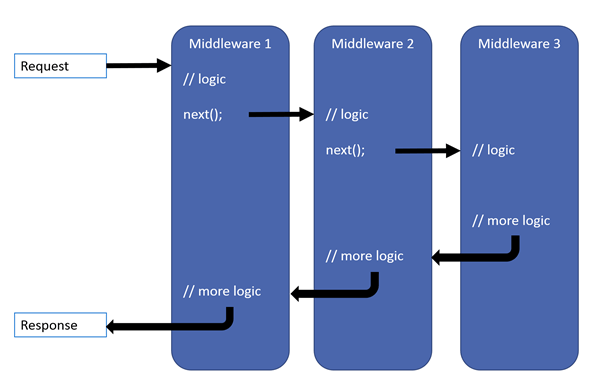
This has two important implications:
- Middleware placed early can wrap and observe failures from later components.
- A middleware that returns without invoking
nextis terminal for that request. Static files, health-check endpoints, CORS preflight handling, and authorization failures can all prevent later components from running.
For example, an exception handler needs to be early because it can only catch exceptions thrown by middleware and endpoints that execute inside it. Authentication must precede authorization because authorization evaluates the authenticated principal. Routing must happen before authorization because routing selects the endpoint and exposes its authorization metadata.
ASP.NET Core middleware | Microsoft Learn
Read Microsoft Learn's concise reference for the core rule: middleware order controls request execution, response unwinding, security behavior, and functionality.
In the Middleware order section, start with the ordering rule. Then read the complete numbered sequence beneath it, paying particular attention to exception handling, HTTPS redirection, routing, authentication, and authorization. The brief setup sentence introduces the list; use the listed middleware order itself as the reference rather than treating it as an arbitrary template.
The documentation lists many possible components because every application has different needs. Your goal is not to memorize a giant universal order. Instead, reason from each component’s dependencies:
| Component | What it needs | Consequence for its placement |
|---|---|---|
| Exception handling | Must wrap code that may throw | Near the start |
| HTTPS redirection | Correct request scheme, possibly supplied by a proxy | Before URL-sensitive logic |
| Routing | Must select an endpoint and its metadata | Before endpoint-aware authorization |
| Authentication | Credentials such as a bearer token | Before code that needs HttpContext.User |
| Custom audit middleware | Selected endpoint and authenticated user | After routing and authentication |
| Authorization | Endpoint metadata and authenticated principal | Immediately after authentication |
| Endpoint execution | All applicable cross-cutting rules complete | Late in the pipeline |
2. Authentication and authorization answer different questions
These terms are frequently compressed into “auth,” but they do distinct jobs.
Authentication establishes who the caller is. For a bearer-token API, UseAuthentication() reads the request’s Authorization: Bearer ... header, validates the token according to the configured scheme, and populates HttpContext.User if validation succeeds.
Authorization decides whether that authenticated caller may perform this operation. UseAuthorization() uses endpoint metadata such as [Authorize], [AllowAnonymous], and named policies.
For a typical JWT-protected API, the outcomes should be clear:
| Situation | Typical result | Meaning |
|---|---|---|
| No access token supplied to a protected endpoint | 401 Unauthorized | The client has not established a valid identity. |
| Token is expired, tampered with, or issued for the wrong audience | 401 Unauthorized | Authentication failed. |
| Valid token, but required permission or claim is absent | 403 Forbidden | The caller is authenticated but not permitted. |
| Valid token and policy requirements satisfied | 2xx or relevant business result | The endpoint executes. |
A 401 usually tells an SPA to acquire or refresh credentials. A 403 tells it that retrying with the same identity will not solve the permission problem. Both are security-relevant API contracts, not merely status codes.
Adding JWT Authentication & Authorization in ASP.NET Core
Watch Nick Chapsas's “Adding JWT Authentication & Authorization in ASP.NET Core” for a compact walkthrough of bearer-token validation, the authentication-versus-authorization distinction, and protected endpoints.
Watch JWT setup to review issuer, audience, lifetime, and signature validation. The video uses a local secret for demonstration; treat that as demonstration-only, not a production secret-management pattern. Then watch pipeline order for the essential placement of authentication before authorization, followed by endpoint protection to connect endpoint metadata with 401 behavior and selective public access.
For the capstone, register authentication and authorization services separately from the middleware that executes them:
using Microsoft.AspNetCore.Authentication.JwtBearer;

var builder = WebApplication.CreateBuilder(args);

builder.Services.AddControllers();
builder.Services.AddProblemDetails();

builder.Services
    .AddAuthentication(JwtBearerDefaults.AuthenticationScheme)
    .AddJwtBearer(options =>
    {
        options.Authority =
            builder.Configuration["Authentication:Authority"];

        options.Audience =
            builder.Configuration["Authentication:Audience"];
    });

builder.Services.AddAuthorization(options =>
{
    options.AddPolicy("PortfolioWrite", policy =>
    {
        policy.RequireAuthenticatedUser();
        policy.RequireClaim("permission", "portfolio.write");
    });
});
This is deliberately a pipeline and policy assembly rather than a full identity-provider implementation. The Entra registration, exact claims, SPA sign-in flow, and production token validation configuration come later in the security module.
For now, notice the separation:
AddAuthentication().AddJwtBearer(...)registers a handler capable of validating bearer tokens.AddAuthorization(...)defines application permission rules.UseAuthentication()andUseAuthorization()later cause those services to participate in each request.- Controller or endpoint metadata chooses where a rule applies.
For a controller-based API, a baseline might look like this:
[ApiController]
[Route("api/portfolios")]
[Authorize]
public sealed class PortfoliosController : ControllerBase
{
    [HttpGet("{id:guid}")]
    public async Task<ActionResult<PortfolioResponse>> GetById(
        Guid id,
        CancellationToken cancellationToken)
    {
        // Implementation comes in a later lesson.
        throw new NotImplementedException();
    }

    [HttpPost]
    [Authorize(Policy = "PortfolioWrite")]
    public async Task<ActionResult<PortfolioResponse>> Create(
        CreatePortfolioRequest request,
        CancellationToken cancellationToken)
    {
        throw new NotImplementedException();
    }
}
The controller-level [Authorize] sets a baseline: every action requires an authenticated user. The POST action adds a stronger rule. Avoid using [AllowAnonymous] as a convenient troubleshooting switch; it explicitly overrides surrounding authorization requirements and should be limited to intentionally public endpoints such as a basic liveness check.
3. Routing supplies authorization with endpoint metadata
Endpoint routing is easy to overlook because modern ASP.NET Core application templates make it feel invisible. Conceptually, it performs two jobs:
- It matches the HTTP method and path to an endpoint.
- It makes endpoint metadata available through
HttpContext.GetEndpoint().
That metadata is why the sequence matters. Before routing, the application does not yet know whether the request targets:
- an
[AllowAnonymous]health endpoint, - an authenticated portfolio query,
- a portfolio write requiring a named policy,
- or no endpoint at all.
Authorization must run after routing so it can inspect those requirements, but before endpoint execution so it can prevent unauthorized code from running.
In the minimal hosting model, MapControllers() registers controller endpoints; it does not execute a controller immediately where the line appears. Writing an explicit UseRouting() makes the boundary visible when you are learning, reviewing, or debugging a pipeline.
A useful local diagnostic after routing is:
app.Use(async (context, next) =>
{
    var endpoint = context.GetEndpoint();

    app.Logger.LogDebug(
        "Selected endpoint: {Endpoint}",
        endpoint?.DisplayName ?? "No endpoint matched");

    await next();
});
Use this only briefly in a local branch. It illustrates that endpoint selection is known before authorization runs. In production, structured request logging and distributed tracing are a better long-term solution.
4. Error handling should be outermost and produce safe API errors
Unhandled exceptions are a server concern, but their response format is still part of the API contract. A browser client should receive a consistent error payload, not an HTML stack trace, a raw database exception, or a mixture of unrelated formats.
For the capstone baseline:
- Use the Developer Exception Page only in Development.
- Use
UseExceptionHandler()outside Development. - Register
AddProblemDetails()so framework error middleware can generate structured Problem Details responses when appropriate. - Use
UseStatusCodePages()if you want empty responses such as unmatched routes to receive a standard error body.
A ProblemDetails response commonly contains fields such as type, title, status, detail, and instance. It gives the Angular client a predictable shape without exposing implementation details.
A safe environment split looks like this:
if (app.Environment.IsDevelopment())
{
    app.UseDeveloperExceptionPage();
}
else
{
    app.UseExceptionHandler();
    app.UseHsts();
}
Do not enable the developer exception page in a deployed environment. It can reveal stack traces, headers, request values, and implementation details that help an attacker and confuse API consumers.
There are also important limits:
- Exception handling can only replace a response before the response has started.
- It should log the full exception server-side, but return a generic client-safe payload.
- It should not turn expected business outcomes into exceptions. A missing resource, invalid request, concurrency conflict, or policy failure should eventually be returned through intentional HTTP semantics.
UseStatusCodePages() is not a replacement for validation or explicit endpoint responses. It only supplies a body when an error status has no response body yet. That makes it useful for cases such as a route that matches no endpoint.
5. A defensible capstone pipeline
Here is a practical Program.cs assembly for the portfolio API. It includes a named CORS policy position because the Angular client will run on a distinct origin during local development and deployment, but detailed CORS hardening comes later.
var app = builder.Build();

// 1. Error boundaries and transport behavior.
if (app.Environment.IsDevelopment())
{
    app.UseDeveloperExceptionPage();
}
else
{
    app.UseExceptionHandler();
    app.UseHsts();
}

app.UseHttpsRedirection();

// Produces Problem Details for eligible empty 4xx and 5xx responses.
app.UseStatusCodePages();

// 2. Select an endpoint and expose its metadata.
app.UseRouting();

// 3. Apply the explicit SPA-origin policy when the API is cross-origin.
app.UseCors("Spa");

// 4. Establish the user principal, then evaluate endpoint policy.
app.UseAuthentication();

app.UseMiddleware<RequestAuditMiddleware>();

app.UseAuthorization();

// 5. Terminal endpoint execution.
app.MapHealthChecks("/health").AllowAnonymous();
app.MapControllers();

app.Run();
Read it as a set of boundaries rather than a memorized incantation.
Error and transport boundary
UseExceptionHandler() is early enough to handle exceptions from the request audit middleware, authorization, controllers, and services invoked by controllers. UseHsts() adds the browser security header in non-development environments. UseHttpsRedirection() rejects the idea that the API should serve ordinary HTTP once deployed behind an HTTPS-capable setup.
When deploying behind a reverse proxy, HTTPS redirection needs correct original-scheme information. If you configure forwarded headers for a trusted proxy, they must run before middleware that consumes scheme, host, or client IP values, particularly HTTPS redirection. You will apply that deployment-specific configuration when moving the capstone to Azure.
Routing and CORS boundary
UseRouting() identifies the intended endpoint. UseCors("Spa") follows it so the policy can consider endpoint-specific CORS metadata if you add any.
CORS belongs before authentication and authorization in this common arrangement. In particular, browser preflight requests should be handled correctly without being misinterpreted as authenticated business calls. The policy must name explicit trusted Angular origins; never use an unrestricted origin policy together with credentials.
Identity and access boundary
UseAuthentication() establishes HttpContext.User. Only then does the audit middleware have a meaningful identity to log. UseAuthorization() immediately follows, evaluating [Authorize] and policy requirements before the controller action can execute.
A useful interview explanation is:
Routing selects the endpoint and its metadata. Authentication validates the caller’s credentials and builds the principal. Authorization evaluates whether that principal satisfies the endpoint’s requirements. Therefore routing comes before authorization, and authentication comes immediately before authorization.
6. Put custom middleware where its required data exists
Custom middleware does not have one universal location. Its correct position follows from two questions:
- What context does it need?
- What requests or responses must it observe?
For the capstone, add a small request-audit middleware. It needs:
- selected endpoint metadata, so it belongs after routing;
- an authenticated principal when one exists, so it belongs after authentication;
- the final authorization outcome, including
401and403, so it belongs before authorization.
public sealed class RequestAuditMiddleware
{
    private readonly RequestDelegate _next;
    private readonly ILogger<RequestAuditMiddleware> _logger;

    public RequestAuditMiddleware(
        RequestDelegate next,
        ILogger<RequestAuditMiddleware> logger)
    {
        _next = next;
        _logger = logger;
    }

    public async Task InvokeAsync(HttpContext context)
    {
        var endpointName =
            context.GetEndpoint()?.DisplayName ?? "No endpoint matched";

        var requestId = context.TraceIdentifier;

        context.Response.Headers["X-Request-Id"] = requestId;

        using (_logger.BeginScope(new Dictionary<string, object?>
        {
            ["RequestId"] = requestId,
            ["Endpoint"] = endpointName,
            ["User"] = context.User.Identity?.Name
        }))
        {
            _logger.LogInformation(
                "Request started: {Method} {Path}",
                context.Request.Method,
                context.Request.Path);

            try
            {
                await _next(context);

                _logger.LogInformation(
                    "Request completed with status {StatusCode}",
                    context.Response.StatusCode);
            }
            catch (Exception exception)
            {
                _logger.LogError(
                    exception,
                    "Request failed before a response was produced");

                throw;
            }
        }
    }
}
This middleware intentionally rethrows exceptions. It logs the failure context but leaves response conversion to the framework exception handler, which is better placed to provide a consistent Problem Details response.
There are several design choices worth defending:
- It accepts only singleton-compatible dependencies in its constructor:
RequestDelegateandILogger<T>. - It receives all request-specific state through
HttpContextinInvokeAsync. - It does not log bearer tokens, authorization headers, portfolio values, or full request bodies.
- It does not implement authorization logic itself. Permission decisions belong in policies and authorization handlers, where they are declarative, testable, and associated with endpoint metadata.
A custom middleware that needs a request-scoped service can accept it as an InvokeAsync parameter, as covered in the previous lesson:
public async Task InvokeAsync(
    HttpContext context,
    IRequestPortfolioContext portfolioContext)
{
    await _next(context);
}
Do not constructor-inject IRequestPortfolioContext into conventional middleware. That would retain request-scoped state in a reused middleware instance.
A placement guide for common custom middleware
| Middleware purpose | Sensible placement | Why |
|---|---|---|
| Correlation/request identifier | Early, after error handling | Most later logs can include it |
| Proxy-aware client IP or scheme logic | After forwarded headers | It needs corrected request values |
| Endpoint audit logging | After routing and authentication, before authorization | It can log endpoint, caller, and access outcome |
| Authorization policy enforcement | Use authorization policies, not custom middleware | Policies are endpoint-aware and composable |
| Response compression | Before endpoints | It must wrap generated responses |
| SPA fallback | Very late | API and static-file routes must take precedence |
7. Validate the behavior, not merely the source order
A pipeline can look correct in Program.cs and still be incorrect because an endpoint lacks [Authorize], a policy is misnamed, CORS is overly broad, or a middleware short-circuits unexpectedly.
Use Postman or an HTTP client to verify this baseline:
| Request | Expected behavior |
|---|---|
GET /health without a token | Successful result because it is explicitly anonymous |
| Protected portfolio request without token | 401 challenge; controller does not execute |
| Protected request with malformed or expired bearer token | 401 challenge |
Write request with a valid identity lacking portfolio.write | 403 response |
| Write request with valid identity and required claim | Endpoint is eligible to execute |
| Unknown API path | 404, with a Problem Details body if Status Code Pages applies |
| Deliberately thrown exception in Development | Detailed developer error only locally |
| Deliberately thrown exception outside Development | Safe server-error response without a stack trace |
For now, use a temporary local endpoint to test the final two checks, then remove it:
if (app.Environment.IsDevelopment())
{
    app.MapGet("/diagnostics/throw", () =>
    {
        throw new InvalidOperationException("Diagnostic exception");
    }).AllowAnonymous();
}
The important review habit is to trace a request mentally. Consider an unauthenticated POST /api/portfolios:
- The exception-handling boundary begins.
- HTTPS and status-code behavior are available.
- Routing selects the
POSTaction and exposes its authorization metadata. - Authentication sees no valid bearer token, leaving no authenticated principal.
- The audit middleware logs the request context.
- Authorization sees
[Authorize], issues an authentication challenge, and prevents the controller action from executing. - The audit middleware resumes and records the completed status.
That is a defensible narrative in both a code review and a senior-level interview.
Key takeaways
- Middleware order defines both request execution and reverse response execution.
- Put exception handling early so it can safely wrap later middleware and endpoints.
- Routing must precede authorization because authorization needs selected endpoint metadata.
- Authentication establishes
HttpContext.User; authorization evaluates endpoint requirements against that user. Authentication must come first. - For bearer-token APIs, distinguish
401authentication failure from403authorization failure. - Place custom middleware based on what context it needs. An audit middleware that needs endpoint metadata and user identity belongs after routing and authentication, but before authorization.
- Conventional middleware should not constructor-capture scoped services; resolve those in
InvokeAsync. - Validate the pipeline through actual
401,403,404, and exception behavior, not only by reviewingProgram.cs.
Next, you will implement an asynchronous API operation that propagates CancellationToken correctly and avoids sync-over-async calls throughout the request path.
Can't find a good explanation? Sign up and we'll make it for you
Sign up