
Good to see you again. In the previous lesson, you established a defensible ASP.NET Core pipeline: routing selects endpoint metadata, authentication establishes the caller, authorization evaluates access rules, and exception handling wraps downstream execution.
This lesson follows one protected request through that pipeline and into application and data-access code. The goal is practical: implement a portfolio read operation that stops doing useful work when its client disconnects, while keeping the path genuinely asynchronous. This matters under load: abandoned Angular requests, browser navigations, retries, and API-client timeouts should not leave database and application threads doing work whose result nobody can receive.
Plan for roughly 45 minutes, including a small implementation pass in your capstone.
1. Cancellation is a request-abandonment signal, not a forced stop
A CancellationToken is a cooperative signal. It tells code, “the caller no longer wants this work,” but it does not forcibly terminate a thread, kill arbitrary CPU work, or guarantee that a database command has stopped at a precise instant.
In an ASP.NET Core controller action, the framework can bind a CancellationToken parameter to HttpContext.RequestAborted. That token is cancelled when the connection underlying the HTTP request is aborted.
Model Binding in ASP.NET Core | Microsoft Learn
Read “Model Binding in ASP.NET Core” from Microsoft Learn to confirm how a controller action receives the request-abort signal without manually accessing HttpContext.
In the “Special data types” section, read the CancellationToken passage. Focus on the fact that this token represents an aborted underlying HTTP connection, and that its purpose is to cancel long-running asynchronous work.
The consequences are operationally important:
| Situation | What the token means | Appropriate response |
|---|---|---|
| User navigates away from an Angular page | The browser may abort outstanding HTTP calls | Stop pending database, HTTP, file, or delay operations where possible |
| API client manually cancels a request | The result is no longer wanted | Avoid subsequent queries, mapping, or external calls |
| A database operation already committed | The client may not receive the response | Do not assume cancellation means “nothing happened” |
| CPU-intensive loop is running | Nothing stops automatically | Check the token at sensible work boundaries |
| Downstream API accepts a token | It can observe cancellation itself | Pass the original token to it |
The last two rows are the key. Cancellation works only when every layer cooperates.
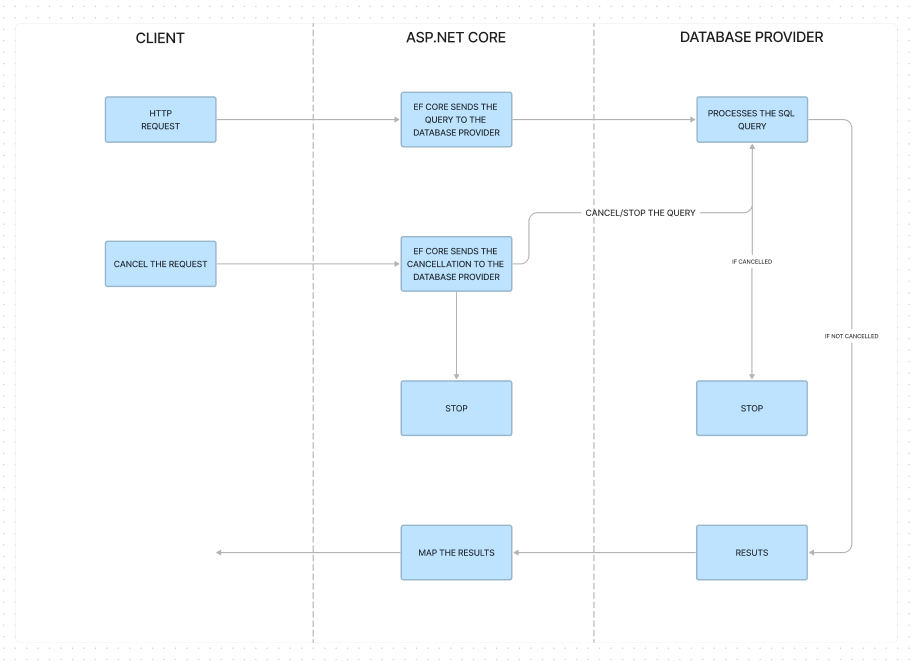
For a portfolio query, cancellation is especially useful when a user changes filters quickly or leaves the portfolio page while the API is still querying SQL Server. Without propagation, the HTTP connection may be gone, yet the API can continue consuming connection-pool capacity, database CPU, and application resources.
A useful interview formulation is:
A request cancellation token is a cooperative signal representing lost interest in a response. I accept it at the API boundary and pass it to every downstream asynchronous operation that supports it, particularly database and network I/O. That prevents unnecessary work after a client disconnects, but it does not reverse work that may already have committed.
2. Treat the token as part of the request contract
For a request-driven operation, make the token visible at every asynchronous boundary:
- The controller accepts the token supplied by ASP.NET Core.
- The application service accepts and forwards it.
- The repository accepts and forwards it to EF Core.
- Any external client, file operation, delay, or loop also receives it if its API supports cancellation.
Keep CancellationToken as the final parameter. This is the conventional .NET signature shape, makes calls readable, and allows static analysis to detect missed propagation.
Here is a compact capstone implementation. The endpoint’s full HTTP semantics and validation will be strengthened in the next lesson; for now, focus on the asynchronous request path.
[ApiController]
[Route("api/portfolios")]
[Authorize]
public sealed class PortfoliosController : ControllerBase
{
    private readonly IPortfolioSummaryService _portfolioSummaryService;

    public PortfoliosController(
        IPortfolioSummaryService portfolioSummaryService)
    {
        _portfolioSummaryService = portfolioSummaryService;
    }

    [HttpGet("{id:guid}/summary")]
    public async Task<ActionResult<PortfolioSummaryResponse>> GetSummary(
        [FromRoute] Guid id,
        CancellationToken cancellationToken)
    {
        var summary = await _portfolioSummaryService.GetSummaryAsync(
            id,
            cancellationToken);

        return summary is null ? NotFound() : Ok(summary);
    }
}
The token is not created by your controller, and the controller should not try to cancel it. ASP.NET Core owns the underlying request-abort signal. Your responsibility is to pass it onward.
Define the service boundary explicitly:
public interface IPortfolioSummaryService
{
    Task<PortfolioSummaryResponse?> GetSummaryAsync(
        Guid portfolioId,
        CancellationToken cancellationToken);
}
Then forward the token into the repository call:
public sealed class PortfolioSummaryService : IPortfolioSummaryService
{
    private readonly IPortfolioRepository _portfolioRepository;

    public PortfolioSummaryService(
        IPortfolioRepository portfolioRepository)
    {
        _portfolioRepository = portfolioRepository;
    }

    public async Task<PortfolioSummaryResponse?> GetSummaryAsync(
        Guid portfolioId,
        CancellationToken cancellationToken)
    {
        cancellationToken.ThrowIfCancellationRequested();

        var portfolio = await _portfolioRepository.GetByIdAsync(
            portfolioId,
            cancellationToken);

        if (portfolio is null)
        {
            return null;
        }

        // This check matters if response construction becomes non-trivial.
        cancellationToken.ThrowIfCancellationRequested();

        return PortfolioSummaryResponse.From(portfolio);
    }
}
Finally, let EF Core observe the same token:
public interface IPortfolioRepository
{
    Task<Portfolio?> GetByIdAsync(
        Guid id,
        CancellationToken cancellationToken);
}

public sealed class EfPortfolioRepository : IPortfolioRepository
{
    private readonly PortfolioDbContext _dbContext;

    public EfPortfolioRepository(PortfolioDbContext dbContext)
    {
        _dbContext = dbContext;
    }

    public Task<Portfolio?> GetByIdAsync(
        Guid id,
        CancellationToken cancellationToken)
    {
        return _dbContext.Portfolios
            .AsNoTracking()
            .SingleOrDefaultAsync(
                portfolio => portfolio.Id == id,
                cancellationToken);
    }
}
Notice that EfPortfolioRepository.GetByIdAsync does not need the async keyword. It returns the Task produced by EF Core directly and does no extra work. That is fully asynchronous and avoids an unnecessary compiler-generated async state machine.
The application service does need async, because it awaits the repository and then performs a decision and mapping step.
3. Forward cancellation to the operation that can actually stop
The most useful place for a token is at the actual I/O boundary. Passing a token only through controller and service signatures is incomplete if the repository silently drops it.
The same pattern applies to the APIs you will use in the capstone:
| Work type | Prefer | Avoid |
|---|---|---|
| EF Core query | ToListAsync(cancellationToken), SingleOrDefaultAsync(cancellationToken) | Calling the overload without a token |
| EF Core write | SaveChangesAsync(cancellationToken) | SaveChanges() in a request path |
| Outbound HTTP | SendAsync(request, cancellationToken) | Calling an overload that ignores cancellation |
| Artificial or polling delay | Task.Delay(delay, cancellationToken) | Thread.Sleep(...) or token-free delays |
| File I/O | Async file APIs with a token where available | Synchronous disk reads in an API request |
| CPU loop over many records | ThrowIfCancellationRequested() periodically | Waiting until every item is processed |
For CPU-bound work, checking on each item can be excessive if the loop is extremely tight. Instead, choose a meaningful batch boundary:
foreach (var batch in holdingBatches)
{
    cancellationToken.ThrowIfCancellationRequested();

    foreach (var holding in batch)
    {
        CalculateHoldingMetrics(holding);
    }
}
Do not add Task.Run merely to make ordinary I/O “asynchronous.” EF Core and HttpClient already expose asynchronous I/O APIs. Wrapping I/O in Task.Run spends an additional thread-pool worker without making the database or network operation more scalable.
For a short in-memory mapping such as PortfolioSummaryResponse.From(portfolio), a cancellation check is not always necessary. It becomes worth adding once the step includes substantial computation, a large collection transformation, image processing, report generation, or repeated calls.
Stop wasting server resources by properly using CancellationToken in .NET
Watch “Stop wasting server resources by properly using CancellationToken in .NET” by Nick Chapsas. It demonstrates the practical failure mode: a client aborts a request, but server work continues because the token was not forwarded.
Watch the uncancelled request to see why abandoned work still reaches the database. Then watch the propagated token, focusing on the controller, interface, repository, and database-command boundaries through which the same token is passed.
4. Cancellation and sync-over-async are separate problems
Code can accept and forward a CancellationToken yet still be harmful under load if it blocks waiting for asynchronous work.
Sync-over-async means synchronously waiting on a Task that should have been awaited. The most common forms are:
// Do not do this in an ASP.NET Core request path.
var portfolio = _portfolioRepository
    .GetByIdAsync(id, cancellationToken)
    .Result;
// Do not do this either.
_portfolioRepository
    .GetByIdAsync(id, cancellationToken)
    .Wait();
// Also synchronous blocking, despite looking more deliberate.
var portfolio = _portfolioRepository
    .GetByIdAsync(id, cancellationToken)
    .GetAwaiter()
    .GetResult();
Each blocks the current thread while the database or network operation is pending. Under concurrent traffic, blocked request threads accumulate. The thread pool may then struggle to provide workers for continuations, logging, authorization, and new requests. In some synchronization contexts, blocking can also cause deadlocks; ASP.NET Core usually does not install the older ASP.NET synchronization context, but that does not make thread-pool blocking acceptable.
The correct version is straightforward:
var portfolio = await _portfolioRepository.GetByIdAsync(
    id,
    cancellationToken);
Use await all the way to the request boundary. In practice, this leads to a clear rule:
If a method starts asynchronous work and needs its result, make the caller asynchronous and await it. Do not convert asynchronous waiting into synchronous blocking just to preserve a synchronous signature.
This does not mean every method must be marked async. A method that simply returns an existing Task, such as the repository method shown earlier, can return it directly. The issue is blocking, not the absence of the async keyword.
Also avoid these adjacent mistakes:
- Do not call
.Resultinside a constructor, middleware, controller, authorization handler, or DI registration factory that performs I/O. - Do not use
async voidfor application methods. UseTaskorTask<T>so errors and cancellation remain observable. - Do not pass
CancellationToken.Nonemerely to quiet an analyzer warning. That explicitly opts out of the request’s cancellation signal. - Do not start fire-and-forget work from a request using its request token. Once the request ends, that work has no valid request lifetime. Durable background processing needs an explicit design, which you will cover later with hosted services and queue-backed work.
ConfigureAwait(false) is not a remedy for sync-over-async. In modern ASP.NET Core application code it is usually unnecessary; it does not justify calling .Result or .Wait().
5. Use CA2016 as a guardrail, then review the gaps it cannot see
The .NET analyzer rule CA2016 identifies a common propagation failure: a method receives a token but calls another method that accepts one without passing it.
Read Microsoft Learn’s explanation of CA2016. It is a focused analyzer rule that helps keep cancellation propagation from regressing during routine feature work and code review.
Read the rule description, then continue through “How to fix violations” and Examples 1 and 2. Notice that the recommended fix forwards the received token; explicitly passing default or CancellationToken.None only suppresses the warning and should be a deliberate, documented exception.
Enable the rule at warning level in the capstone’s .editorconfig:
[*.cs]
dotnet_diagnostic.CA2016.severity = warning
For example, this service has accepted cancellation but accidentally discarded it:
public async Task<Portfolio?> GetPortfolioAsync(
    Guid id,
    CancellationToken cancellationToken)
{
    return await _portfolioRepository.GetByIdAsync(id);
}
The correct code is:
public async Task<Portfolio?> GetPortfolioAsync(
    Guid id,
    CancellationToken cancellationToken)
{
    return await _portfolioRepository.GetByIdAsync(
        id,
        cancellationToken);
}
CA2016 is valuable but not magical. It cannot reliably prove that:
- your own method signatures expose cancellation consistently;
- a third-party library truly honours its token;
- a long CPU loop performs cancellation checks;
- cancellation is safe relative to a business side effect;
- an operation has been made asynchronous rather than hidden behind
.Result.
Use the analyzer as a safety net, then trace the call chain during review.
6. Handle cancellation deliberately; do not disguise it as success
Most token-aware APIs signal cancellation by throwing OperationCanceledException. TaskCanceledException derives from it, so catch the base type if you need to catch cancellation specifically.
At the application-service layer, you often do not need to catch it at all. Let it propagate out of the operation so all layers stop naturally. If you add logging or cleanup, filter the exception to the token you actually own:
try
{
    return await _portfolioRepository.GetByIdAsync(
        portfolioId,
        cancellationToken);
}
catch (OperationCanceledException)
    when (cancellationToken.IsCancellationRequested)
{
    _logger.LogInformation(
        "Portfolio summary request was cancelled for {PortfolioId}",
        portfolioId);

    throw;
}
Do not catch cancellation and return an empty successful response:
// Misleading: an empty portfolio list is not the same as an aborted request.
catch (OperationCanceledException)
{
    return [];
}
The client requested cancellation; it cannot use a replacement response reliably, and returning 200 OK would blur a meaningful operational event into ordinary business data.
Similarly, do not convert a client-aborted request into a 400 Bad Request. When the underlying connection is gone, there is typically no client available to receive an HTTP response anyway. Your main job is to stop work and record cancellation at an appropriate log level, rather than create noisy error logs.
This slightly updates the audit middleware from the previous lesson. A request abort should not be logged as an unexpected server error:
try
{
    await _next(context);
}
catch (OperationCanceledException)
    when (context.RequestAborted.IsCancellationRequested)
{
    _logger.LogInformation(
        "Request cancelled by client: {Method} {Path}",
        context.Request.Method,
        context.Request.Path);

    throw;
}
catch (Exception exception)
{
    _logger.LogError(
        exception,
        "Request failed before a response was produced");

    throw;
}
There is an important write-operation nuance. Suppose a client cancels during a future POST that saves a portfolio change. The cancellation may arrive just after SQL Server has committed but before the response reaches the client. A retry could therefore duplicate the business action unless the API has an idempotency or concurrency strategy. Forward cancellation for resource efficiency, but do not claim that request cancellation provides transactional rollback or exactly-once behavior.
7. Implement and verify the capstone path
Apply this focused checklist to the portfolio tracker now:
- Add a
CancellationToken cancellationTokenparameter to one controller action that performs an EF Core read. - Add the same final parameter to its application-service and repository contracts.
- Forward the exact token into EF Core’s asynchronous query method.
- Search the affected request path for
.Result,.Wait(), and.GetAwaiter().GetResult(). Replace each withawaitor restructure the caller to return aTask. - Enable CA2016 as a warning and resolve any new findings by forwarding the token.
- Add a temporary development-only diagnostic delay, if useful, and cancel the request from Postman or the browser. Confirm through logs that work after the awaited delay or query does not execute.
A small unit-level check can verify propagation without requiring a real database. A hand-written test double records the token received by the repository, and the test asserts that the service passed through the same token. Later, you will formalize this kind of verification with xUnit, integration tests, and WebApplicationFactory.
For code review, inspect the operation in this order:
| Review point | Expected evidence |
|---|---|
| Controller boundary | A final CancellationToken parameter |
| Service contract | Token present and forwarded unchanged |
| Repository or client | Token passed to EF Core or HTTP async overload |
| Async behavior | Every required task is awaited or returned as Task |
| Blocking scan | No .Result, .Wait(), or .GetAwaiter().GetResult() |
| Cancellation handling | No conversion of cancellation into fake successful data |
| Logging | Client cancellation is distinguishable from a server failure |
Key takeaways
- ASP.NET Core binds a controller
CancellationTokento the request-abort signal. - Cancellation is cooperative: it becomes effective only when downstream database, HTTP, delay, file, or CPU-bound code observes the token.
- Pass the token from controller to service to repository, with
CancellationTokenas the final parameter. - Use token-aware EF Core methods such as
SingleOrDefaultAsync,ToListAsync, andSaveChangesAsync. - Keep request processing async all the way through.
.Result,.Wait(), and.GetAwaiter().GetResult()block threads and can cause thread-pool starvation under load. - CA2016 helps detect missed propagation, but review still needs to examine I/O calls, CPU loops, and business-side-effect safety.
- A cancelled request is not a successful empty response, and it does not guarantee that a partially completed write was rolled back.
Next, you will turn this operational skeleton into a more complete portfolio REST endpoint: appropriate HTTP status codes, explicit request validation, and consistent Problem Details errors.
Can't find a good explanation? Sign up and we'll make it for you
Sign up