Recommended resources
The freely available resources this lesson will direct you to.
Introduction
Welcome back! In our last lesson, you accomplished a huge milestone by "batching" an entire week's worth of content. You now have a folder with finalized videos, graphics, and captions, all ready to go. This is the secret weapon of efficient creators, freeing you from the daily pressure of content creation.
Today, we'll complete this workflow by automating the final step: publishing. Instead of having to log in and post manually every day, you'll learn how to use free tools to schedule your content in advance. This is how you achieve true consistency and reclaim your time.
By the end of this 60-minute lesson, you will be able to use a free scheduling tool to schedule your batched posts for Instagram, Facebook, TikTok, Pinterest, and X, ensuring they go live at the perfect time without any manual effort from you.
1. Why Schedule? The Power of Automation
Before we dive into the "how," let's quickly cover the "why." You've already done the hard work of batching your content. Scheduling is the final piece of the puzzle that lets you:
- Stay Consistent: Your content goes out on schedule, even on your busiest days. Consistency is one of the most important factors for growth on any social media platform.
- Post at Optimal Times: These tools can help you post when your audience is most active, increasing the chance of engagement, even if that time is inconvenient for you.
- Reduce Stress: Once your week is scheduled, you can relax. You've created a system that works for you in the background, allowing you to focus on engaging with your community.
For your needs, we'll focus on two excellent and free tools:
- Meta Business Suite: The official, free tool for scheduling content on Facebook and Instagram.
- Buffer: A third-party tool with a great free plan that lets you schedule for other platforms like TikTok, Pinterest, and X.
2. Scheduling for Instagram & Facebook with Meta Business Suite
Meta Business Suite is the best place to start because it's the native tool for two of your key platforms. It’s powerful, completely free, and perfectly integrated.
To begin, let's get a clear overview of what the tool does and how to get it set up.
Meta Business Suite: What It Is and How to Use It
This article from Buffer, 'Meta Business Suite: What It Is and How to Use It,' provides a great introduction. It explains the key features and walks through the initial setup process.
Read the first two main sections: 'What is Meta Business Suite?': Focus on the key features, especially content creation and scheduling. 'How to start using Meta Business Suite': Follow the steps to ensure your account is set up correctly. You likely did much of this when you created your Business/Creator accounts.
Your Action Plan: Schedule a Post with Meta Business Suite
Now let's put this into practice. The following video tutorial provides a clear, step-by-step walkthrough of the scheduling process.
Ultimate Meta Business Suite Tutorial for Beginners (Updated for 2025)
This 'Ultimate Meta Business Suite Tutorial for Beginners' by Stewart Gauld gives a fantastic visual guide to scheduling. We'll use it to schedule your first post.
Follow along with the video to schedule the Instagram Carousel post you created in the last lesson. Get Set Up (00:32 - 02:32): Watch this section to make sure your Facebook Page and Instagram account are properly connected in the Business Suite. Create & Schedule (02:32 - 05:59): This is the core of the task. Follow the steps to upload your carousel images and caption. Pay close attention to how you can customize the post for Facebook and Instagram. When you get to the scheduling option (around 05:02), pick a date and time for your post to go live. View in Planner (14:35 - 15:05): After scheduling, watch this short clip to see how to use the 'Planner' to view your content on a calendar.
Once you've scheduled your post, it will appear in the Planner view. This calendar gives you a bird's-eye view of your content strategy, which is incredibly useful for spotting gaps and ensuring a good mix of content.

3. Scheduling for TikTok, Pinterest & X with Buffer
While Meta Business Suite is perfect for Facebook and Instagram, you need another tool to manage your other platforms. This is where Buffer comes in. Its free plan is generous and allows you to connect up to three channels, perfect for covering TikTok, Pinterest, and X.
How to Automate Social Media Posts with Buffer (2026)
This article, 'How to Automate Social Media Posts with Buffer,' explains the benefits of using Buffer and why it's a favorite among creators for its simplicity and power.
Read the following sections to understand Buffer's core functionality: 'What Is Buffer?': Get familiar with what the tool does and the platforms it supports. 'Benefits of Automating Social Media Posts With Buffer': This reinforces why we are adding this step to our workflow. 'How to Set Up Buffer for Social Media Automation': Read through the steps for creating an account and connecting your channels.
Your Action Plan: Schedule with Buffer
Now, let's use Buffer to schedule the rest of your batched content. The process is just as straightforward as with Meta Business Suite.
Buffer Social Media Post Scheduler | Step by Step Tutorial for Beginners
This 'Buffer Social Media Post Scheduler' tutorial by Joe Zeplin provides a fantastic, beginner-friendly walkthrough. We'll use it to schedule your Pinterest Pin and X thread.
Follow along with the video to get set up and schedule your posts. Sign Up & Connect (00:44 - 01:54): Follow the steps to create your free Buffer account. Then, connect your Pinterest, TikTok, and X (Twitter) accounts. Pay close attention to the requirement for a TikTok Business Account. Schedule a Post (01:54 - 04:03): Use this part of the video as a guide to schedule your Pinterest Pin and your X thread. Notice how Buffer alerts you to platform-specific requirements, like character limits. Find Optimal Times (04:03 - 05:11): This is a key feature. Watch this section to see how Buffer can recommend the best times to post based on your audience's activity. Use this insight when choosing your schedule times.
By using Buffer's scheduling and timing recommendations, you're not just automating your posts—you're making them smarter and more effective.
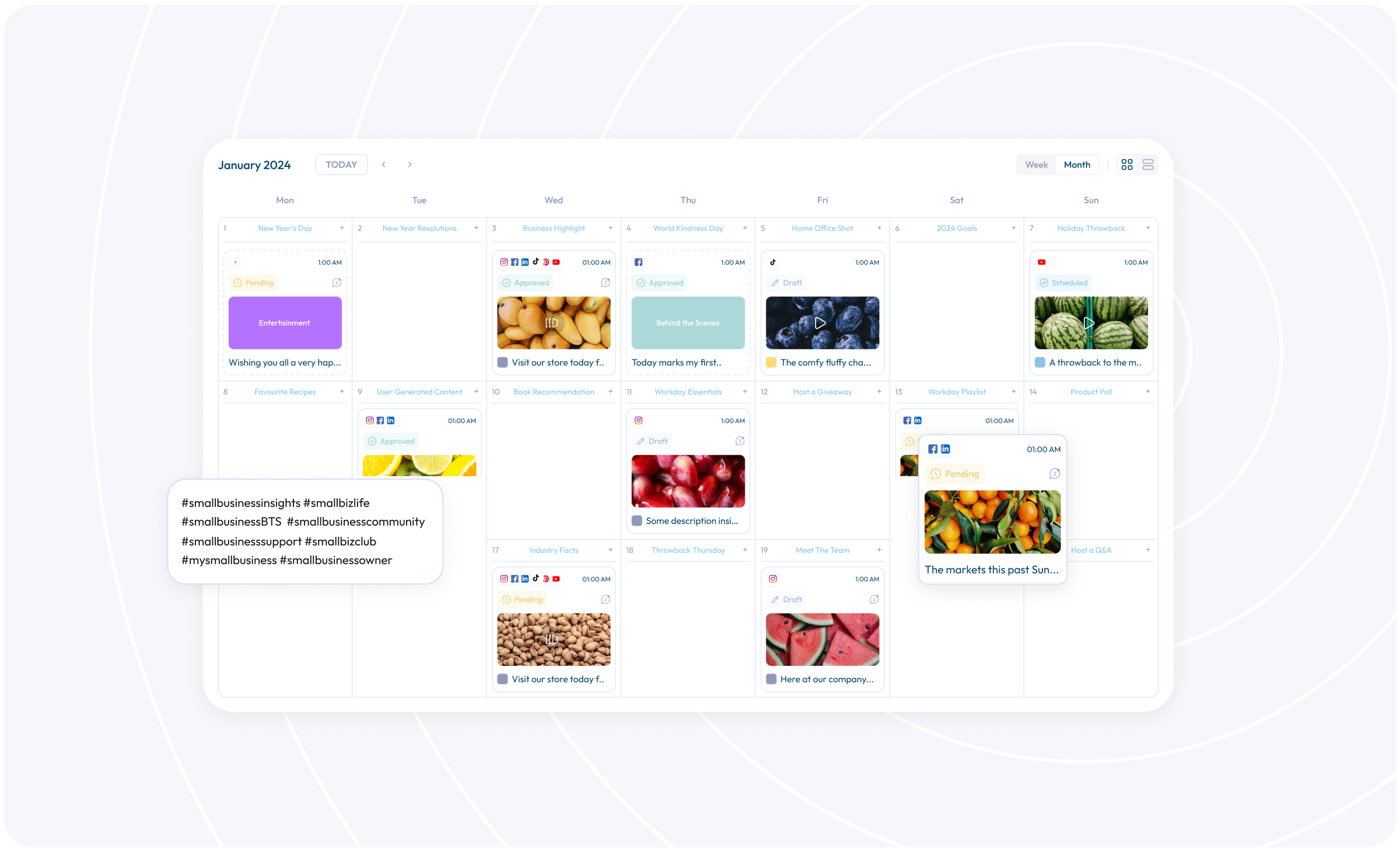
4. Your Final Action Plan: Schedule Your Week
You've learned how to use both tools. Now it's time to bring it all together and schedule the full week of content you batched in the last lesson.
Your Goal: Take your folder of content (1 Reel/TikTok, 1 Carousel, 1 Pin, 1 X thread) and get it all on your content calendar.
-
Open Meta Business Suite:
- Schedule your Instagram Carousel post.
- Schedule your Instagram Reel. (You can also have it post to your Facebook Page at the same time).
- Use the Planner to confirm they are scheduled correctly.
-
Open Buffer:
- Schedule your Pinterest Pin with its title and description.
- Schedule your X thread.
- As a bonus, schedule the same video file from your Reel to your TikTok account. You can adjust the caption and hashtags for the TikTok audience right in Buffer.
Congratulations! You have now fully automated your content publishing for an entire week.
Conclusion
You've just built a complete, professional content workflow. By combining batch creation with automated scheduling, you've moved from being reactive to being strategic. This frees up your time and energy to focus on what really drives growth: creating high-quality content and engaging with your community.
Key Takeaways:
- Scheduling tools are essential for consistency and posting at optimal times.
- Meta Business Suite is the best free tool for scheduling to Facebook and Instagram.
- Buffer's free plan is a perfect complement for scheduling to other platforms like TikTok, Pinterest, and X.
- The full workflow is: Plan -> Batch Create -> Schedule.
Preview of the Next Lesson:
Now that your content is being published consistently, it's time to focus on growth. In our next module, we'll dive into the specific strategies for growing on Instagram and TikTok. We'll start by learning how to research and use hashtags effectively to get your "cheap and cheerful" content discovered by a wider audience.