
Hello! Welcome to your next lesson on asyncio.
Introduction
In our last session, we mastered asyncio.gather(), a powerful tool for running a collection of coroutines concurrently and collecting their results. We saw how it simplifies the code compared to manually managing tasks with asyncio.create_task().
Today, we'll put that knowledge into practice to achieve the learning outcome: Write a program to concurrently fetch data from multiple simulated web endpoints and compare its performance to a sequential approach. This is a quintessential use case for asyncio, as network operations are classic examples of I/O-bound tasks where a program spends most of its time waiting.
By the end of this lesson, you will have built two versions of a web-fetching program, measured their performance, and gained a concrete understanding of the dramatic speed improvements offered by concurrency.
Let's start with a visual that perfectly captures the goal of this lesson.
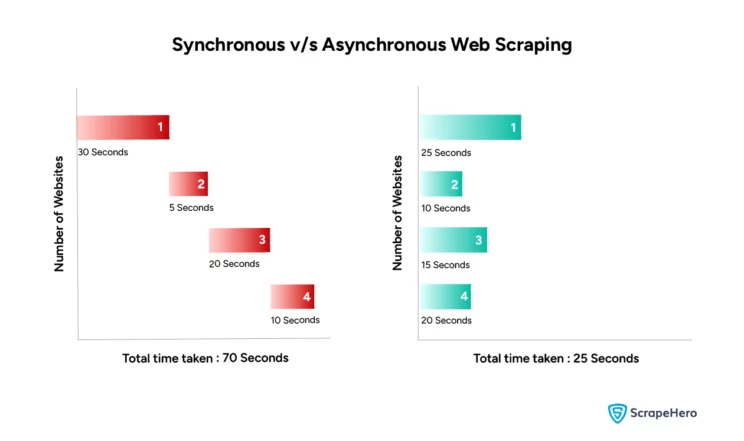
1. Establishing the Baseline: The Sequential Approach
Before we can appreciate the speed of a concurrent program, we need a benchmark. We'll start by writing a simple, synchronous script that downloads content from a list of websites one after another.
For this, we'll use the popular requests library, which is a standard choice for synchronous HTTP operations in Python. If you don't have it installed, you can add it to your environment:
pip install requests
The following article provides a clear, standard implementation of a sequential web-fetching program.
Speed Up Your Python Program With Concurrency
The article 'Speed Up Your Python Program With Concurrency' from Real Python provides an excellent starting point. We'll begin with their synchronous example to create our performance baseline.
Please read the subsection titled 'Synchronous Version'. Focus on the simplicity of the code structure: it uses a standard for loop to iterate through URLs and makes a blocking request for each one.
Here is the code, adapted slightly for our purposes. Create a file named sequential_fetch.py, paste the code below, and run it.
sequential_fetch.py
import time
import requests

def download_site(url, session):
    """Downloads a single site and prints the size of the response."""
    with session.get(url) as response:
        print(f"Read {len(response.content)} bytes from {url}")

def download_all_sites(sites):
    """Downloads all sites in the list sequentially."""
    with requests.Session() as session:
        for url in sites:
            download_site(url, session)

if __name__ == "__main__":
    sites = [
        "https://www.jython.org",
        "http://olympus.realpython.org/dice",
    ] * 15  # Let's fetch 30 sites

    start_time = time.perf_counter()
    download_all_sites(sites)
    duration = time.perf_counter() - start_time

    print(f"\nDownloaded {len(sites)} sites in {duration:.2f} seconds")
When you run this script, you'll notice a distinct pause as it processes each request. The total time is the cumulative sum of the time taken for every single network round-trip. This is the bottleneck we aim to eliminate.
2. The asyncio Solution: Concurrent Fetching
To overcome the sequential bottleneck, we will rewrite our program using asyncio. A critical point here is that we cannot use the requests library, as its operations are blocking. A blocking call would freeze our entire single-threaded asyncio application, defeating the purpose of the event loop.
Instead, we must use an asyncio-compatible HTTP client library. A popular and robust choice is aiohttp.
First, install the library:
pip install aiohttp
Now, we'll refactor our code to be asynchronous. The logic will be similar, but the implementation will leverage async, await, and asyncio.gather() to execute the requests concurrently.
The same Real Python article provides an excellent walkthrough of this conversion.
Speed Up Your Python Program With Concurrency
Let's continue with the Real Python article. The next section details how to convert the synchronous code into a high-performance asynchronous version using aiohttp.
Read the section 'Asynchronous Version'. Pay close attention to these key changes: The use of async def to define coroutines. The async with statement for managing the aiohttp.ClientSession. The pattern of creating a list of tasks (one for each URL). The use of await asyncio.gather(*tasks) to run all tasks concurrently.
Here is the concurrent version of the code. Create a new file named concurrent_fetch.py, paste the code, and run it.
concurrent_fetch.py
import asyncio
import time
import aiohttp

async def download_site(session, url):
    """Downloads a single site asynchronously."""
    async with session.get(url) as response:
        content = await response.read()
        print(f"Read {len(content)} bytes from {url}")

async def download_all_sites(sites):
    """Creates a session and gathers tasks for all sites to be downloaded concurrently."""
    async with aiohttp.ClientSession() as session:
        tasks = [download_site(session, url) for url in sites]
        await asyncio.gather(*tasks, return_exceptions=True)

if __name__ == "__main__":
    sites = [
        "https://www.jython.org",
        "http://olympus.realpython.org/dice",
    ] * 15 # Same 30 sites

    start_time = time.perf_counter()
    # In Python 3.7+, asyncio.run() is the standard way to call the top-level async function.
    asyncio.run(download_all_sites(sites))
    duration = time.perf_counter() - start_time

    print(f"\nDownloaded {len(sites)} sites in {duration:.2f} seconds")
Notice how the output appears much more rapidly and in a non-deterministic order. This is the event loop at work, executing whichever task is ready to proceed.
3. Performance Analysis: Quantifying the Gains
Now for the main event. Compare the execution times printed by sequential_fetch.py and concurrent_fetch.py. The difference should be substantial. On a typical connection, the sequential version might take 5-10 seconds, while the concurrent version could finish in under a second.
This dramatic improvement happens because the asyncio version doesn't wait idly for a server to respond. When it awaits a network operation (like session.get(url)), it yields control to the event loop, which immediately starts or resumes another download task. The total time is now dictated by the longest few requests and network overhead, not the sum of all of them.
The following video provides a great dynamic walkthrough of this exact process, including building the sequential and concurrent versions and comparing their performance.
Next-Level Concurrent Programming In Python With Asyncio
The video 'Next-Level Concurrent Programming In Python With Asyncio' by ArjanCodes demonstrates this concept perfectly using a Pokémon API.
Watch the segment from 06:35 to 09:40. He first demonstrates the slowness of sequential await calls in a loop and then refactors it using asyncio.gather, measuring the time for both. This is exactly the comparison we've just performed.
A Note on HTTP Client Libraries
We used aiohttp, which is a powerful and widely-used library. Another excellent modern choice is httpx. It's notable because it provides a requests-compatible API and can be used for both synchronous and asynchronous code, which can be very convenient. The video by Jie Jenn (cba49) uses httpx to achieve the same result if you're interested in seeing an alternative implementation.
Conclusion
You have successfully built and benchmarked both a sequential and a concurrent web-fetching program, directly fulfilling the learning outcome. This exercise provides a tangible demonstration of asyncio's power for I/O-bound workloads.
Key Takeaways:
- Sequential I/O is a bottleneck: Programs that wait for network or disk I/O in a sequence spend most of their time doing nothing.
asyncioeliminates waiting: By usingawaiton non-blocking operations, a coroutine can cede control, allowing the event loop to run other tasks.- The
gatherpattern is powerful: The pattern of creating a list of coroutines and running them withawait asyncio.gather(*coroutines)is a clean and highly effective way to execute many I/O-bound operations concurrently. - Async libraries are essential: To benefit from
asyncio, you must use libraries (e.g.,aiohttp,httpx) designed with non-blocking operations.
Going Further
Given your background, you might find it interesting that for extremely high-throughput scenarios (tens of thousands of requests), even asyncio on a single CPU core can become a bottleneck due to the Python code running on the event loop. The Klaviyo Tech Blog article, "A Deep Dive into High Performance HTTP Requests," (435c3) explores this and demonstrates how combining asyncio with multiprocessing can push performance even further. This is an advanced pattern but a logical next step in scaling concurrent applications.
Preview of the Next Lesson:
We've focused on fetching a batch of items where we know all the URLs in advance. But what if we're dealing with a source that provides data as a continuous stream—like a live stock ticker feed or messages from a chat server? Simply gathering a predefined list won't work. In our next lesson, we will explore the motivation for asynchronous iterators and generators, which allow us to elegantly process items from I/O-bound streams using the async for loop.
Can't find a good explanation? Sign up and we'll make it for you
Sign up