
Hello! Let's dive into our next lesson on asyncio.
Introduction
In our previous lesson, we unlocked true concurrency by using asyncio.create_task() to schedule coroutines on the event loop. We saw how this allows the event loop to switch between tasks during I/O waits, drastically reducing total execution time. However, the pattern of creating tasks one by one and then awaiting them individually can become cumbersome, especially when dealing with a large number of concurrent operations.
This lesson introduces a more elegant and powerful solution. We will focus on the learning outcome: Use asyncio.gather() to run multiple coroutines concurrently and collect their results. You'll learn how asyncio.gather() simplifies the management of concurrent tasks, making your code more concise and readable without sacrificing performance.
1. From Manual Task Management to asyncio.gather()
While creating and awaiting tasks manually works perfectly well, asyncio provides higher-level APIs to streamline this common pattern. asyncio.gather() is the most fundamental of these APIs. It's designed to run a collection of awaitable objects (like coroutines or tasks) concurrently and "gather" their results into a list.
The key idea is to treat a group of concurrent operations as a single awaitable unit.
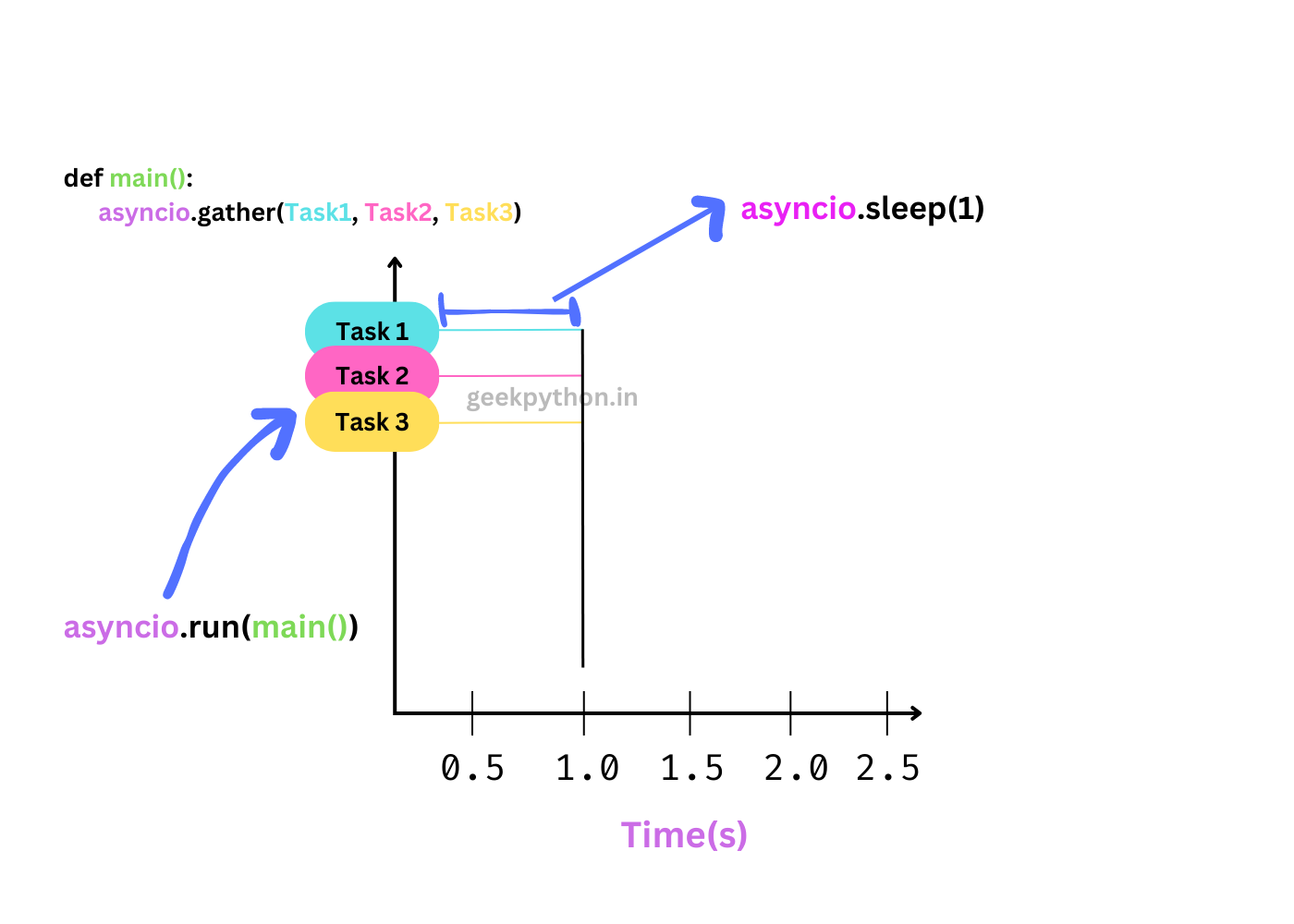
To start, let's read a short article that provides a clear example and a helpful analogy for what gather() does.
Running Parallel Operations with Asyncio Gather
The article 'Running Parallel Operations with Asyncio Gather' by Shane Chang offers a concise introduction to asyncio.gather(). It presents the core functionality with a clear code example.
Read the section 'Gather: Running Multiple Coroutines in Parallel'. Focus on the code example and how it achieves a 3-second runtime for tasks that would sequentially take 6 seconds. The shopping analogy is a simple but effective way to frame the concept.
2. How gather() Works
At first glance, gather() might seem like a simple loop, but it's more sophisticated. When you pass coroutines to asyncio.gather(), it automatically wraps each one in a Task and schedules them on the event loop. It then returns a single Future object that represents the entire group of operations.
When you await this Future, the event loop proceeds with running the tasks concurrently. Your main coroutine remains suspended until all the tasks passed to gather() have completed. Upon completion, the await expression resolves to a list containing the return values of each coroutine, in the same order they were passed in.
A very common and practical pattern is to prepare a list of coroutines and then use the iterable unpacking operator (*) to pass them as separate arguments to gather().
Let's explore these mechanics in more detail.
How to Use asyncio.gather() in Python
The article 'How to Use asyncio.gather() in Python' from Super Fast Python provides a deeper look into the mechanics of gather().
Please read the following three sections: 'How to use Asyncio gather()': This covers the key mechanics, such as how gather() returns a Future and how awaiting it retrieves results. 'Example of gather() For Many Coroutines in a List': This demonstrates the essential * operator for unpacking a list of awaitables. 'Example of gather() With Return Values': This reinforces how the results are collected into a list. Focus on understanding that gather itself is non-blocking and returns an awaitable Future that, when awaited, yields the collected results.
3. Your Turn: Refactoring to asyncio.gather()
Now, let's apply this knowledge. Below is the solution from our previous lesson, where we used asyncio.create_task() to run two coroutines concurrently. Your task is to refactor the main function to use asyncio.gather() instead.
Your Code to Modify:
import asyncio
import time

async def fetch_data(data_id: int, delay: float):
    """A coroutine that simulates a network request."""
    print(f"Starting to fetch data {data_id}...")
    await asyncio.sleep(delay)
    print(f"Finished fetching data {data_id}.")
    return {"data_id": data_id, "content": f"Data for {data_id}"}

async def main():
    """The main entry point for our program."""
    start_time = time.perf_counter()

    print("--- Concurrent Execution with create_task ---")
    # Create tasks and schedule them on the event loop
    task1 = asyncio.create_task(fetch_data(1, 2))
    task2 = asyncio.create_task(fetch_data(2, 3))

    # Await the completion of the tasks to get their results
    result1 = await task1
    result2 = await task2

    print(f"Result 1: {result1}")
    print(f"Result 2: {result2}")

    end_time = time.perf_counter()
    print(f"Total time: {end_time - start_time:.2f} seconds")

if __name__ == "__main__":
    asyncio.run(main())
Instructions:
- Modify the
mainfunction to useasyncio.gather(). - You should be able to achieve the same result in a single
awaitstatement. - The results from
gather()will be a list. Unpack this list to print the individual results. - Run the code and verify that the total time is still approximately 3 seconds.
Click here for the solution
import asyncio
import time

async def fetch_data(data_id: int, delay: float):
    """A coroutine that simulates a network request."""
    print(f"Starting to fetch data {data_id}...")
    await asyncio.sleep(delay)
    print(f"Finished fetching data {data_id}.")
    return {"data_id": data_id, "content": f"Data for {data_id}"}

async def main():
    """The main entry point for our program."""
    start_time = time.perf_counter()

    print("--- Concurrent Execution with gather ---")

    # Run coroutines concurrently and gather results
    results = await asyncio.gather(
        fetch_data(1, 2),
        fetch_data(2, 3)
    )

    # The results are returned as a list in the order the coroutines were provided
    result1, result2 = results

    print(f"Result 1: {result1}")
    print(f"Result 2: {result2}")

    end_time = time.perf_counter()
    print(f"Total time: {end_time - start_time:.2f} seconds")

if __name__ == "__main__":
    asyncio.run(main())
4. Error Handling and Advanced Usage
A crucial aspect of any robust system is how it handles failures. The default behavior of asyncio.gather() is to "fail fast." If any of the awaitables passed to it raises an exception, the gather() call is immediately cancelled, and it propagates the first exception it encounters. This can leave other, longer-running tasks in an indeterminate state—they are not automatically cancelled.
For scenarios where you want to ensure all tasks run to completion, even if some fail, gather() provides the return_exceptions=True argument. When set, gather() will treat exceptions as successful results. The returned list will contain the exception objects for the failed tasks alongside the regular return values for the successful ones. This allows your code to process all outcomes without crashing.
Another important point of comparison is with asyncio.TaskGroup (introduced in Python 3.11), which offers more structured concurrency. A TaskGroup guarantees that if one task fails, all other tasks within the group are automatically cancelled.
The following video explains these trade-offs clearly.
Python Tutorial: AsyncIO - Complete Guide to Asynchronous Programming with Animations
Let's return to Corey Schafer's 'Complete Guide to AsyncIO'. This segment provides an excellent discussion on gather, its error handling, and how it compares to TaskGroup.
Watch the segment from 55:14 to 1:01:40. Pay close attention to the explanation of the return_exceptions parameter and the fundamental difference in error handling philosophy between gather and TaskGroup.
To summarize the trade-offs:
asyncio.gather()(default): Fails fast. Good for tightly coupled operations where one failure means the whole batch is invalid.asyncio.gather(..., return_exceptions=True): Runs all tasks to completion. Ideal for independent operations where you want to process as many successful results as possible (e.g., scraping a list of URLs).asyncio.TaskGroup: "All or nothing" with guaranteed cleanup. If one task fails, all others in the group are cancelled. This is often the safest and most robust choice for modern Python applications.
Conclusion
In this lesson, you've added asyncio.gather() to your toolkit, a powerful and convenient function for managing concurrent operations.
Key Takeaways:
asyncio.gather()simplifies running multiple awaitables concurrently by wrapping them in a singleFuture.- It collects results in a list, ordered according to the input awaitables.
- It's common to use the
*operator to unpack a list of coroutines intogather(). - Error handling is a critical consideration: by default,
gather()fails fast, butreturn_exceptions=Trueallows you to collect exceptions as results. - For structured concurrency with guaranteed cleanup,
asyncio.TaskGroupis often a more robust alternative.
Preview of the Next Lesson:
We now have two solid patterns for concurrency: manual asyncio.create_task() and the convenient asyncio.gather(). In the next lesson, we will apply these concepts to a practical challenge: writing a program to concurrently fetch data from multiple simulated web endpoints and formally comparing its performance against a sequential approach. This will solidify your understanding of the real-world benefits of asyncio.
Can't find a good explanation? Sign up and we'll make it for you
Sign up