
Hello. In the last lesson, you chose among formula fields, validation rules, roll-up summaries, and Flow by focusing on the behavior required: calculate, block, aggregate, or automate. This lesson adds the timing dimension. A validation rule that was correct in isolation can still fail unexpectedly if a Flow or trigger changes the record just before validation; an after-save Flow can create work that rolls back if an earlier part of the transaction fails.
Salesforce’s order of execution is the platform’s lifecycle for a save transaction: a user edit, API update, Flow update, or Apex DML operation. You do not need to recite every numbered step from memory. You do need to trace the major phases accurately enough to debug “why didn’t this save?” and “why did this automation run twice?”—both common job-interview and production-support questions.
By the end, you will be able to narrate a record update from incoming field values through validation, declarative automation, triggers, commit, and asynchronous work.
The central distinction: saved is not committed
Consider a user changing a Subscription__c record from Pending to Active. Clicking Save starts a transaction, not a sequence of separate permanent writes.
During the transaction, Salesforce may:
- update fields on the Subscription;
- run record-triggered Flows and Apex triggers;
- enforce validation and duplicate rules;
- create related records such as a provisioning request or onboarding Case;
- update a parent through a roll-up summary;
- enqueue asynchronous work.
Many of those actions occur before Salesforce reaches the final database commit. If a synchronous step fails—because a validation rule blocks the record, a duplicate rule blocks it, or Apex throws an unhandled exception—Salesforce rolls back the transaction. The Subscription and its related synchronous changes do not persist.
This gives us the first rule:
“After save” does not mean “after commit.”
After-save triggers and after-save Flows run after Salesforce has written the record within the transaction, but before the entire transaction is final.
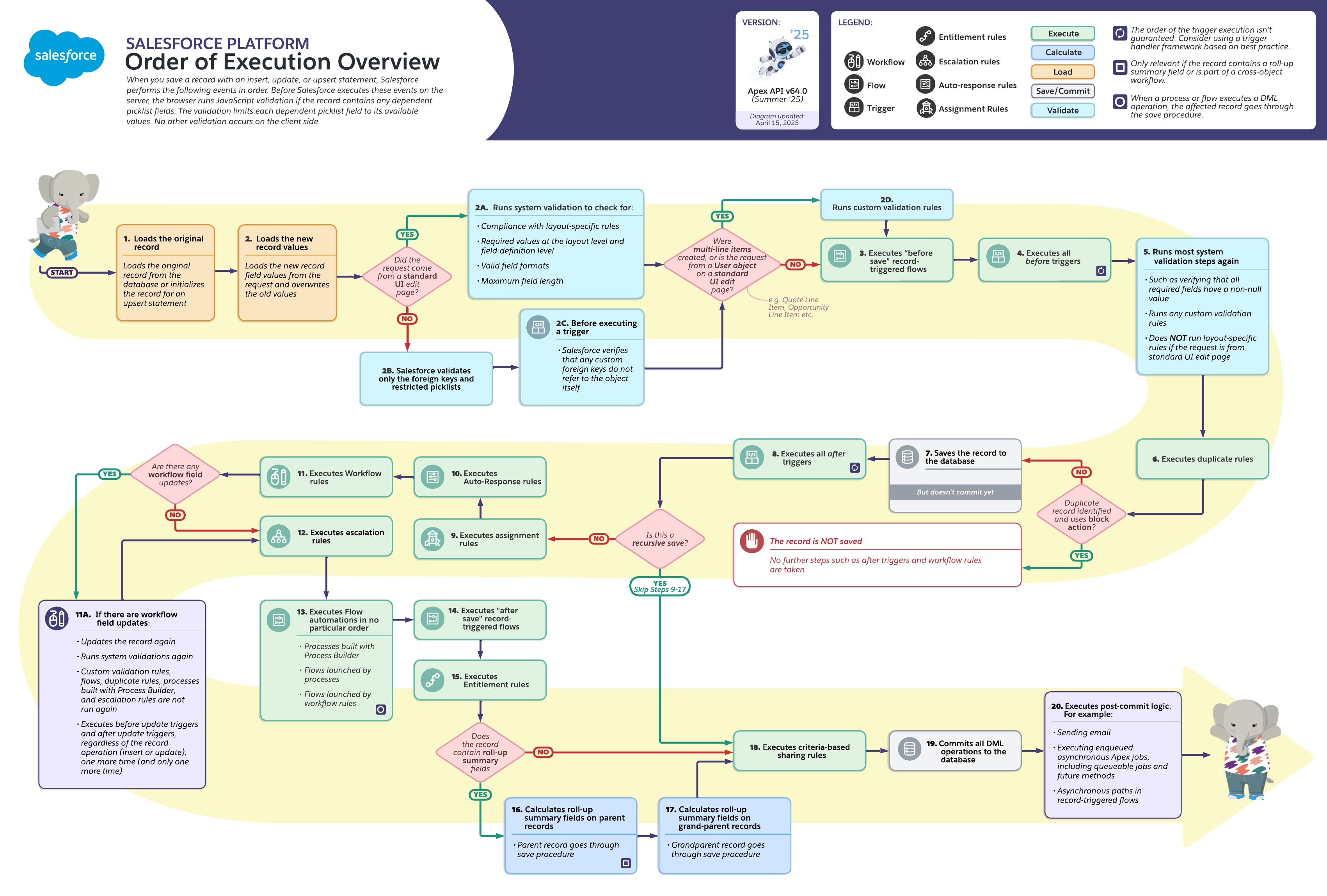
The official Salesforce Platform Order of Execution Overview is worth keeping as a reference diagram. Its detailed numbered steps are useful when several kinds of automation coexist; for routine reasoning, we will organize them into a handful of meaningful phases.
Phase 1: Salesforce constructs the proposed record
For an update, Salesforce first loads the original record from the database and then overlays the incoming values. At this point, it has both:
- the old database state, such as
Status__c = Pending; - the proposed new state, such as
Status__c = Active.
This distinction is crucial in Apex triggers. A trigger can compare old and new values to determine whether a meaningful change occurred. Later in the course, this becomes the foundation for idempotent automation: perform work when a status actually changes, not merely because an update occurred.
Salesforce also performs initial checks. The exact checks vary by entry point:
- A standard Salesforce UI edit applies page-layout-related constraints as well as field definition and format checks.
- API and Apex updates do not use page layouts in the same way, so you should not treat a page layout as a universal integrity control.
- Relationship and foreign-key integrity must still hold.
This is why a field that merely appears required on a page layout may not protect an integration path. If the value is a true business requirement regardless of how the record is saved, enforce it at the field-definition level where appropriate or with a validation rule.
Phase 2: before-save automation prepares the record
Next come the mechanisms that can adjust the record before it is written to the database:
- Before-save record-triggered Flows
- Before Apex triggers
- System and custom validation checks
- Duplicate rules
The ordering matters. A before-save Flow has the first opportunity to update fields on the triggering record. A before trigger follows and can also modify the pending record in Apex. Salesforce then validates the resulting values.
For our Subscription update, suppose the business has this design:
- A before-save Flow normalizes a service-location code and assigns a routing region.
- A before update trigger derives a technical activation key when
Status__cchanges to Active. - A validation rule requires an activation date whenever status is Active.
- A duplicate rule blocks reuse of a unique external order reference.
The validation rule evaluates the record after the before-save Flow and before trigger have had an opportunity to change it. This can be helpful: a Flow may populate a valid value before validation occurs. It can also create defects: a Flow or trigger may set a field combination that violates validation logic, causing the full transaction to fail.
A disciplined design assigns clear ownership of each field. For example, do not allow both a before-save Flow and a before trigger to independently decide the routing region. Timing tells you which one wins, but that is not a reliable design strategy.
Validation rules are a transaction gate
From the previous lesson, remember that a validation rule formula returns TRUE for an invalid state. At this stage, Salesforce checks the business rule against the record’s final pre-save values.
If the user sets the Subscription to Active but neither user input nor automation supplies Activation_Date__c, the validation rule stops the save. Nothing later runs:
- no after trigger;
- no after-save Flow;
- no provisioning request;
- no post-commit integration job.
Duplicate rules follow validation. If a matching record is found and the rule is configured to block, Salesforce similarly stops the transaction before the record proceeds to later automation.
This is a useful debugging shortcut:
| Symptom | Most likely phase to inspect first |
|---|---|
| User sees a validation or duplicate error | Pre-save validation and duplicate-rule phase |
| An after trigger never logged or ran | Check whether validation or duplicate handling stopped the save |
| A field is unexpectedly changed before validation | Before-save Flow and before trigger logic |
| An integration never received an event | Determine whether the transaction ever committed |
Watch this concise walkthrough before moving into the post-save stages.
Order of Execution in Salesforce | EXPLAINED | Salesforce Makes Sense
“Order of Execution in Salesforce | EXPLAINED” by Salesforce Makes Sense narrates the main lifecycle from an incoming update through commit. Watch it to reinforce the placement of before-save Flow, triggers, validation, and post-commit work.
Watch record setup for the original-versus-new record distinction and source-dependent validation. Then watch pre-save processing, focusing on why validation and duplicate rules can prevent later automation. Finish with post-save stages to place legacy automation, after-save Flows, roll-ups, commit, and asynchronous work in the overall sequence.
Phase 3: the record is saved, but the transaction remains reversible
Once validation and duplicate checks pass, Salesforce saves the record to the database but does not yet commit it.
For a new record, this is the point at which it has a Salesforce record ID available to later logic. For an update, Salesforce has written the changed values inside the active transaction. Either way, the write can still be rolled back.
Then Salesforce runs after triggers.
The practical boundary between before and after automation is not just terminology:
| Context | Best suited to | Key constraint |
|---|---|---|
| Before-save Flow | Fast field updates on the triggering record | Cannot perform the broader related-record actions of after-save Flow |
| Before trigger | Preparing or validating the pending record with Apex logic | Should not require the record’s post-save state |
| After trigger | Creating or updating related records, and work requiring a saved record | Any failure can still roll back the original save |
| After-save Flow | Actions and related records after the triggering record is saved | It still runs before final commit |
An after trigger on the activated Subscription might create a Provisioning_Request__c. That insertion is itself DML, so the Provisioning Request goes through its own relevant save lifecycle. If a validation rule on Provisioning_Request__c fails, the Subscription activation fails too, because both changes are part of one synchronous transaction.
That behavior is often surprising to new developers, but it is desirable: Salesforce prevents a half-completed business process from being committed accidentally.
Phase 4: post-save synchronous automation
After triggers, Salesforce continues through several platform features. Not every feature applies to every object or organization, but their placement matters when diagnosing legacy-heavy environments.
The useful broad sequence is:
- Assignment rules, where applicable, such as Lead or Case ownership assignment.
- Auto-response rules, where applicable.
- Workflow rules, including legacy workflow field updates.
- Escalation rules, typically relevant to Cases.
- Legacy process automation and Flow launches associated with those mechanisms.
- After-save record-triggered Flows.
- Entitlement rules, where applicable.
- Roll-up summary and certain cross-object calculations.
- Criteria-based sharing evaluation.
The exact numbered reference is useful because older organizations can contain several generations of automation at once. Use the Apex Hours cheat sheet as a review reference rather than trying to memorize each number in isolation.
Order of execution in Salesforce - Apex Hours
Apex Hours’ “Order of execution in Salesforce” provides a compact 20-step reference. Read it after the conceptual model above to connect each platform feature to its precise place in a transaction.
In the article’s opening 20-step cheat-sheet, read the full checklist from the initial-record load through the final after-commit stage. Focus especially on the distinction between the uncommitted database save, after triggers, after-save record-triggered Flows, roll-up updates, and the final commit.
The legacy workflow field-update exception
Workflow Rules are legacy automation, but they remain relevant when maintaining existing orgs. A workflow rule that performs a field update causes a special additional update cycle.
In simplified terms, Salesforce:
- applies the workflow field update;
- reruns relevant system validation;
- fires before-update and after-update triggers one additional time.
Custom validation rules do not run again in that special workflow-update cycle. The additional trigger execution occurs at most once for that workflow field update path.
This is a classic source of “Why did my update trigger run twice?” bugs. If an old workflow rule changes a field after your trigger’s initial execution, the trigger may see a second update. Trigger logic must therefore be designed to tolerate re-entry and to act only when the business condition truly requires action.
Record-triggered Flows have a more explicit placement:
- Before-save Flows occur early, before before triggers.
- After-save Flows occur later, after the record has been saved within the transaction and after several legacy automation stages.
For Flows of the same type on the same object, Salesforce provides ordering controls in Flow Trigger Explorer. That is helpful, but it does not eliminate the need to understand interactions with validation rules, triggers, related-record DML, and older automation.
Phase 5: parent effects, commit, and post-commit work
The original record may not be the only record affected.
Roll-up summaries can start a parent save procedure
Suppose Subscription_Component__c is a detail record in a master-detail relationship with Subscription__c. Updating a component’s Monthly_Charge__c can recalculate a roll-up summary on its parent Subscription.
Salesforce updates that parent record through its own save procedure. In practice, that means automation on the parent can run. If a parent has another roll-up relationship, the effect can extend to a grandparent.
This is why an apparently simple child-record update can produce debug-log entries for several objects. When tracing a defect, do not stop at automation directly attached to the record the user edited; examine parent automation affected by roll-ups too.
Commit makes the transaction durable
After synchronous logic succeeds, Salesforce evaluates relevant criteria-based sharing and then commits all DML operations. At that point, the transaction’s record changes are durable.
Only then does Salesforce run post-commit logic, including examples such as:
- asynchronous Apex work, including Queueable and future jobs;
- asynchronous paths in record-triggered Flows;
- email sends;
- other deferred platform processing.
Return to the activation scenario. An after trigger or after-save Flow might enqueue a Queueable job that calls an external provisioning system. The Subscription activation must successfully commit before that job executes. If the transaction is rolled back, the job is not executed as a consequence of that failed transaction.
This gives a second important rule:
Synchronous automation participates in the current transaction; asynchronous work begins after a successful commit and has its own failure handling.
The next modules will examine asynchronous Apex, retries, and integration idempotency in detail. For now, use the commit boundary as the line between work that can roll back the current save and work that must handle failure separately.
Trace a record update with a repeatable method
When you debug or explain a scenario in an interview, avoid reciting a long list immediately. Start with the record and then trace outward.
For an update to a Subscription, use this method:
-
Identify the entry point. Is this a UI edit, API upsert, import, Apex DML operation, or a Flow’s update? This affects initial validation behavior and tells you what initiated the transaction.
-
List direct automation in phase order. Start with before-save Flow, then before triggers, then validation and duplicate rules. Continue with after triggers and after-save Flow.
-
Identify every additional DML operation. If an after trigger creates a Provisioning Request, that new record has its own save processing. If a Flow updates an Account, trace the Account too.
-
Check parent propagation. Ask whether master-detail roll-ups or cross-object behavior cause parent or grandparent records to be updated.
-
Locate the commit boundary. Determine which work must finish before commit and which work begins only after commit.
-
Find the first failing synchronous step. Salesforce rolls back downstream work, so the earliest error is normally more informative than the final symptom.
A concise interview-quality explanation might sound like this:
“The user’s Subscription values are loaded and initial checks run. The before-save Flow and before trigger can prepare the pending record, then the activation validation rule and duplicate rule decide whether the save can proceed. Salesforce writes the record without committing, runs after-trigger and post-save automation, and any related-record DML follows its own save procedure. If all synchronous work succeeds, Salesforce commits; asynchronous provisioning work then runs after commit.”
Notice that this explanation is accurate without being a brittle recital of twenty numbered steps.
Key takeaways
A Salesforce record update is a single transaction until commit:
- Salesforce loads the prior record and overlays incoming values.
- Before-save Flow runs before before triggers; both can prepare the pending record.
- Validation rules and duplicate rules can stop the transaction before after automation begins.
- The record is saved before after triggers and after-save Flows run, but it is not committed yet.
- Related-record DML and roll-up summary updates can cause other records to enter their own save procedures.
- Legacy workflow field updates can cause before-update and after-update triggers to run one additional time.
- Commit makes the transaction durable; asynchronous Apex, asynchronous Flow paths, and similar post-commit work execute afterward.
Next, you will move from transaction behavior to authorization: determining what a user can do to an object and its fields through profiles, permission sets, and permission-set groups.
Can't find a good explanation? Sign up and we'll make it for you
Sign up