
Good to see you again. In the previous lesson, you separated object permissions and field-level security from the page layouts and tabs that merely shape the interface. You learned that a user can have Account Edit at the object level yet still be unable to edit a particular Account.
This lesson supplies the missing layer: record access. After Salesforce confirms that a user may act on an object and field, it evaluates whether that user can act on this specific record. This is both a frequent production-support problem and a common Salesforce interview topic: “Why can this user edit one Account but not another?”
By the end, you will be able to trace access from the restrictive baseline through the mechanisms that selectively expand it: organization-wide defaults, role hierarchy, sharing rules, teams, and manual sharing.
Record access is a layered, additive decision
Start with the complete security question. To edit Account A, a user needs all of the following:
- Object permission: Account Read and Edit.
- Field permission: Read and Edit access to each field they intend to change.
- Record permission: Read/Write access to
Account A.
A grant at one layer does not override a restriction at another. For example, if a sharing rule gives a user Read/Write access to an Account but their permission sets grant only Account Read, they can view the record but cannot edit it. Conversely, Account Edit alone does not give the user a route to every Account record.
There are two broad exceptions worth checking early in a real diagnosis:
- View All on an object bypasses ordinary record sharing for viewing.
- Modify All bypasses ordinary sharing for broad management of that object’s records.
When neither is present, Salesforce begins with the record owner and the object’s organization-wide default, then accumulates valid sharing grants. It does not use sharing rules, teams, or manual shares to take access away.
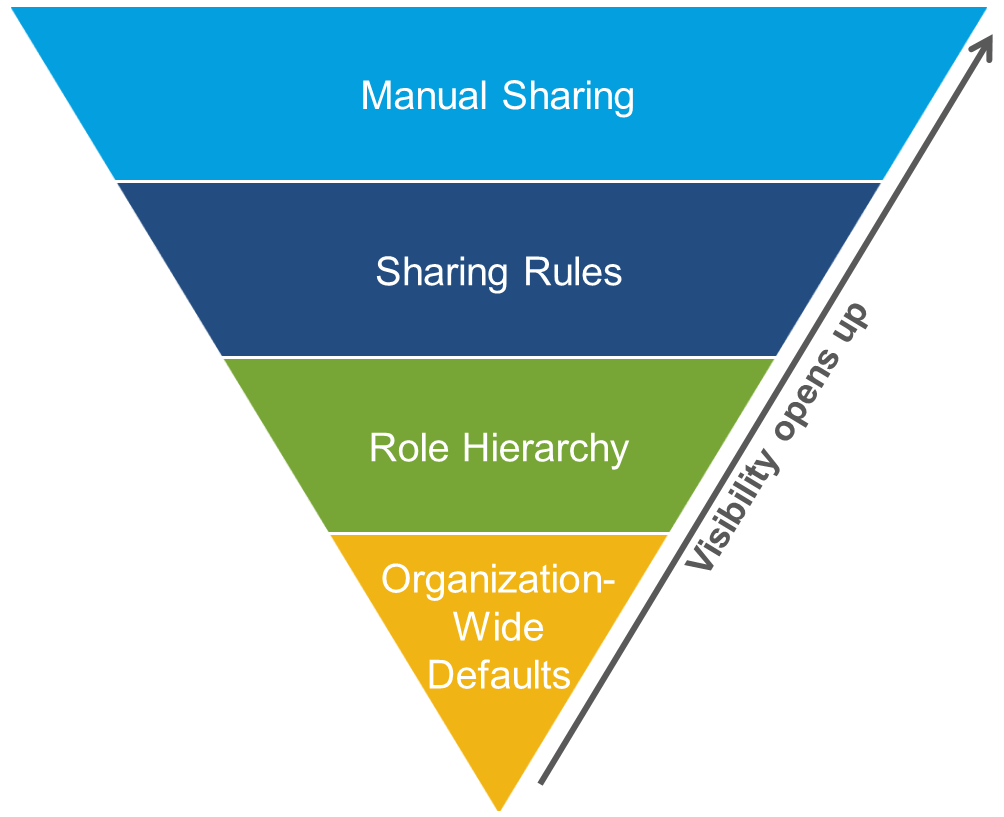
The pyramid is a useful diagnostic model, but do not treat it as a mandatory sequence in which only one mechanism can apply. A user might receive access through several paths at once. Your task is to find any path that supplies the needed record access, while remembering that object and field permissions remain the ceiling.
Read Salesforce Trailhead’s overview before learning each mechanism in detail.
Improve Record Access Control in Your Org
Read “Control Access to Records” from Salesforce Trailhead to establish the baseline model Salesforce uses for record-level security.
In the “Record-Level Security” subsection, read from the record access problem through the list of four controls. Then, in “Organization-Wide Defaults,” read from the OWD explanation, including the definitions of Private, Public Read Only, Public Read/Write, and Controlled by Parent. Finish with the Recruiting-app example immediately below, which shows how the “most restricted user” determines a sensible baseline.
1. Organization-wide defaults: the baseline for records not owned by the user
Organization-wide defaults, usually called OWD, define the default record access for users who do not own a record. Configure them per object in Setup, Sharing Settings.
The design principle is simple:
Set OWD according to the access required by the most restricted legitimate user. Then add access only where a business need justifies it.
For typical internal users, the essential settings are:
| OWD setting | Access to records the user does not own |
|---|---|
| Private | No access by default |
| Public Read Only | Read access and reporting access, but not edit access |
| Public Read/Write | Read and edit access |
| Controlled by Parent | Access follows the parent record’s access |
With Private OWD, record owners can work with their own records, subject to object and field permissions. Other users need another valid route: a hierarchy grant, sharing rule, team membership, or manual share.
With Public Read Only, everyone with object-level Read can view the records, but only owners and users receiving an additional write-capable grant can edit. With Public Read/Write, ordinary record sharing is generally unnecessary because the object is already open to all eligible users.
Controlled by Parent deserves special attention. It is not a looser or stricter version of Private. A detail record inherits access from its parent; access to the parent governs the detail. This commonly occurs with a master-detail relationship, where the child cannot be shared independently in the ordinary way.
Choosing OWD from requirements
Suppose a company stores customer Accounts:
- Sales users should work only with their assigned Accounts.
- Sales managers must oversee their teams’ Accounts.
- Support personnel should see only Accounts assigned to their support program.
- Finance users should not see Accounts at all.
The Account OWD should be Private, not Public Read Only. A Public Read Only setting would reveal every Account to any user who has Account Read, including sales users outside the account team. Once information is visible through OWD, sharing tools cannot make it private again for selected people.
That leads to a reliable interview-ready explanation:
OWD is the organization’s default exposure policy. For sensitive or segmented data, begin with Private and grant access through defined business relationships.
2. Role hierarchy: access travels upward through roles
A role hierarchy represents data visibility, often aligned with management responsibility. It is different from a profile, permission set, or job title:
- A profile or permission set controls what a user can do on an object.
- A role helps determine whose records the user can access.
- Several users can have the same role.
- A role hierarchy need not reproduce the company’s HR reporting chart exactly. Its purpose is data access.
In the usual model, users in a higher role gain access to records owned by users below them. Thus, a sales manager can oversee a sales representative’s Accounts without needing a separate sharing rule for every representative.
Consider these roles:
| Role | User |
|---|---|
| VP of Sales | Elena |
| Regional Sales Manager | Noor |
| Account Executive | Jamal |
If Jamal owns Acme Telecom and Account OWD is Private, Noor can generally access that record through the hierarchy, and Elena can access it as well. A peer Account Executive is not above Jamal and receives no access from the hierarchy merely by being in the same sales organization.
For custom objects, Salesforce provides the Grant Access Using Hierarchies option. When it is disabled, users above the owner’s role do not automatically receive hierarchy-based access to that custom object’s records. This is useful when a reporting structure should not imply access, such as highly sensitive employee assessments. Standard objects generally follow their platform-defined hierarchy behavior rather than offering this same general switch.
A hierarchy answers a predictable question: Should leaders routinely access their subordinates’ work? If the answer is yes, it is a better fit than managing individual shares. If the desired audience crosses departments or does not follow managerial relationships, use a sharing rule or a team instead.
3. Sharing rules: predictable automatic exceptions
A sharing rule automatically grants additional access to a known population of records and a known population of users. It is appropriate when the requirement is stable and repeatable.
Every sharing rule has three parts:
- Which records are shared?
- Who receives access?
- What record access level do they receive?
There are two common ways to select records:
| Rule type | Record selection | Example |
|---|---|---|
| Owner-based | Records owned by selected users, roles, or groups | Share all Accounts owned by the Enterprise Sales role with Customer Success |
| Criteria-based | Records matching field criteria | Share Accounts where Support_Tier__c is “Premium” with the Premium Support group |
The recipient can be a role, a role and its subordinates, a territory-based group where applicable, or a public group. A public group is particularly useful when the audience spans roles, such as a group containing premium-support agents, implementation managers, and renewal specialists.
For example, assume Account OWD is Private. A criteria-based rule could grant the Premium Support public group Read access to all Accounts whose Support_Tier__c equals Premium. Every qualifying Account is shared automatically; new premium Accounts receive the same access once sharing recalculation applies.
Sharing rules are grants, not denials:
- They can grant Read Only or Read/Write.
- They cannot hide records exposed by OWD.
- They cannot overcome missing object permissions.
- They are not ideal when the audience changes record by record in an unpredictable way.
Improve Data Security with Sharing Rules
Read Salesforce Trailhead’s “Define Sharing Rules” to connect the abstract model to the three design decisions behind a sharing rule.
In “Extend Access with Sharing Rules,” read the three components. Then read the Recruiting-app comparison beginning the interviewer example. Focus on why a predictable audience supports a sharing rule, while a changing record-specific audience does not. In “What Are Public Groups?”, review how a public group can combine users and roles that share a business function.
4. Teams: named collaboration around a particular record
A team mechanism is appropriate when several people collaborate on an individual record but ownership should remain clear. It provides more structure than a one-off manual share because it records each person’s business role in the collaboration.
Account Teams are the central example. An Account still has one owner, but it may also involve a sales engineer, customer-success manager, renewal manager, and support lead. Add those users as team members to that Account and give each appropriate access.
For an Account Team member, the administrator or owner can configure record access such as:
- Account access for the Account itself;
- where appropriate, access to related Contacts, Opportunities, or Cases.
The exact team features available are object-specific. Salesforce also provides team concepts for some other standard business processes, such as cases and opportunities. The design principle remains the same: team membership is a targeted, record-centered collaboration grant, not a replacement for OWD or object permissions.
Account Teams are especially useful where different Accounts need different collaborators. A default Account Team can reduce repeated setup when an Account owner regularly works with the same group, while still allowing that team to be added only to the Accounts where it belongs.
What are Account Teams in Salesforce | How to add Account Team Members in Salesforce
Watch “What are Account Teams in Salesforce” by Salesforce Hulk for a visual explanation of how Account Teams complement ownership and enable record-specific collaboration.
Watch the purpose to distinguish the single Account owner from the other people working with that customer. Then watch adding members to see individual users added to an Account Team with an assigned role and access level. Focus on the design reason for choosing a team: the collaborators are determined for a particular Account, rather than being the same stable group for every record.
Teams versus sharing rules
Use this distinction when choosing a design:
| Requirement | Better mechanism | Reason |
|---|---|---|
| Every Premium Account should be visible to Premium Support | Criteria-based sharing rule | The record condition and recipient group are predictable |
| All records owned by a sales division should be visible to its operations group | Owner-based sharing rule | Ownership identifies a stable record set |
| A specific Account has its own sales engineer and success manager | Account Team | Membership is meaningful and differs per Account |
| One employee needs temporary access to one unusual record | Manual sharing | The request is exceptional and narrowly targeted |
5. Manual sharing: a precise exception
Manual sharing grants access to a particular record for a particular user or supported group. It is appropriate when neither a role hierarchy nor a sharing rule expresses the business rule cleanly.
For example, a legal reviewer may need temporary Read access to one strategically important Account during a contract dispute. Creating a sharing rule for that one exception risks exposing too much data. A manual share grants access only to the required record.
Depending on object configuration and the user’s authority, a record can be shared with an individual user, role-based recipient, or public group. The record owner and users with appropriate authority can manage sharing. The exact UI availability and actions depend on the object and the org’s Lightning configuration, but the key point in an access analysis is the same: inspect the record’s sharing information for direct grants.
Manual sharing should not become the default solution to a recurring business process. Hundreds of manual shares create an opaque security model that is hard to audit and vulnerable to missed access changes. If the same sharing decision repeats according to ownership, field values, or a stable group, encode it with a sharing rule. If it repeats around record-specific collaborators, use a team.
A complete access determination
Let’s combine the controls in one scenario.
Configuration
- Account OWD: Private
- Jamal owns
Acme Telecom. - Jamal, Noor, Leah, Maya, and Alex all have Account Read and Edit object permission.
- Noor’s role is above Jamal’s role.
- Leah belongs to the Premium Support public group.
- A criteria-based sharing rule grants Premium Support Read Only access to Accounts where
Support_Tier__c = Premium. Acme Telecomis Premium.- Maya is an Account Team member on
Acme Telecomwith Account Read/Write access. - Jamal manually shares
Acme Telecomwith Alex as Read Only.
Now determine each user’s record access.
| User | Access to Acme Telecom | Reason |
|---|---|---|
| Jamal | Read/Write | He is the record owner and has Account Edit |
| Noor | Read/Write | She receives access through the role hierarchy |
| Leah | Read only | The criteria-based sharing rule matches both the record and her public group |
| Maya | Read/Write | Account Team membership grants access to this Account |
| Alex | Read only | Jamal created a direct manual share |
| Another Account Executive | No access | Private OWD applies, and no other grant is present |
Suppose Leah also has Account Edit from a permission set. She still cannot edit Acme Telecom, because her record-level grant is only Read Only. Object Edit is necessary but not sufficient.
Suppose Alex is given Read/Write manual sharing access but lacks field-level Edit to Annual_Revenue__c. Alex can edit permitted fields on the Account but cannot edit Annual_Revenue__c. The record share does not override FLS.
A practical troubleshooting order
When a user reports missing record access, investigate in this order:
- Identify the object, record, and needed action: view, edit, delete, or another operation.
- Confirm relevant object permissions, including whether View All or Modify All changes the analysis.
- Confirm the required field permissions if the symptom is an edit problem.
- Identify the record owner and the object’s OWD.
- Check whether the user sits above the owner in the role hierarchy, and whether hierarchy access applies to the object.
- Inspect matching owner-based and criteria-based sharing rules, including public-group membership.
- Inspect relevant team membership and its configured access level.
- Check for a manual share on that individual record.
This method avoids a common mistake: beginning with a sharing rule while the real problem is missing Account Read, missing field edit permission, or an overly broad View All grant.
Key takeaways
Record-level security determines which individual records a user can access after object and field permissions have allowed the action.
- OWD supplies the baseline for records the user does not own. Set it for the most restricted legitimate user.
- Role hierarchy normally opens access upward to users in superior roles; it does not grant CRUD permissions.
- Sharing rules automatically grant access for predictable sets of records and users. They can only expand access.
- Teams, such as Account Teams, represent structured collaboration around a particular record and can grant targeted access.
- Manual sharing is best for a specific exception on a specific record, not as the foundation of a recurring process.
- Effective access is the combination of valid record-sharing paths, still constrained by object permissions and field-level security.
Next, you will move from access control to transaction diagnosis: interpreting a debug log to identify the governor limit that caused an Apex transaction to fail.
Can't find a good explanation? Sign up and we'll make it for you
Sign up