
Hello, and welcome to the first lesson in your Salesforce Developer preparation course. We begin with a distinction that looks basic but has real consequences in production work and technical interviews: what exactly are you deploying?
A Salesforce release is rarely just “code.” It may contain object definitions, fields, validation rules, Flow logic, permission assignments, reference values, and live customer records. Treating all of these as the same kind of thing is how deployments become incomplete or unsafe. In this lesson, you will learn to classify a change as metadata, configuration data, or business data, then use that classification to choose a sensible deployment approach.
The central idea: define the system versus operate the system
A useful first cut is this:
- Metadata defines how the Salesforce application is structured and behaves.
- Business data is the operational information the business creates and uses.
- Configuration data consists of values that control or parameterize application behavior without being the everyday operational records of the business.
Consider a simple customer-support implementation:
| Item | Classification | Why |
|---|---|---|
Service Request custom object | Metadata | Defines a new type of record Salesforce can store. |
Priority picklist field and its values | Metadata | Defines the allowed structure and values of the field. |
| Validation rule requiring a reason when priority is Critical | Metadata | Defines behavior enforced by the platform. |
| Record-triggered Flow that notifies an escalation team | Metadata | Defines automation behavior. |
A Service Policy custom object record containing a response-time target | Configuration data | A record, but one that controls how the application behaves. |
| A Custom Metadata Type record mapping country codes to routing queues | Metadata | A special kind of record Salesforce treats as deployable metadata. |
| An actual customer’s Case | Business data | Represents a live customer interaction. |
| An Account, Contact, Opportunity, or survey response | Business data | Represents the operational state of the business. |
The important nuance is that “record” does not automatically mean “business data.” A record can be configuration data, and in the special case of Custom Metadata Types, a record is itself metadata.
Why the wording “configuration” can be confusing
In everyday Salesforce conversation, people often say “configuration” broadly to mean “things changed in Setup.” That broad usage includes metadata: fields, layouts, flows, permission sets, and many other Setup components.
For deployment planning, it helps to use a narrower meaning:
Configuration data is record-level information that determines application behavior, but is stored as data rather than as a standard metadata component.
For example, suppose a Flow looks up a Survey Configuration record to determine:
- which questions to display,
- which region receives notifications,
- how many reminders to send,
- whether a survey is active.
The Flow itself is metadata. The custom object and its fields are metadata. But the 50 Survey Configuration records that set the actual behavior are usually configuration data. They still need to be moved to production, but a traditional Change Set will not move those ordinary custom-object records.
This is why successful deployment work starts with classification, not clicking Deploy.
Change Set Deployment in Salesforce #SalesforceHunt | Deployment
Watch “Change Set Deployment in Salesforce” by Salesforce Hunt for a concise visual explanation of the traditional Change Set boundary: customizations are deployed, while ordinary records are not.
Watch the definition. Focus on the distinction between a Setup customization such as a custom object and operational records such as contacts. Treat the statement as the standard rule for Change Sets; later in this lesson, you will learn the important Custom Metadata Type exception.
Metadata: the deployable definition of the org
Metadata is often summarized as “data about data,” but in Salesforce the practical meaning is more useful:
Metadata is the deployable definition of the application: its schema, behavior, interface, access model, and code.
Typical metadata includes:
- Schema: custom objects, custom fields, relationships, record types, picklist definitions.
- User interface: Lightning record pages, page layouts, tabs, apps, and compact layouts.
- Declarative behavior: validation rules, formula fields, approval processes, and Flows.
- Programmatic behavior: Apex classes, triggers, tests, Lightning Web Components.
- Access configuration: permission sets, permission-set groups, profiles, sharing rules, and custom permissions.
- Application reference definitions: Custom Metadata Types and their records.
A useful test is:
If production needs the same definition, logic, or setup structure as the sandbox, classify it first as metadata.
Imagine you add a Preferred Contact Channel field to Contact. The field definition needs to exist in production before anyone can store values in it. The definition is metadata. Later, a particular contact may have Email selected in that field; that value is business data.
This distinction also reveals dependencies. If you deploy a Flow that writes to the new field before the field exists in the target org, the deployment can fail. A sound release includes the required object, field, permissions, and automation as a coherent unit.
Business data: the live state of the company
Business data represents real entities, events, and decisions in the organization. It is the information users create, edit, report on, and rely on in their daily work.
Examples include:
- customer Accounts and Contacts,
- leads and opportunities,
- support Cases,
- orders and invoices,
- campaign members,
- employee-entered records on custom objects,
- survey responses submitted by customers.
The central risk with business data is not only technical. It is operational. Moving production customer records from one org to another may have privacy, ownership, duplicate, timing, and compliance implications. Even moving test data to production should be questioned: production should receive only data with a clear business purpose.
A Change Set is designed to move metadata, not these live records. Business data generally needs a data migration or integration approach that considers:
- Record identity: Which source record matches which target record? Use stable external IDs where appropriate, not Salesforce record IDs that differ across orgs.
- Relationships: A child record cannot point to a source-org parent ID in production. Parent records must exist and relationships must be remapped.
- Order of loading: Reference records and parents may need to be loaded before dependent records.
- Security and privacy: Sensitive customer data requires deliberate handling and often should not be copied at all.
- Repeatability: A migration should be safe to rerun without creating duplicates or overwriting intentional target-org changes.
You will work with Apex, integrations, and bulk data later in the course. For now, retain the architectural boundary: metadata creates the container; business data fills it with live operational facts.
Configuration data: records that make a feature behave correctly
Configuration data sits between the two categories in a practical sense. It is not the application definition itself, but it determines what the application does.
Take this survey release:
- A custom object named
Survey Configurationand its ten fields define the structure. That is metadata. - Fifty records specify which surveys are active, the questions they contain, and where responses should be routed. That is configuration data.
- Each response submitted by a customer is business data.
The Salesforce Trailhead example captures why this separation matters: a deployment can succeed technically while the released feature is still unusable because its required configuration records never arrived in production.
Efficiently Deploy Metadata and Data Without Stress
Read Salesforce Trailhead’s “Efficiently Deploy Metadata and Data Without Stress.” It uses a survey-system release to show why metadata and configuration records must be planned together even when they move through different mechanisms.
In “Move Metadata and Data Changes Without the Stress,” read from the deployment problem through the comparison table. Then read the full “Real-Life Scenario: Deploying a Survey System,” beginning at the survey example. Identify which artifacts define the survey feature and which records determine its behavior.
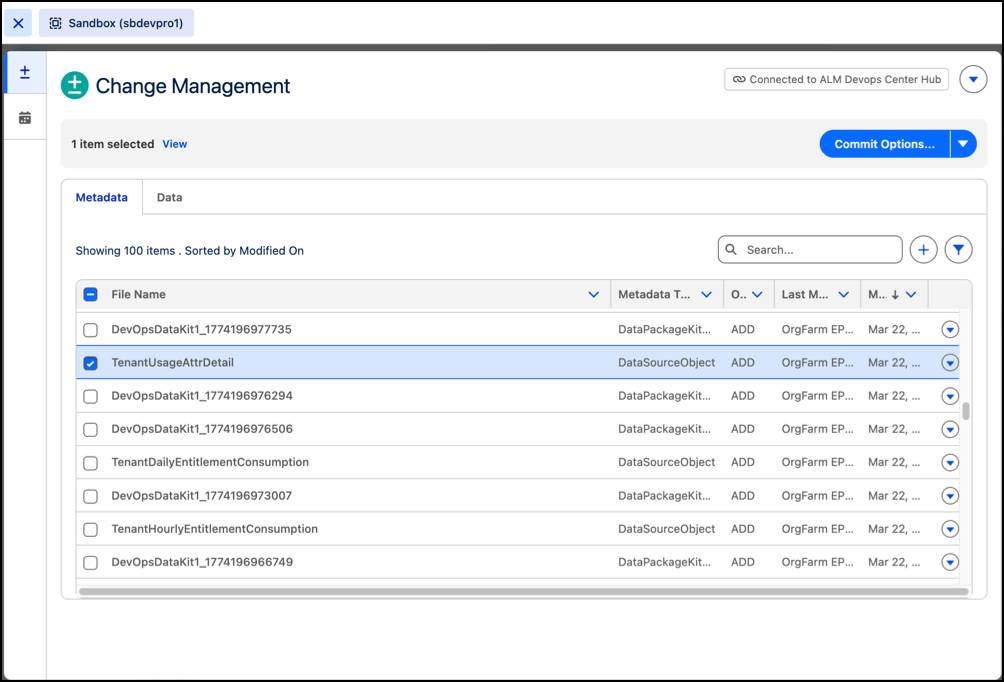
The screenshot below illustrates a tool that presents metadata and data separately in a single change-management workspace. The screen organization reinforces the key point: even if a release tool can coordinate both, metadata and data remain different deployment categories with different risks and dependencies.
The “configuration data” deployment question
When you see a configuration record, ask three questions:
-
Can the target org safely receive the source value?
A default escalation threshold probably can. A record containing a production-specific endpoint or owner may need target-org values instead. -
Does the record reference other records?
A routing configuration may point to a Queue, User, or custom object record. Those dependencies must exist and be mapped correctly. -
Should this configuration be modeled as metadata instead?
If the values are versioned application rules that should travel with every release, a Custom Metadata Type may be a better design than ordinary custom-object records or custom settings.
The special case: Custom Metadata Type records
Custom Metadata Types are deliberately designed for application configuration that should be deployable and versionable.
For a normal custom object:
- its object and field definitions are metadata;
- its records are data.
For a Custom Metadata Type:
- the type definition is metadata;
- its records are metadata too.
Suppose an application needs a table of country-specific rules:
| Country | Default language | Support queue | Maximum response hours |
|---|---|---|---|
| India | English | APAC Support | 12 |
| Germany | German | EMEA Support | 8 |
| Canada | English | North America Support | 6 |
If these are stable rules that should be identical across development, test, and production, Custom Metadata Type records are often an appropriate fit. The application can use them to determine behavior, and the rules can be deployed together with the rest of the application.
This differs from ordinary custom-object records and custom-setting records, whose record values do not normally travel in a Change Set. Custom Metadata Types therefore reduce the risk of deploying the logic but forgetting the configuration it depends on.
Understanding Custom Metadata Types - Trailhead - Salesforce
Read Salesforce Trailhead’s “Get Started with Custom Metadata Types” for the precise distinction between ordinary data records and Custom Metadata Type records.
In “What Is a Custom Metadata Type?”, begin at metadata and data. Continue through the discussion that starts deployable records. Focus particularly on why Custom Metadata Type records are treated as metadata and why ordinary custom-object and custom-setting records are left behind by metadata deployment.
Do not turn this into an absolute rule that every reference table belongs in Custom Metadata Types. Use it when the values are application-controlled, relatively stable, and meant to be released across environments. If business users need to manage changing records as part of normal operations, an ordinary custom object may be more appropriate.
A deployment classification workflow
When given a release request, do not start by choosing a tool. First create a small deployment inventory.
1. Identify the artifact’s purpose
Ask: Does it define the system, parameterize it, or describe a business event/entity?
- Defines structure or behavior: metadata.
- Parameterizes behavior: configuration data, unless it is Custom Metadata Type data.
- Represents live business activity: business data.
2. Identify the storage type
The same business purpose can be stored differently, and storage affects deployment:
| Storage mechanism | Structure | Records / values | Practical deployment meaning |
|---|---|---|---|
| Custom object | Metadata | Usually data | Deploy schema separately; migrate required records separately. |
| Custom setting | Metadata | Configuration data | Deploy the setting definition; plan record migration separately. |
| Custom Metadata Type | Metadata | Metadata | Deploy the type and its records together as metadata. |
| Standard object, such as Account or Case | Salesforce-provided metadata | Business data | Normally migrate records only for a specific integration or migration need. |
3. Map dependencies before moving anything
For a feature such as “route critical survey feedback,” an inventory might look like this:
| Component | Classification | Depends on |
|---|---|---|
Survey_Response__c custom object | Metadata | None |
Severity__c picklist field | Metadata | Survey_Response__c |
Critical_Response_Routing Flow | Metadata | Object, field, Queue, notification template |
Survey_Routing__mdt type | Metadata | None |
India_Critical routing record | Metadata | Survey_Routing__mdt |
| Existing customer Contact | Business data | Must already exist in production |
| Historical sandbox survey responses | Business data | Usually should not be deployed |
Notice that the live Contact is not a prerequisite to deploying the schema. It is a prerequisite only when testing or operating a process that relates a response to that Contact.
4. Select the deployment treatment
A practical decision rule:
- Metadata: include in the metadata deployment, validate dependencies, and test it.
- Custom Metadata Type records: include alongside metadata, subject to the chosen release process.
- Configuration data stored as ordinary records: use a coordinated data deployment/migration step; specify external IDs, relationships, and source-to-target differences.
- Business data: migrate only where there is a justified operational or integration requirement; protect sensitive data and plan reconciliation.
Worked release scenario
Assume a sandbox contains a new “Partner Discount” feature:
- A
Partner Tiercustom object with fields for discount percentage and effective date. - A validation rule preventing discounts above 40%.
- A Flow that applies the discount during quote creation.
- Six
Partner Tierrecords: Bronze, Silver, Gold, and three regional variations. - Existing partner Accounts and Quotes.
Classify it carefully:
- The custom object, fields, validation rule, and Flow are metadata.
- The six
Partner Tierrecords are configuration data if they determine system behavior. Since they are ordinary custom-object records, deploying the object through a Change Set does not bring them along. - The partner Accounts and Quotes are business data. They should not be casually copied from the sandbox into production.
A release plan could be:
- Deploy and validate the metadata, including dependencies such as fields referenced by the Flow.
- Load or deploy the six configuration records with a deliberate method, using stable keys and verifying any lookups.
- In production, test the feature using approved test records or a controlled pilot.
- Confirm that the Flow finds the intended configuration record and applies the expected discount.
Now consider a design revision: partner tiers are centrally managed application rules, rarely changed by end users, and should be identical in every environment. The team may model them as Custom Metadata Type records instead. The important gain is not merely convenience; it is that the rules become part of the application’s deployable definition.
Common mistakes to avoid
“Everything in Setup is metadata, so everything will deploy”
The first half is broadly useful shorthand; the second is unsafe. Setup can define a custom object, but its ordinary records remain data. Always distinguish the definition from its instances.
“Every record is business data”
A routing matrix, tax rule, survey definition, or feature toggle may be a configuration record rather than operational business data. But it is still a record-level concern unless stored as Custom Metadata.
“A successful deployment means the feature is released”
Not necessarily. A Flow may deploy successfully but fail functionally because a configuration record, Queue, email template, permission assignment, or integration credential is missing or intentionally different in production.
“Custom Metadata Types are just custom objects with a new suffix”
They are conceptually different. Their records are metadata and can move with metadata deployments. That makes them well suited to versioned application configuration, not a general replacement for all ordinary records.
A release-note habit worth building
For each feature you deploy, write a short manifest with three headings:
-
Metadata to deploy
Objects, fields, layouts, flows, Apex, permissions, custom metadata types, and custom metadata records. -
Configuration data to migrate or set up
Ordinary configuration records, environment-specific values, queues, users, credentials, or mappings that need an explicit target-org plan. -
Business data intentionally excluded or migrated
State whether live records are untouched, seeded only for testing, or migrated through a dedicated data process.
This habit makes releases easier to review and communicates clearly with admins, QA, product owners, and other developers.
Key takeaways
A Salesforce deployment is not a single undifferentiated package.
- Metadata defines Salesforce structure and behavior: schema, UI, automation, code, and access configuration.
- Business data captures real operational facts, such as customers, cases, orders, and responses.
- Configuration data consists of record-level values that control application behavior; ordinary configuration records usually need their own migration plan.
- Custom Metadata Type records are the key exception: Salesforce treats them as metadata, so they can travel with metadata deployments.
- A safe deployment starts with an inventory of components, records, dependencies, target-org differences, and verification steps.
Next, you will build on this foundation by designing a Salesforce data model with standard objects, custom objects, lookup relationships, and master-detail relationships.
Can't find a good explanation? Sign up and we'll make it for you
Sign up