
Hello. In the previous lesson, you separated metadata from configuration and business data so that a release plan includes both the application definition and the records it needs. A data model is part of that metadata: custom objects, fields, and relationship fields define the containers and links in which business data will live.
This module is a compact refresh of the Salesforce platform foundations that commonly surface in developer interviews and production design discussions. Here you will learn to turn a business scenario into a defensible Salesforce data model: reuse standard objects where they fit, introduce custom objects where Salesforce has no suitable concept, and choose deliberately between lookup and master-detail relationships.
By the end, you should be able to explain not merely what relationship you selected, but what that choice means for record existence, deletion, sharing, and reporting.
Start with the business model, not Object Manager
A Salesforce object is analogous to a table in a relational database:
- An object represents one type of thing the business needs to track.
- A field represents one attribute of that thing.
- A record is one instance of it.
- A relationship field stores a reference from one record to another.
For example, a broadband provider might need to track:
- customer organizations or households,
- people who communicate with the provider,
- active service subscriptions,
- physical service locations,
- support cases,
- components of a subscription, such as internet, television, or mobile add-ons.
The first modelling decision is whether each business concept already has a useful Salesforce standard object.
Standard objects first; custom objects when the domain requires them
Standard objects are supplied by Salesforce and bring established behavior, user interface, APIs, reports, and integrations. Common examples include:
| Business concept | Likely standard object | Why it fits |
|---|---|---|
| Customer organization or customer account | Account | Supports ownership, activity history, contacts, sales, and service relationships. |
| Person associated with a customer | Contact | Represents an individual and supports communication details and interaction history. |
| Sales pursuit | Opportunity | Represents a potential revenue-generating deal. |
| Customer issue or request | Case | Supports service processes, queues, escalations, and customer support reporting. |
| Product offering | Product | Represents an item that can be sold, often used with price books and opportunities. |
Custom objects represent business concepts that Salesforce does not model adequately out of the box. Their API names usually end in __c, such as Subscription__c or Service_Location__c.
For the provider example, Salesforce has no universal standard object that exactly captures the company’s definition of a provisioned telecommunications subscription. A custom Subscription__c object is therefore sensible. It might hold fields such as:
Subscription_Number__cStatus__cActivation_Date__cContract_End_Date__cMonthly_Fee__c
Similarly, Service_Location__c could represent the physical address where service is delivered, including installation constraints or network availability information.
The point is not to make every noun in a requirements document into an object. A field may be enough. “Activation date” is a property of a subscription, so it is a field. “Subscription” has its own lifecycle, status, and likely its own related records, so it merits an object.
A useful test is the grain statement:
One
Subscription__crecord represents one customer’s agreement to receive one defined service at a particular point in time.
If you cannot state what exactly one record represents, the model is probably still ambiguous.
Object Relationships: Create & Manage - Trailhead
Read Trailhead's Object Relationships: Create and Manage to establish the platform vocabulary before applying it to a practical model. It uses Account, Contact, Property, and Offer to make the distinction between a relationship link and a dependency concrete.
In “What Are Object Relationships?”, read the introduction, which frames relationships as a special field type rather than a vague visual connection. Then move to “The Wide World of Object Relationships.” Read the two relationship types. Focus on the operational consequence of deleting a parent, not just the names. Finally, in “More on Relationships,” read the standalone-record discussion. Notice that the question is whether the child has an independent lifecycle.
Relationship fields express both cardinality and dependency
When a relationship exists, identify the parent and child.
Suppose one customer Account can have many Subscription records. Account is the parent; Subscription is the child. The relationship field, such as Account__c, lives on the child object, Subscription__c. Each Subscription record stores the identity of its related Account.
This gives a one-to-many relationship:
- one Account can relate to many Subscriptions;
- each Subscription’s
Account__cfield can reference one Account.
The same design principle applies whether you use a lookup or master-detail field: create the relationship field on the child object.
Salesforce also supports one-to-one and many-to-many designs, but most initial business models consist primarily of one-to-many relationships. Do not confuse “a relationship is required” with “it must be master-detail.” A lookup can be configured as required too; the meaningful question is whether the child’s existence and access are controlled by the parent.
Lookup: an association between independently meaningful records
A lookup relationship links records that can remain meaningful separately. It is the flexible default when the child has its own lifecycle, ownership, or security needs.
For example:
- A Contact may be related to an Account, but it can also exist as an independent person record.
- A
Subscription__crecord can look up toService_Location__c. The location may remain in Salesforce after the subscription ends, even if it later serves a different customer. - A Case can look up to
Subscription__c. A support case may need to be retained for service history even after a subscription is cancelled.
With a lookup relationship:
- the child can generally exist without a parent value, unless you explicitly make the lookup field required;
- the child maintains its own ownership and record-sharing model;
- deleting a parent does not cause automatic deletion of child records;
- deletion behavior can be configured to clear the lookup or prevent deletion when related records exist;
- Salesforce does not provide native roll-up summary fields across the lookup relationship.
That last point is a design consideration, not a reason to force every relationship into master-detail. If records have independent lifecycles, choose lookup and meet aggregation needs through an appropriate later mechanism.
Master-detail: composition, not merely a stronger lookup
A master-detail relationship models a dependent component. The detail record is part of the master record’s lifecycle and should not survive without it.
Consider a custom Subscription_Component__c object. A component might represent the individual services included in a subscription:
| Subscription | Subscription component |
|---|---|
| Fiber Plan 2026 | Internet 1 Gbps |
| Fiber Plan 2026 | Wi-Fi router rental |
| Fiber Plan 2026 | Streaming add-on |
A component has no useful meaning in this model without the subscription that contains it. If the Subscription record is deleted, the related component records should disappear too. That makes Subscription_Component__c a suitable detail object and Subscription__c its master.
Master-detail has several material consequences:
| Behavior | Lookup | Master-detail |
|---|---|---|
| Can the child exist without a parent? | Usually yes; the lookup may also be made required. | No; a parent is required. |
| If the parent is deleted | Child records are not automatically deleted. | Detail records are deleted through cascade deletion. |
| Sharing and ownership | Child can have independent ownership and record sharing. | Detail inherits record access from its master; it does not have independent ownership. |
| Native roll-up summaries on parent | Not available through the relationship alone. | Available for counts and supported aggregate calculations. |
| Best semantic fit | Association between independently managed records. | A component whose lifecycle belongs to its parent. |
The key design insight is:
Choose master-detail only when dependency is truly intended in both the business process and the data-retention policy.
For instance, “a subscription must have an Account” does not automatically make Account-to-Subscription master-detail. A subscription might be historically important, owned by a specialist team, or retained after an Account is merged or removed. In those cases, a required lookup can be the more appropriate relationship.
Introduction to Salesforce and Data Modeling | Quick Start | Episode 1
Watch Introduction to Salesforce and Data Modeling | Quick Start | Episode 1 from Salesforce Developers for a concise visual explanation of how relationship fields are stored on child records and how a master-detail relationship is created.
Watch vehicle and test drives. Focus first on the one-vehicle-to-many-test-drives model, then observe that the relationship field is created on the Test Drive child object. Use the deletion and sharing distinctions as a checklist for deciding whether the demonstrated master-detail choice fits a real requirement.
A worked Salesforce design
Let us turn the broadband-provider scenario into a modest but realistic model.
1. Define the objects
| Object | Type | What one record represents |
|---|---|---|
| Account | Standard | A customer organization or customer account. |
| Contact | Standard | A person associated with that Account. |
Service_Location__c | Custom | A physical place where a service can be installed or delivered. |
Subscription__c | Custom | One customer’s service agreement. |
Subscription_Component__c | Custom | One service component included in a subscription. |
| Case | Standard | One customer service issue, request, or incident. |
This model intentionally reuses Account, Contact, and Case. Replacing them with Customer__c, Customer_Person__c, and Support_Ticket__c would discard mature Salesforce capabilities without a compelling domain reason.
2. Define each relationship in business language
| Child object and field | Parent object | Type | Design rationale |
|---|---|---|---|
| Contact: Account | Account | Standard lookup relationship | A person can be associated with an account but may need to exist independently. |
Subscription__c.Account__c | Account | Lookup, potentially required | The subscription belongs to a customer commercially, but may require independent retention, ownership, or access controls. |
Subscription__c.Service_Location__c | Service_Location__c | Lookup | A location can outlive one subscription and later be reused by another customer or service. |
Subscription_Component__c.Subscription__c | Subscription__c | Master-detail | A component is part of a subscription and has no independent business purpose after that subscription is removed. |
Case: Subscription__c | Subscription__c | Lookup | A support case must be retained and may need independent service-team access even after a subscription ends. |
Notice the level of reasoning. “Subscription has components” identifies a relationship, but it does not by itself identify its type. The master-detail choice comes from the further requirement that components are inseparable from, inherit access from, and should be deleted with their subscription.
3. Test the model against difficult scenarios
A good data model survives the uncomfortable questions:
-
If a service location is no longer active, should old subscriptions vanish?
No. Historical subscriptions can remain. Use lookup from Subscription to Service Location. -
If a subscription is removed because it was created in error, should its components remain?
No. Those component records are meaningless alone. Use master-detail. -
Should support staff be able to access a Case without being allowed to view every record on the related Subscription?
Potentially yes. A lookup lets Case retain its own sharing model. -
Do product managers need a total monthly price across all components of a subscription?
Master-detail supports native roll-up summaries, which is a useful secondary confirmation of the choice. The next lesson will examine when to choose a roll-up summary versus formulas, validation rules, or Flow.
Read the schema as a reviewer would
Schema Builder is useful because it converts a collection of fields into a visible map of dependencies. It is not a replacement for requirements analysis, but it is excellent for detecting accidental complexity: duplicate concepts, missing parent relationships, and objects that have become hubs without a clear purpose.
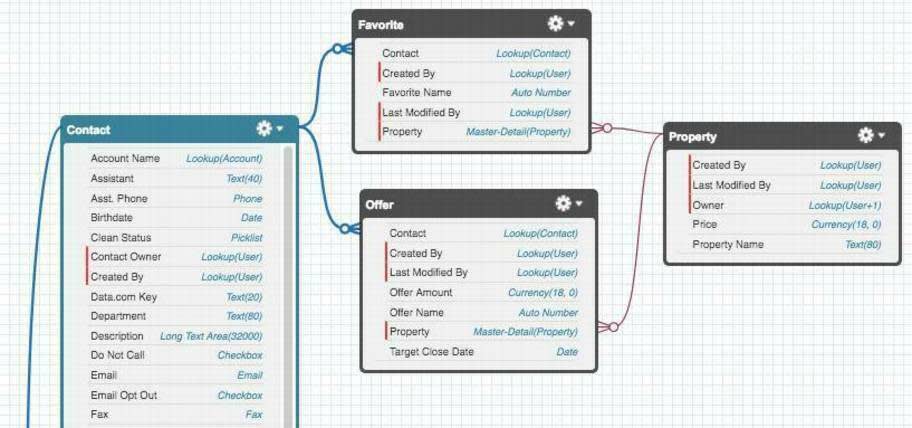
In this diagram:
- Contact is a standard object representing a person.
- Property, Offer, and Favorite are custom business objects.
Favoritehas a lookup to Contact because a person remains meaningful even if a particular favorite is removed.Favoritehas a master-detail relationship to Property because the favorite is treated as dependent on the property.Offerfollows the same broad pattern: it relates to a Contact and is dependent on a Property.
When reviewing a Schema Builder canvas, trace each connector and ask:
- Which object physically contains the relationship field?
- Which record is the parent?
- Could the child exist after the parent is deleted?
- Should the parent’s sharing determine access to the child?
- Is the child truly a component, or merely related?
A visual layout can be rearranged without changing the model. Creating an object or field through Schema Builder, however, does change metadata, so it belongs in the deployment inventory discipline from the previous lesson.
A repeatable modelling method
For a developer interview or a real feature discussion, use this sequence rather than naming objects immediately.
1. Identify the business entities and their grain
Write a one-sentence definition for each proposed record type. This prevents vague objects such as Customer_Data__c or Process__c, which usually combine multiple unrelated concepts.
2. Separate entities from attributes
If the item has its own lifecycle, status, ownership, reporting need, or related records, it may be an object. If it simply describes another thing, it is likely a field.
For example, “service location” can be a custom object because several subscriptions and operational processes may relate to it. “Installation instructions” may simply be a long-text field on that location.
3. Reuse standard objects deliberately
Check Account, Contact, Opportunity, Case, Product, Asset, Contract, and other relevant standard objects before creating a custom counterpart. Use a custom object when the standard object’s semantics or lifecycle do not fit, not merely because a custom name seems clearer.
4. Choose relationship behavior based on lifecycle
Use these decision rules:
- Choose lookup when the child can stand alone, needs separate ownership or sharing, or should survive deletion of the related parent.
- Choose master-detail when the child is a dependent component, must always have a parent, should inherit parent access, and should be removed with its parent.
- Use a required lookup when a parent reference is mandatory but independent lifecycle or security is still needed.
5. Validate deletion, access, and reporting implications
Relationship type is an architectural choice because it affects operations later:
- deletion behavior,
- record sharing,
- ownership,
- native roll-up capability,
- migration order and data quality,
- how Apex, Flow, and reports traverse the records.
This is why “I would use master-detail because the parent field is required” is not a strong interview answer. A stronger answer identifies the business dependency first, then names the Salesforce behavior it requires.
Key takeaways
A solid Salesforce data model begins with business meaning and lifecycle, then expresses that reasoning through objects, fields, and relationships.
- Use standard objects when Salesforce already models the concept well; use custom objects for genuine domain-specific entities.
- Define each object’s grain so everyone knows what one record represents.
- Put relationship fields on the child object.
- Use lookup relationships for flexible associations between independently meaningful records.
- Use master-detail relationships for true parent-child dependency, including required parentage, inherited access, cascade deletion, and native roll-up summaries.
- A required parent field alone does not justify master-detail; a required lookup may be the better design.
- Use Schema Builder to inspect and communicate the model, while remembering that objects and relationship fields are deployable metadata.
Next, you will use these model relationships to decide which declarative mechanism best meets a requirement: formula field, validation rule, roll-up summary, or Flow.
Can't find a good explanation? Sign up and we'll make it for you
Sign up