
Hello! Welcome back to our module on building your Go-to-Market Content Strategy.
In our last lesson, you created a strategic content outline focused on high-intent prospects. You now have a plan for creating competitor comparison pages and use-case articles—the very content that attracts visitors who are actively looking for a solution like yours.
Driving traffic is only half the battle. Today, we focus on the crucial next step: converting those visitors into leads. The learning outcome for this lesson is to identify a high-value lead magnet idea (e.g., a checklist, template) that solves a specific pain point for your Ideal Customer Profile (ICP). This is how you'll start building your email list, which is one of the most valuable assets for any SaaS business.
Part 1: The Foundation: Uncovering Customer Pain Points
A lead magnet is a free, valuable resource you offer in exchange for a prospect's email address. The key word here is valuable. And value, in this context, means solving a real, nagging problem for your Ideal Customer Profile. Before you can create a solution, you must deeply understand the problem.
This is where "pain points" come in. These are the specific problems, frustrations, and challenges your potential customers face. Your goal is to find a pain point that is so acute that getting a free resource to solve it is a "no-brainer" exchange for their email.
There are generally four types of pain points to look for:

- Process Pain Points: Inefficiencies in a customer's current workflow (e.g., "Onboarding a new client is a manual, chaotic process").
- Financial Pain Points: The customer is spending too much money or wants to increase revenue (e.g., "I'm wasting money on ads that don't convert").
- Productivity Pain Points: Wasting time or a desire to be more efficient (e.g., "It takes me hours to draft a single proposal").
- Support Pain Points: Not getting the help they need at critical moments (e.g., "I can't get timely answers when our system breaks").
For B2B SaaS, these often manifest as pressing business challenges.
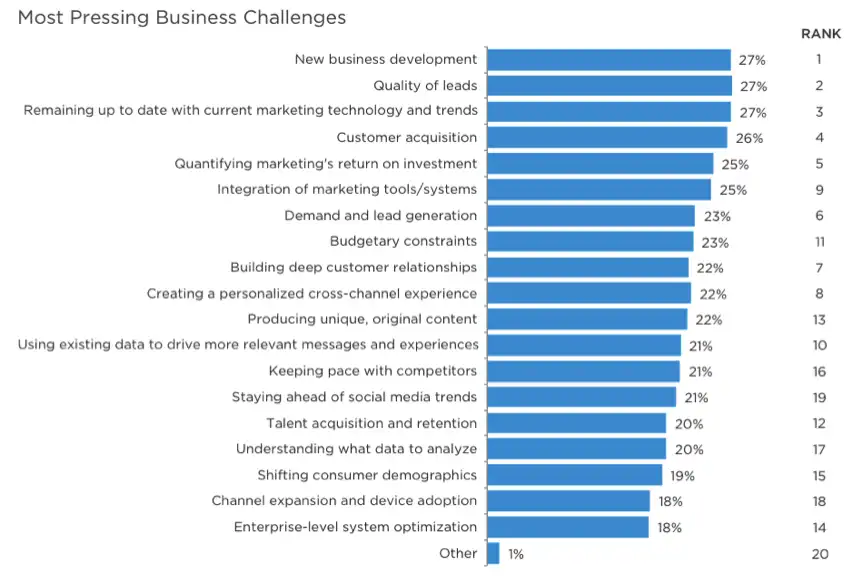
So, how do you find these pain points, especially when you're just starting and don't have an existing customer base to survey? You become a digital anthropologist.
How To Identify Customer Pain Points (Detailed Breakdown)
The video 'How To Identify Customer Pain Points' from Chrystabelle provides a fantastic, practical guide for founders in your position. It details several methods for uncovering pain points without needing an existing audience.
Watch from 03:15 to 08:28. Focus on these actionable research tactics: Online Spaces (03:15): How to observe conversations in Facebook groups, Reddit forums, and other niche communities. Research Tools (04:50): Using a free tool called 'Answer The Public' to find what your ICP is searching for on Google. Public Reviews (06:20): Analyzing reviews on sites like Amazon and comments on YouTube videos to find what people like, dislike, and wish for in existing solutions. The Critical Filter (07:30): The importance of choosing a pain point that is 'painful enough' to warrant a solution.
To summarize the key research methods for a new founder:
- Join Online Communities: Go to the subreddits, LinkedIn Groups, and forums where your ICP hangs out. Don't post—just listen. What questions are asked repeatedly? What frustrations are vented? Use the exact language they use.
- Use Search Tools: A tool like AnswerThePublic takes a keyword (e.g., "cold outreach") and shows you all the questions people are asking around that topic. This is a goldmine for pain points.
- Analyze Reviews: Look at reviews for competitor products or related books on Amazon. The 1, 2, and 3-star reviews are especially useful for identifying what existing solutions are missing.
Part 2: The Asset: Types of High-Value Lead Magnets
Once you've identified a painful problem, you need to choose the right format for your solution. Not all lead magnets are created equal.
How to create powerful SaaS Lead Magnets + examples
The article 'How to create powerful SaaS Lead Magnets' from Mr. Unlocked introduces a 'Value Hierarchy' that's perfect for understanding which types of lead magnets are most effective.
Read the section 'The Value Hierarchy for SaaS Lead Magnets.' Pay close attention to the three categories and why 'Tactical' lead magnets are described as 'pure gold.'
As the article explains, the hierarchy is:
- Tactical (Highest Value): Templates, checklists, examples, calculators. These are "plug-and-play" and solve an immediate problem. A user can get value from them in minutes. This is where you should focus your initial efforts.
- Educational: Guides, e-books, courses, webinars. These require more time investment from the user but can position you as an expert.
- Inspirational: Industry reports. These are good for shareability and brand awareness but are least likely to convert to a sale because they don't solve an immediate, personal problem.
To give you a sense of what's possible within these categories, it's helpful to see real-world examples.
How to create powerful SaaS Lead Magnets + examples
Let's return to the same article from Mr. Unlocked. It contains an extensive list of real lead magnets from successful SaaS companies.
Scan the 'Overview of different types of lead magnets' section. Look at the examples under 'Templates, Guides & E-Books,' 'Calculators,' and 'Mini tools.' Notice how each one is a tool that helps the ICP do their job better.
For instance, Lemlist (a cold email tool) offers Cold Email Templates. This is a perfect tactical lead magnet. Their ICP's pain point is "I don't know what to write to get replies." The template directly solves this. Similarly, Taplio (a LinkedIn tool) offers a LinkedIn Headline Generator. This solves the pain point "My LinkedIn profile doesn't grab attention."
Part 3: The Workflow: Brainstorming Your Lead Magnet with AI
Now, let's bring it all together using a workflow that leverages your preference for AI tools. You can use AI to synthesize your pain point research and your knowledge of lead magnet types to rapidly generate high-quality ideas.
The key is a structured prompt. You don't just ask "give me lead magnet ideas." You provide the AI with the necessary context, just as you would when calling a function with specific parameters in code.
How To Create A Lead Magnet With AI [The New Way]
The video 'How To Create A Lead Magnet With AI' by Eddy Ballesteros demonstrates a brilliant and detailed prompt for this exact purpose.
Watch from 01:46 to 04:51. The creator shares a prompt template you can use in ChatGPT or Claude. Pay close attention to the three key inputs he provides: Ideal Statement/Niche: Who you help and what you help them achieve. Content Pillars: The main topics or categories you focus on. He then shows how the AI uses this context to generate five distinct, high-quality lead magnet ideas, complete with format suggestions and how they connect to a paid offer.
Here is the core structure of the prompt shown in the video, which you can adapt:
- Your Role: "Act as a marketing expert..."
- The Goal: "...generate 5 high-converting lead magnet ideas."
- Context 1 (Your ICP & Niche): "I help [ICP] achieve [Result] by [Your Method]."
- Context 2 (Content Pillars): "My main content pillars are [Pillar 1], [Pillar 2], and [Pillar 3]."
- The Output Format: "For each idea, provide the format (e.g., checklist, template), components, and how it could upsell to a paid product."
Test your understanding!
Let's say your SaaS idea is an AI tool that helps solo consultants create and send proposals faster. Your content pillars are "Proposal Writing," "Client Acquisition," and "Pricing Strategies."
Using the prompt structure above, what would be a good input for "ICP & Niche" to give to ChatGPT? And based on that, what is one potential tactical lead magnet idea the AI might generate?
Show answer
Input for "ICP & Niche": "I help solo consultants and freelancers win more clients by creating professional proposals in minutes using AI."
Potential Tactical Lead Magnet Idea:
- Idea: The 5-Minute Proposal Template
- Format: A fill-in-the-blank PDF or Google Doc template.
- Pain Point Solved: "Creating proposals takes too long and I'm never sure what to include." This is a classic Process and Productivity pain point. The template provides an immediate, actionable solution.
Part 4: Putting It All Together: A Case Study
Let's look at one final example that ties all these threads together.
Lead Magnets for B2B SaaS: What Works in 2025
The article 'Lead Magnets for B2B SaaS' from SaaSFunnelLab features an excellent case study on the company DesignFiles.
Read the short case study section, 'B2B SaaS Lead Magnet Example: Client Questionnaire For DesignFiles.' Identify the ICP, their specific pain point, and the lead magnet created to solve it.
This is a perfect illustration of the principles we've discussed:
- ICP: Interior designers.
- Pain Point: Frustration from incomplete client briefs, leading to miscommunication and project delays (a Process pain point).
- Lead Magnet: A "Client Questionnaire Template."
- Value: It's a tactical resource that solves an immediate, recurring problem in the designer's workflow. It provides a quick win and perfectly positions the DesignFiles software as the next logical step for streamlining their entire client management process.
Conclusion
You now have a complete framework for moving from market research to a validated, high-value lead magnet idea. This isn't just about collecting emails; it's about starting a relationship with potential customers by demonstrating your value and expertise from the very first interaction.
Key Takeaways:
- A high-value lead magnet solves a specific, acute pain point for your Ideal Customer Profile.
- Begin by researching these pain points in online communities, with search analysis tools, and by studying competitor reviews.
- Prioritize Tactical lead magnets like templates, checklists, and calculators, as they provide the most immediate, "plug-and-play" value.
- Use structured AI prompts with clear context (ICP, niche, content pillars) to rapidly brainstorm and refine lead magnet ideas.
Preview of the Next Lesson:
With a powerful idea in hand, the next step is execution. In our next lesson, you will create a lead magnet asset using a tool like Canva or a document editor. We'll cover the practical steps of designing and producing the asset you've just conceptualized, getting it ready to be shared with your audience.