
Hello. In the previous lesson, you chose Kafka when a system needs a durable, replayable stream of facts that several independent consumers can use. Now we move inside that stream.
By the end of this lesson, you should be able to trace one business event—such as OrderPlaced—from the application that produces it, through a Kafka topic partition stored on a broker, to one or more consumer groups. Along the way, you will identify why keys, partitions, offsets, and consumer groups exist.
The record: an event with a Kafka address
Kafka documentation uses event, record, and message with closely related meanings. In this course, an event is the business fact (OrderPlaced), while a record is the Kafka representation that carries that fact.
A record commonly contains:
| Part | Purpose | Example |
|---|---|---|
| Topic | Named stream the record belongs to | orders |
| Key | Optional routing and ordering field | order-718 |
| Value | Main event payload | order ID, items, customer ID, total |
| Headers | Optional metadata | correlation ID, event type |
| Timestamp | Time attached to the record | producer or broker timestamp |
| Partition | One log within the topic | partition 2 |
| Offset | Position within that partition | offset 41 |
The last two fields give a stored record its practical address:
For example, orders, partition 2, offset 41 identifies one specific record. An offset is meaningful only inside its partition. Offset 41 in partition 2 is unrelated to offset 41 in partition 0.
Read the Apache Kafka documentation’s concise account of the components we will use throughout the course.
Read Apache Kafka’s official introduction to establish the vocabulary of events, topics, partitions, brokers, producers, and consumers. It is intentionally high-level; focus on the relationships between the components rather than configuration details.
In “How does Kafka work in a nutshell?”, read the opening explanation of Kafka servers and clients, beginning with the deployment overview. Then move to “Main Concepts and Terminology.” Read from the paragraph beginning “An event records the fact…” through the figure description. Pay particular attention to topic retention: consuming does not remove a record. Finish with the key ordering rule, which is central to the path a record takes.
Two distinctions will prevent considerable confusion later:
- A topic is the named stream, such as
orders. - A partition is one ordered, append-only log inside that topic.
A topic is therefore not one globally ordered list. It is a collection of partition logs.
Partitions: where the record is actually appended
Why not store all orders records in one giant log? One log would place the storage and read/write workload on one machine. Kafka instead splits a topic into partitions, so different parts of the stream can be stored and processed concurrently.
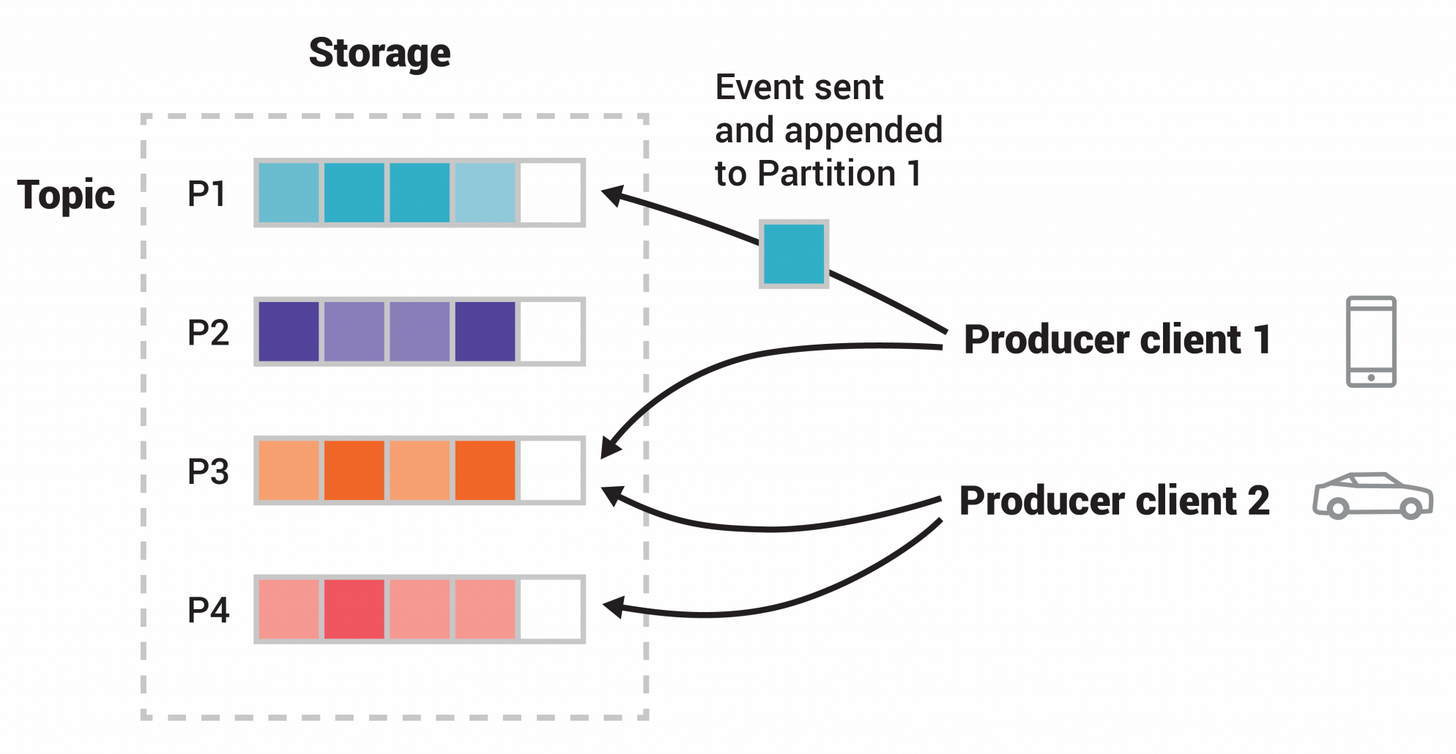
The figure shows a topic with four partitions. Notice that a producer does not send an event “to all four partitions.” Each individual record is appended to one partition.
Within a partition, Kafka assigns each new record the next offset:
| Partition 2 contents | Offset |
|---|---|
| Earlier record | 39 |
| Earlier record | 40 |
OrderPlaced(order-718) | 41 |
| Later record | 42 |
The record at offset 41 never moves within that partition. Its retained position is what makes later replay possible.
How a producer chooses a partition
A producer application creates a record with a topic, key, and value. The producer client then determines the destination partition. The most important cases are:
- An explicit partition is supplied. The producer uses that partition. This is possible, but it is usually an application-level choice that should be made carefully.
- A key is supplied. Kafka’s partitioning logic hashes the key and selects a partition. Equal keys are routed to the same partition while that partition layout remains unchanged.
- No key is supplied. The producer spreads records across available partitions for balanced throughput. Do not depend on the exact partition selected or on an order among such records.
Suppose these are all records in topic orders:
key=order-718, value=OrderPlaced
key=order-718, value=OrderPaid
key=order-902, value=OrderPlaced
The first two records use the same key, so they go to the same partition and retain their append order within it. The order-902 record may go to a different partition and can be processed concurrently.
This is why a Kafka key is often a business entity identifier:
- order ID when an order’s lifecycle must remain ordered;
- customer ID when customer-level events must remain ordered;
- account ID when balance-affecting events must remain ordered.
The key is not necessarily a database primary key. It is primarily a routing decision with ordering consequences.
Watch this short visual explanation before continuing. It reinforces the crucial limitation: Kafka guarantees order within a partition, not across an entire multi-partition topic.
Partitions | Apache Kafka 101 (2025 Edition)
Watch “Partitions | Apache Kafka 101 (2025 Edition)” from Confluent Developer for a compact visual model of why topics are partitioned and how keys influence record placement.
Watch partition purpose to see why one topic is divided into several logs. Then watch unkeyed routing and keyed routing. Focus on the design implication: use a key when records for the same entity need a dependable per-entity sequence; do not infer a single order across all partitions.
The broker: the server that stores and serves partitions
A broker is a Kafka server process. A Kafka cluster contains one or more brokers, and brokers store topic partitions.
For the local lab later in this module, you will run one broker in Docker. The logical path is the same as in a production cluster, though a production setup distributes partitions across several brokers and keeps replica copies for fault tolerance.
For now, use this mental model:
- The producer client runs in your application.
- The producer sends the record across the network to the broker that currently accepts writes for the selected partition.
- That broker appends the record to the partition log and assigns its offset.
- Kafka retains the record according to the topic’s retention settings, whether or not a consumer has already read it.
The producer is not sending a record directly to a consumer. It is writing a retained record to Kafka storage.
After Kafka accepts a write, the producer can receive metadata identifying where the record landed, including its topic, partition, and offset. In the Java producer module, you will inspect this metadata directly with RecordMetadata.
Consider the following trace:
- The Order service creates
OrderPlacedwith keyorder-718. - Its Kafka producer targets topic
orders. - The producer’s partitioning logic selects partition
2. - The broker responsible for
orders-2appends the record. - Kafka assigns offset
41. - Kafka retains the record, independently of whether any consumer is currently available.
At that point, the producer’s job is complete. It does not wait for fulfillment, notifications, or analytics to process the event.
Consumers read; consumer groups divide work
A consumer is a client application that fetches records and processes them. A consumer might update a database, call a downstream system, send a notification, or compute an analytical aggregate.
A consumer group is a named team of consumers collaborating on the same logical job. All consumers that use the same group.id belong to the same group.
Kafka assigns the topic’s partitions among the consumers in that group. The governing rule is:
At a given time, one partition is assigned to at most one active consumer within a consumer group.
This ensures the group does not process the same partition’s records twice merely because it has multiple members.
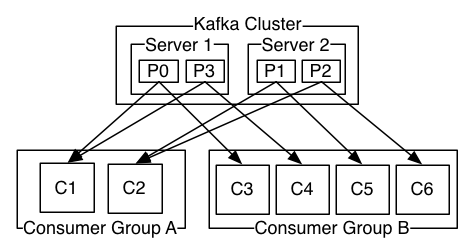
In the diagram, Consumer Group A and Consumer Group B both read the same Kafka topic, but they are independent.
For a four-partition topic:
| Consumer group | Members | Possible assignment | Meaning |
|---|---|---|---|
fulfillment-service | 2 consumers | Each owns 2 partitions | Two instances share fulfillment work |
notification-service | 1 consumer | Owns all 4 partitions | One service processes every event |
analytics-service | 4 consumers | Each owns 1 partition | Four instances process partitions concurrently |
Each group can process the complete topic independently. Kafka does not remove OrderPlaced(order-718) after the fulfillment group reads it, so the notification and analytics groups can read it too.
Within a single group, however, the record is handled by only the consumer currently assigned its partition. If orders-2 belongs to consumer fulfillment-1, another fulfillment consumer in the same group does not also read it.
This yields two important scaling limits:
- A consumer can own multiple partitions.
- A group cannot actively use more consumers than partitions. With four partitions, a fifth consumer in the same group has no partition to own and is idle.
Offsets: each group’s saved reading position
Consumer groups need to know where to continue after a restart or a temporary failure. Kafka records each group’s committed offset for every partition it consumes.
The subtle but essential convention is that a committed offset normally means:
“The next offset this group should read from this partition.”
Suppose fulfillment-service has successfully handled records through offset 41 in orders-2. It commits 42. If the consumer restarts, the group resumes at offset 42, rather than reprocessing 41.
Now compare two groups reading the same partition:
| Partition | Stored records | fulfillment-service committed position | analytics-service committed position |
|---|---|---|---|
orders-2 | offsets 0 through 100 | 42 | 88 |
Kafka retains the same records once, but each group has its own progress. Here, fulfillment still has records starting at 42 to process, while analytics has already advanced through 87.
That independent progress is what enables several services to consume the same event stream at different speeds. It also makes replay possible: a group can deliberately reset its position when it needs to reprocess retained history, subject to retention.
Offset commits become a major reliability decision later in the course. For this lesson, retain the basic lifecycle:
- A consumer fetches records from its assigned partition or partitions.
- The application processes a record.
- The group records its progress by committing an offset.
- On restart or reassignment, the group resumes from that saved position.
One complete trace: OrderPlaced
Let’s put the components together. Assume:
- topic:
orders - partitions:
0,1,2,3 - event key:
order-718 - partition selected by the producer:
2 - new offset assigned by Kafka:
41
1. Producer client
The Order service’s Java application constructs a Kafka record:
topic: orders
key: order-718
value: OrderPlaced(...)
Its producer client chooses partition 2 from the key and sends the record to Kafka.
2. Broker and partition
The responsible broker appends the record to partition orders-2. The record receives offset 41.
The durable location is now:
Kafka keeps this record until the topic’s retention policy permits its removal. It does not disappear when anyone consumes it.
3. Fulfillment consumer group
The fulfillment-service group has two running consumers. Kafka assigns orders-2 to fulfillment-1.
fulfillment-1 polls Kafka, receives OrderPlaced(order-718) from partition 2 at offset 41, creates the fulfillment work, and commits offset 42 after successful handling.
4. Notification consumer group
The independent notification-service group also subscribes to orders. One of its consumers reads the same stored record at orders-2, offset 41, sends an order-confirmation notification, and commits its own progress.
5. Analytics consumer group
An analytics-service group can read offset 41 as well, perhaps counting the order in a near-real-time sales dashboard. Its committed offset has no effect on the other two groups.
The central principle is worth stating precisely:
A partition is shared within a consumer group but replicated logically across consumer groups through independent reads of the retained log.
If a fulfillment consumer fails, Kafka can reassign its partition to another consumer in the fulfillment group. That reassignment is called a rebalance. The replacement consumer resumes from the group’s committed position, which is why correct offset management matters.
A compact tracing checklist
When you see a Kafka architecture diagram or troubleshoot a record path, trace it in this order:
- Producer: Which application created the record? What topic, key, and value did it send?
- Partition: Which partition did Kafka select, and does the key preserve the ordering boundary the business needs?
- Broker: Which Kafka server stores and serves that partition?
- Offset: What is the record’s ordered position within that partition?
- Consumer group: Which independently named application capability is reading the topic?
- Consumer instance: Which group member currently owns the partition?
- Progress: What offset has that group committed, and therefore where will it resume?
This checklist separates three ideas that beginners often accidentally merge:
- Record storage belongs to the topic partition.
- Work sharing happens among consumers in the same group.
- Consumption progress belongs to each group, not to the topic globally.
Takeaways
You can now trace a Kafka record from creation to processing:
- A producer publishes a record containing a topic, optional key, value, and metadata.
- A topic is divided into partitions, which are independent ordered logs.
- The record’s key usually determines its partition; Kafka preserves order within that partition, not across the whole topic.
- A broker stores and serves partitions, appending each record at a numbered offset.
- Kafka retains records independently of consumption.
- A consumer group independently reads the topic; members of the same group share partitions so that one active member handles a given partition at a time.
- Each group tracks its own committed offsets, allowing independent speed, recovery, and replay.
Next, you will make these components tangible by launching a single-node Kafka environment in KRaft mode with Docker and verifying that the broker is reachable.
Can't find a good explanation? Sign up and we'll make it for you
Sign up