
Welcome back. In the previous lesson, you learned to judge whether generative AI belongs in a workflow at all by considering evidence, stakes, privacy, and meaningful human oversight. Once a task is appropriate for AI assistance, a practical next decision is: what kind of Claude workspace best fits the work?
Claude chat, Projects, and Artifacts are related, but they solve different problems. A chat is mainly a place to have a conversation; a Project is a reusable context for ongoing work; an Artifact is a standalone work product. By the end of this lesson, you will be able to choose a sensible starting point for common beginner use cases—and recognize when a Project and an Artifact should be used together.
Three layers, not three competing tools
It is tempting to ask, “Which feature is best?” But this is usually the wrong question. The better question is: What does this task need to retain or produce?
A task can involve three layers:
| Layer | What it provides | Claude feature |
|---|---|---|
| Conversation | A place to ask, refine, clarify, and review | Chat |
| Persistent context | Reusable files, instructions, and related work | Project |
| Standalone output | A document, visual, tool, or interactive experience | Artifact |
A normal chat is the default when you have a bounded request: you provide the needed context, discuss the result, and finish. A Project becomes useful when the same context needs to support multiple chats over time. An Artifact is appropriate when the output itself should stand on its own for editing, reuse, or interaction.
These choices are therefore not always exclusive. For example, you might create a Project for an ongoing training program, then create an Artifact inside it: an interactive quiz based on the program’s reference materials. The Project supplies the context; the Artifact is the learner-facing deliverable.
A short visual walkthrough will help establish the distinction before we examine each choice more closely.
How to Use Claude AI (Beginner Tutorial)
Watch “How to Use Claude AI (Beginner Tutorial)” by Kevin Stratvert for a concrete tour of a normal Claude chat, an editable Artifact, and a Project that organizes files and instructions.
Watch basic chat to see an ordinary prompt refined through follow-up messages. Then watch Artifacts, focusing on the separate editable side panel. Finish with Projects, noting how files, chats, and instructions are gathered around one ongoing piece of work.
The important distinction is not how visually impressive the feature appears. It is the shape of the work:
- Is this an isolated conversation?
- Will I need the same trusted material and instructions again?
- Am I creating something another person should be able to use directly?
Choose a chat for bounded, conversational work
Use a regular Claude chat when the task is specific, short-lived, and self-contained. You can still have an extended back-and-forth, attach a file, ask for revisions, and save the conversation in your history. What you do not have is a dedicated workspace with a reusable knowledge base and instructions designed for one continuing workstream.
A chat is usually the most efficient choice when setup would cost more time than it saves.
Typical chat use cases include:
- drafting one email from notes you paste into the prompt;
- asking for a plain-language explanation of a concept;
- summarizing one uploaded report that you only need to discuss today;
- brainstorming names for a workshop;
- revising a résumé bullet for one application;
- asking Claude to critique and improve a short piece of writing.
For example, suppose you paste notes from a meeting and ask:
Draft a polite follow-up email to the vendor. Keep it under 150 words, list the two agreed actions, and use a professional but warm tone.
This belongs in a chat. The task has a clear input and a clear result. If you want a more concise version or need to correct a detail, continue in the same conversation. There is no strong reason yet to build a separate workspace.
A chat is also a good place to explore a new task before committing to a Project. You may not initially know what reference materials, instructions, or recurring workflow you actually need. First, experiment with a few prompts. If you repeatedly paste the same source material or repeat the same requirements, you have evidence that a Project could be worthwhile.
Do not confuse “one file” with “one Project”
Uploading a document does not automatically mean you need a Project. If you need a quick summary of one annual report, attach it to a chat. If you will return to that report, related reports, and the same analysis standards throughout a quarter, use a Project.
The deciding factor is repeated, organized use, not merely whether a file exists.
Choose a Project for continuing work with shared context
A Claude Project is a self-contained workspace for a specific workstream. It can hold related chats, reusable reference files, and instructions that guide Claude across conversations in that Project.
Introduction to projects · Claude 101
Read Claude Academy’s “Introduction to Projects” to see why Projects are useful for ongoing work rather than one-off requests.
In the “When to use Projects” subsection, read the decision criteria. Focus on the three signals: materials you will reuse, requirements that should stay consistent, and collaboration around shared context. Then read the examples in “Example projects to inspire you,” beginning with the example projects, and identify the durable information each workspace preserves.
A Project is valuable because it reduces repeated setup. Instead of attaching the same policies each time and re-explaining the desired format, you establish an organized environment once.
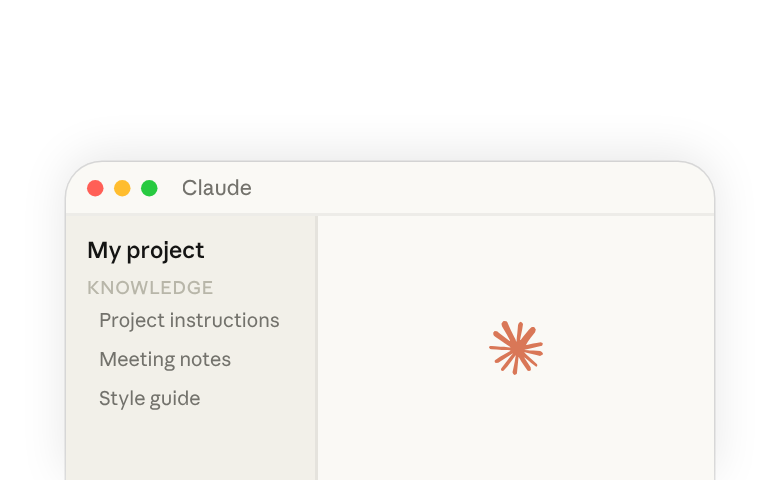
Use a Project when one or more of these conditions is true:
-
You will return to the work repeatedly.
For example, you are supporting a client account over several weeks, running an event, maintaining product documentation, or studying one subject over a semester. -
The same reference material must inform many requests.
You may need Claude to consult brand guidelines, approved policy documents, research notes, previous deliverables, or course readings again and again. -
The output must consistently follow specific requirements.
Project instructions can establish expectations such as: cite the supplied documents, use a particular report structure, write for beginners, or ask for clarification when source material is insufficient. -
Several related conversations need to remain organized.
A Project can keep research, drafts, planning conversations, and finished materials connected to one topic instead of dispersed across unrelated chats. -
A team needs a shared foundation.
In an organizational setting, shared Projects can help people work from the same approved files and instructions, subject to the organization’s access and data policies.
A useful beginner example: a study assistant Project
Imagine you are taking a certification course and expect to revisit the same materials every week. You could create a Project called AI Professional Study Assistant and add:
- the course outline;
- approved notes or slides;
- a glossary of important terms;
- instructions such as: “Explain concepts at beginner level. Distinguish facts from inferences. When using uploaded sources, identify the source section. Do not invent citations.”
Each new chat inside the Project can address a different need: summarize a module, compare two concepts, create a revision plan, or explain a difficult passage. The Project avoids rebuilding the same context every time.
However, a Project does not make Claude automatically correct. Its knowledge files and instructions improve relevance and consistency; they do not remove the need to review important claims, especially claims involving current, high-stakes, or sensitive information. This continues the principle from the previous lesson: better context supports better work, but it does not transfer accountability to the model.
Keep Projects focused
A common beginner mistake is to make one giant Project called “Work,” “School,” or “Everything.” This mixes unrelated instructions and documents, making it harder to tell what Claude should rely on.
Prefer a Project with a coherent purpose, such as:
- “Spring onboarding program”
- “Acme client account”
- “Website redesign research”
- “AI professional study materials”
If two workstreams have different sources, audiences, or rules, they usually deserve separate Projects.
Choose an Artifact when the output should stand on its own
An Artifact is a self-contained output that Claude creates in a dedicated area alongside the conversation. Rather than leaving a long document, diagram, or interactive tool embedded in chat messages, Claude presents it as something you can inspect, revise, reuse, and—in suitable circumstances—share.
Creating with artifacts · Claude 101 · Claude Academy
Read Claude Academy’s “Creating with Artifacts” for the practical criteria that distinguish a standalone Artifact from an ordinary chat response.
Start in “What are artifacts?” and read the definition and criteria. Then scan “Common artifact types” to connect different deliverables—documents, diagrams, web pages, and interactive components—to the Artifact format. In “Creating your first artifact,” read from the creation guidance, paying attention to the option of explicitly asking Claude to create an Artifact.
Artifacts are particularly suitable when you want a result that is more than an answer to read once. Common examples include:
- a project-brief template you will edit and reuse;
- a polished report outline or planning document;
- a flowchart that visualizes a process;
- a simple landing page or web prototype;
- an interactive calculator;
- a beginner quiz or flashcard tool;
- a dashboard or data visualization;
- a small interactive learning experience.
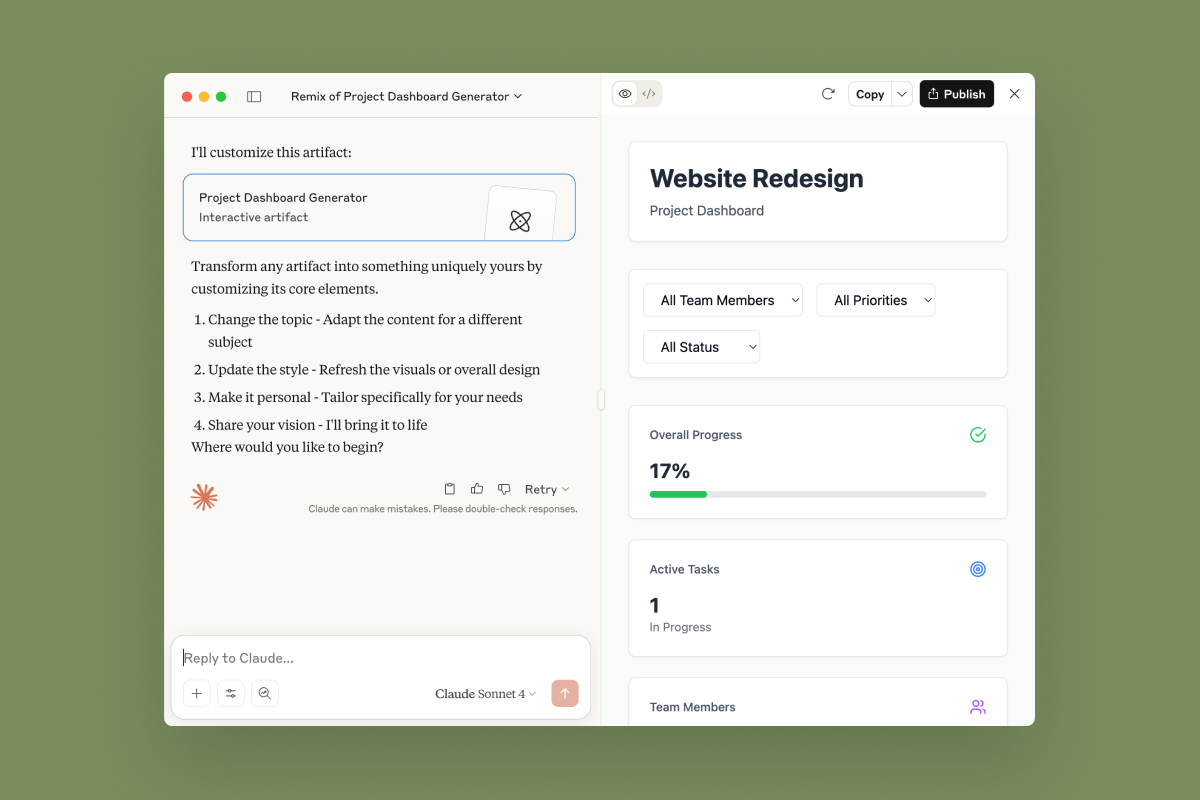
The dashboard in the image illustrates the crucial idea: an Artifact is a work product with its own usable form. A person can interact with a dashboard, use a calculator, edit a template, or review a visual diagram without needing to read the entire conversation that produced it.
When an Artifact is better than chat text
Suppose you ask Claude for a list of five questions to ask in a job interview. A normal chat response is probably enough.
Now change the request:
Create an interactive interview-preparation quiz for beginners. Give feedback after each answer, explain why each answer is strong or weak, and include a restart button. Create it as an Artifact.
This is an Artifact task because the intended result is an interactive learning tool, not simply a written answer. Asking explicitly for an Artifact helps communicate that you want a separate, editable deliverable.
Similarly, if you are developing a reusable “weekly project update” template, an Artifact can provide a clean document you can refine and reuse. If you merely want Claude to suggest a possible structure for the update, a chat response is enough.
An Artifact is not a knowledge base
An Artifact may be created from information discussed in a chat, but it is not itself the persistent context system that a Project provides. It is the deliverable. If you need Claude to repeatedly consult a substantial collection of approved documents, create a Project for that ongoing work.
Also, the ability to create or share an Artifact does not make its content verified, safe, or suitable for public release. Before sharing, check factual claims, permissions, confidential content, accessibility, and the intended audience. An interactive calculator with an incorrect formula can be more harmful than a mistaken paragraph because people may rely on its apparent authority.
A practical selection method
When facing a beginner use case, begin with the task’s primary need. Work through these questions in order.
-
Do I need a dedicated workspace with reusable files, instructions, or related chats?
If yes, start with a Project. This is the right choice for ongoing work, not merely a long task. -
Do I need a standalone output that people will edit, reuse, view, or interact with?
If yes, create an Artifact. If the work also requires ongoing reference material, create the Artifact within a Project. -
If neither is true, do I simply need to ask, draft, analyze, or refine something now?
Use a normal chat.
This method avoids treating Projects and Artifacts as upgrades that must be used whenever available. They solve specific problems. More setup is not automatically better.
| Beginner use case | Best starting choice | Why |
|---|---|---|
| Draft one email from notes pasted today | Chat | The task is bounded and conversational. |
| Summarize one uploaded report for a meeting this afternoon | Chat | The source is needed now, not as a continuing knowledge base. |
| Prepare weekly materials using the same course readings and lesson rules | Project | The files and instructions will be reused across many chats. |
| Support an ongoing client account using its brand guide, past deliverables, and meeting notes | Project | The work needs durable, separated client context. |
| Create a reusable project-brief template | Artifact | The main result is a standalone document to edit and reuse. |
| Build a beginner-friendly quiz with buttons and feedback | Artifact | The output needs interaction, not only prose. |
| Run a product launch over several weeks and build a public-facing readiness calculator | Project plus Artifact | The Project holds the launch context; the Artifact is the calculator deliverable. |
Notice the final row. “Choose among” does not always mean “choose only one.” A Project and an Artifact can complement each other, while the normal chat remains the place where you direct revisions.
A compact way to justify your choice
In professional work, explain your selection in one or two sentences:
Choice: Project. This work will continue for six weeks and requires the same approved policy, style guide, and reporting format in multiple conversations. A dedicated Project reduces repeated uploads and keeps the work separate from unrelated tasks.
Or:
Choice: Artifact. The goal is an interactive self-assessment quiz that learners can use directly. A standalone Artifact is more appropriate than leaving the quiz as plain text in a chat.
Or:
Choice: Chat. This is a one-time request to improve an email draft. The necessary context fits in the conversation, so a Project would add unnecessary setup.
This explanation demonstrates that you understand the feature’s purpose rather than simply naming it.
Preserve the safeguards from task selection
Workspace choice is separate from whether the task is safe to delegate. A Project containing sensitive documents still needs approved access controls and careful data handling. An Artifact that gives medical, legal, financial, or employment-related guidance still requires appropriate expert review and should not present uncertain material as a decision.
Use the same safeguards introduced in the previous lesson:
- upload only data you are authorized to use;
- provide approved source material when accuracy depends on current internal information;
- verify consequential claims before relying on or sharing them;
- keep a human responsible for high-impact judgments;
- avoid publishing an Artifact that contains confidential, personal, copyrighted, or unsupported material.
A Project improves organization. An Artifact improves presentation or interactivity. Neither replaces verification or human accountability.
Key takeaways
A Claude chat is the default for a one-off, self-contained conversation: ask, refine, and finish.
A Project is a focused, continuing workspace for work that repeatedly needs the same files, instructions, and related chats. It is especially useful for recurring study, client work, research, campaigns, and collaborative workstreams.
An Artifact is a standalone, editable, reusable, or interactive output: a template, diagram, dashboard, web page, calculator, quiz, or other deliverable. You can explicitly ask Claude to create one as an Artifact.
The most important insight is that these features can work together. Use a Project when durable context is the need; use an Artifact when a standalone deliverable is the need; use a chat when neither is necessary. In the next lesson, you will apply these choices in a practical workflow by completing a file-based task through drafting, critique, and revision.
Can't find a good explanation? Sign up and we'll make it for you
Sign up