
Welcome back. In the previous lesson, you learned when to use a Claude chat, Project, or Artifact. This lesson puts that choice into practice: you will use Claude to work with a file, produce a first version, inspect it critically, and direct a focused revision.
A first draft is not a finished deliverable. Claude can accelerate the drafting and editing work, but you remain responsible for whether the file is accurate, usable, appropriate for its audience, and safe to share. By the end of this lesson, you will be able to complete a small file-based workflow using a deliberate draft, critique, and revision cycle rather than accepting the first output or repeatedly regenerating it.
The loop: control the work, do not merely request it
For this lesson, use a low-risk file you are authorized to upload: perhaps meeting notes, a short report, a course handout, or a document you wrote yourself. Avoid personal, confidential, client, health, financial, or proprietary material unless you have explicit permission and your organization permits its use in Claude.
A good beginner task is:
Turn a source document into a one-page briefing for a defined audience, then create the briefing as a Word document or PDF.
This task is small enough to finish in one session, yet realistic enough to reveal what professional AI use involves. You have a source file, an intended deliverable, constraints, and an obligation to check the result.
The workflow has six stages:
- Define what “done” means before Claude drafts.
- Upload the source and ask Claude for a plan or clarifying questions.
- Approve the plan and request the first file version.
- Critique the result against the source and requirements.
- Give a specific revision request rather than starting over.
- Perform a final quality check, save the finished version, and retain the source and decisions.
Claude’s file-creation capability, where enabled in your account or workspace, can produce Word documents, PDFs, PowerPoint presentations, and Excel workbooks. The key point is not the file type; it is the review loop that surrounds its creation.
Create and edit files with Claude
Read Anthropic Support’s “Create and edit files with Claude” for a concise overview of requesting files, the available formats, and the need to inspect generated work.
In the section “Using code execution and file creation,” read the central workflow. Then continue through “Supported file types.” Focus on two practical facts: specificity about structure and formatting improves the initial draft, and reviewing and refining are expected parts of the process.
A file is only a container. A polished-looking PDF can still have incorrect numbers, missing requirements, a misleading conclusion, or a tone that is unsuitable for its audience. Treat the first file as version 1, not as proof that the task is complete.
Stage 1: define the deliverable before uploading
Before opening Claude, write a compact delivery brief. This takes two minutes and prevents vague feedback later such as “make it better.”
For the one-page briefing example, define the following:
| Element | Example decision |
|---|---|
| Source | One uploaded report called Workshop_Notes.docx |
| Deliverable | A one-page briefing document |
| Audience | A manager who did not attend the workshop |
| Purpose | Explain decisions, risks, and next actions |
| Required content | Three decisions, three action items, named owners if present in the source |
| Length | Maximum 500 words |
| Tone | Clear, neutral, professional |
| Format | .docx, title, short headings, bullets for actions |
| Evidence rule | Use only information supported by the uploaded source; flag gaps rather than inventing details |
Notice that these are testable requirements. At review time, you can check whether every action item has an owner, whether the document stays below the word limit, and whether each claim is actually present in the source.
Use the same chat for the entire cycle. For a one-off file task, a normal chat is sufficient. If you expect to produce several related documents from the same approved files and instructions, work inside the focused Project you learned about in the previous lesson.
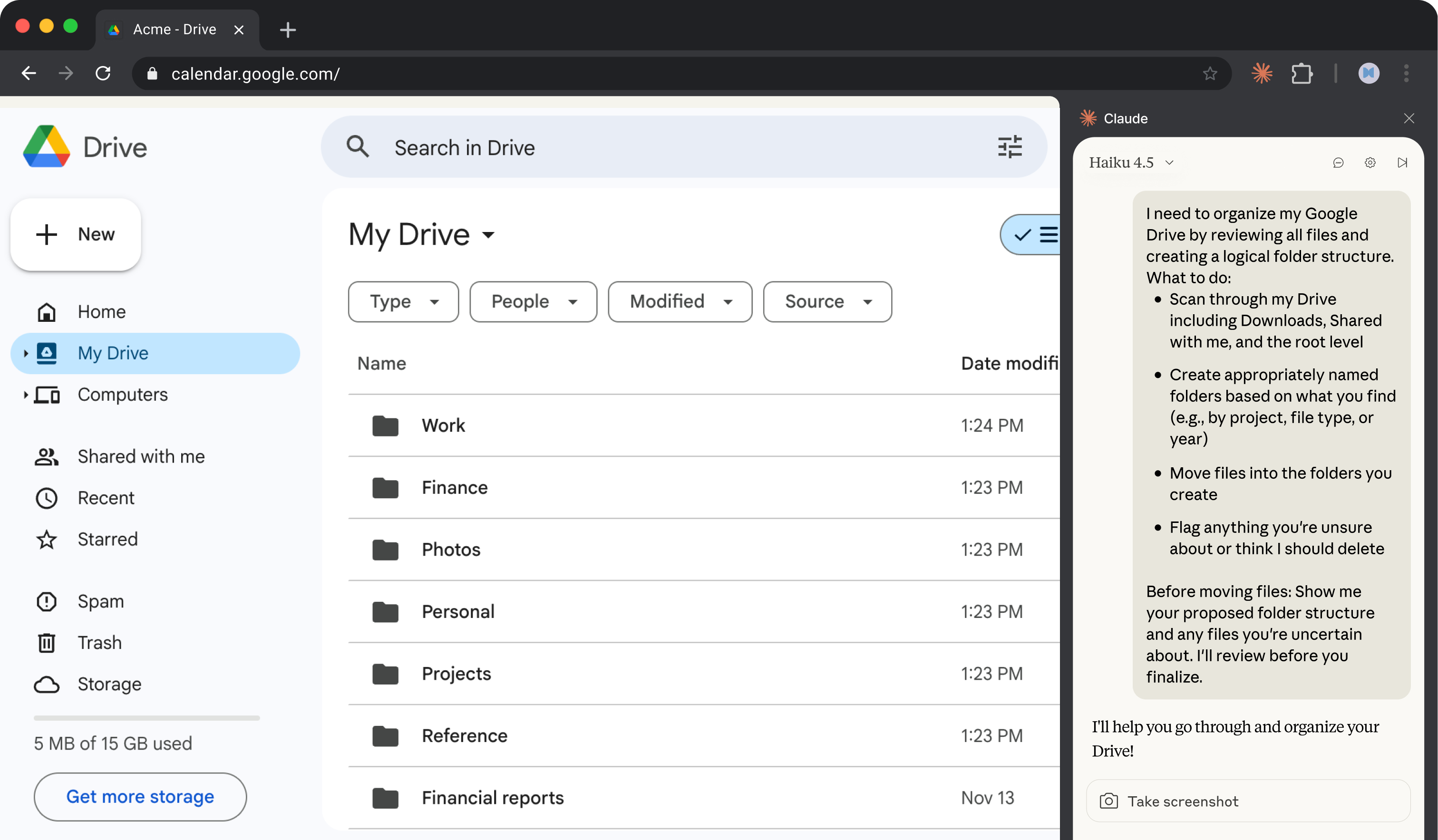
The image below illustrates an important professional habit: ask for a proposed structure and flag uncertainty before making irreversible changes.
Stage 2: get a plan, then request version 1
Upload your chosen source file. In Claude, ask for a plan before asking it to create the final file. This exposes misunderstandings while they are cheap to correct.
You can adapt this prompt:
I have uploaded a source document. Create a one-page briefing for a manager who did not attend the event.
Purpose: summarize decisions, open risks, and next actions.
Requirements: maximum 500 words; professional, neutral tone; use headings; put next actions in bullets; include owners only when the source identifies them.
Source rule: use only information supported by the uploaded file. If an essential detail is absent or unclear, list it as a source gap rather than guessing.Before creating the file, give me:
- a proposed outline,
- any assumptions you would need to make, and
- any clarifying questions.
This is not unnecessary bureaucracy. Claude may otherwise choose an audience, infer an owner, or give equal weight to information that you consider minor. Reviewing a plan makes your expertise visible at the right moment.
Hand Claude Cowork your first task · Introduction to Claude Cowork · Claude Academy
Claude Academy’s “Hand Claude Cowork your first task” explains a delegation-oriented interface, but its planning, clarification, and review principles also apply to ordinary Claude chats and Projects.
In “Delegate your first task,” read the prompt ingredients. Identify the three pieces: deliverable, inputs, and task-specific nuance. Next, in “Answer the clarifying questions,” read clarifying questions, noting why uncertainty should be resolved early. Finally, in “Review the finished deliverable,” read the review guidance and retain its skeptical but constructive standard.
After Claude provides its plan, inspect it. Correct any wrong assumption in direct language. For example:
Keep the decision about the pilot program in the opening section because it is the manager’s immediate concern. Do not describe the budget as approved; the source says it is pending review. The final audience is internal leadership, not external customers.
Only then request the draft:
Proceed with the approved outline. Create the briefing as a Word document named
Workshop_Briefing_v1.docx. Preserve uncertainty: label any unresolved source gaps clearly rather than filling them in. After creating the file, provide a short change note stating the sections included and any source gaps still present.
The filename matters. Version labels preserve a recoverable history: v1 is the initial draft; a later revised version can be v2. Avoid overwriting the only copy of work you may need to compare or restore.
Stage 3: critique version 1 systematically
When the file is ready, preview it in Claude and, if possible, download and open it in the intended application. A document can be correct in text but render poorly because of awkward page breaks, clipped tables, broken headings, or inconsistent bullet formatting.
Do not begin with “Do I like it?” Instead, review in passes.
Pass 1: requirement fit
Check the delivery brief you created.
- Is it actually a one-page briefing rather than a general summary?
- Does it include every required section?
- Does it respect the word limit and requested tone?
- Are the action items easy to find?
- Is the output in the requested file format?
Pass 2: source fidelity
Open the original source alongside the draft. Spot-check every decision, number, date, quoted phrase, owner, and recommendation that could affect a reader’s understanding.
Pay particular attention to claims that sound unusually specific. Specificity is not evidence. If you cannot find support in the uploaded source, it is a problem to resolve, not a detail to leave because it sounds plausible.
Pass 3: audience and judgment
Ask whether the document helps the intended reader act. A manager usually needs implications and next actions before background detail. A briefing can be factually accurate yet ineffective if it buries its central decision, overuses jargon, or presents unresolved uncertainty as settled fact.
Pass 4: presentation and safety
Check headings, spelling, whitespace, filenames, page count, and whether the file accidentally includes a draft note, placeholder, confidential detail, or internal instruction not meant for the final audience.
Claude can help organize your critique, but it cannot replace your comparison with the source. Ask it to audit the draft without changing it yet:
Do not edit the document yet. Audit version 1 against my stated requirements and the uploaded source. Return a table with: requirement or claim, evidence in the draft, issue found, and recommended correction. Separately list any factual claim, number, date, owner, or conclusion that you cannot directly support from the source.
This request is useful because it separates diagnosis from revision. You can decide which changes are warranted before an AI edits the document again.
Stage 4: revise specifically, preserve what already works
A weak revision request is:
Make the briefing better.
Claude has to guess what “better” means, and a broad rewrite can remove content you already approved. Instead, state what to change, what to preserve, and what must not be inferred.
For example:
Create
Workshop_Briefing_v2.docxby revising version 1 as follows:
- Move the pilot-program decision into the opening paragraph.
- Replace “the budget was approved” with “the budget is pending review.”
- Remove the action item about staff training because the uploaded source does not assign it.
- Keep the existing title, neutral tone, and action-item layout.
- Keep the document under 500 words.
Do not add facts, dates, owners, or recommendations not supported by the uploaded source. After revising, provide a concise change log and list any remaining source gaps.
This is the core professional skill: convert your critique into observable edits.
The appropriate revision scope depends on the defect:
| Problem found | Best response |
|---|---|
| A sentence is too long or too technical | Request a local rewrite of that sentence or section. |
| A fact is unsupported or wrong | Correct it from the source, or remove it if no evidence exists. |
| A required section is missing | Add the section, stating its purpose and constraints. |
| The whole document serves the wrong audience | Revise the structure and tone; restate the intended reader. |
| Claude lacked a crucial source document | Upload the authorized source, explain its role, then ask for targeted updates. |
| The format or layout is wrong | Specify the exact structural correction and inspect the regenerated file. |
The distinction matters. A minor wording issue does not justify rebuilding a reliable document. Conversely, if the audience or source basis is wrong, superficial editing will not repair the document’s foundation.
How to Use Claude AI (Beginner Tutorial)
Watch Kevin Stratvert’s “How to Use Claude AI (Beginner Tutorial)” for a short demonstration of iterative refinement: a response is adjusted through follow-up instructions instead of discarded.
Watch iterative revision. Focus on the choice to preserve a useful initial response while correcting the missing detail, then refining length, tone, or audience with additional instructions. Apply that same discipline to the file draft: revise the known defect rather than regenerating blindly.
If you use an integration that supports tracked changes, keep edits visible until you have reviewed them. Tracked edits provide a clear distinction between the approved baseline and the proposed revision. If your Claude interface does not support them, retain the versioned files and use the change log as your review record.
Complete a 40-minute file task
Use this sequence to complete the outcome in one focused session.
| Time | Action | Evidence of progress |
|---|---|---|
| 0–5 minutes | Choose an authorized source file and write the delivery brief. | A short list of audience, purpose, requirements, and evidence rules. |
| 5–10 minutes | Upload the file and request an outline, assumptions, and questions. | Claude’s plan, plus your corrections or approval. |
| 10–18 minutes | Request and preview version 1. | A downloadable .docx or PDF with a clear version name. |
| 18–28 minutes | Compare version 1 with the source and delivery brief. | A short critique noting exact issues, not vague impressions. |
| 28–35 minutes | Submit a focused revision request and inspect version 2. | A revised file and a change log. |
| 35–40 minutes | Perform the final quality check and save the approved output. | A final file you can open, read, and justify. |
Your final quality gate should be brief but firm:
- The file opens correctly and uses the required format.
- Required sections and constraints are met.
- Important claims have been checked against the source.
- Unsupported details have been removed or clearly marked as unresolved.
- The tone and structure fit the reader.
- You know what changed between version 1 and version 2.
- You have not included information you were not authorized to share.
“Claude created a file” is not the completion criterion. “I reviewed a source-grounded file that meets the stated requirements” is.
Key takeaways
A reliable file workflow begins with a defined deliverable: audience, purpose, content requirements, format, and evidence rules.
Ask for a plan or clarifying questions before requesting the file. This makes assumptions visible before they become errors in a document.
Treat Claude’s first file as version 1. Critique it against the source, your requirements, the needs of the audience, and the rendered file itself. Then request a focused revision that states both what must change and what must remain intact.
Most importantly, do not rely on fluent writing as proof of accuracy. You are accountable for checking consequential claims and approving the final deliverable.
This completes the foundations module. Next, you will move from one-off instructions to deliberate prompt design, beginning with how to specify a prompt’s goal, context, audience, constraints, and expected output.
Can't find a good explanation? Sign up and we'll make it for you
Sign up