
Welcome back. In the previous lesson, you learned to identify repeated work in code and account for both time and auxiliary space. A nested pair scan for Two Sum takes time because each candidate value may trigger another linear search.
This lesson introduces the main tool that removes many of those repeated searches: hash-based lookup using JavaScript Map and Set. You will learn when to choose each structure, use their APIs without JavaScript-specific mistakes, and state the usual interview complexity trade-off: extra space in exchange for expected lookups.
The core idea: stop repeatedly scanning the array
Suppose you need to know whether a value has appeared before.
With an array, the direct tool is usually includes:
seenValues.includes(value);
But includes may scan the entire array, so its worst-case cost is:
If you call it once inside a loop that itself can run times, the total can become:
A Set stores only values and answers the question:
“Is this value present?”
A Map stores key-value associations and answers questions such as:
“Have I seen this value, and if so, what index/count/record is associated with it?”
In typical interview analysis, Set.has, Set.add, Map.has, Map.get, and Map.set are treated as expected constant-time operations:
So a single pass through an array, with a lookup and insertion per element, is usually:
This is an implementation-model assumption, not an unconditional language guarantee. MDN specifies that Map access must be sublinear on average; engines commonly use hash-table-like implementations that give the expected behavior used in interviews.
The cost is memory. If a map or set grows to contain up to one entry per input element, its auxiliary space is:
That is the central trade-off:
| Approach | Lookup cost per check | Total cost in a full scan | Extra space |
|---|---|---|---|
Search an array with includes | Often | ||
Use Set or Map lookup | Expected | Often |
You Should Use Maps and Sets in JS
Watch “You Should Use Maps and Sets in JS” from Syntax for a concise JavaScript-focused introduction to the APIs and the reason they replace repeated array searches.
Start with Map mechanics to see construction, set, get, and has. Continue through key behavior, especially the difference between numeric and string keys in a Map. Then watch Set motivation for the cost of array membership checks, followed by Set lookup. Focus on the distinction between an array scan with includes and a membership test with has.
Use a Set when you only need membership
A Set is a collection of unique values. Its job is not to preserve duplicates, positions, or counts. Its job is to represent membership.
Its essential operations are:
const seen = new Set();

seen.add(42);        // Insert a value.
seen.has(42);        // true
seen.has(99);        // false
seen.delete(42);     // Removes the value; returns true if it existed.
seen.size;           // Number of unique values.
Adding the same value more than once does not create multiple entries:
const tags = new Set();

tags.add("frontend");
tags.add("frontend");

console.log(tags.size); // 1
That makes a Set the natural default whenever a problem asks for one of these ideas:
- determine whether any duplicate exists;
- check whether a required value has appeared before;
- maintain a collection of distinct values;
- avoid processing the same state more than once;
- track visited nodes later in graph problems.
Example: detect whether an array has a duplicate
function containsDuplicate(nums) {
  const seen = new Set();

  for (const num of nums) {
    if (seen.has(num)) {
      return true;
    }

    seen.add(num);
  }

  return false;
}
Read the loop as a small invariant:
Before processing
num,seencontains exactly the values from earlier positions.
For each number:
- Check whether the value is already in
seen. - If it is, the current occurrence is a duplicate.
- Otherwise, add it so later values can detect it.
The order matters. This version is wrong:
function containsDuplicateWrong(nums) {
  const seen = new Set();

  for (const num of nums) {
    seen.add(num);

    if (seen.has(num)) {
      return true;
    }
  }

  return false;
}
It returns true for any nonempty input because it checks membership immediately after adding the current value.
The correct solution performs at most one has and one add per element:
The set can contain every distinct input value:
An early return might make a particular run fast, such as when the first two values are equal. But if all values are distinct, the function checks every element, so the worst-case time remains .
Use a Map when lookup must return information
A Map associates a unique key with a value. In interview problems, the key is often a number, character, string, or node; the stored value is often an index, frequency, Boolean state, or computed result.
const indexById = new Map();

indexById.set(42, 0);
indexById.set(17, 1);

console.log(indexById.has(42)); // true
console.log(indexById.get(42)); // 0
console.log(indexById.get(99)); // undefined
The useful interview question is:
If the key exists, what information will I need later?
That answer tells you what to store as the map value.
| Needed later | Appropriate map meaning |
|---|---|
| Original position | value to index |
| Number of occurrences | value to frequency |
| Associated record | identifier to object |
| Previously computed result | state to result |
For example, if a later step needs to know where a value appeared, a Set is insufficient because it only knows presence. A Map can store the index:
const indexByValue = new Map();

indexByValue.set(8, 0);
indexByValue.set(3, 1);

console.log(indexByValue.get(8)); // 0
has and get answer different questions
Map.get(key) returns undefined when a key is absent. But undefined can also be a value you deliberately stored:
const statusById = new Map();

statusById.set("job-17", undefined);

console.log(statusById.get("job-17")); // undefined
console.log(statusById.get("job-99")); // undefined
If you need to distinguish “missing key” from “stored value happens to be undefined,” use has:
if (statusById.has("job-17")) {
  const status = statusById.get("job-17");
  // The key definitely exists, even if status is undefined.
}
For index values and numeric frequencies, get is often enough when combined with a deliberate default. Here is the standard counting update:
function incrementCount(counts, value) {
  const currentCount = counts.get(value) ?? 0;
  counts.set(value, currentCount + 1);
}
The ?? 0 means “use zero only when the lookup returned null or undefined.” Once the key exists, its numeric count is retrieved and incremented.
A later lesson will turn this small update into full frequency-map problems. For now, recognize the fundamental pattern: a map can retrieve prior information about the current value without scanning the input again.
Keyed collections - JavaScript - MDN Web Docs - Mozilla
Read this MDN guide from Mozilla as a compact reference for the practical Map and Set APIs. It also clarifies why Map is usually the safest interview default for dynamic key-value data.
In “Maps”, read the “Map object” subsection and follow the API setup into the example code block. Identify what set, get, has, delete, and size do. Next, read “Object and Map compared” for the distinction between object keys and map keys. In “Sets”, read “Set object” and the complete example block beginning with const mySet = new Set(). Use the Set overview as a navigation point. Finally, skim “Key and value equality of Map and Set”; note in particular that NaN is treated as equal to itself by both collections.
JavaScript details that cause interview bugs
The algorithmic idea is often correct while the JavaScript implementation is subtly wrong. These are the most important pitfalls to avoid.
1. Do not use square brackets to insert Map entries
This is incorrect:
const indexByValue = new Map();

indexByValue[5] = 0;

console.log(indexByValue.has(5)); // false
Square-bracket assignment creates an ordinary property on the Map object. It does not create an entry in the map’s internal key-value collection.
Use .set:
const indexByValue = new Map();

indexByValue.set(5, 0);

console.log(indexByValue.has(5)); // true
console.log(indexByValue.get(5)); // 0
Similarly, use Set.add(value), not bracket notation, to insert a Set value.
2. Re-setting a map key overwrites its old value
A key occurs only once in a Map:
const lastIndex = new Map();

lastIndex.set("a", 0);
lastIndex.set("a", 3);

console.log(lastIndex.get("a")); // 3
console.log(lastIndex.size);     // 1
Overwriting is sometimes exactly what you want. For example, a map named lastIndex should retain the most recent location of each value. But it is incorrect if you need every index where a value appeared; that would require storing an array as the map value.
3. A Map does not coerce key types like an object does
These are different keys:
const records = new Map();

records.set(7, "numeric ID");
records.set("7", "string ID");

console.log(records.size); // 2
This is generally helpful in interview code: use the actual input values as keys, without silently changing their types.
For object keys, equality is based on reference identity:
const first = { id: 1 };
const equivalentLookingObject = { id: 1 };

const metadata = new Map();
metadata.set(first, "stored");

console.log(metadata.has(equivalentLookingObject)); // false
Those objects have the same visible properties but are different objects in memory. Most array and string interview problems use primitive keys, so this does not arise often, but it is worth recognizing.
4. Building the collection also takes time
Creating a set from an array is convenient:
const allowedIds = new Set(ids);
But it must insert every input item, so construction costs:
If you perform only one membership check, an array scan and building a set are both in asymptotic time. A set becomes valuable when you need repeated membership checks, or when it is naturally built as part of a one-pass algorithm.
Likewise, iterating across every entry in a Map or Set is linear:
for (const value of seen) {
  // Runs once per stored value.
}
The collection gives fast lookup; it does not make a full traversal constant time.
A preview: why a map solves complement lookup
The next lesson will use a one-pass Map to solve complement-search problems such as Two Sum. The important choice is what the map represents:
key: a previously seen number
value: its index
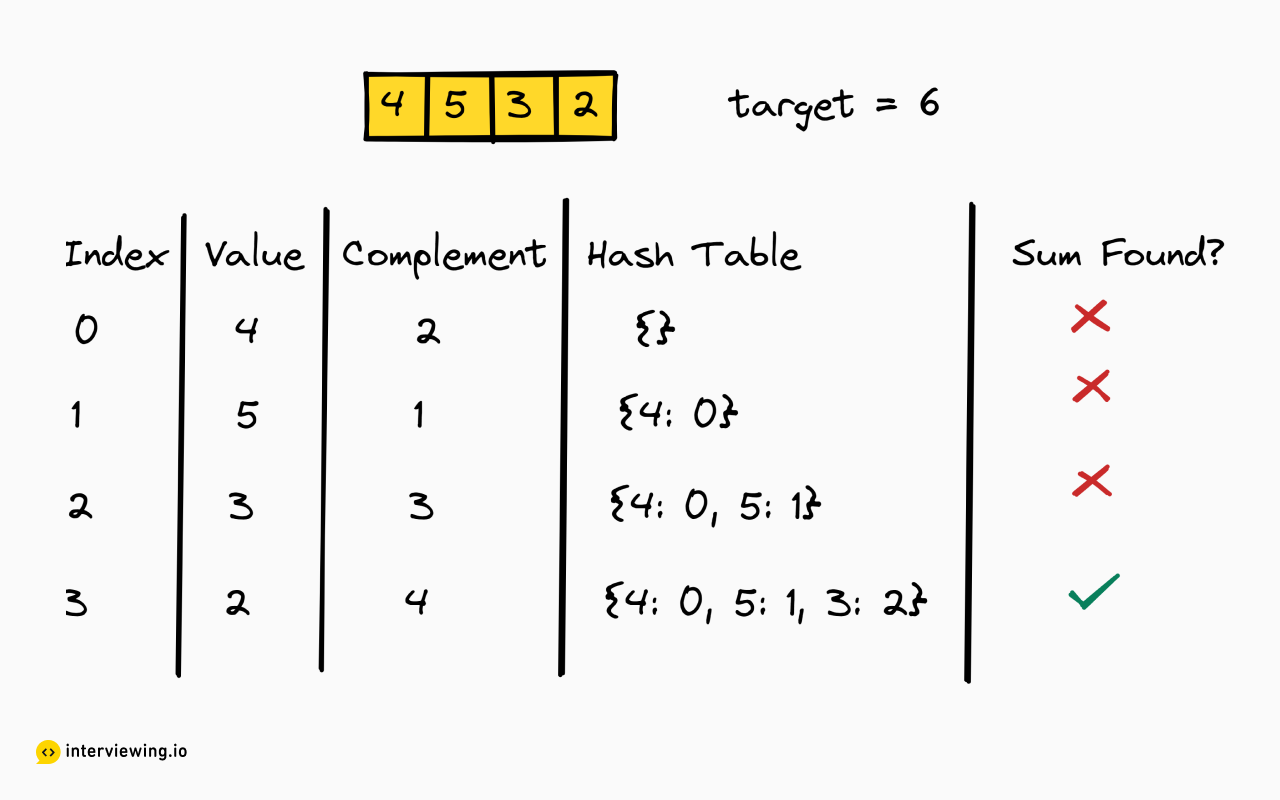
In the trace, consider the final value, 2. The target is 6, so the needed complement is:
The map already contains 4 with index 0, so the pair is found at indices 0 and 3.
Notice that the lookup occurs before storing the current value. That ordering ensures we pair the current element only with an earlier, distinct array element.
For an array containing only [3] with target 6, storing first and then looking up 3 would falsely allow the item to match itself. But with lookup first, the map is initially empty, so no invalid pair is returned. For [3, 3], the first 3 is stored; the second 3 correctly finds the earlier one.
Each iteration does a constant amount of arithmetic plus expected constant-time map operations:
The map may retain an entry for every value:
Key takeaways
A Set answers membership questions. Use it when the value itself is enough: “Have I seen this?” or “Is this visited?”
A Map answers lookup plus associated-information questions. Use it when you need an index, count, record, or other value associated with a key.
For interview complexity analysis:
Keep the core JavaScript rules straight:
- Insert into a
Mapwith.set(key, value), not brackets. - Check key existence with
.has(key). - Retrieve stored data with
.get(key). - Insert into a
Setwith.add(value). - Check
Setmembership with.has(value). - Remember that repeated
Map.setcalls overwrite the existing value for that key.
Next, you will apply these tools directly: derive and implement a one-pass hash-map solution for a complement-search problem, including the ordering that prevents an element from being reused.
Can't find a good explanation? Sign up and we'll make it for you
Sign up