
Good to see you again. In the previous lesson, you used Map and Set to replace repeated array scans with expected constant-time lookup. Sorting is a different kind of tool: rather than answering “have I seen this value?”, it deliberately rearranges data so that order becomes useful.
In this lesson, you will make numeric sorting reliable in JavaScript, understand exactly what a comparator tells sort(), and include sorting in your complexity analysis. This matters because many interview approaches begin with “sort the input, then scan it”—but that first step is not free.
Why sort() alone is wrong for numeric arrays
A common JavaScript interview bug is writing:
const nums = [1, 2, 15];
nums.sort();

console.log(nums); // [1, 15, 2]
That output is not numerically sorted. By default, JavaScript converts array elements to strings and sorts them lexicographically—character by character.
So JavaScript effectively compares:
"1""2""15"
Since "15" begins with "1", it comes before "2" in string order.
This is why a more obvious-looking input can also fail:
const nums = [100, 2, 5, 4];

nums.sort();

console.log(nums); // [100, 2, 4, 5]
The default .sort() is appropriate for simple strings when JavaScript’s default character ordering is acceptable. It is not the safe default for numbers.
Watch the following short segment for a visual explanation of the default string conversion and the comparator fix.
JavaScript Comparator Function | Sorting Explained!
Watch “JavaScript Comparator Function | Sorting Explained!” by The Code Creative. It demonstrates the default numeric-sort mistake, then derives the comparator convention you will use in interview code.
Begin with numeric default sort to see why 100 can appear before 2. Continue with the comparator and focus on what negative, positive, and zero return values mean. The final shorthand, a - b, is the standard ascending numeric comparator.
The comparator contract
Pass sort() a comparator function when you want an order other than JavaScript’s default string order:
nums.sort((a, b) => {
  // Return a number describing the relative order of a and b.
});
The names a and b represent two values that the sorting algorithm has chosen to compare. Your function returns a number:
| Comparator result | Meaning |
|---|---|
| Negative | Put a before b |
| Positive | Put a after b |
0 | Treat them as equal for this ordering |
For an ascending numerical order, subtract b from a:
const nums = [100, 2, 5, 4];

nums.sort((a, b) => a - b);

console.log(nums); // [2, 4, 5, 100]
Why does this work?
- If
a = 2andb = 5, thena - bis negative.2belongs before5. - If
a = 100andb = 4, thena - bis positive.100belongs after4. - If both values are
7, thena - bis0. They are equal numerically.
For descending order, reverse the subtraction:
const scores = [72, 95, 60, 88];

scores.sort((a, b) => b - a);

console.log(scores); // [95, 88, 72, 60]
A useful memory rule is:
// Low to high
(a, b) => a - b

// High to low
(a, b) => b - a
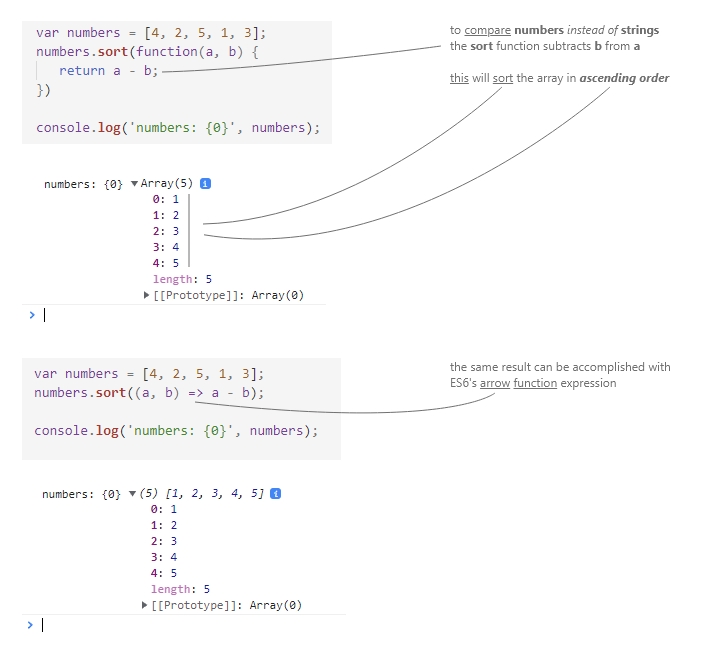
The sorting engine decides which pairs to compare and how many comparisons to make. Your job is only to provide a consistent answer for any two values. Do not assume that a and b are adjacent in the original array.
One tempting but incorrect comparator is:
nums.sort((a, b) => a > b);
It returns a Boolean, which JavaScript converts to 0 or 1. In particular, when a < b, it returns false, or 0, incorrectly claiming that the values are equal. This comparator does not express the required three-way ordering and can behave inconsistently across JavaScript engines.
Use subtraction for numbers instead.
sort() changes the original array
sort() is an in-place method. It reorders the original array and returns a reference to that same array:
const prices = [30, 5, 12];

const result = prices.sort((a, b) => a - b);

console.log(prices); // [5, 12, 30]
console.log(result); // [5, 12, 30]
console.log(result === prices); // true
In an interview, mutation may be fine if the problem permits modifying the input. But do not silently destroy the original order if later logic needs it.
To preserve the input, make a copy before sorting:
const prices = [30, 5, 12];

const sortedPrices = [...prices].sort((a, b) => a - b);

console.log(prices);        // [30, 5, 12]
console.log(sortedPrices);  // [5, 12, 30]
For arrays of numbers, this is usually the clearest safe pattern:
const sorted = [...nums].sort((a, b) => a - b);
The spread operation creates a new array, so preserving the input has a definite extra-space cost for the copy.
The MDN reference below is worth keeping as a syntax-and-semantics reference. Read it now with two questions in mind: “What exactly must my comparator return?” and “What does sort() mutate?”
Array.prototype.sort() - JavaScript - MDN Web Docs
Read MDN’s Array.prototype.sort() reference for the exact comparator contract, the default string-based behavior, and the fact that sorting changes the source array.
In the Syntax section, read the comparator contract. Then, in the Description section, read the default behavior and numeric fix. Focus on the sign of the comparator result, not on any particular internal sorting algorithm.
Sorting numeric fields in objects
The same logic applies when the array holds objects but the ordering key is numeric. Extract the numeric property from both objects, then subtract:
const candidates = [
  { name: "Ava", score: 81 },
  { name: "Noah", score: 95 },
  { name: "Mia", score: 88 },
];

candidates.sort((a, b) => b.score - a.score);

console.log(candidates);
/*
[
  { name: "Noah", score: 95 },
  { name: "Mia", score: 88 },
  { name: "Ava", score: 81 }
]
*/
Here, a and b are objects, so subtracting the objects themselves would make no sense. But a.score and b.score are numbers.
For ascending numeric properties:
items.sort((a, b) => a.value - b.value);
For descending numeric properties:
items.sort((a, b) => b.value - a.value);
When two values have equal sort keys, a correct comparator returns 0. Modern JavaScript specifies stable sorting, meaning entries with equal keys retain their prior relative order. That is useful, but the main interview requirement is simpler: ensure equal values are treated as equal rather than forcing an arbitrary result.
Account for the cost of sorting
A sorting approach is often much better than brute force, but it is not automatically linear time.
For a general array of values, budget:
time for sorting.
JavaScript does not promise one particular internal sorting algorithm or a precise complexity bound in the language specification. In interview analysis, however, the standard and appropriate assumption for a general comparison sort is:
Suppose a solution has two phases:
- Sort the array.
- Perform one linear scan with pointers.
Its total time is:
The sorting term dominates, so the final time complexity is:
Do not say merely because the scan after sorting is linear.
For example:
function hasAdjacentDuplicateAfterSorting(nums) {
  nums.sort((a, b) => a - b);

  for (let i = 1; i < nums.length; i++) {
    if (nums[i] === nums[i - 1]) {
      return true;
    }
  }

  return false;
}
The loop is , but sorting occurs first:
Space analysis: state the meaningful distinction
Sorting in place avoids an explicit second array in your code:
nums.sort((a, b) => a - b);
But the exact auxiliary memory used internally by JavaScript’s sort implementation is engine-dependent. Therefore, a careful interview explanation is:
“The time complexity is . I sort the input in place. The runtime’s internal sorting memory is implementation-dependent.”
If you copy before sorting:
const sorted = [...nums].sort((a, b) => a - b);
then the copy alone requires:
additional space, regardless of the engine’s internal sort behavior.
This distinction is particularly important when a problem says “do not modify the input” or when you must retain original indices.
Choosing between sorting and hashing
From the previous lesson, a Map or Set can often support a one-pass expected- solution using extra space. Sorting gives a different trade-off:
| Strategy | Typical time | Explicit extra space | Changes input? |
|---|---|---|---|
Set or Map scan | Expected | No | |
| Sort in place, then scan | No explicit copy | Yes | |
| Copy, sort, then scan | for copy | No |
Neither technique universally wins. A hash-based approach may be faster asymptotically when the problem is fundamentally about lookup. A sorting-based approach is natural when ordered values make relationships easy to inspect—for example, adjacent values, ranges, or two values moving toward each other from opposite ends.
In a solution explanation, make the sort visible:
“I sort numerically with
(a, b) => a - b, which costs , then perform a linear scan. Therefore the overall time is .”
That one sentence prevents a frequent complexity-analysis error.
Key takeaways
For numeric data, always provide a comparator:
nums.sort((a, b) => a - b); // ascending
nums.sort((a, b) => b - a); // descending
Remember the comparator contract:
- negative:
abeforeb; - positive:
aafterb; - zero: equal in the selected ordering.
Default .sort() uses string ordering, so it can place 100 before 2. Also remember that .sort() mutates its array; use [...nums] before sorting when the original order must remain available.
Finally, include sorting in the runtime:
Next, you will strengthen the other foundational interview habit that makes correct solutions robust: designing edge-case tests for array and string algorithms.
Can't find a good explanation? Sign up and we'll make it for you
Sign up