
Hello again. In the previous lesson, you established the BPMN vocabulary: events show occurrences, activities show work, gateways control the path, and pools and lanes clarify participation and accountability. You also connected BPMN to SIPOC: SIPOC defines the process boundary at a high level, while BPMN makes the operational flow inside that boundary visible.
This lesson turns that knowledge into a repeatable analyst workflow. You will take a written scenario, separate stated facts from assumptions, identify roles and control points, and build an as-is BPMN model. The goal is not to design an ideal future process. It is to faithfully represent how work is currently described, including decisions and handoffs that stakeholders can validate.
Model the current process, not the process you wish existed
An as-is BPMN model is evidence-based. Its purpose is to establish a shared view of the present workflow before anyone proposes automation, policy changes, or redesigned steps.
That distinction matters in an analyst role. A narrative may say:
The service desk records the request, sends it to a manager for approval when needed, and then the access team fulfils it.
An as-is model should show those stated activities and the decision that controls approval. It should not silently add:
- automatic eligibility checks;
- an SLA timer;
- an approval-reminder email;
- a new self-service portal;
- an escalation team; or
- detailed system integrations.
Those may be sensible future improvements, but unless the scenario or stakeholder confirms them, they are assumptions. Capture them in an open-points list, rather than drawing them as facts.
A useful rule is:
Model what is said; record what is missing; do not invent what would make the process better.
For an as-is model, begin with a short scope statement based on the SIPOC boundary:
| Scope component | Example |
|---|---|
| Process starts when | A completed access request is received by the Service Desk. |
| Process ends when | Access is granted and confirmed, or the request is rejected and closed. |
| Primary outcome | The requester receives a confirmed access outcome. |
| Out of scope for this model | How the requester completes the form; technical steps within identity-management tooling; post-closure audits. |
A scope statement protects the model from two common problems: beginning too early with unrelated customer activity, and expanding into detailed technical procedures that hide the business flow.
First pass: convert prose into modelling evidence
A written business scenario is rarely already structured for BPMN. It mixes roles, actions, decisions, timing, data, and business policy in ordinary language. Before opening a diagramming tool, extract the operational evidence.
Use this simple classification pass:
| What you find in the narrative | What to capture | Likely BPMN treatment |
|---|---|---|
| An occurrence that starts or finishes the process | “Request received”; “Request closed” | Start or end event |
| Work performed by a person or system | “Record request”; “Grant access” | Task |
| A role, team, or organization | “Service Desk”; “Line Manager” | Lane or pool |
| A decision rule or condition | “If privileged access is requested…” | Gateway and labelled outgoing flows |
| An output or document | “Approval decision”; “Access confirmation” | Usually a task result; optionally a data object |
| Missing detail or vague wording | “As needed”; “normally”; “quickly” | Open point, not an invented BPMN element |
Pay particular attention to verbs, roles, and conditions:
- Verbs usually reveal activities: record, review, grant, notify.
- Roles reveal lane candidates: Service Desk, Line Manager, Access Team.
- Conditions reveal gateways: if approval is required, if approved, otherwise.
The following short walkthrough shows this translation from narrative to model using a leave-application process.
BPMN Tutorial with Example - The Leave Application Process
Read Visual Paradigm’s worked example to see a short written workflow translated into lanes, tasks, a decision gateway, and distinct end states.
In the section “The Leave Application Process Example,” begin at the sentence “To begin the process, an employee needs to request leave.” Read the worked translation. Notice the order in which the author identifies the initiating event, transfers accountability between lanes, introduces the approval decision, and separates the declined and approved paths.
The tutorial’s example is deliberately simple. That is a strength at this stage: a stakeholder should be able to trace the normal path and each decision outcome without needing to decode a dense diagram.
A worked scenario: employee access requests
Use the following current-state scenario as the basis for a model. It is intentionally cross-industry: the same reasoning applies whether the workflow concerns a service request, insurance claim, loan request, retail exception, or automotive engineering approval.
Current process: employee access request
Acme’s Service Desk begins handling a request when it receives a completed employee access request. The Service Desk records the request. Standard application access does not require manager approval, but privileged access requires approval from the employee’s Line Manager.When manager approval is required, the Line Manager reviews the request. If the manager rejects it, the Service Desk records the rejection and sends a rejection notification to the employee. The request is then closed.
For standard access, or for privileged access approved by the Line Manager, the Identity and Access Team grants the requested access. The Service Desk records fulfilment, sends a confirmation to the employee, and closes the request.
Before modelling, transform the paragraph into a compact evidence table.
| Narrative evidence | Extracted fact | BPMN implication |
|---|---|---|
| “Service Desk begins handling a request when it receives…” | The defined process begins on receipt by the Service Desk. | Start event: Completed access request received |
| “The Service Desk records the request.” | The Service Desk performs work. | Task in Service Desk lane: Record access request |
| “Standard access does not require… privileged access requires…” | One of two mutually exclusive paths applies. | Exclusive gateway: Manager approval required? |
| “Line Manager reviews the request.” | A different internal role performs a task. | Task in Line Manager lane: Review access request |
| “If the manager rejects it…” | Approval has two exclusive outcomes. | Exclusive gateway: Request approved? |
| “Identity and Access Team grants…” | A handoff occurs before fulfilment work. | Task in Identity and Access Team lane: Grant requested access |
| “records fulfilment, sends a confirmation…” | Service Desk completes recordkeeping and communication. | Two Service Desk tasks |
| “The request is then closed.” | Two valid final outcomes exist. | Two clearly named end events |
The evidence table is often worth retaining in a project folder or Confluence page. It provides a lightweight audit trail from source narrative to model, and helps during review when someone asks, “Where did this decision come from?”
Choose the right participants and level of detail
For this scenario, use one pool because the work being modelled is Acme’s internal access-management process. Divide that pool into three lanes:
- Service Desk
- Line Manager
- Identity and Access Team
The employee is an important stakeholder, but the narrative does not describe the employee’s internal actions after request submission. The employee therefore does not need a lane in this particular internal process model. Receipt of the completed request can be the start event in the Service Desk lane.
If the purpose were to show the interaction between the employee and Acme in detail, the employee would become a separate pool, with message flows between the employee and Acme. Do not create that second pool simply because the employee receives notifications. Choose the diagram’s perspective first.
The BPMN 2.0 reference sheet below is useful as a desk reference while drawing. Focus on the basic shapes in the top portion: start and end events, tasks, exclusive gateways, pools, lanes, sequence flows, and message flows.
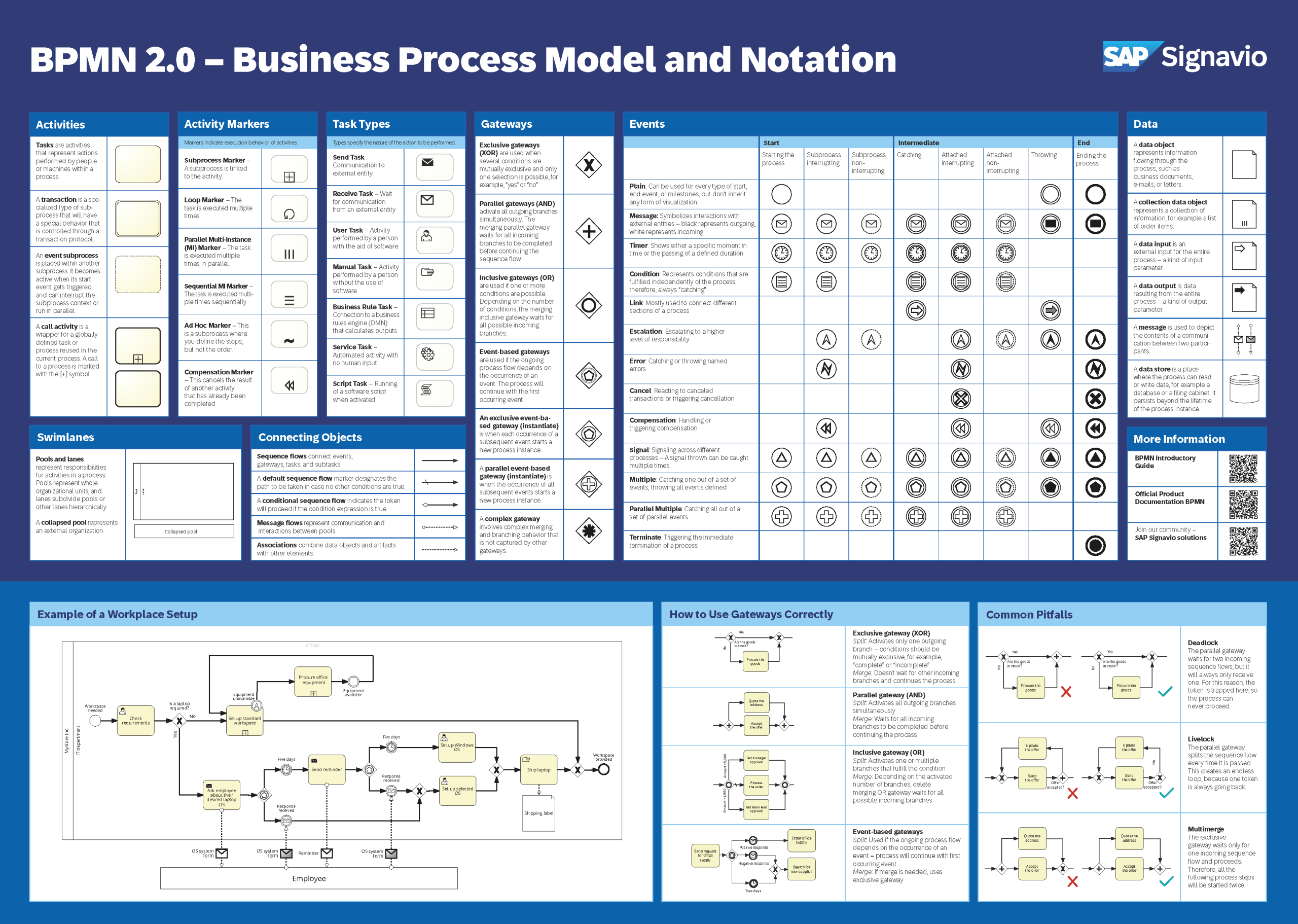
For this first as-is model, avoid adding technical detail such as API calls, directory groups, database updates, or individual form fields. Those details may become useful later when analysing interfaces and requirements, but they would obscure the main operational question: who does what, under which condition, and with what outcome?
Build the BPMN model in a controlled order
Do not draw the diagram in the same order that the narrative happens to be written. Use a deliberate construction sequence.
1. Place the process boundary
In the Service Desk lane, place:
- a start event labelled Completed access request received;
- two end events:
- Request rejected and closed
- Access granted and request closed
These end states are deliberately different. A rejected request and a fulfilled request both close the process, but they have materially different business outcomes.
2. Draw the backbone of the successful path
Place the essential work in chronological order, generally from left to right:
| Order | Lane | BPMN element and label |
|---|---|---|
| 1 | Service Desk | Start event: Completed access request received |
| 2 | Service Desk | Task: Record access request |
| 3 | Service Desk | Exclusive gateway: Manager approval required? |
| 4 | Identity and Access Team | Task: Grant requested access |
| 5 | Service Desk | Task: Record fulfilment |
| 6 | Service Desk | Task: Send access confirmation |
| 7 | Service Desk | End event: Access granted and request closed |
At this point, the model has a readable standard-access route. Notice the naming:
- Tasks use verb plus object: Record access request, Grant requested access.
- The gateway is a question: Manager approval required?
- Events describe an occurrence or completed outcome, not work performed.
3. Add the approval branch
From Manager approval required?, create two outgoing sequence flows:
- [No] continues toward access fulfilment.
- [Yes] crosses into the Line Manager lane and continues to Review access request.
After that task, place a second exclusive gateway: Request approved?
Its two outgoing flows are:
- [Yes] rejoins the standard-access path before Grant requested access.
- [No] crosses back to the Service Desk lane and continues through:
- Record rejection
- Send rejection notification
- End event: Request rejected and closed
Where the standard-access and approved privileged-access routes meet, use a converging exclusive gateway if it makes the convergence clear. The gateway does not perform work; it simply expresses that the process now continues along one common path after either valid route.
4. Check each connector
Use solid sequence flows for all movement within Acme’s pool, including movement across lanes. The lane change shows a handoff of responsibility, not a communication between separate organizations.
The employee notifications are tasks performed by the Service Desk. You do not need message flows unless you add a separate employee pool.
The video below demonstrates a similar modelling sequence: set up a pool and functional lanes, place a start event and tasks, branch using an exclusive gateway, then complete the possible outcomes.
BPMN 2.0 Tutorial – Create Your First Business Process Diagram with HEFLO
Watch “BPMN 2.0 Tutorial – Create Your First Business Process Diagram with HEFLO” by We are HEFLO for a visual walkthrough of turning a service-delivery narrative into a BPMN diagram. The tool is specific to HEFLO, but the modelling decisions transfer to any BPMN-capable editor.
Start with the scenario to identify the trigger, roles, customer interaction, and outcome. Then watch lanes and ownership for the setup of functional lanes, followed by events and tasks for chronological layout and verb-object task naming. Finish with the decision paths, focusing on the exclusive gateway, labelled outcomes, and distinct end states rather than the editor-specific clicks.
Produce your own as-is diagram
Create the access-request diagram in a BPMN-capable diagramming tool of your choice. Aim for a single-page model that a Service Desk lead could review in under two minutes.
Use this build checklist:
- Create a pool named Acme Internal Access Management.
- Add the three functional lanes: Service Desk, Line Manager, and Identity and Access Team.
- Place activities in the lane of the role accountable for doing the work.
- Use only exclusive gateways for the two mutually exclusive decisions in the scenario.
- Label the outgoing sequence flows from both gateways.
- Keep the primary successful path visually direct.
- Use two end events because rejection and fulfilment are different outcomes.
- Give the diagram a clear title, such as As-Is Employee Access Request Process.
- Add a version and date in a small annotation or document header if your tool supports it.
Do not add a timer, a reminder, a database, an employee lane, a risk review, or automated notification logic. The scenario does not establish those facts. A restrained model is more credible than a detailed but fictional one.
A useful working habit is to create a short companion list titled Open Points Not Modelled. For this scenario, possible entries include:
| Open point | Why it matters |
|---|---|
| What rule classifies access as standard or privileged? | It defines the decision condition at the first gateway. |
| Can a manager delegate approval? | It may introduce another role and path. |
| What happens when the requested access cannot be granted? | It may require an exception path and a different final outcome. |
| Is notification automated or sent manually? | It affects future process, integration, and non-functional analysis. |
These are not defects in the model. They are precisely the uncertainties that a well-made as-is diagram makes visible.
Validate the model before calling it complete
Validation is more than checking whether the shapes look correct. Perform a token walk-through: mentally follow one request at a time through every possible path.
For the access-request model, walk through these three cases:
- A standard-access request reaches the Service Desk, bypasses approval, is granted by the access team, confirmed, and closed.
- A privileged-access request is approved, joins the fulfilment path, is granted, confirmed, and closed.
- A privileged-access request is rejected, has its rejection recorded, is notified to the employee, and closes without reaching the access team.
During a stakeholder review, ask focused confirmation questions such as:
- Does the stated start event match the actual point at which the Service Desk becomes accountable?
- Are these the real teams responsible for each activity?
- Are standard and privileged access the only approval categories?
- Does approval occur before any access work begins?
- Are rejection and successful fulfilment genuinely the only final outcomes within the agreed boundary?
Finally, run a notation and readability check:
| Check | What “good” looks like |
|---|---|
| Boundary | The start and end events match the stated scope. |
| Activities | Every task is a clear action with a verb and object. |
| Events | Start and end events are occurrences or outcomes, not actions. |
| Gateways | Each gateway represents a genuine decision with at least two labelled paths. |
| Roles | Each task is in the accountable functional lane. |
| Flow logic | Every non-end element has a valid outgoing sequence flow. |
| Pool rule | No sequence flow leaves the Acme pool. |
| Readability | The normal path is easy to follow and connector crossings are minimized. |
| Evidence | Every diagram element can be traced to the scenario or is listed as an open point. |
Key takeaways
Creating an as-is BPMN model from a written scenario is a structured analysis activity:
- Start with a clear process boundary inherited from SIPOC.
- Extract facts about events, roles, activities, decisions, and outcomes before drawing.
- Use one pool for the focal organization’s internal process and lanes for meaningful accountability boundaries.
- Build the successful backbone first, then add only the decision paths explicitly supported by the scenario.
- Name tasks with a verb and object, events as occurrences or outcomes, and gateways as decision questions.
- Label gateway paths with their conditions.
- Treat missing information as an open point, not as an invitation to invent process steps.
- Validate the finished diagram by walking through each possible route and reviewing it with process participants.
Next, you will extend the as-is model with exception paths and escalation routes. That work will address situations deliberately left open here, such as an access request that cannot be fulfilled, a delayed approval, or a failed notification.
Can't find a good explanation? Sign up and we'll make it for you
Sign up