
Welcome back. Your previous model captured the normal operational paths of an employee access-request process: standard access, manager-approved privileged access, and manager rejection. You kept the model evidence-based, used lanes for accountability, and recorded missing information as open points rather than inventing steps.
Real processes also need to show what happens when normal work cannot continue, takes too long, or needs higher-level attention. In this lesson, you will extend an as-is BPMN model with exception paths and escalation routes while preserving a readable main flow. The goal is not to make the diagram technically elaborate; it is to make operational risk, ownership, and recovery visible enough for stakeholders to validate.
By the end, you should be able to decide whether a situation belongs in a gateway, a boundary event, or an escalation route, and then add a complete, evidence-based path to your BPMN model.
An exception is not simply an unhappy outcome
A rejected request is not automatically an exception. In the prior access-request model, a manager could approve or reject a request. Both outcomes were anticipated by the business rule, so an exclusive gateway was the right notation:
- Request approved?
- [Yes] continues to fulfilment.
- [No] records rejection, notifies the employee, and closes the request.
The fact that the requester may dislike the rejection does not make it exceptional. It is still an expected, controlled outcome.
An exception is a condition that occurs while an activity or subprocess is underway and requires a response outside the normal route. Examples include:
- the identity-management service is unavailable while access is being provisioned;
- an approver has not acted by an agreed deadline;
- an external system returns a technical failure;
- the requester cancels while fulfilment is in progress;
- mandatory supporting information is found to be invalid during review.
An escalation is a particular kind of exception response: it increases visibility or authority because ordinary handling is not sufficient. For example, an overdue approval may be escalated to an approval manager while the original Line Manager is still allowed to complete the review.
Use this decision guide before choosing BPMN notation:
| Situation | BPMN treatment | Why |
|---|---|---|
| The process evaluates known data before choosing a normal route. | Exclusive gateway | The process deliberately makes a decision. |
| A task cannot continue because of a failure. | Interrupting boundary event | The active task stops and a recovery path takes over. |
| A deadline passes, but the original task should continue. | Non-interrupting timer boundary event | The escalation route starts in parallel with the original work. |
| A delay or issue needs to be reported to a higher process scope. | Escalation throw and catch events | A structured BPMN escalation is raised without necessarily treating the issue as a fatal error. |
| A participant cancels or an external event arrives during work. | Message or signal boundary event | The task reacts to something that occurs outside it. |
The key distinction is when the condition is known.
If the process can decide before work begins, use a gateway. If the condition can arise during work that is already active, a boundary event is often more faithful.
Boundary events: watch a task while it is active
A boundary event is attached to the border of an activity or subprocess. It monitors for a specified occurrence while that work is active. If the activity completes normally first, the boundary event no longer applies.
This is similar to operational monitoring: a service can be healthy until a threshold is breached while it is running. The monitoring condition is meaningful only for the period in which the service or task is active.
Tutorial: BPMN Boundary Events and How to Use them in Camunda
Watch Tutorial: BPMN Boundary Events and How to Use them in Camunda by Camunda. The examples are playful, but they make the execution difference between interrupting and non-interrupting boundary events unusually clear.
First watch interrupting timers. Focus on the fact that the timer runs alongside the active task and diverts the process only if it fires before the task finishes. Then watch noninterrupting events, concentrating on why a dashed boundary event creates an additional path while the original task continues.
The boundary’s border communicates its effect:
| Boundary-event type | Visual cue | Effect on the attached work | Suitable access-request example |
|---|---|---|---|
| Interrupting | Solid boundary | Cancels the activity or subprocess and takes the exception route. | The provisioning service fails while access is being granted. |
| Non-interrupting | Dashed boundary | Leaves the activity running and starts an additional path. | An approval has remained unresolved for two business days. |
A non-interrupting event creates a parallel route. That has an important modelling consequence: do not merge the escalation branch back into the original flow unless the business truly requires synchronization.
Suppose an approval reminder is sent after two days. The Line Manager can still approve the request later, while the Approval Manager separately receives and acts on the escalation. If you incorrectly merge those paths using a parallel gateway, the process could wait for both the manager decision and the escalation action even when the real process does not require that. That is an artificial dependency.
This reading provides a concise reference for choosing and completing boundary-event paths.
BPMN Boundary Events: Handle Exceptions with Confidence
Read this Visual Paradigm guide to reinforce the distinction between interrupting and non-interrupting events, then apply its warning about incomplete recovery paths to the access-request model.
In “Understanding BPMN Boundary Events,” read the definition, then continue through the comparison of the two event types. In “Implementing Error Events BPMN,” focus on the recovery-path principle: an exception is not fully modelled until the response has a responsible owner and an outcome. Finally, in “Advanced Tips: Non-Interrupting Events and Timers,” read the timer example and compare it with an overdue approval in the scenario below.
Extend the access-request model using validated exception evidence
An as-is model must still be grounded in evidence. For this lesson, treat the following as a validated stakeholder addendum to the process from the previous lesson:
A privileged-access request must receive a Line Manager decision within two business days. If no decision has been recorded by then, the Approval Manager is notified. The Line Manager’s review remains open and can still be completed.
While the Identity and Access Team is provisioning access, the identity-management service can be unavailable. If this occurs, provisioning stops. The Service Desk records the technical failure, creates an IT incident, informs the employee that the request is pending, and ends the access-request process. The incident-resolution process is outside the current model boundary.
These statements give enough evidence to add two distinct paths. Notice that they are different in both business meaning and BPMN behaviour:
| Validated fact | Trigger | Does original work continue? | BPMN choice |
|---|---|---|---|
| No Line Manager decision within two business days | Time elapses during review | Yes | Non-interrupting timer boundary event |
| Identity-management service is unavailable during provisioning | Technical error during provisioning | No | Interrupting error boundary event |
1. Model the overdue-approval escalation
Attach a non-interrupting timer boundary event to Review access request in the Line Manager lane.
Configure or annotate the timer clearly as:
Two business days after review starts
From the dashed timer event, create an escalation route. Because the addendum says the Approval Manager is notified and acts, add an Approval Manager lane to the pool. The route can contain:
- Review overdue approval in the Approval Manager lane.
- Send reminder to Line Manager in the Approval Manager lane.
- An end event named Approval escalation handled.
Meanwhile, retain the normal sequence flow from Review access request to Request approved?. The Line Manager can still approve or reject after the timer has fired.
The resulting logic is:
- If the Line Manager acts within two business days, only the original approval route is taken.
- If two business days pass first, the escalation route starts.
- The original review remains active.
- The Approval Manager’s action does not itself approve or reject the request unless stakeholders confirm that authority.
That last point is important. It is tempting to add “Approval Manager approves request” because it sounds efficient. But the evidence only says that the manager is notified and sends a reminder. In an as-is model, escalation does not silently become delegation.
2. Model the provisioning failure exception
The existing task Grant requested access represents work performed by the Identity and Access Team. If the current process includes a service or platform failure during that work, attach an interrupting error boundary event to that task.
Label the event specifically, for example:
Identity service unavailable
Avoid generic labels such as Error or System issue. A reviewer needs to understand what failed, not merely that something went wrong.
Route the solid boundary event to the following recovery activities:
- Record provisioning failure in the Service Desk lane.
- Create IT incident in the Service Desk lane.
- Notify employee of pending request in the Service Desk lane.
- End event: Request pending due to provisioning failure.
The standard sequence flow leaving Grant requested access still proceeds to Record fulfilment, but only if provisioning finishes successfully. If the error occurs, the task is interrupted and the normal fulfilment route is not taken.
This is a useful integrity check: the model must never show a failed provisioning attempt proceeding to Record fulfilment or Send access confirmation.
Use BPMN escalation events carefully
In ordinary business conversation, escalation often means “notify a manager.” In BPMN, an escalation event has a more specific meaning. It communicates an issue to a higher flow scope, typically from inside a subprocess to a boundary event or event subprocess that catches it.
The diagram below shows this formal throw-and-catch pattern.
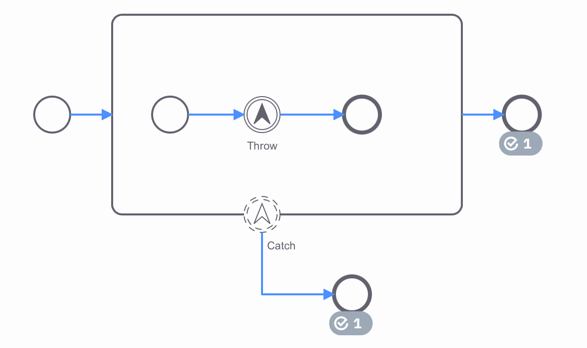
In this pattern:
- an intermediate escalation throw event occurs inside a subprocess;
- it references a named escalation, such as APPROVAL_OVERDUE;
- a matching escalation boundary event is attached to the enclosing subprocess;
- the catch route performs higher-level handling;
- the original subprocess can continue if the catch event is non-interrupting.
For the access-request process, this formal pattern would be appropriate if Obtain manager decision becomes an expanded subprocess. Inside it, an overdue condition could throw an escalation; outside it, a non-interrupting escalation boundary event could initiate Review overdue approval.
However, do not use formal escalation events merely because a supervisor is involved. In the simpler as-is model, a non-interrupting timer boundary event attached directly to Review access request is easier to read and fully expresses the validated behaviour.
Escalation events | Camunda 8 Docs
Read the relevant Camunda documentation as a precise reference for formal BPMN escalation semantics. This is most useful when modelling a subprocess rather than a single human task.
In “Escalation events,” read the execution overview. Then read “Defining an escalation” and “Catching the escalation.” Focus on the role of a shared escalation code, the fact that a catch event handles the escalation at the nearest relevant parent scope, and the distinction between non-critical escalation handling and an interrupting catch. Finish with the unmatched case so you understand why a matching handler must be verified.
For portfolio and interview work, it is usually enough to explain the distinction accurately:
“The overdue approval is a non-interrupting timer-based escalation: it alerts an Approval Manager while allowing the Line Manager’s review to continue. I would use formal escalation throw-and-catch events only if the review were scoped as a subprocess and the modelling audience needed that level of BPMN precision.”
That is a stronger answer than treating every delayed task as an error.
A disciplined workflow for exception modelling
When you add exception paths, work from evidence outward rather than from BPMN symbols inward.
Establish the exception facts
For each candidate exception, capture five pieces of information before editing the model:
| Information to confirm | Overdue approval example | Provisioning-failure example |
|---|---|---|
| Trigger | Two business days pass without a decision. | Identity-management service is unavailable. |
| Active scope | Line Manager review is in progress. | Access provisioning is in progress. |
| Effect on current work | Review continues. | Provisioning stops. |
| Owner of response | Approval Manager. | Service Desk. |
| Completion outcome | Escalation has been handled; review remains open. | Request is pending and an IT incident exists. |
This small table is valuable in a stakeholder workshop. It exposes ambiguities that a diagram alone can hide. For example, “escalate after two days” is incomplete until the team agrees whether the Line Manager’s task remains active, who has authority to intervene, and what outcome ends the escalation branch.
Attach the event to the correct scope
Attach a boundary event to the work that is genuinely being monitored:
- Attach the timer to Review access request, not to the earlier Record access request task.
- Attach the technical error event to Grant requested access, not to the entire process, unless the same failure response applies to every activity in that wider scope.
- If several related tasks share the same deadline, consider placing them inside a subprocess and attaching the event to the subprocess boundary.
The scope should mirror the business statement. A timer attached too broadly can imply that a deadline applies before responsibility has even been assigned.
Make the recovery route complete
Every exception path needs a business outcome. A route that leaves an event and ends at an unlabeled task or a dangling connector is not an analysed process; it is an unresolved question disguised as a diagram.
For each route, show:
- the response work;
- the accountable role;
- any notification or record that stakeholders identify as necessary;
- an end event or a clearly justified re-entry point.
For the provisioning exception, the current process ends after creating an IT incident because incident resolution is explicitly out of scope. If a stakeholder later confirms that the access request automatically resumes after the incident is resolved, that is a new fact requiring a revised process boundary and a reconnection mechanism.
Keep exceptions readable
Exception handling can make BPMN diagrams cluttered quickly. Use these practical rules:
- Keep the normal path visually direct from left to right.
- Place boundary-event routes below the attached task where possible.
- Use event labels that describe the business condition: Approval overdue, Identity service unavailable.
- Keep one or two material exception paths on a high-level as-is model.
- Put rare technical variants, detailed error codes, or retry policy in a separate subprocess, annotation, or supporting specification when they obscure the business conversation.
- Do not use an error event for a normal business decision such as rejection, ineligibility, or an invalid request that is routinely handled through a known review rule.
Update the model and retain an exception register
Revise your As-Is Employee Access Request Process diagram with the two validated paths from this lesson:
- a non-interrupting timer escalation on Review access request;
- an interrupting error path on Grant requested access.
Then create a small companion register. This makes the model reviewable and creates traceable analysis evidence for a portfolio case study.
| ID | Condition | BPMN location | Handling route | Assumption or confirmed fact? |
|---|---|---|---|---|
| EX-01 | No manager decision after two business days | Non-interrupting timer on Review access request | Approval Manager reviews escalation and sends reminder | Confirmed for this exercise |
| EX-02 | Identity service unavailable during provisioning | Interrupting error boundary on Grant requested access | Record failure, create incident, notify employee, end pending | Confirmed for this exercise |
| OP-01 | Identity service is slow but still available | Not modelled | Clarify whether a retry, timeout, or manual workaround exists | Open point |
| OP-02 | Approval Manager does not act after escalation | Not modelled | Clarify second-level escalation authority and deadline | Open point |
Run a token walk-through across these cases:
- A Line Manager approves within two business days.
- The approval timer fires, the Approval Manager sends a reminder, and the Line Manager later approves.
- The identity service fails during provisioning.
- A privileged request is rejected before any escalation timer fires.
The model is consistent only if each case reaches a valid outcome without accidentally recording fulfilment after failure or waiting for a branch that does not need to complete.
Key takeaways
Exception paths model conditions that arise while work is active; they are not substitutes for normal gateway decisions.
- Use a gateway for anticipated alternatives based on known business rules.
- Use an interrupting boundary event when a failure stops the active task and requires recovery.
- Use a non-interrupting boundary event when the original task should continue while an additional response, such as escalation, begins.
- Make every exception route specific, owned, and complete.
- Treat formal BPMN escalation events as scoped communication to a higher-level flow, not simply as a decorative symbol for notifying a manager.
- Keep the as-is model evidence-based: uncertain handling belongs in the open-points list, not in invented BPMN paths.
Next, you will use the enriched as-is model to identify bottlenecks, duplicated work, and risky handoffs. The overdue-approval and provisioning-failure routes you added here will provide concrete evidence for that analysis.
Can't find a good explanation? Sign up and we'll make it for you
Sign up