
Welcome. This course begins with a habit that pays off in nearly every pwn challenge: do not start by fuzzing or opening Ghidra blindly. First establish what the file actually is, how Linux loads it, and which compiler and linker defenses are already shaping the problem.
In this module, you will build a repeatable triage workflow for Linux ELF binaries. Today’s outcome is narrow but essential: use file, readelf, and checksec to identify an x86-64 ELF’s architecture, linking model, and security posture. You already have enough assembly, GDB/GEF, and pwntools experience to make the output operational rather than merely descriptive.
Plan for about 40–50 minutes, including a short hands-on triage pass.
A binary’s first facts: identity before disassembly
An ELF file is not simply “some x86 code.” It contains metadata that tells Linux and analysis tools how to interpret, load, and begin executing it. The three views we need are:
| Question | Primary tool | Evidence to record |
|---|---|---|
| What kind of file is this? | file | ELF class, architecture, endianness, PIE hint, linking, stripped status |
| How is it structured and loaded? | readelf | ELF type, machine, interpreter, segments, dynamic tags, sections |
| Which common hardenings are present? | checksec | RELRO, canary, NX, PIE, RPATH/RUNPATH, fortify status |
The tools overlap on purpose. Treat that overlap as confirmation, not wasted effort. A useful CTF triage note always preserves the underlying evidence, not only a one-line checksec result.
Before continuing, watch this compact orientation to connect ELF metadata with the loader.
Inside a Linux Executable File
“Inside a Linux Executable File” by Deep Linux introduces ELF as the format that Linux loaders and analysis tools understand, then demonstrates the key fields exposed by readelf.
Watch ELF orientation for the distinction between machine code and a runnable ELF program. Then watch header fields for the magic bytes, ELF64, little-endian encoding, machine architecture, file type, and entry point. Keep one correction in mind: an ELF entry-point value is a virtual address; for a PIE binary it is normally an offset relative to the image’s runtime load base, not a raw offset from the beginning of the file.
A conceptual distinction will make the rest of this lesson easier:
- Sections describe how the linker and analysis tools organize the file:
.text,.rodata,.data,.bss,.plt,.got, and symbol tables. - Segments describe how the loader maps ranges of that file into virtual memory with permissions such as read, write, and execute.
The loader primarily follows program headers and segments, rather than treating each section as a separately mapped memory region.
Read the selected parts of “ELF and Dynamic Linking” for a coherent picture of ELF headers, loadable segments, dynamic linking, and the sections-versus-segments distinction.
In “What is ELF?”, read the overview of ELF headers, program headers, and section headers. In “ELF Header: The Binary’s Identity,” focus on the DYN discussion, especially the warning that an ELF of type DYN can be a PIE executable rather than a shared library. Then, under “Dynamic Linking: when the binary is not alone,” read the program-header explanation. Finally, under “Sections and Segments,” read the permission discussion. Focus on why sections are a file-oriented view while segments govern runtime mappings.
Pass 1: file gives the fast hypothesis
Start with:
file -L ./target
The -L option follows symbolic links. That matters for system programs such as /bin/ls, which may be a symlink on some distributions.
A typical dynamically linked PIE result looks similar to:
./target: ELF 64-bit LSB pie executable, x86-64, version 1 (SYSV),
dynamically linked, interpreter /lib64/ld-linux-x86-64.so.2,
BuildID[sha1]=..., for GNU/Linux ..., stripped
Read each phrase as a claim to verify:
file output phrase | What it tells you | Why it matters in triage |
|---|---|---|
ELF 64-bit | The file uses the ELF64 format. | Pointers and common register-sized values are 8 bytes. |
LSB | Data is little-endian. | This matches ordinary x86-64 Linux and affects how values appear in memory. |
x86-64 | The target architecture is AMD64. | Use x86-64 disassembly, calling convention, gadgets, and shellcode assumptions. |
pie executable | The main executable was built position-independently. | Its image base can vary between executions under ASLR. |
dynamically linked | It relies on a runtime dynamic linker and usually shared libraries such as libc. | Imported functions, PLT/GOT structures, and shared-library addresses become relevant. |
interpreter ... ld-linux... | Linux starts the dynamic linker, which then prepares the executable. | Strong static evidence of ordinary dynamic linking. |
statically linked | The executable generally contains the code it needs rather than requesting a dynamic interpreter. | No normal libc PLT/GOT leak route; the file may be much larger. |
stripped | Traditional symbol and debug information has been removed. | Ghidra can still recover functions and imports, but names will be less informative. |
Two cautions:
- ELF64 is not synonymous with x86-64. ELF64 could also be AArch64, RISC-V, or another 64-bit architecture. Confirm
x86-64infileor theMachinefield inreadelf. - “Stripped” does not mean “unreversible.” A dynamically linked binary usually retains
.dynsyminformation needed to resolve imports. Function names for its own code may be gone, but strings, cross-references, control flow, PLT entries, and debugger observations remain useful.
file is your fast hypothesis. readelf is where you inspect the evidence directly.
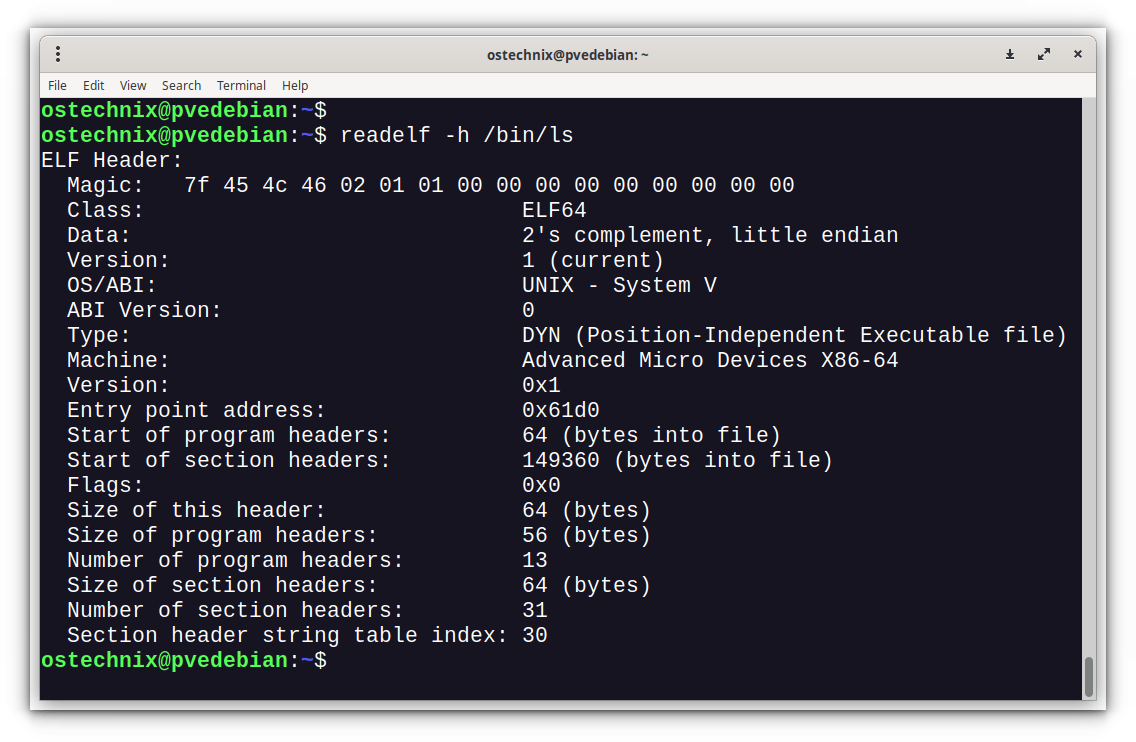
Pass 2: readelf -h establishes architecture and ELF type
Run:
readelf -hW ./target
The -W flag prevents narrow terminals from wrapping important fields. Concentrate on these lines:
Class:                             ELF64
Data:                              2's complement, little endian
Type:                              DYN (Position-Independent Executable file)
Machine:                           Advanced Micro Devices X86-64
Entry point address:               0x....
The essential interpretation is:
Class, data encoding, and machine
For this course, the expected combination is:
Class: ELF64Data: ... little endianMachine: Advanced Micro Devices X86-64
This is the confirmation that the binary uses the Linux x86-64 environment you have been practicing. It justifies using the System V AMD64 ABI conventions later: arguments commonly begin in registers such as rdi, rsi, and rdx, and return addresses occupy 8-byte stack slots.
ELF Type: EXEC, DYN, and REL
The most useful ELF file types are:
Type | Meaning | Typical situation |
|---|---|---|
EXEC | Fixed-address executable | A traditional non-PIE main executable |
DYN | Dynamically positionable object | A shared library or a PIE executable |
REL | Relocatable object file | A .o file; not directly runnable as a normal process |
The important ambiguity is DYN.
A shared library like libc.so.6 is normally DYN. But a PIE executable is also DYN, because both are designed to be placed at a variable base address. Therefore, do not conclude “this is a shared library” from Type: DYN alone.
For normal Linux challenge binaries, conclude that an object is a PIE executable when the evidence agrees:
filecalls it apie executable;readelf -hreportsType: DYN;readelf -lcontains anINTERPprogram header.
A shared library will typically be DYN but has no INTERP segment of its own because it is not launched as the main program.
The entry point is not main
The ELF header’s Entry point address names the first instruction reached after the kernel and, for dynamically linked programs, the dynamic loader complete their setup. It is normally startup code such as _start, not your decompiler’s main.
For a non-PIE EXEC binary, it is usually a stable virtual address in the main program image. For a PIE DYN executable, it is best thought of as an address relative to the image base. The runtime base can change under ASLR; the next lesson will inspect that variation directly.
Pass 3: program headers reveal loading, permissions, and linking
Now inspect the program headers:
readelf -lW ./target
For a focused view:
readelf -lW ./target | grep -E 'INTERP|LOAD|DYNAMIC|GNU_STACK|GNU_RELRO'
You will commonly see entries resembling:
INTERP         ...
LOAD           ... R
LOAD           ... R E
LOAD           ... R
LOAD           ... RW
DYNAMIC        ...
GNU_STACK      ... RW
GNU_RELRO      ...
The exact offsets and segment count vary. What matters is the role of each entry.
INTERP: proof of ordinary dynamic linking
An INTERP segment specifies the dynamic linker that Linux should invoke for the main executable. On an x86-64 Linux system it is often a path similar to:
/lib64/ld-linux-x86-64.so.2
The dynamic linker maps shared libraries, performs relocations, and transfers control into the program’s startup code. The presence of INTERP is strong evidence that the executable is dynamically linked.
A normal statically linked executable lacks this segment because the kernel can load the executable directly without launching a separate runtime linker.
LOAD: mappings and permissions
Each LOAD program header tells the kernel to map part of the file into virtual memory. The permission letters are especially useful:
| Permission pattern | Likely contents | Exploitation relevance |
|---|---|---|
R E | Code and related read-only executable data | Typical mapping for .text and the PLT |
R | Read-only data | Often includes constants and strings |
RW | Writable data | Often includes .data, .bss, GOT-related data, and dynamic-loader structures |
RWE | Writable and executable memory | Unusual in modern hardened binaries; immediately worth investigating |
You should expect code to be readable and executable, and data to be readable and writable. A writable-and-executable segment weakens the usual separation between injected data and executable code, although you still need a path to control execution.
GNU_STACK: a direct view of the NX policy
The GNU_STACK segment asks the loader for permissions on the initial process stack:
RWwithoutEmeans the stack is requested as non-executable. This corresponds to the usual NX enabled result.RWErequests an executable stack. This generally corresponds to NX disabled.
NX is often described as “the stack cannot execute shellcode.” More precisely, the standard ELF indicator tells the loader that the initial stack mapping should not be executable. It does not prove that a program will never create any executable writable memory later, but it is exactly the property that matters in most introductory stack-overflow triage.
GNU_RELRO: the foundation of RELRO
A GNU_RELRO segment identifies data that the dynamic linker can make read-only after loading. It is one component of RELRO; it does not, by itself, prove full RELRO. To distinguish partial from full RELRO, examine the dynamic tags as well.
Pass 4: inspect the dynamic table rather than guessing
Use:
readelf -dW ./target
Or focus on the most relevant tags:
readelf -dW ./target | grep -E 'NEEDED|BIND_NOW|FLAGS|FLAGS_1|RPATH|RUNPATH'
Important entries include:
| Dynamic tag | Meaning |
|---|---|
NEEDED | A required shared library, often libc.so.6 |
BIND_NOW | Relocations should be resolved eagerly at startup |
FLAGS / FLAGS_1 | Dynamic-linking flags; may include NOW or PIE |
RPATH / RUNPATH | Extra library-search paths embedded in the binary |
NEEDED entries answer the linking-model question without executing the binary. For example, a line naming libc.so.6 tells you that libc code is expected to be loaded at runtime.
This static method is safer than using ldd on an unfamiliar file. In CTF work, you may run trusted challenge binaries locally, but as a general reverse-engineering discipline, do not rely on executing unknown files merely to learn their dependencies.
BIND_NOW is the other entry to notice. Together with GNU_RELRO, it supports a full RELRO conclusion: relocations are completed before the process begins normal execution, allowing relocation-related data such as the GOT to be made read-only.
Finally, look at sections when you want to orient yourself before Ghidra:
readelf -SW ./target | less
For a normal dynamically linked ELF, these names are useful landmarks:
| Section | What it is for |
|---|---|
.text | Main executable code |
.rodata | Read-only constants and strings |
.data and .bss | Writable global storage |
.plt | Stubs used for calls to imported functions |
.got and .got.plt | Runtime-resolved addresses used by dynamic linking |
.dynsym and .dynstr | Dynamic symbols and their names |
.symtab | Broader static symbol table, often absent from stripped binaries |
Do not confuse a section’s AX or WA flags with a direct process mapping. The program headers ultimately govern the runtime memory permissions, but section names make static reversing much easier.
Pass 5: checksec turns the evidence into a mitigation summary
Run the version supported by your system:
checksec file ./target
If your installed version uses the older interface, inspect checksec --help; many Kali systems also accept a --file=./target form.
checksec automates useful checks, but it is still a summary tool. Learn its output, then verify surprising results using readelf.
checksec/README.md at main · slimm609/checksec
Read the official checksec documentation’s overview and CLI example to become familiar with the columns you will record during every challenge triage.
Read the opening description in “checksec,” especially the property list. Then go to the “Examples” section and study the CLI output. Compare each column with the interpretations below; the exact command syntax can vary slightly across checksec versions.
A typical result:
RELRO           Stack Canary      NX            PIE             RPATH
Full RELRO      Canary found      NX enabled    PIE enabled     No RPATH

RELRO
RELRO means Relocation Read-Only. It concerns data used by dynamic linking, especially the Global Offset Table.
| Result | Practical interpretation |
|---|---|
No RELRO | Relocation-related data is left more writable than necessary. |
Partial RELRO | Some relevant regions become read-only, but lazy binding generally leaves the PLT-related GOT writable. |
Full RELRO | Relocations are resolved at startup and relocation data is made read-only; ordinary GOT overwrite targets are generally unavailable. |
A full-RELRO result should agree with both:
- a
GNU_RELROprogram header fromreadelf -lW; - an eager-binding tag such as
BIND_NOWor a relevantNOWflag inreadelf -dW.
RELRO does not prevent a buffer overflow. It removes or restricts a particular writable code-pointer target that older dynamic-linking exploits often used.
Stack canary
A stack canary is a value placed between vulnerable local stack data and control data such as saved frame information and a return address. Before returning, protected functions compare it against the expected value. A changed value usually terminates the process through a stack-check failure.
| Result | What you may conclude |
|---|---|
Canary found | The binary contains stack-protector support; vulnerable functions may check a canary before returning. |
No canary found | There is no clear binary-wide evidence of ordinary compiler stack-protector instrumentation. |
This is not a per-function guarantee. Compiler heuristics can protect some functions but not others, depending on flags and local variables. Treat checksec as the starting hypothesis; once you identify an overflow site, inspect its prologue and epilogue in Ghidra or GDB to confirm whether that specific function accesses the canary through thread-local storage and calls __stack_chk_fail.
NX
NX enabled means the normal initial stack is non-executable. This blocks the classic plan of placing shellcode on the stack and simply returning to it. It does not eliminate control-flow vulnerabilities, but it shifts attention toward existing executable code and later toward code-reuse techniques.
If checksec reports NX disabled, verify GNU_STACK with readelf -lW. An RWE stack request is an unusually favorable condition in a training challenge, but it still does not substitute for finding a memory-corruption primitive.
PIE
| Result | Main executable’s load location |
|---|---|
No PIE | Normally fixed at a known virtual base, often near 0x400000 on x86-64. |
PIE enabled | Built as a relocatable DYN main program; the image base can vary under ASLR. |
PIE does not randomize anything by itself. It makes the main executable eligible to be placed at a variable base address. ASLR is the operating-system mechanism that supplies the variation. We will test this across multiple process runs in the next lesson.
RPATH, RUNPATH, symbols, and fortify
These fields deserve recording, even though they are not usually the first deciding factor in a CTF pwn solve:
- RPATH/RUNPATH specify additional library-search paths. Embedded search paths can matter for library-loading behavior and are worth noting in unusual targets.
- Symbols commonly says
No Symbolsfor a stripped target. Dynamic imports may still be identifiable through.dynsym, PLT labels, and strings. - FORTIFY indicates compiler-assisted checked wrappers for some libc calls. It is a useful hardening signal, not proof that every dangerous operation is safe.
A good operational rule is: checksec tells you what to investigate; it does not tell you whether a vulnerability exists.
A repeatable triage transcript
Use this sequence on a trusted local target. /bin/ls is a safe practice subject; then repeat the same sequence on a CTF binary.
TARGET=/bin/ls

file -L "$TARGET"

readelf -hW "$TARGET"

readelf -lW "$TARGET" | grep -E 'INTERP|LOAD|DYNAMIC|GNU_STACK|GNU_RELRO'

readelf -dW "$TARGET" | grep -E 'NEEDED|BIND_NOW|FLAGS|FLAGS_1|RPATH|RUNPATH'

readelf -SW "$TARGET" | less

checksec file "$TARGET"
Do the commands in that order. The sequence moves from a fast classification, through direct ELF evidence, to a compact mitigation conclusion.
Record the outcome in a short form such as:
Target: ./target
Architecture: ELF64, little-endian, AMD x86-64
ELF type: DYN
Role: PIE main executable
Linking: dynamically linked
Interpreter: /lib64/ld-linux-x86-64.so.2
Needed libraries: libc.so.6, ...
Entry point: 0x....
Stack policy: GNU_STACK RW; NX enabled
RELRO evidence: GNU_RELRO plus BIND_NOW; Full RELRO
Canary: found
Symbols: stripped / not stripped
Initial implications: PIE and NX present; inspect for a leak or other
information disclosure before assuming static code addresses are usable.
This report intentionally separates facts from implications. For instance:
Type: DYN,INTERP, andPIE enabledare facts.- “A main-image base leak may be needed before using fixed gadgets” is an implication.
- “The binary is exploitable” is not a conclusion that triage can justify.
Spend the final 10–15 minutes doing this twice: once for /bin/ls, then for one previously solved or familiar pwn challenge. Compare the reports rather than merely comparing the checksec lines. In particular, locate the INTERP, GNU_STACK, and GNU_RELRO evidence yourself.
Key takeaways
A sound ELF triage pass answers three questions before any exploit development:
- What execution environment is this? Confirm
ELF64, little-endian encoding, andMachine: X86-64; never infer x86-64 from ELF64 alone. - How is it linked and loaded? Use
INTERPandNEEDEDtags to establish ordinary dynamic linking. Remember thatType: DYNcan describe either a shared library or a PIE executable. - Which common defenses shape the search? Use
checksecfor speed, then verify NX throughGNU_STACKand full RELRO throughGNU_RELROplus eager binding. Treat canary and symbol results as valuable clues, not complete per-function proofs.
Next, we will move from the file on disk to a running process: reading /proc/<pid>/maps across multiple runs to see exactly which regions ASLR randomizes, and why PIE changes the usefulness of the addresses you find in Ghidra.
Can't find a good explanation? Sign up and we'll make it for you
Sign up