
Hello again. Your solution is now running locally and tracked in GitHub. This lesson starts the first real restaurant behavior: a console receipt calculator that totals ordered items, optionally applies a discount, calculates tax, and prints a final amount.
You will use the C# foundations that appear constantly in junior .NET work: appropriate data types, nullable input, if conditions, Boolean logic, and a for loop. Keep this version intentionally small. In the next lesson, the parallel item data will become proper C# classes such as MenuItem and Order.
Choose types that match restaurant data
A program is more dependable when its types represent what the data actually means.
For this receipt calculator:
| Restaurant value | C# type | Why |
|---|---|---|
| Item name | string | Text such as "Veg Biryani" |
| Quantity | int | A whole-number count of items |
| Unit price, subtotal, tax, discount | decimal | Financial calculations need exact decimal precision |
| A yes/no decision | bool | Conditions evaluate to true or false |
| A discount that may not exist | decimal? | It can contain a decimal value or null |
| Text entered at the console | string? | Console.ReadLine() can return no value |
The important financial decision is decimal, not double. A double is useful for general scientific or measurement calculations, but it stores many decimal fractions approximately in binary. For prices, tax, and totals, use decimal.
A decimal literal needs the m suffix:
decimal unitPrice = 250.00m;
decimal taxRate = 0.05m;
Without the m, C# interprets a value such as 250.00 as a double, and it cannot be assigned directly to a decimal.
Built-in types and literals - C# | Microsoft Learn
Microsoft Learn’s “Built-in types and literals” explains the core types used in this receipt calculation and, importantly, why financial values should use decimal.
In the Numeric types section, read the opening numeric-types overview. Then read the precision guidance closely. Next, in Literal syntax, read the literal list, paying particular attention to the null literal and the m suffix for decimals.
Nullable values describe absence honestly
A normal decimal must always have a number:
decimal subtotal = 0m;
A decimal? means “a decimal value may be present, or it may be absent”:
decimal? discountRate = null;
That fits the business situation. A customer may enter SAVE10, producing a discount rate of 0.10m; a customer who presses Enter has no discount rate.
To safely use a nullable value in a calculation, provide a fallback with the null-coalescing operator ??:
decimal appliedDiscountRate = discountRate ?? 0m;
Read this as: use discountRate when it has a value; otherwise use zero.
The same idea applies to console input:
string? discountCode = Console.ReadLine();
The question mark is important because input can be unavailable. Rather than assuming a value exists, the code below handles null and blank input safely.
Conditions make business decisions; loops process repeated lines
An order calculator makes several decisions:
- Do the arrays contain the same number of values?
- Is each quantity positive and each price non-negative?
- Did the customer enter a valid discount code?
- Is there an actual discount rate to display?
Each decision produces a bool: true or false.
bool hasMatchingLineData =
    itemNames.Length == unitPrices.Length &&
    unitPrices.Length == quantities.Length;
Here, == compares values. Do not confuse it with =, which assigns a value.
The && operator means and. All comparisons must be true for hasMatchingLineData to be true. The validation inside the loop uses ||, meaning or:
if (unitPrices[index] < 0m || quantities[index] <= 0)
{
    Console.WriteLine("Each line needs a non-negative price and a positive quantity.");
    return;
}
If either part is invalid, the program prints a clear message and stops. The return; ends this top-level console program before it calculates an incorrect receipt.
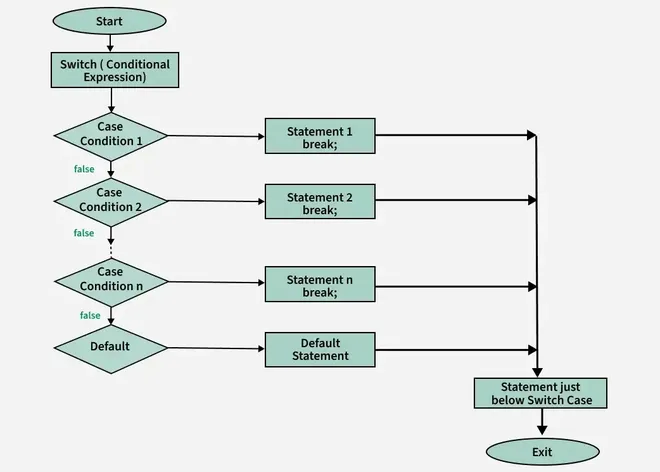
A switch is useful when one value has several discrete possibilities, such as an order status or menu category. Here, an if / else if chain expresses the discount rules more directly:
if (string.Equals(discountCode, "SAVE10", StringComparison.OrdinalIgnoreCase))
{
    discountRate = 0.10m;
}
else if (!string.IsNullOrWhiteSpace(discountCode))
{
    Console.WriteLine("The discount code was not recognized. No discount will be applied.");
}
StringComparison.OrdinalIgnoreCase means that save10, SAVE10, and Save10 are treated as the same code. string.IsNullOrWhiteSpace safely handles both null and an empty input.
Why use a for loop here?
An order has repeated lines. Repeating calculation code manually for every menu item would be fragile and difficult to extend. A loop lets one block of code process every line.
for (int index = 0; index < itemNames.Length; index++)
{
    // Process one order line.
}
A for loop has three parts:
| Part | In this calculator | Meaning |
|---|---|---|
| Initializer | int index = 0 | Start at the first array position. |
| Condition | index < itemNames.Length | Continue while a valid position exists. |
| Iterator | index++ | Move to the next position after each pass. |
Arrays start at position zero, so the first order line is at index zero. The condition must be <, not <=. If there are three items, valid positions are zero, one, and two. Position three does not exist.
Learn C# with CSharpFritz - Beginning C#: Loops and Conditional Statements
The dotnet video “Learn C# with CSharpFritz — Loops and Conditional Statements” gives a practical explanation of the two control-flow tools you will use in the receipt calculator: if blocks and for loops.
Watch if blocks for the structure of if, else if, and else. Pay attention to why braces remain valuable even when a block currently contains only one statement. Then watch for loops. Focus on the initializer, continuation condition, and iterator; map them to the receipt calculator’s index variable.
Build the console order calculator
First, begin this feature from an up-to-date main branch:
git switch main
git pull --ff-only
git switch -c feature/order-calculation-console
Open src/Restaurant.Console/Program.cs and replace its current contents with the following code:
const decimal TaxRate = 0.05m;

string[] itemNames = { "Paneer Wrap", "Veg Biryani", "Lemon Soda" };
decimal[] unitPrices = { 250.00m, 180.00m, 70.00m };
int[] quantities = { 2, 1, 3 };

bool hasMatchingLineData =
    itemNames.Length == unitPrices.Length &&
    unitPrices.Length == quantities.Length;

if (!hasMatchingLineData)
{
    Console.WriteLine("Order data is incomplete. Item names, prices, and quantities must match.");
    return;
}

Console.Write("Discount code (SAVE10 or press Enter for none): ");
string? discountCode = Console.ReadLine();

decimal? discountRate = null;

if (string.Equals(discountCode, "SAVE10", StringComparison.OrdinalIgnoreCase))
{
    discountRate = 0.10m;
}
else if (!string.IsNullOrWhiteSpace(discountCode))
{
    Console.WriteLine("The discount code was not recognized. No discount will be applied.");
}

decimal subtotal = 0m;
int totalItemCount = 0;

Console.WriteLine();
Console.WriteLine("----- Restaurant Receipt -----");

for (int index = 0; index < itemNames.Length; index++)
{
    if (unitPrices[index] < 0m || quantities[index] <= 0)
    {
        Console.WriteLine("Each line needs a non-negative price and a positive quantity.");
        return;
    }

    decimal lineTotal = unitPrices[index] * quantities[index];

    subtotal += lineTotal;
    totalItemCount += quantities[index];

    Console.WriteLine(
        $"{itemNames[index],-16} {quantities[index],2} x {unitPrices[index],8:C} = {lineTotal,8:C}");
}

decimal appliedDiscountRate = discountRate ?? 0m;
decimal discount = subtotal * appliedDiscountRate;
decimal taxableAmount = subtotal - discount;
decimal tax = taxableAmount * TaxRate;
decimal finalTotal = taxableAmount + tax;

Console.WriteLine("------------------------------");
Console.WriteLine($"Items:    {totalItemCount}");
Console.WriteLine($"Subtotal: {subtotal:C}");

if (discountRate.HasValue)
{
    Console.WriteLine($"Discount ({discountRate.Value:P0}): -{discount:C}");
}

Console.WriteLine($"Tax:      {tax:C}");
Console.WriteLine($"Total:    {finalTotal:C}");
This is deliberately a small, procedural program. For now, the three arrays remain aligned by position:
| Position | itemNames | unitPrices | quantities |
|---|---|---|---|
0 | Paneer Wrap | 250.00 | 2 |
1 | Veg Biryani | 180.00 | 1 |
2 | Lemon Soda | 70.00 | 3 |
On each loop pass, index selects the related name, price, and quantity at the same position. The program calculates one lineTotal, adds it to the order subtotal, and adds the quantity to totalItemCount.
The constants and accumulators have different roles:
TaxRateis aconstbecause this small calculator should not accidentally change it while it runs.subtotalstarts at zero and grows as each line is processed.totalItemCountstarts at zero and counts the physical items, not just the number of distinct lines.discountRatemay be absent, so it is nullable.appliedDiscountRateis always a normaldecimal, because?? 0msupplies a reliable fallback.
The :C format specifier prints a value as currency using your computer’s regional settings. Its symbol and placement may differ between machines; the calculation itself remains the same.
Run, trace, and verify the behavior
Run the program from the solution root:
dotnet run --project src/Restaurant.Console/Restaurant.Console.csproj
Use these checks to verify the calculation. Currency display may use a different symbol, but the numeric amounts should match.
| Console input | Subtotal | Discount | Tax | Final total |
|---|---|---|---|---|
| Press Enter | 890.00 | 0.00 | 44.50 | 934.50 |
SAVE10 | 890.00 | 89.00 | 40.05 | 841.05 |
vip | 890.00 | 0.00 | 44.50 | 934.50 |
The tax in this exercise is calculated after the discount. That is an explicit business rule chosen for this calculator; real tax rules vary by location and business requirements.
A useful debugging method is to trace one loop iteration by hand. On the first pass, index is zero. The calculator reads the first price and quantity, computes that line’s amount, adds it to the initial zero subtotal, prints the line, then increments index. It repeats until index reaches the number of item names.
Common errors at this stage are usually small but meaningful:
| Symptom | Likely cause | Fix |
|---|---|---|
Cannot convert from double to decimal | A money literal lacks m | Write 250.00m, not 250.00. |
| An index-out-of-range error | The loop uses <= itemNames.Length | Use index < itemNames.Length. |
| A discount is always applied | = was used in a condition, or the code initializes a rate directly | Compare with == or string.Equals, and initialize discountRate to null. |
No discount line is printed after entering SAVE10 | The nullable rate was never assigned | Ensure the assignment is inside the matching if block. |
| Incorrect line data is calculated | The arrays have different lengths or an incorrect position | Keep parallel arrays aligned for now; the next lesson replaces them with classes. |
When your checks pass, save the implementation in Git:
git status
git add src/Restaurant.Console/Program.cs
git commit -m "feat: calculate console restaurant order"
git push -u origin feature/order-calculation-console
Create a pull request into main, review the changed code and receipt behavior, merge it, then update your local main as you practiced in the previous lesson.
You have now implemented a real piece of restaurant business logic using:
intfor quantities anddecimalfor moneystring?anddecimal?to represent values that may be absentif,else if, Boolean comparisons, and logical operators for business rules- a
forloop to calculate repeated order lines - accumulators for subtotal and item count
- formatting to present a readable receipt
The current parallel arrays are workable for learning, but they create a risk: a name, price, and quantity can become misaligned. Next, you will model menu items, customers, and orders as C# classes with constructors, properties, and methods, giving the restaurant data a safer structure.
Can't find a good explanation? Sign up and we'll make it for you
Sign up