
Welcome to the Azure course. In this first module, you will establish the boundaries that make later deployments safe to experiment with: where resources live, what gets created and deleted together, and which identities may manage them. The immediate goal is not to provision anything; it is to make deliberate choices before Terraform, containers, databases, or Kubernetes introduce cost and complexity.
For the course application—a React frontend and FastAPI backend packaged as containers—we will use a personal-lab design that is inexpensive and easy to remove, while also noting where a production design would need stronger separation.
Cost note: this lesson is planning only. Viewing subscriptions, creating resource groups, and configuring standard Azure RBAC role assignments have no direct usage charge. Charges begin when you create billable service resources such as databases, compute, public IP addresses, or log ingestion.
The four boundaries of Azure management
Azure resources are managed through Azure Resource Manager (ARM), the control plane used by the Azure portal, Azure CLI, Terraform’s AzureRM provider, and other deployment tools. ARM gives Azure a common organization and authorization model rather than making every service independently managed.
Read the following Microsoft Learn material before applying the model to the course lab.
What is Azure Resource Manager? - Microsoft Learn
Read this Microsoft Learn overview to establish the precise meaning of Azure resources, scopes, resource groups, and resource-group locations. These concepts will be the foundation for every Terraform deployment later in the course.
Start with the introductory terminology list before the section “The benefits of using Resource Manager.” Read the terminology, paying particular attention to resource, resource group, resource provider, and declarative deployment. Then, in “The benefits of using Resource Manager,” read the subsection “Understand scope.” Read the scope introduction and note that management settings applied at a higher scope are inherited below it. In “What is a resource group?”, read the lifecycle guidance beginning with the lifecycle rule. Continue through the rest of that section for deletion behavior, access-control scope, and the fact that resources can communicate across resource groups. Finally, read “Which location should I use for my resource group?” from the metadata explanation through the end of the section. Distinguish ARM control-plane operations from your application’s actual traffic and data.
Azure has four relevant management scopes:
- Management group: an optional governance container for multiple subscriptions. It is useful for organizations with several teams, business units, or environments that need shared policies.
- Subscription: a major boundary for billing, access, quotas, and governance. A subscription contains resource groups.
- Resource group: a logical container for resources that should normally be deployed, operated, and removed together.
- Resource: an individual Azure service instance, such as a container registry, PostgreSQL server, virtual network, Container Apps environment, or Application Insights instance.
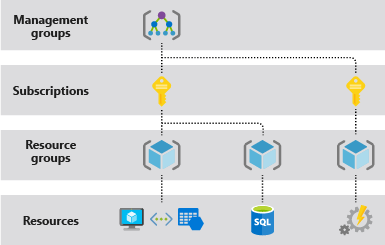
The hierarchy is not merely a folder structure. It determines the blast radius of governance choices:
| Decision | Typical effect |
|---|---|
| A policy at subscription scope | Affects all resource groups and resources in that subscription |
| A role assignment at resource-group scope | Applies to the group and its contained resources |
| Deleting a resource group | Deletes the resources in that group |
| A resource-level role assignment | Grants access only to one selected resource |
One important distinction for infrastructure work: ARM is the control plane. Terraform uses it to create, read, update, and delete Azure resources. Your running application uses the data plane: browser requests to the frontend, API calls to FastAPI, database connections, and image pulls. A decision about a resource group’s location affects ARM metadata and control operations; it does not relocate the application’s data-plane traffic.
Subscription: a boundary, not just a billing label
A subscription is where Azure aggregates charges, applies quotas, and establishes a broad access boundary. In a larger organization, a common baseline is to keep production, non-production, and experimental work in separate subscriptions. This prevents an experimental deployment from sharing the same broad permissions, policies, quota pool, and cost reporting boundary as production.
Create and scale Azure subscriptions - Cloud Adoption Framework | Microsoft Learn
This Microsoft Cloud Adoption Framework guidance explains why subscriptions should separate environments and how governance choices such as RBAC, policies, budgets, and tags work together.
In “Start with subscription policies,” read the subscription rationale and its three recommendations. Focus on the distinction between a management group used for broad governance and subscriptions used to separate workloads. Next, in “Create your initial subscriptions,” read the three-subscription model. Treat it as an organizational target, not as a requirement for a personal training account. Finally, in “Govern your subscriptions,” read the RBAC guidance from the least-privilege recommendation. Scan the adjacent budget and tagging points; the next lesson will turn those into a practical budget guardrail and cleanup plan.
For this course, the appropriate initial choice is normally:
- Use your existing personal Azure subscription as the course’s lab subscription.
- Do not create separate paid subscriptions merely to imitate an enterprise landing zone. It adds administrative overhead and does not by itself reduce resource consumption.
- Treat every deployed lab resource as non-production.
- If you later operate a real public application, use a separate production subscription if your Azure billing arrangement permits it. This is a meaningful boundary for access, costs, and policy, not simply a naming convention.
A single-subscription lab is reasonable, but it has limits. A budget applies to the subscription’s aggregate spend unless you deliberately filter it by resource group or tags; quota is also shared. Most importantly, anyone with broad subscription permissions can affect every course project. Resource-group-level RBAC helps, but it cannot replicate the isolation of a separate subscription.
Management groups are not necessary for this personal lab. They become useful when you need to impose the same region restrictions, mandatory tags, or security policy across several subscriptions.
Resource groups should follow lifecycle
A resource group should answer one practical question:
Which resources should usually be created, changed, and deleted together?
For a short-lived lab, the answer is usually “the complete application environment.” A backend service, frontend service, temporary database, monitoring resources, and their supporting network configuration may be separate Azure resources, but they form one deployable system. Putting them in a single application resource group makes destruction unambiguous.
For the course, use this intended structure:
| Scope | Suggested name | Purpose and lifecycle |
|---|---|---|
| Subscription | Your existing personal subscription | Billing and top-level lab boundary |
| Resource group | rg-grasp-app-dev-we | Short-lived application environment: frontend, backend, database, and observability resources |
| Resource group | rg-grasp-tfstate-we | Terraform remote-state storage, created later and retained when the app environment is destroyed |
Here, we is only a region abbreviation example for West Europe. Choose your actual abbreviation only after selecting the region.
Separating Terraform state from the application is deliberate. The application environment must be disposable: when a deployment goes wrong or the lab is finished, destroying its resource group should remove the billable application resources. Terraform state has a different lifecycle. If state were deleted along with the application resources, Terraform would lose its deployment record and safe cleanup or recreation becomes harder.
This is the most useful resource-group pattern for the course:
- One resource group for short-lived workload resources.
- One separately managed resource group for longer-lived operational foundations, such as Terraform state.
- Further separation only when lifecycle or administration is genuinely different.
Avoid splitting resource groups merely by Azure service type—one group for all databases, another for all containers—unless the teams, access model, and lifecycle really differ. A database that exists only to support a temporary development application typically belongs with that application, even though it is technically a distinct service.
A resource can connect to one in another resource group. This enables the application group to use shared services later, but connectivity does not mean the resources should necessarily share a lifecycle.
Region: choose for the workload, not for the label
Every Azure resource has its own region. The region determines where that service is deployed and is therefore relevant to latency, service availability, data residency, resilience options, and price.
The resource group also has a location, but that location has a narrower meaning: it stores metadata about the group and supports ARM control-plane operations. It is not the location of every resource inside the group. Azure allows resources from several regions in one resource group, but this flexibility should not become the default architecture.
For this course’s first application deployment, choose one primary Azure region and place the application resources and the application resource group there whenever supported. A single-region lab is simpler to reason about, easier to clean up, and avoids accidental cross-region data transfer or latency.
Use this region-selection checklist:
-
Service availability
Verify that the Azure services planned for the lab are available in the region under your subscription. A region may support one service but not a specific service tier or feature. -
Location of users and operators
For a lab run from Poland, a European region is a sensible starting point. West Europe or North Europe are often candidates, but availability and pricing must be checked at the time of deployment. -
Data residency requirements
For the training application, avoid real personal or customer data. For real workloads, regulatory and contractual requirements can constrain the acceptable region. -
Price and capacity
Prices and available SKUs vary by region. This matters particularly for later PostgreSQL and Kubernetes labs. The next lesson will make cost estimation and budget alerts explicit. -
Related resources
Keep components that exchange frequent traffic close together: backend and database in the same region, for example. Cross-region designs are possible but should be intentional and justified by resilience or geographic requirements.
A concise design decision for the course is therefore:
Use one existing personal subscription, select one suitable European region after confirming service availability, and create the disposable application environment in one regional resource group.
RBAC: decide who can do what, where
Azure role-based access control (Azure RBAC) authorizes management operations against Azure resources. Every role assignment combines three parts:
| Part | Question it answers | Example |
|---|---|---|
| Security principal | Who receives access? | A user, Microsoft Entra group, application service principal, or managed identity |
| Role definition | What may it do? | Reader, Contributor, Owner, or a service-specific role |
| Scope | Where may it do it? | Management group, subscription, resource group, or individual resource |
The role assignment is inherited downward through the hierarchy. A Contributor assignment at subscription scope applies across all resource groups in that subscription. A Contributor assignment at one resource group applies only inside that group.
Permissions are generally additive. Granting Reader at subscription scope and Contributor at a resource group does not reduce the user to Reader elsewhere; it gives the user Contributor capability in that resource group and Reader visibility across the subscription. This is why least privilege depends on the scope as much as on the role name.
For the course, the three baseline built-in roles are enough:
| Role | Appropriate use | Important limitation |
|---|---|---|
| Reader | Reviewing resources, configurations, and deployment status | Cannot create, modify, or delete resources |
| Contributor | Terraform deployment identity or an engineer managing application resources | Cannot create Azure RBAC role assignments |
| Owner | Initial subscription administration and exceptional recovery | Includes broad resource management and access-management authority |
Avoid assigning Owner to a CI/CD identity. An automation identity that can deploy application infrastructure generally needs Contributor only at the workload resource group. Broad subscription-level Owner is convenient initially but creates an unnecessarily large blast radius if a credential, workflow, or Terraform configuration is misused.
A practical role model for the course looks like this:
| Principal | Role | Scope | Reason |
|---|---|---|---|
| Your administrator account | Owner | Subscription | Bootstrap access, budget setup, and exceptional administration |
| Future Terraform deployment identity | Contributor | rg-grasp-app-dev-we | Can manage the disposable workload without controlling unrelated resources |
| Future Terraform state identity, if separated | A storage-specific data role | State storage resource or state resource group | Can read and write the Terraform state without broad subscription access |
| Reviewer or collaborator | Reader | Application resource group | Can inspect the lab without changing it |
The Terraform authentication method will be covered in the next module. The key architectural choice now is to avoid embedding a personal Owner identity into automation. Later, GitHub Actions will use short-lived OIDC authentication, and Azure-hosted services can use managed identities. Both are security principals to which Azure RBAC roles can be assigned.
There is one common surprise: Terraform may be able to create a resource but unable to create an RBAC assignment. That is expected if it has only Contributor. Creating role assignments is an access-management operation. When that becomes necessary—for example, authorizing a workload to pull images from a private registry—grant the specific permission at the narrowest practical scope, or perform the assignment from a separate tightly controlled administrative workflow.
A decision record for the course lab
Before provisioning, record the following decisions in your repository’s README or an architecture-notes file. This is not bureaucracy: it makes a future terraform destroy and an RBAC review much safer.
| Decision | Course-lab choice | Why |
|---|---|---|
| Subscription | Existing personal Azure subscription | No additional subscription administration or billing structure needed for a temporary lab |
| Environment | Development / learning only | Never treat the course deployment as production |
| Primary region | One verified European region | Keeps application components close and reduces accidental complexity |
| Application resource group | rg-grasp-app-dev-<region> | Whole disposable application lifecycle is visible and removable in one place |
| State resource group | rg-grasp-tfstate-<region> | Terraform state survives replacement of the application environment |
| Human access | Keep subscription Owner for bootstrap only | Needed for initial administration, but inappropriate as routine deployment access |
| Automation access | Contributor at the workload resource-group scope | Enough to deploy the application while limiting blast radius |
| Role-assignment authority | Separate, narrow, and intentional | Prevents ordinary deployment automation from changing access broadly |
Naming is less important than consistency, but names should reveal purpose, environment, and often region. The resource group is not an environment by itself; the dev component of the name makes the intended lifecycle and risk level clear.
The central ideas are now in place:
- A subscription is a major billing, access, quota, and governance boundary.
- A resource group is primarily a lifecycle boundary: group resources that should be deployed and deleted together.
- A region applies to each resource’s actual deployment; a resource group’s location stores management metadata and should normally align with the workload region.
- Azure RBAC assigns a role to a security principal at a scope, with inheritance from higher scopes to lower ones.
- For this lab, use one personal subscription, a disposable application resource group, a separately retained Terraform-state resource group, and least-privilege automation access.
Next, you will turn this design into financial guardrails: estimate likely lab costs, create budget alerts, define tags, and write a cleanup plan before any billable infrastructure is provisioned.
Can't find a good explanation? Sign up and we'll make it for you
Sign up