Hello! Welcome to our first lesson in the "Selling and Marketing on TikTok Shop" module.
In our previous module, we wrapped up our deep dive into Amazon by covering the essentials of US sales tax compliance. You learned how Marketplace Facilitator Laws on platforms like Amazon, Walmart, and TikTok Shop significantly simplify your obligations as a remote seller. This foundation in compliance is crucial as we now expand to a new, dynamic platform.
Today, we'll tackle the learning outcome: Set up a TikTok Shop seller account and connect it to your business entity. This is a purely practical lesson where we'll walk through the exact steps to get your store live. The US business structure (LLC and EIN) you established in Module 1 will be the foundation for this entire process.
Let's get started.
1. Preparation: Gather Your Documents and Information
Before you even visit the TikTok Shop website, it's essential to have all your information and documents ready. This will make the registration process smooth and reduce the chances of errors or rejections. Based on your business structure, here is your checklist.
The official requirements for a US corporation (which includes your LLC) are detailed in TikTok's documentation. It's a good habit to review the primary source.
How to register as a Corporation or Partnership
Let's review the official list of required information and documents from the TikTok Shop Seller University. This ensures we have everything prepared before we begin.
Read the sections titled 'What are the Requirements?', 'What Information Will Need to be Provided?', and 'What Documents Will Be Requested?'. Focus on the lists of required information (EIN, business name) and accepted ID documents.
Based on that guide, here is a summary of what you need to have on hand:
- Business Information:
- Your LLC's legal name.
- Your Employer Identification Number (EIN).
- The registered US business address (your virtual address).
- Personal Information (as the Primary Representative):
- Your full legal name as it appears on your ID.
- A valid, unexpired government ID (e.g., your passport).
- Your date of birth.
- Your residential address.
- The last 4 digits of your Social Security Number (SSN) or Individual Taxpayer Identification Number (ITIN).
Make sure you have digital copies (clear photos or scans) of your ID ready to upload.
2. The Step-by-Step Account Creation Process
With your information gathered, you're ready to create the account. The process is straightforward, but each step must be done carefully. We'll use a video to walk through the main flow.
TikTok Shop Seller Tutorial For Complete Beginners in 2025
This video from Trevin Peterson provides a clear, screen-recorded walkthrough of the entire sign-up process. We'll follow these steps directly.
Watch the segment from 01:39 to 04:49. Follow along as he navigates from the sign-up page, selects the business type, enters the required business details, and sets up the shop information. This is the core of the registration.
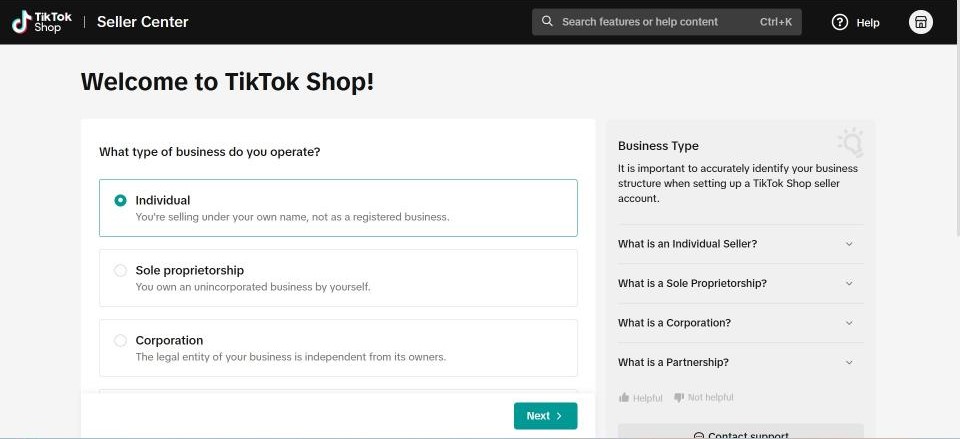
Choosing Your Business Type
One of the first and most important choices is your business type. Based on the LLC you've set up, you will select Corporation.
Critical Details for International Sellers
The general process is the same for everyone, but as a non-resident operating a US company, there are a few specific points to be aware of. The next video highlights these perfectly.
How to Create TikTok Shop Seller Account The Right Way and Not Get Suspended! (Step-By-Step)
This video from I Am David Scheuer provides crucial context for international sellers. It reinforces why your LLC is necessary and discusses the identification you'll provide.
Please watch these two segments: 00:00 - 01:16: The speaker explains that for sellers outside the US, a US company (LLC) and EIN are required. This confirms the strategy we've implemented. 02:19 - 04:22: This part details the choice between 'Individual' and 'Corporation' and shows where you will upload your ID and provide your taxpayer identification number (ITIN or SSN). Focus on how your situation (non-resident with a US LLC) maps directly to the 'Corporation' path described.
After you submit this information, TikTok will review your documents. This can take anywhere from a few minutes to a couple of days. You will receive an email once your account is approved.
3. Finalizing Your Shop Setup
Once your business verification is approved, there are a few final but mandatory steps to complete before your shop is fully operational and you can start selling. These steps officially connect your business entity's financial and logistical details to the platform.
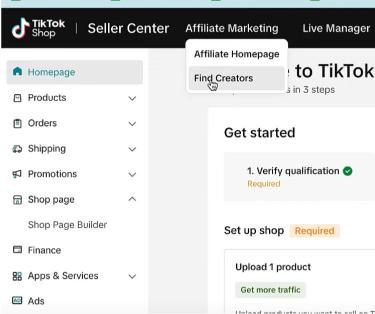
We'll use TikTok's official documentation to guide us through these final configurations.
How to set up your TikTok Shop
This guide from TikTok Seller University outlines the crucial post-verification steps: adding tax info, setting up your warehouse, and linking your TikTok account.
Please read the sections titled 'Add Tax Information', 'Warehouse Setup', and 'Link Official TikTok Account'. Tax Information: This is where you'll submit your W-9 form digitally, using your LLC name and EIN. Warehouse Setup: You will enter your virtual US address as your 'ship from' location. Link Official Account: This step connects your shop to a standard TikTok profile, which is vital for marketing.
Completing these three steps achieves the second part of our learning outcome:
- Adding Tax Information (W-9) formally links your business's EIN to the shop for payment and tax reporting purposes.
- Setting up the Warehouse connects your registered business address to the shop's logistics.
- Linking your Official TikTok Account connects your storefront to your primary marketing channel on the platform, allowing your products to appear in your profile's shop tab.
4. Troubleshooting: What if Your Account is Immediately Suspended?
A frustrating but common issue is having a new account automatically suspended by TikTok's system immediately after creation. If this happens, do not panic. There is a standard procedure to resolve it, and knowing the right steps can save you from being permanently locked out.
How to Create TikTok Shop Seller Account The Right Way and Not Get Suspended! (Step-By-Step)
Let's return to David Scheuer's video, as he gives excellent, practical advice on what to do if you face an immediate suspension.
Watch the segment from 05:46 to 07:10. The key advice is to use the 'Help' function to contact support rather than using up your limited number of 'Appeal' attempts. This is a critical pro-tip.
Test your understanding!
You've just submitted your application for a TikTok Shop account using your LLC and EIN. While waiting for approval, a friend who is a US citizen tells you they just opened a shop using only their personal Social Security Number. Why was their process different from yours?
Show answer
TikTok Shop has different requirements for US residents versus non-residents operating in the US market.
- Your friend, as a US resident, can register as an 'Individual' seller, using their personal information (like an SSN).
- You, as a non-resident, are required by TikTok to have a formal US business entity (like your LLC) and its corresponding EIN to sell on the US platform. This is why you had to register as a 'Corporation' and provide your business details.
Conclusion
Congratulations! You now have a complete, practical roadmap for establishing your presence on TikTok Shop. This lesson is your direct bridge from having a US business entity on paper to having a functional storefront on one of the world's fastest-growing e-commerce platforms.
Key Takeaways:
- Preparation is Key: The setup process is much smoother when you have all your LLC, EIN, and personal ID information ready beforehand.
- Follow the 'Corporation' Path: As a non-resident with a US LLC, you must register as a Corporation and provide your business details.
- Connect Your Entity: The setup isn't complete until you've submitted your W-9 tax form (linking your EIN), configured your warehouse address, and linked your official TikTok profile.
- Be Prepared for Glitches: Immediate account suspension is a possibility. Knowing the correct procedure (contacting 'Help' before appealing) is crucial for a quick resolution.
Next Up:
An empty shop doesn't sell anything! With your seller account now set up and connected, our very next step will be to populate it with products. In the next lesson, we will focus on how to optimize your product listings for discovery within the TikTok Shop to ensure potential customers can find what you're selling.