
Hello! Welcome back to your training.
In our last lesson, we focused on active enumeration, where you directly interrogated services like FTP, SMB, and DNS to gather technical details. We've built a solid foundation in interacting with a target's live systems.
Today, we shift our strategy from active to passive reconnaissance. This lesson covers how to extract metadata from public documents and analyze social media to gather intelligence on a target. This field is broadly known as Open-Source Intelligence (OSINT). The key difference is that these techniques allow you to gather a vast amount of information without sending a single packet to the target's servers, making your initial reconnaissance completely invisible. For a bug bounty hunter or pentester, OSINT is often the first step in understanding an organization's structure, technology stack, and, most importantly, its people.
Let's begin by exploring the hidden data lurking in plain sight.
1. Uncovering Secrets in Public Files: Metadata Analysis
Organizations frequently publish documents like PDFs, Word documents, and images on their websites. What they often forget is that these files contain hidden data, or metadata, which can be a goldmine for an attacker.
This metadata can include:
- Usernames of employees who created or modified the document.
- Software versions used to create the files, which might reveal unpatched software.
- Email addresses, internal paths, and printer names.
- GPS coordinates embedded in photos (known as EXIF data).
The following video from Security Weekly provides a great introduction to the concept and its importance.
Public File Metadata Analysis - Tradecraft Security Weekly #1
This video, titled 'Public File Metadata Analysis', explains what metadata is, why it's a security risk, and how to find these files. It provides the foundational 'why' before we get into the 'how'.
Please watch from 00:45 to 04:01, and then from 10:35 to 11:18. The first segment covers the definition of metadata and how to find public files using Google dorking. The second segment summarizes the key takeaway about the importance of stripping metadata.
Finding and Analyzing Metadata
As the video explained, your first step is to find the documents. You can use Google dorks, which you've seen before, but now with a specific focus on file types. For example, to find all PDF files on a target's website, you would search:
site:target.com filetype:pdf
Once you've downloaded a file, you need a tool to extract its metadata. The industry-standard command-line tool for this is ExifTool. It's incredibly powerful and can parse metadata from hundreds of file types.
To install it on Kali Linux or other Debian-based systems:sudo apt update && sudo apt install libimage-exiftool-perl
And to use it, the command is simple:exiftool <filename>
ExifTool is a command-line utility for reading, writing, and editing metadata.
The ExifTool command is a cornerstone of metadata analysis. This is an example from the "One-Liner-OSINT" GitHub repository, a resource we'll explore more later.
For instance, running exiftool financial_report.pdf might reveal the author's username is j.smith, the creator software is Microsoft Word 2016, and the company name is MegaCorp. This instantly gives you a potential username format (first_initial.last_name) and a piece of their software stack.
2. People as the Perimeter: Social Media Intelligence (SOCMINT)
While technical reconnaissance finds vulnerable servers, Social Media Intelligence (SOCMINT) focuses on the human element. Employees often share details about their work, technologies they use, and frustrations with corporate policies on platforms like LinkedIn, Twitter, and even personal blogs. This information can help you build a detailed profile of a target organization and its people.
However, there is a lot of hype around SOCMINT. Before we dive into the tools, it's important to understand what is realistically achievable.
SOCMINT: Intelligence in the Social Media Era - Netlas Blog
This article from the Netlas Blog, 'SOCMINT: Intelligence in the Social Media Era', does an excellent job of defining SOCMINT, setting realistic expectations, and explaining its limitations.
Read the sections 'What is Social Media Intelligence?', 'OSINT vs SOCMINT', 'The Hype Around SOCMINT', and 'What SOCMINT Tools Actually Reveal'. This will give you a clear, hype-free understanding of what you can and cannot do.
Core SOCMINT Techniques and Tools
Now, let's look at the practical techniques you'll use to gather intelligence from social media.
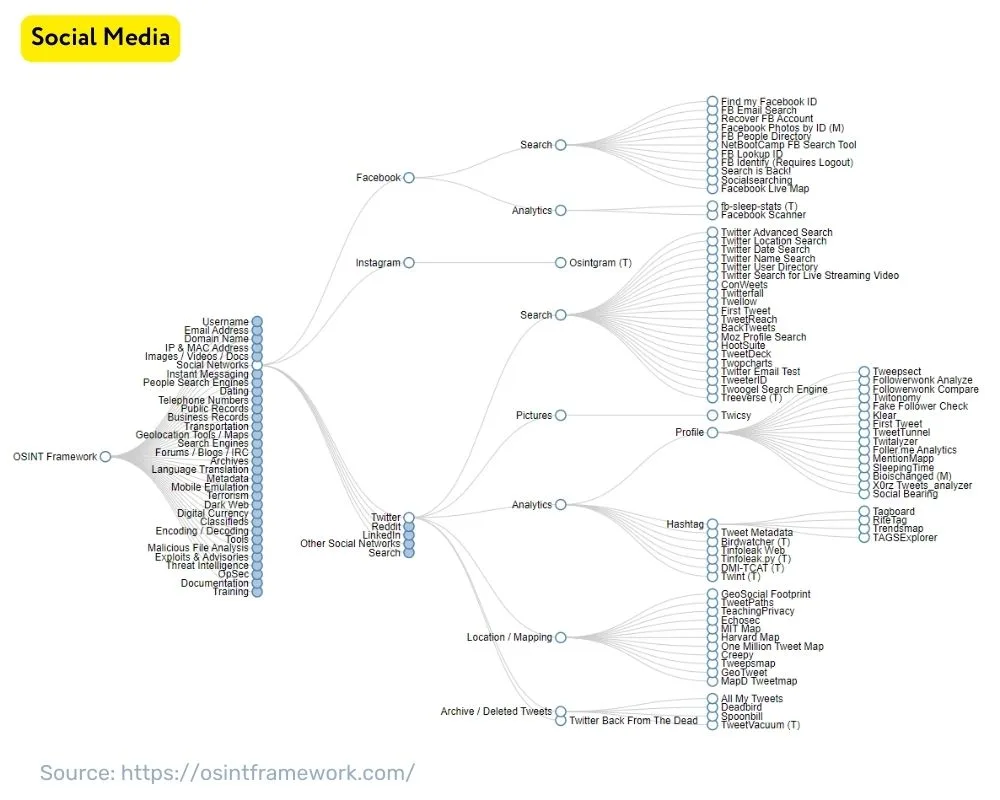
1. Username Enumeration
People often reuse the same username across multiple platforms. If you find a developer's GitHub username, there's a good chance they use the same one on Twitter, Reddit, or a personal blog. Finding these linked accounts can reveal a much broader picture of their interests and activities.
A fantastic tool for this is Sherlock. Given a single username, it will search hundreds of social media sites to find matching profiles. The Netlas blog post you just read includes clear installation instructions for Sherlock under its "Popular SOCMINT Tools" section.
Once installed, usage is straightforward:sherlock <username>
2. Advanced Searching and Dorking
Your skills with Google dorks are just as applicable to finding people. The next video demonstrates several practical OSINT techniques, including using dorks to find social media activity.
SOCIAL MEDIA OSINT (private accounts)
This video, titled 'SOCIAL MEDIA OSINT', provides short, practical demonstrations of several key techniques for finding information on people.
Watch from 01:31 to 04:15. This segment covers using Google dorks to find social media comments, locating public documents with a person's name, searching with keywords (like a university or workplace), reverse-searching profile pictures, and searching for usernames.
3. The Power of an Image
As shown in the video, a profile picture can be a powerful pivot point. Using reverse image search engines like Google Images, Yandex, or TinEye, you can upload a person's profile picture to find other websites where that same image appears. This can help you uncover profiles on platforms you weren't aware of. Facial recognition tools like PimEyes take this a step further, finding other photos of the same person across the web.
Your OSINT Cheatsheet
The world of OSINT is vast, with countless tools and techniques. The GitHub repository below is an outstanding collection of one-liner commands and dorks. You should bookmark this and refer to it often.
This GitHub repository, 'One-Liner-OSINT', is an invaluable resource that you'll likely use throughout your career. It consolidates hundreds of practical commands and dorks for various OSINT tasks.
Take about 10 minutes to explore this resource. Focus on the sections under 'OSINT on People', 'Extract Metadata & Documents', 'OSINT for Social Media', and 'People Search & Email Investigation'. You don't need to memorize everything; the goal is to become familiar with the types of queries and tools available.
Test your understanding!
You are investigating a company, example.com, for a bug bounty program. An employee, Jane Doe, is listed on their "About Us" page. What are three distinct OSINT techniques you could use to start building an intelligence profile on Jane and the company, without directly touching example.com's servers?
Show answer
Here are three possible techniques:
- Document Metadata Analysis: Use a Google dork like
site:example.com filetype:pdf "Jane Doe"to find documents she may have authored. Download any findings and useexiftoolto look for her username, software versions, or other internal information. - Username Enumeration: If you can guess or find her username (e.g., from a LinkedIn profile URL), run it through a tool like
Sherlock(sherlock jdoe123) to discover her presence on other social media platforms, which might reveal personal interests or technical discussions. - Reverse Image Search: Take her profile picture from the company website and run it through a reverse image search like Yandex or a facial recognition tool like PimEyes to find other social media profiles or online presences.
Conclusion
In this lesson, you've added a critical layer to your reconnaissance skills by moving into the realm of passive intelligence gathering. You now understand how to find valuable information not just from servers, but from the documents and digital footprints of the people behind them.
Key Takeaways:
- Metadata is a Leak: Publicly shared files can contain metadata that reveals usernames, software versions, and even physical locations. Use Google dorks to find files and
ExifToolto analyze them. - SOCMINT Targets People: Analyzing social media can provide insights into an organization's employees, culture, and technology stack.
- Core OSINT Techniques: Your primary methods will be username enumeration across platforms (using tools like
Sherlock), advanced Google dorking for people and profiles, and reverse image searching to link accounts. - Ethical Responsibility: Remember that OSINT deals with public, but often personal, information. Always act ethically and within the legal boundaries and the rules of engagement of your test.
Next Lesson Preview:
Over the past several lessons, you have gathered a massive amount of information through both active and passive reconnaissance. In the final lesson of this module, we will address a critical step: how to organize and document your reconnaissance findings in a structured format for attack planning. A successful attack is built on well-organized intelligence, and this next lesson will show you how to build that foundation.