
Hello! Welcome to the next lesson in our module on API & Web Application Security.
In our previous lesson, we mastered Cross-Site Request Forgery (CSRF) protection. We learned that CSRF is a concern for stateful, session-based web applications, where requests originate from the same domain. Laravel's @csrf directive is the primary defense against this type of attack.
Today, we shift our focus to a different but related challenge that arises when building modern applications, especially when your frontend (like a Single-Page Application) lives on a different domain than your backend API. This is known as a "cross-origin" scenario. We will explore Cross-Origin Resource Sharing (CORS), the browser security mechanism that governs these interactions, and learn how to configure your Laravel API to handle such requests securely.
1. The "Why": Understanding the Same-Origin Policy and CORS
Before we can configure anything, we must understand the problem CORS is designed to solve. By default, web browsers enforce a strict security rule called the Same-Origin Policy (SOP).
The SOP dictates that a script running on a web page can only make requests to the same origin from which the page was served. An origin is defined by the combination of protocol (http/https), domain (e.g., myapp.com), and port (e.g., :8000). If any of these differ, the origins are considered different.
http://localhost:3000andhttp://localhost:8000are different origins (different ports).https://myapp.comandhttp://myapp.comare different origins (different protocols).https://myapp.comandhttps://api.myapp.comare different origins (different subdomains).
This policy is a fundamental security pillar of the web, preventing a malicious site from making arbitrary requests to other sites where you might be logged in. However, for modern APIs consumed by SPAs or mobile apps, this is too restrictive.
CORS is the W3C standard that allows a server to relax the Same-Origin Policy. It's a system of HTTP headers that lets a server declare which origins, other than its own, are permitted to make requests.

To understand how this works in practice, we need to distinguish between two types of CORS requests: simple and preflighted.
Mohamed Said, a former Laravel core team member, provides a fantastic explanation of the Same-Origin Policy and why browsers distinguish between 'simple' and 'preflighted' requests.
Watch the first 1 minute and 37 seconds of this video. Focus on understanding why the browser sends a special OPTIONS request (a 'preflight' request) before certain types of actual requests (like PUT, DELETE, or those with custom headers).
As the video explained, for any request that is not "simple" (e.g., a GET or HEAD request with standard headers), the browser first sends a preflight OPTIONS request to the server. The server then responds with a set of Access-Control-* headers. If these headers indicate that the actual request is allowed, the browser proceeds to send it.
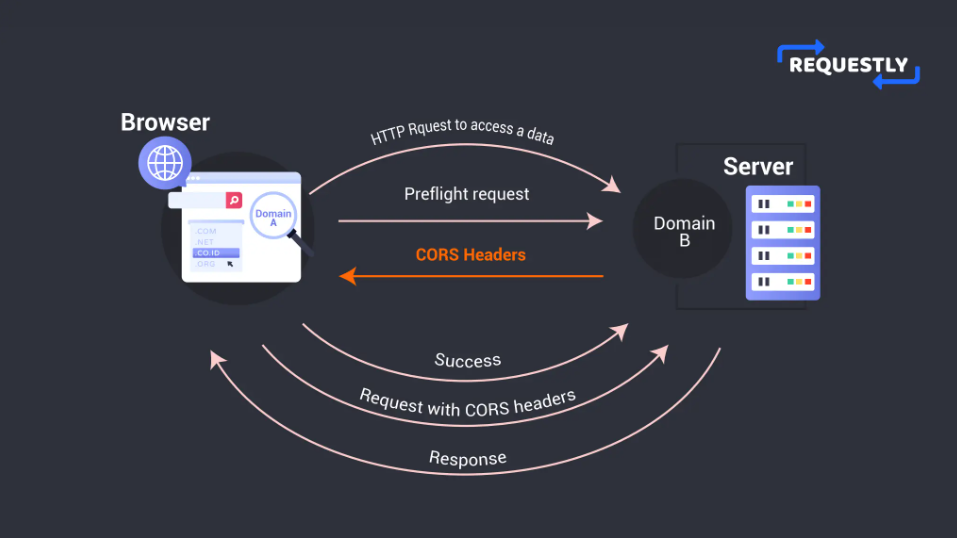
2. The "How": Configuring CORS in Laravel
Now that we understand the theory, let's get practical. Laravel comes with a powerful and flexible package for handling CORS. Your main tool will be the config/cors.php configuration file.
A Common Error and a Quick Fix
When you're developing locally with a separate frontend and backend, you will almost certainly encounter a CORS error. It typically looks something like this in your browser's developer console:
Access to XMLHttpRequest at 'http://api.myapp.test/api/user' from origin 'http://localhost:3000' has been blocked by CORS policy...
This error is the browser enforcing the Same-Origin Policy. Your API at api.myapp.test hasn't told the browser that it trusts requests from http://localhost:3000.
Debugging Laravel Sanctum CORS errors
Let's watch a practical demonstration of what this error looks like and the most common fix when working with Laravel Sanctum for authentication in an SPA context.
Watch from the beginning to 02:14. Pay attention to how the browser console reports the error and how adjusting the origin in the .env file resolves it. Note the importance of getting the protocol, domain, and port exactly right.
As you saw, for applications using Sanctum's SPA authentication, setting the SANCTUM_STATEFUL_DOMAINS (or FRONTEND_URL in older setups) in your .env file is a quick way to whitelist your frontend's origin. Laravel uses this to automatically configure the Access-Control-Allow-Origin header for you.
Deep Dive into config/cors.php
While the .env variable is convenient, the real power lies in the config/cors.php file. This file gives you granular control over every aspect of your CORS policy. If this file doesn't exist in your project, you can publish it by running: php artisan vendor:publish --tag="cors"
CORS Setup and API Versioning Patterns
The following article provides a concise example of the config/cors.php file. We will use it as a reference as we break down each option.
Briefly review the config/cors.php code block in this section. You don't need to memorize it, just get familiar with the keys like paths, allowed_methods, and allowed_origins.
Let's explore the most important options in this file, using a video that demonstrates each one's effect.
Debugging Laravel Sanctum CORS errors
This video walks through the cors.php configuration file, explaining each key setting with practical examples.
Watch from 02:14 to 06:44. This is the core of the lesson. Follow along as the video explains and demonstrates each of these configuration keys: paths: Restricting which routes respond with CORS headers (e.g., api/*). allowed_methods: Specifying allowed HTTP verbs. allowed_origin_patterns: Using wildcards to allow all subdomains (e.g., *.myapp.com). allowed_headers: Which custom headers the browser can send. exposed_headers: Which custom headers from the response should be accessible to frontend JavaScript. max_age: Caching the preflight response to improve performance. supports_credentials: A critical setting for allowing cookies to be sent with cross-origin requests, which is necessary for session-based authentication.
To summarize the key configurations from config/cors.php:
paths: An array of URL patterns where CORS headers should be applied. Typically, you'll set this to['api/*']to enable CORS for all your API routes.allowed_origins: The most critical setting. An array of exact origins that are allowed to make requests. For production, you should list your frontend's domain here (e.g.,['https://www.myapp.com']). Using'*'is permissive and should be used with caution.allowed_origins_patterns: Useful for allowing a range of origins, like all subdomains of your app.allowed_methods: An array of HTTP methods (GET,POST,PUT, etc.) that are permitted.'*'allows all methods.supports_credentials: Set this totrueif your API needs to handle cookies or session-based authentication (like with Laravel Sanctum). This sends theAccess-Control-Allow-Credentials: trueheader. Your frontend client (e.g., Axios, Fetch) must also be configured to send credentials.
3. CORS and Security
It's vital to understand what CORS is and what it is not.
CORS is not a server-side security mechanism. It does not protect your API from being accessed directly by tools like cURL, Postman, or a malicious server-side script. CORS is a policy that browsers enforce to protect their users. Your API is still public to anyone who ignores that policy.
Therefore, you must never rely on CORS as your only line of defense. Your API must still have proper authentication and authorization to protect sensitive endpoints.
Understanding Cross-Origin Resource Sharing (CORS)
This article provides a clear explanation of the security implications of CORS.
Read the short section titled 'CORS and Security'. The key takeaway is bolded: CORS should be configured to allow only the necessary origins, methods, and headers.
A common mistake is to set allowed_origins to ['*'] in production. While this makes development easy, it means any website on the internet can make JavaScript requests to your API. If your API relies on cookies for authentication, this could make your application vulnerable to attacks, defeating the purpose of the Same-Origin Policy. Always be as specific as possible with your allowed origins.
Conclusion
Congratulations! You now have a solid understanding of how to manage cross-origin requests in a secure and controlled way. By properly configuring Laravel's CORS middleware, you can build robust APIs that seamlessly integrate with modern frontend applications.
Key Takeaways:
- Same-Origin Policy (SOP): A browser security feature that restricts HTTP requests to the same origin.
- CORS: A mechanism using HTTP headers that allows servers to specify which other origins are permitted to access their resources.
- Preflight Requests: For complex requests (e.g., using
PUTor custom headers), the browser sends a preliminaryOPTIONSrequest to check for permission before sending the actual request. - Laravel Configuration: CORS is managed primarily in
config/cors.php, where you can define allowed paths, origins, methods, and more. - Security: CORS is a browser-enforced policy, not a replacement for server-side authentication and authorization. Always be restrictive with your
allowed_originsin production.
Up Next:
We've now covered controlling who can access your API from a browser (CORS) and preventing forged requests in web applications (CSRF). The next logical step in securing your API is to control how often it can be accessed. In the next lesson, we will dive into API rate limiting and throttling, learning how to protect your application from abuse and ensure fair usage for all clients.