
Hello! Welcome to the second module, "Network Exploitation & Initial Access."
In our previous lesson, you learned how to meticulously organize your reconnaissance findings into a structured format. You now have a system for tracking target IP addresses, open ports, and, most importantly, the specific versions of services running on them. This organized intelligence is the foundation for the next phase of a penetration test: turning information into access.
This lesson directly addresses the first step in that process: to identify potential exploits for discovered services using search engines and exploit databases. We will bridge the gap between knowing a service is running (e.g., "Apache 2.4.29") and finding the specific code or technique to compromise it. We'll explore how to use general search engines, specialized databases, and professional command-line tools to hunt for vulnerabilities.
1. The Vulnerability and Exploit Ecosystem
Before we start searching, it's crucial to understand what we're looking for. The process generally follows this path:
- Service: A piece of software running on a target (e.g.,
vsftpd 3.0.3). - Vulnerability: A flaw in that software's code or configuration that could be exploited. When publicly disclosed, vulnerabilities are often assigned a CVE (Common Vulnerabilities and Exposures) identifier, like
CVE-2015-1234. This provides a unique name for a specific flaw. - Exploit: A piece of code, a command, or a sequence of steps that takes advantage of a vulnerability to cause an unintended behavior, such as gaining remote access.
Your job as a tester is to connect the service version you found during reconnaissance to a known CVE, and then find a working exploit for that CVE.
To get a high-level tour of the primary resources used in this process, let's start with a video that covers several key tools.
Master Vulnerability Research: 5 Essential Tools Every Security Pro Uses
The video 'Master Vulnerability Research: 5 Essential Tools Every Security Pro Uses' provides an excellent overview of the landscape. It introduces the concept of CVEs and demonstrates several popular databases for finding vulnerabilities and their corresponding exploits.
Watch from the beginning to 06:24. Pay close attention to the different types of resources and the information they provide: CVE Details: How it connects products (like 'Bomgar') to a list of CVEs. Exploit Database: How it provides actual exploit code, not just descriptions. SearchSploit: The command-line version of Exploit Database. Rapid7 Database: Its direct integration with the Metasploit framework, and the distinction between a 'vulnerability' and a 'module'.
As the video shows, a CVE ID is a starting point, but what you really want is the exploit code itself. Let's look at the different ways to find it.
2. Hunting for Exploits with Google Dorking
You are already familiar with Google dorking from our reconnaissance module. The same techniques are incredibly powerful for finding exploits. By crafting precise search queries, you can often find exploits, proof-of-concept (PoC) code on GitHub, or detailed blog posts explaining a vulnerability.
Your CS background gives you an advantage here, as you can quickly assess whether a code snippet from GitHub is a legitimate PoC or something unrelated.

Here are some patterns for applying these operators to exploit hunting:
-
Basic Service + Version Search:
"ProFTPD 1.3.5" exploit"Apache 2.4.49" RCE PoC(RCE: Remote Code Execution, PoC: Proof of Concept)
-
Targeting Specific Exploit Sources:
site:exploit-db.com "Joomla" 3.7.0site:github.com "CVE-2022-1388" poc
-
Finding Vulnerable Files or Paths:
inurl:"/wp-content/plugins/revslider/" filetype:php(Searching for a specific vulnerable WordPress plugin)
-
Finding Detailed Write-ups:
"CVE-2021-44228" writeup"SSRF exploit" blog
The goal is to move beyond generic searches and use operators to filter the vast amount of internet noise to find actionable intelligence.
A hacker’s guide to Google dorking
To reinforce these techniques, review this guide on Google dorking. While you've seen this topic before, focus on how you can adapt the examples for exploit research rather than just asset discovery.
Briefly review the 'Core Google dorking operators' section. Then, read 'Basic Google dorking queries: hands-on examples' and 'Tailoring Google dorks to your targets'. As you read, think about how you could modify the dorks shown (e.g., site:*.google.com ext:php) to search for exploits in PHP files instead of just discovering them.
3. The Professional's Toolkit: Exploit-DB and SearchSploit
While Google is a great starting point, professionals rely on curated, well-maintained exploit databases. The most famous and widely used is Exploit-DB, run by Offensive Security. It's a massive archive of public exploits.
While you can browse the website, the most efficient way to use it is via its command-line interface, SearchSploit. This tool is pre-installed on Kali Linux and maintains a local, offline copy of the entire database, allowing for incredibly fast searches.
Using SearchSploit
Let's watch a detailed walkthrough on how to use searchsploit effectively.
SearchSploit - Searching For Exploits
The video 'SearchSploit - Searching For Exploits' by HackerSploit provides a practical, step-by-step guide. It explains why professionals prefer this tool and demonstrates the core workflow of finding and preparing an exploit.
Watch from 02:51 to 14:42. This covers the essential commands: Why use it? (02:51) - Understand the benefits of offline access. Updating: (06:16) - searchsploit -u is a crucial first step to ensure your database is current. Searching: (07:21) - Learn to search by service name and version. Copying: (11:12) - How to copy an exploit file to your working directory using the path. This is a critical step to avoid modifying the original database files.
Advanced SearchSploit Usage
The video covered the basics, but searchsploit has many powerful options for refining your searches. The official manual is the best place to learn these.
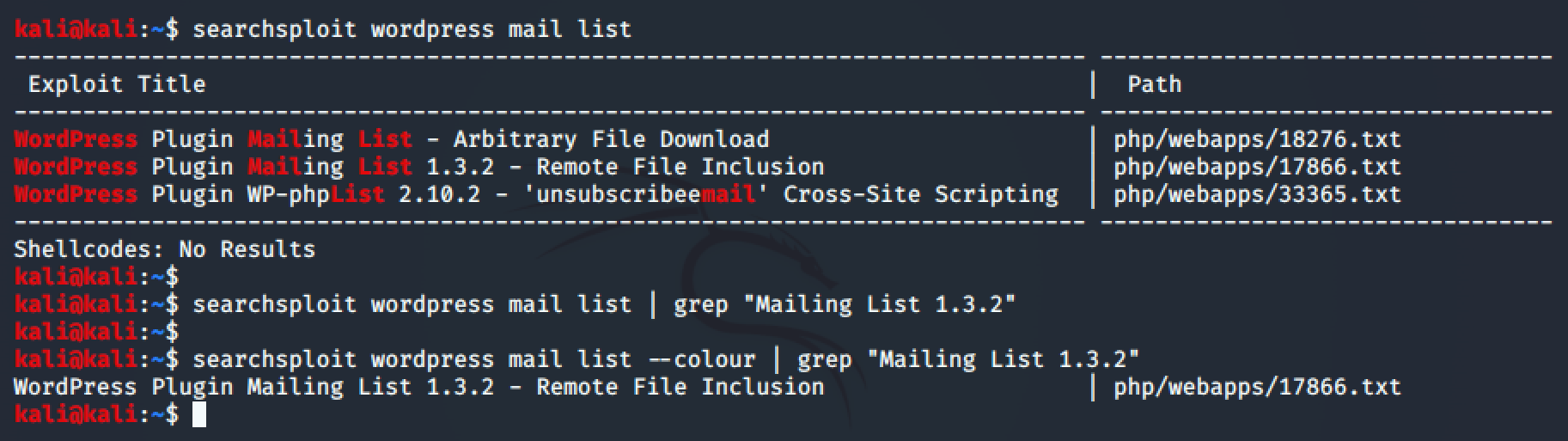
Let's dive into the manual to understand some of these advanced flags.
Exploit Database SearchSploit Manual
The 'SearchSploit Manual' is your definitive guide to the tool. We will focus on the options that help you narrow down results and manage exploits.
First, review the 'Usage' and 'Options' tables in the 'Help Screen' section to see all available flags. Then, read the sections: Title Searching: Understand how -t can reduce false positives. Removing Unwanted Results: Learn to use --exclude to filter out irrelevant results like Denial of Service (DoS) or PoCs. Copy To Clipboard and Copy to Folder: See how -p (path) and -m (mirror) provide convenient ways to access the exploit file.
By combining these flags, you can construct highly effective queries. For example, if you found a Linux server running a kernel version around 3.2, you could search like this:
searchsploit -t linux kernel 3.2 --exclude="(DoS)|PoC"
This command searches only the exploit titles for "linux kernel 3.2" and excludes any results that are for "Denial of Service" or are just a "Proof of Concept," helping you find exploits that lead to privilege escalation.
Test your understanding!
During your reconnaissance, an Nmap scan reveals a server running vsftpd 2.3.4. You suspect it might be vulnerable.
- What
searchsploitcommand would you use to find potential exploits? - Your search returns an exploit with the path
unix/remote/17491.rb. What does the.rbextension suggest? - What
searchsploitcommand would you use to copy this exploit into your current working directory?
Show answer
- A good command would be
searchsploit vsftpd 2.3.4. - The
.rbextension indicates that this is a Ruby script. This strongly suggests it's a Metasploit module, as Metasploit is written in Ruby. - You would use the
-m(mirror) flag:searchsploit -m 17491. You can also use the full path.
Conclusion
In this lesson, you've learned the critical skill of mapping discovered services to potential exploits. This methodical process of vulnerability research is what separates targeted, professional hacking from random guessing.
Key Takeaways:
- The research workflow is key: Service Version -> CVE -> Exploit Code.
- Google Dorking is for more than recon: It's a powerful tool for finding PoC code, write-ups, and exploits on sites like GitHub.
- SearchSploit is your primary tool: It provides fast, offline access to the Exploit-DB, and its filtering capabilities are essential for efficiency.
- Always read the exploit code: Before running any exploit you find, especially from unverified sources, read the code to understand what it does. This is where your Computer Science skills are invaluable.
Next Lesson Preview:
You found an exploit for vsftpd 2.3.4 and noticed it was a Metasploit module. But what does that mean? How do you use it? In our next lesson, we will set up and navigate the Metasploit Framework to search for and configure exploit modules. You will learn how to take the exploit you just found and prepare it for launch against a target.