
Hello again. In the previous lesson, you turned a service-desk concern into a KPI definition with a formula, unit, aggregation level, and time period. That KPI only works if the fields it uses mean the same thing to every analyst and tool.
This lesson introduces the document that makes those meanings explicit: the data dictionary. By the end, you should be able to create a practical dictionary for a tabular dataset that explains each field and states what values are valid—including the meaning of blanks, codes, and derived fields. This is a core habit for reliable analysis in Excel, SQL, pandas, and Power BI.
A data dictionary is the dataset’s operating manual
A data dictionary is structured documentation for a dataset’s fields (usually its columns). It is metadata: data about the data.
A spreadsheet header such as SLA_Breached is not enough on its own. Does Yes mean the ticket missed its SLA, is projected to miss it, or was excluded from the SLA? Does a blank mean “No,” “Unknown,” or “Not applicable”? A data dictionary answers those questions before an analyst makes calculations.
Watch “Data Dictionary (Database)” by Christopher Kalodikis for a quick introduction to a dictionary as metadata and a simple field-level example.
Watch the definition to see the core purpose and common column attributes. Then watch the examples, focusing on how a field’s type, format, description, and example value remove ambiguity.
A data dictionary is useful in at least four ways:
- Analysis accuracy: it prevents incorrect filters, joins, counts, and KPI calculations.
- Data-quality checks: it establishes what “invalid” means—for example, an unknown status or a negative duration.
- Handover and collaboration: another analyst can understand the dataset without relying on the original extractor.
- Tool consistency: Excel, SQL, pandas, and Power BI implementations can use the same definitions.
It is not merely a list of headers copied from a CSV file. It records the business meaning behind those headers.
What belongs in a useful data dictionary
There is no single mandatory layout. The spreadsheet data-dictionary example below includes columns for a related scale, machine-readable field name, label, type, allowable values, origin, transformations, and skip logic. That is a strong model because it separates the raw field name from its meaning and behavior.
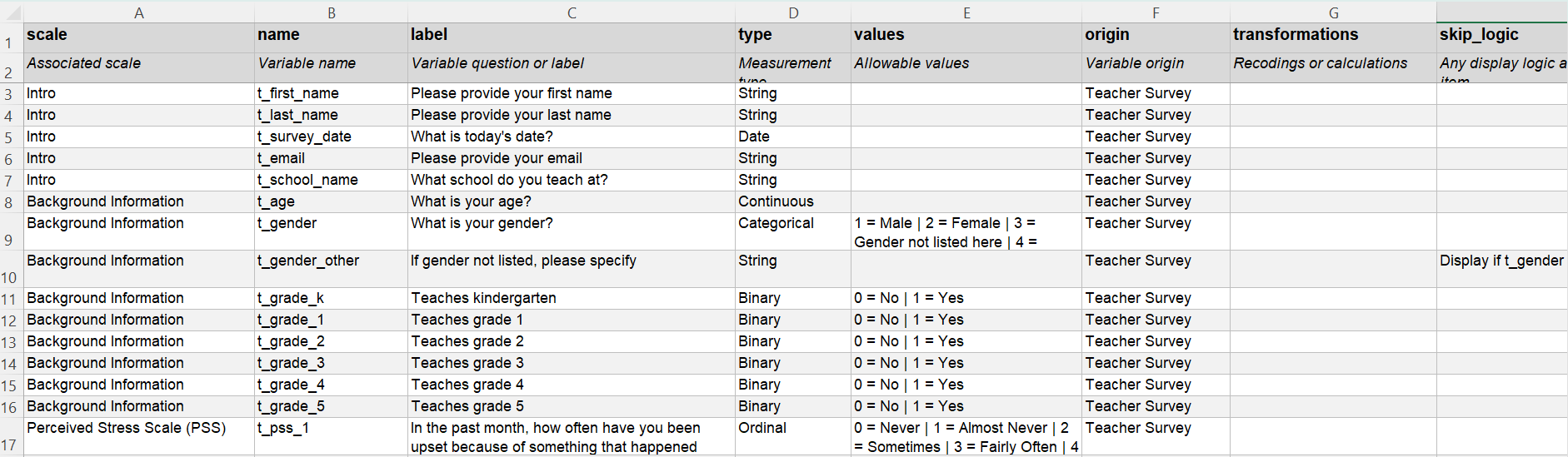
For analyst work, use two levels of documentation:
- Dataset-level information explains what the whole table is.
- Field-level information explains every column.
The UK Data Service emphasizes that raw numeric values can be misleading without their coding scheme, units, and applicability rules. Read the following before building your template.
Data-level documentation - UK Data Service
The UK Data Service explains why tabular data needs variable-level documentation, especially for codes, missing values, and derived fields.
In the tabular-data discussion, read the full explanation. Focus particularly on the distinction between valid values and missing-data codes, plus the need to document applicability and constructed variables.
Dataset-level information
Put a short overview above the field table or on a separate Read Me worksheet. At minimum, document:
| Item | Example for a service-desk dataset |
|---|---|
| Dataset name | Resolved_Incidents |
| Scope | Incident tickets that reached resolution |
| Grain | One row represents one resolved incident ticket |
| Source | Export from the IT service-management system |
| Business owner | Service Operations manager |
| Refresh or extract date | Weekly refresh; extract taken on a specified date |
| Version | Version 1.0 |
| Known limitations | Historical assignment-group names may have changed after a reorganization |
The grain belongs here because it applies to the table as a whole, not just one column. It tells you whether counting rows is meaningful and what a duplicate record would mean.
The Smithsonian data-dictionary guide provides a useful checklist for both the overall description and individual data elements.
Best Practices for Describing Your Data: Data Dictionaries
This Smithsonian guide distinguishes the dataset overview from the detailed documentation required for each field.
First, in the opening guidance, note the suggested dataset context: who collected the data, when, what it measures, why it was collected, and relevant assumptions. Then, in the detailed field guidance following the sentence “After the overall definition,” read the field documentation checklist. Notice that “all valid or allowed values” is a separate requirement, not something to leave implicit.
Field-level information
Each field should have one row in the dictionary. A practical minimum template is:
| Dictionary column | What to document |
|---|---|
| Field name | Exact column header used in the dataset, such as Resolved_Date |
| Business label | Human-readable name, such as “Resolved date and time” |
| Definition | What the field represents in business terms |
| Analytical role | Identifier, dimension, measure, or date |
| Data type and format | Text, integer, decimal, date, date-time, Boolean; include expected date format or precision where relevant |
| Unit | Minutes, hours, currency, percentage points, tickets, and so on |
| Valid values or rule | Allowed categories, numeric range, date rule, pattern, or reference list |
| Missing-value meaning | Whether blanks are allowed and what values such as Unknown or Not applicable mean |
| Source / origin | Source system, input form, reference table, or calculation |
| Transformation / notes | Renaming, recoding, formula, validation rule, or other important behavior |
For a small workplace dataset, this can be one Excel worksheet named Data_Dictionary. Keep it with the source data and update it when the dataset changes.
Document meaning, not just a label
A weak definition repeats the field name:
Priority: Ticket priority.
A useful definition lets a new teammate interpret the field without opening the source system:
Priority: Operational urgency assigned to an incident under the service-management policy at the time the ticket is logged.P1is the highest urgency andP4is the lowest.
A good field definition answers three questions:
- What does the value represent?
- At what point in the business process is it recorded?
- How should an analyst use or not use it?
Consider Assignment_Group. A vague label could refer to the group currently assigned, the group that first received the ticket, or the group that resolved it. Those values can differ after reassignment.
For the previous KPI, the needed field was more precise:
Assignment_Group_At_Resolution: The operational team assigned to the ticket when it was resolved. Use this field to attribute resolution outcomes and SLA performance.
That definition makes the field suitable for the KPI’s aggregation level: assignment group by calendar month.
Valid values are rules, not always lists
The dictionary’s valid values column states what values are permitted. How you document them depends on the kind of field.
| Field kind | How to document valid values |
|---|---|
| Categorical dimension | List every allowed category, such as P1, P2, P3, P4 |
| Binary field | State both allowed values, such as Yes and No |
| Numeric measure | State an allowed range, unit, and precision, such as non-negative minutes to two decimal places |
| Date or date-time | State the expected format and business boundaries, such as valid timestamps on or before the extract date |
| Identifier | State a uniqueness and nonblank rule; describe any expected pattern if known |
| Free-text notes | State the purpose, maximum length if relevant, and whether blank is allowed |
| Reference-list field | Identify the master table or source that contains the approved current values |
For a continuous field such as Resolution_Minutes, listing every possible value would be meaningless. Instead, document a rule:
Decimal number of minutes between ticket creation and resolution; must be greater than or equal to zero; calculated to two decimal places.
For an identifier, arithmetic does not define its purpose. Ticket_ID may contain digits, but it is generally used to identify a ticket rather than to measure a quantity. Treating it as a measure would produce meaningless totals or averages.
Valid values versus observed values
Keep these concepts separate:
- Valid values are values the business rules permit.
- Observed values are values that actually appear in the current extract.
Suppose your dictionary says the only valid priorities are P1, P2, P3, and P4, but an Excel filter reveals p2, P2 , and Urgent. Those are observed values, but not all are valid standardized values. They indicate a cleaning or source-quality issue.
This distinction is important because a list of current values is not automatically a list of acceptable values.
Missing, unknown, and not applicable are different states
A blank cell is not a complete definition. It can mean several very different things:
| Representation | Meaning | Typical analytical treatment |
|---|---|---|
Blank / NULL | Value was not supplied or is absent | Investigate; do not automatically treat as zero or No |
Unknown | The field applies, but the value could not be determined | Retain as a named category or exclude using a documented rule |
Not applicable | The field does not apply to this record | Exclude from calculations requiring that field |
Not asked | A process rule prevented collection | Often linked to a conditional or skip rule |
0 | A genuine numeric value of zero | Include in numeric analysis; never use as a substitute for missing unless explicitly documented |
For example, an SLA result may be irrelevant for a ticket with no applicable SLA. That is not the same as an SLA result that is unknown.
Document the relationship explicitly:
If
SLA_Applicable = No, thenSLA_Breachedmust beNot applicable.
IfSLA_Applicable = Yes, thenSLA_Breachedmust beYes,No, orUnknown.
This is an applicability rule, sometimes called skip logic. It gives you a future data-quality test: a record with SLA_Applicable = No and SLA_Breached = Yes violates the dictionary.
A worked data dictionary for resolved incidents
The following is a compact example for the service-desk dataset used in the earlier KPI lesson. It is a model of the level of detail you should aim for; actual allowable values and source rules should always be confirmed with the system owner or documentation.
| Field | Meaning and role | Type / unit | Valid values or rule | Missing, source, and transformation notes |
|---|---|---|---|---|
Ticket_ID | Unique identifier assigned to an incident ticket. Identifier; use for distinct ticket counts and duplicate checks. | Text | Required and unique. Do not sum, average, or treat as a measure. | Source: service-management system. A missing or duplicated value is a data-quality exception. |
Ticket_Type | Classification of the service-management record. Dimension. | Text | Incident, Service Request, or Problem; for a resolved-incidents extract, only Incident is expected. | Source: ticket classification. Unexpected values should be reviewed before calculating incident-only KPIs. |
Resolved_Date | Date and time at which the ticket reached the defined resolved state. Date. | Date-time | Valid date-time; must not be after the extract timestamp. | Required for the resolved-incidents dataset. Used to assign tickets to resolution reporting periods. |
Assignment_Group_At_Resolution | Team responsible when the ticket was resolved. Dimension. | Text | One approved group name from the operational-group reference list. | Source: assignment history. Blank or retired names require review; do not substitute the current group without documenting the change. |
Priority | Operational urgency assigned under the service-management policy. Dimension. | Text | P1, P2, P3, or P4; P1 is highest urgency. | Source: ticket priority. Values such as p1 or High are invalid unless recoded under a documented rule. |
SLA_Applicable | Whether the ticket is subject to the SLA measured by the report. Dimension / eligibility flag. | Text or Boolean | Yes or No. | Blank is not an acceptable outcome; investigate it. Used to define the denominator of SLA KPIs. |
SLA_Breached | Whether an applicable SLA was breached at resolution. Dimension / KPI input. | Text | If SLA applies: Yes, No, or Unknown. If SLA does not apply: Not applicable. | Source: SLA evaluation process. Do not treat Unknown as No in an SLA breach-rate calculation. |
Resolution_Minutes | Elapsed time from opening to resolution, calculated under the organization’s business-time rule. Measure. | Decimal; minutes | Greater than or equal to zero, normally reported to a stated precision. | Derived field. Document whether paused time, weekends, and public holidays are excluded. |
Notice how this dictionary supports the KPI definition from the prior lesson:
Ticket_IDtells you what to count distinctly.Resolved_Datetells you which month includes a ticket.Assignment_Group_At_Resolutiontells you how to attribute results.SLA_ApplicableandSLA_Breacheddefine the KPI’s denominator and numerator.- The missing-value rules prevent an analyst from silently converting uncertainty into good performance.
Derived fields need reproducible logic
A derived field is created from other fields rather than captured directly from the source system. Examples include:
Resolution_MinutesResolution_MonthSLA_Eligible_FlagCustomer_Satisfaction_Band
A dictionary entry for a derived field should say:
- Which source fields are used.
- The transformation or formula.
- The assumptions in the calculation.
- How missing source values are handled.
For example:
Resolution_Month: Calendar month containingResolved_Date, stored as the first day of the month for grouping. Derived fromResolved_Date. Blank whenResolved_Dateis blank.
This is much stronger than writing only “Month.” It tells future users that the month is based on resolution, not opening, and that it follows calendar-month boundaries.
Where the transformation is complex, link the dictionary entry to the SQL query, Power Query steps, or pandas notebook that performs it. The dictionary explains the logic; the code implements it.
A reliable workflow for creating the dictionary
Creating a dictionary is an investigative process, not a typing task.
-
Start from the dataset and its purpose.
Record the table’s name, scope, source, and grain. Compare its intended purpose with the stakeholder question. -
List every field exactly as supplied.
Preserve original headers, even if they are abbreviated or poorly named. Add a separate business label rather than silently replacing the original name. -
Classify and define each field.
Use the analytical roles from earlier lessons: identifier, dimension, measure, or date. Write a business definition rather than repeating the header. -
Identify intended valid values.
Consult business rules, source-system documentation, or a data owner. Do not infer that every observed value is valid. -
Profile the actual values.
Inspect distinct category values, minimum and maximum numeric values, date ranges, blanks, and duplicate identifiers. The next lesson focuses on doing this systematically. -
Document transformations and exceptions.
Explain derived columns, recodings, exclusions, and cross-field rules such as SLA applicability. -
Version the document.
Add a version, date, and short change log. IfPrioritychanges fromP1–P4toCritical–Low, historical reports may no longer be directly comparable.
A final quality check is simple: a colleague who has not seen the raw file should be able to tell what every column means, which values are permitted, what blanks mean, and whether a field can safely be used in a calculation.
Key takeaways
A data dictionary makes a dataset understandable and analysable beyond its original creator.
- Document the dataset scope and grain before documenting its individual fields.
- For every field, record its exact name, business definition, role, type, format or unit, valid values, missing-value meaning, origin, and transformations where relevant.
- Valid values are business rules; observed values are what happen to appear in an extract. Differences between them often reveal data-quality issues.
- Treat
Unknown,Not applicable, blank, and zero as distinct states unless documentation proves otherwise. - Document cross-field applicability rules, particularly for eligibility flags and KPI inputs.
- Derived fields need their source fields and calculation logic recorded so that their results can be reproduced.
Next, you will use this dictionary as a benchmark to profile a dataset for missing values and duplicate records. The dictionary tells you what should be present and unique; profiling tells you whether the actual data meets those expectations.
Can't find a good explanation? Sign up and we'll make it for you
Sign up