
Hello again. In the previous lesson, you solved linear equations such as by applying the same operation to both sides until stood alone. Rearranging a formula uses exactly that balancing logic, but the answer is usually not a single number. Instead, it is an expression involving the other variables.
In this lesson, you will make a chosen variable the subject of a formula. This is a practical algebra skill: later, model equations will relate inputs, predictions, errors, and parameters, and you will often need to express one quantity in terms of the others.
From solving for a number to solving for a variable
A formula describes a relationship among quantities. For example, distance , speed , and time satisfy
When and are known, the time is found by isolating .
Because is multiplied by , divide both sides by :
It is conventional to write the target variable on the left:
This does not mean that has a particular numerical value yet. It says how to calculate time from distance and speed once numbers are supplied.
While rearranging, treat every letter other than your target as a known quantity. For example, when solving for , the acts like a coefficient: it is multiplying .
The crucial condition is the same as before:
Every operation applied to one side of an equation must also be applied to the other side.
Khan Academy’s short explanation connects formula rearrangement directly to the equation-solving method you already know.
Isolating quantities | Lesson (article) | Khan Academy
Read Khan Academy’s “Isolating quantities” lesson for its concise statement of why a rearranged formula remains equivalent to the original.
In the subsection “Like solving equations, but with more variables,” read the main explanation. Then read the numbered three-step method immediately afterward. Focus on the idea that the desired letter ends alone, while the other variables remain as part of an expression.
A reliable method: remove everything attached to the target
To rearrange a formula, identify the target variable and ask: what operations are being done to it? Then undo those operations in reverse order.
Suppose you want to solve
for .
The is first multiplied by , then is added. Undo the addition first by subtracting from both sides:
Now divide both sides by :
Finally, place the isolated variable on the left:
The parentheses in the numerator matter. You are dividing the entire expression by , not just dividing by .
A useful written workflow is:
- Write the original formula and clearly identify the target variable.
- Undo additions and subtractions attached to the target.
- Undo multiplication or division attached to the target.
- If the target is squared, cubed, or otherwise powered, undo the power last with the appropriate root.
- Check the result by substituting it into the original formula.
A geometric example: finding a triangle’s height
The area of a triangle is
where is area, is base length, and is height. Suppose the target is .
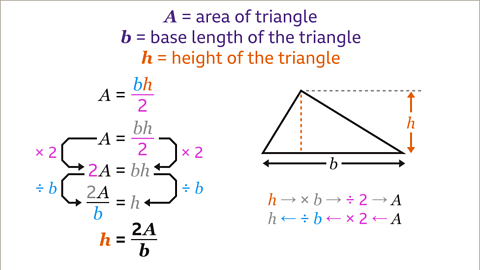
The expression means that and are multiplied, and then their product is divided by . Start by undoing the division by : multiply both sides by .
Now is multiplied by , so divide both sides by :
Write the target first:
The only restriction is that , because division by zero is undefined. In context, a triangle with base would not be an ordinary triangle anyway.
Watch this compact walkthrough before moving to more general examples.
Rearrange formulas to isolate specific variables | Linear equations | Algebra I | Khan Academy
In “Rearrange formulas to isolate specific variables,” Khan Academy works through the triangle-area formula one balanced operation at a time.
Watch the setup to connect the symbols to the diagram. Then watch removing one half and isolating height. Notice that multiplying by 2 and dividing by b are performed on both sides, not merely “moved across” the equals sign.
A formula you will meet in data work
A common data-science operation is standardization, which converts an original value into a scaled value :
For now, read as a reference value and as a positive scaling value. You will study their statistical meanings later. Here the algebraic goal is to recover when , , and are known.
The entire numerator is divided by . Undo that division by multiplying both sides by :
Next, add to both sides:
Therefore,
This is the same pattern as ordinary equation solving, except that the “numbers” being carried through the work are symbols.
A numerical check makes the meaning concrete. Suppose
Then the rearranged formula gives
Put this back into the original formula:
So the two forms are consistent.
When the target is inside a power
Sometimes you first isolate a power of the target, then apply a root. Consider the volume of a cylinder:
To solve for , first remove the factors multiplying . Divide both sides by :
Then take the square root of both sides:
For a cylinder, is a radius, so it cannot be negative. That is why we use the nonnegative square root here.
In a purely algebraic equation such as
both and solve the equation. Context matters: a formula may represent a physical quantity with restrictions, while an abstract equation may allow more than one solution.
The general principle is:
- Isolate the powered expression first, such as .
- Then undo the power using a root.
- Use the context to determine whether all algebraic solutions make sense.
Check a rearranged formula
A reliable check is to substitute your rearranged expression back into the original formula and simplify.
For the formula
you found
Substitute this expression for into the original right-hand side:
The cancels with the denominator:
The original equation is recovered, so the rearrangement is correct.
You can also perform a numerical check in Python. The code below tests that converting a value of to , then putting that into the original formula, returns the same .
import math

def forward_formula(x):
    return 3 * x + 4

def solve_for_x(y):
    return (y - 4) / 3

for y in [4, 10, -2]:
    recovered_y = forward_formula(solve_for_x(y))
    assert math.isclose(recovered_y, y)

print("All checks passed.")
This kind of forward-and-reverse check is valuable in programming as well as algebra. It helps catch missing parentheses, incorrect signs, and division applied to only part of an expression.
Common mistakes to avoid
Dividing only one term
From
the correct rearrangement is
It is not
because the division by must apply to all of .
Changing a sign without a balanced operation
From
it may be tempting to say that “ moves over and becomes .” The actual valid step is:
which simplifies to
The shortcut phrase is harmless only if you remember the real operation behind it.
Dividing by a quantity that could be zero
From
we obtained
This assumes . In applied settings, consider whether a denominator can be zero and what that would mean for the situation.
Key takeaways
Rearranging a formula means making a requested variable stand alone on one side of an equation.
- Use the same balanced-operation principle used for solving equations.
- Treat non-target variables as quantities that may behave like coefficients.
- Undo operations in reverse order, preserving parentheses when an entire expression is multiplied or divided.
- For powers, isolate the powered term before taking a root.
- Check by substitution, numerically or symbolically, and note any restrictions such as denominators being nonzero.
Next, you will use the same algebraic discipline with linear inequalities. The key new detail will be that multiplying or dividing an inequality by a negative number reverses its comparison sign.
Can't find a good explanation? Sign up and we'll make it for you
Sign up