
Hello. In the previous lesson, you treated a set of equations as a dependency graph: source quantities become available first, intermediate quantities are computed in a valid order, and a final output is produced by a forward pass.
This lesson completes that bridge from mathematical model to executable model. You will write short Python statements that follow the same dependency order as the equations, run them, compare the result with a hand calculation, and then safely modify an input such as the number of agent candidates. The purpose is not merely to “do math in code.” It is to make a workflow model inspectable and testable.
An expression calculates; an assignment stores
In mathematics, an expression such as
has a value:
Python can evaluate the same calculation, but it uses an explicit multiplication symbol:
5 * 1200
If you run that expression in a notebook or Python console, Python displays:
6000
Usually, though, you want to store the result under a useful name:
total_tokens = 5 * 1200
This is an assignment statement. Python first evaluates the expression on the right, then stores the resulting value in the variable on the left.
It is important not to read Python’s = exactly like a mathematical equals sign.
| Mathematical notation | Python code | Meaning |
|---|---|---|
total_tokens = candidates * tokens_per_candidate | Calculate a value and give it a name. | |
variable_cost = price_per_token * total_tokens | Use a previously stored value in a later calculation. | |
x = x + 1 | Replace the old stored value of x with a new one. |
The first two rows translate a static mathematical model. The last row is common in programs that track changing state, such as a retry counter or a running token total. It is not an algebraic claim that a number equals itself plus one. It means: take the current value, add one, and store that new value under the same name.
Python Math Operators - Visually Explained
Watch “Python Math Operators - Visually Explained” by Visually Explained for a compact demonstration of the symbols Python uses for arithmetic and how to execute a calculation in a notebook cell.
Watch basic operators for addition, subtraction, multiplication, and division. Then watch extra operators for powers, floor division, and remainders. Focus on the fact that Python needs * for multiplication and ** for powers.
Translating ordinary mathematical notation into Python
Most of the arithmetic notation you have used so far has a direct Python equivalent:
| Mathematical operation | Python operator | Example |
|---|---|---|
| Addition | + | fixed_cost + variable_cost |
| Subtraction | - | baseline_value - penalty |
| Multiplication | * | price_per_token * total_tokens |
| Division | / | total_cost / candidates |
| Exponent | ** | branching_factor ** depth |
| Parentheses | () | (base_cost + variable_cost) * tax_rate |
Two translation rules prevent many errors:
-
Write every multiplication explicitly.
Mathematics permits and ; Python requires5 * KandK * t. -
Use
**, not^, for an exponent.
The mathematical expression becomes3 ** 2. In Python,^has a different technical meaning and does not mean “raised to a power.”
Parentheses work in Python just as they do in arithmetic. Consider the utility equation from the previous lesson:
A direct Python translation is:
utility = baseline_value - cost_penalty * total_cost - latency_penalty * total_latency
Multiplication occurs before subtraction, so this works as written. Still, adding parentheses can make a model easier to inspect:
utility = baseline_value - (cost_penalty * total_cost) - (latency_penalty * total_latency)
When code is intended to communicate a system model to another person—or to your future self—clarity is more valuable than saving a few characters.
Read “Mathematical Expressions” from Runestone Academy to reinforce the distinction between a Python expression and an assignment, then review Python’s arithmetic operators and evaluation order.
In Subsection 1.7.1, read assignment evaluation. Notice the stated direction: Python evaluates the right-hand side before storing the result on the left. Then go to Subsection 1.7.3, “Arithmetic Operators.” Read the tables of basic and special operators, beginning with the basic operators, and continue through the discussion of PEMDAS and tracing assignments. For this course, prioritize +, -, *, /, **, and parentheses. Recognize // as floor division and % as remainder, but do not substitute them for ordinary division in cost, latency, or rate calculations.
Values have types, but types do not carry units
Python distinguishes whole-number values and decimal-number values:
- An integer, written as
int, is a whole number such as500. - A floating-point number, written as
float, is a decimal quantity such as3.14.
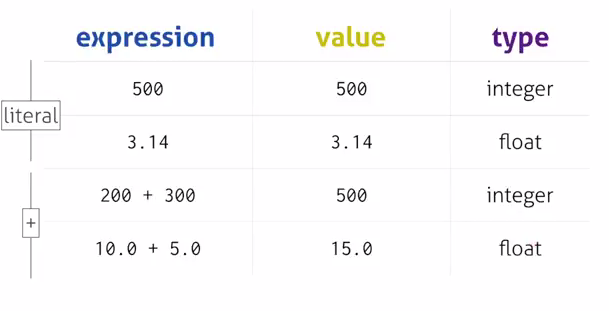
You can ask Python to reveal a value’s type:
print(type(500))
print(type(3.14))
print(type(200 + 300))
print(type(10.0 + 5.0))
The output is:
<class 'int'>
<class 'float'>
<class 'int'>
<class 'float'>
For system models, counts are often integers:
candidates = 5
tokens_per_candidate = 1200
Costs, rates, probabilities, and durations are often floats:
price_per_token = 2e-6
setup_latency = 0.5
success_rate = 0.82
The notation 2e-6 is Python’s compact form of scientific notation:
That makes it useful for quantities such as dollars per token, where writing all the zeros would obscure the important scale.
A type is not the same as a unit. Both 0.5 seconds and 0.5 dollars are floats, but they represent different physical or system quantities. Python will happily add them unless you structure the model carefully; your unit reasoning is what prevents a meaningless equation.
Also note that ordinary Python division, /, produces a float:
print(15 / 12)
produces:
1.25
By contrast, 15 // 12 produces 1 by discarding the fractional part. That may be appropriate if you truly need the number of complete groups, but it would be wrong for an average latency or a cost-per-token calculation.
Reproducing a workflow calculation by hand and in Python
Return to the candidate-evaluation model from the prior lesson:
Using these source values:
the hand calculation gave:
Now write the same forward pass in Python. The descriptive Python names are longer than the mathematical symbols, but they make the code legible when it appears in an experiment or harness configuration.
# Source quantities
candidates = 5
tokens_per_candidate = 1200
price_per_token = 2e-6
fixed_cost = 0.010

setup_latency = 0.5
latency_per_candidate = 1.2

baseline_value = 90
cost_penalty = 1000
latency_penalty = 2

# Computed quantities, in dependency order
total_tokens = candidates * tokens_per_candidate
variable_cost = price_per_token * total_tokens
total_cost = fixed_cost + variable_cost

total_latency = setup_latency + candidates * latency_per_candidate

utility = (
    baseline_value
    - cost_penalty * total_cost
    - latency_penalty * total_latency
)

# Inspect the forward pass
print("Total tokens:", total_tokens)
print("Variable cost:", variable_cost)
print("Total cost:", total_cost)
print("Total latency:", total_latency)
print("Utility:", utility)
The important part is not the formatting of the code. It is the structural correspondence:
| Equation | Python statement | Dependency idea |
|---|---|---|
total_tokens = candidates * tokens_per_candidate | Both inputs must already exist. | |
variable_cost = price_per_token * total_tokens | Uses the earlier token result. | |
total_cost = fixed_cost + variable_cost | Combines fixed and variable cost. | |
total_latency = setup_latency + candidates * latency_per_candidate | An independent latency branch. | |
utility = ... | Joins the cost and latency branches. |
This is the same topological order you used by hand. Python does not understand your dependency graph as a diagram; it follows the sequence of statements you provide. If you try to compute utility before total_cost or total_latency has been assigned, Python cannot complete the calculation.
You could condense the total-cost calculation into one line:
total_cost = fixed_cost + price_per_token * candidates * tokens_per_candidate
It has the same mathematical value. But the longer version retains total_tokens and variable_cost as named checkpoints. During real system analysis, those checkpoints make it much easier to locate an incorrect assumption, anomalous measurement, or unexpected cost increase.
Modify one assumption and observe all consequences
A model becomes useful when you can change an assumption and see which outputs change. Keep every line of the code above, but change only:
candidates = 8
Then rerun the entire block from top to bottom. The hand calculation predicts:
The final utility fell from to . The model makes the reason concrete:
- three extra candidates add generated tokens;
- that adds dollars of token cost;
- the cost penalty therefore rises by points;
- the extra candidates add seconds of latency;
- the latency penalty therefore rises by another points.
The total decline is utility points.
Python may occasionally display a very long decimal such as 40.599999999999994 instead of 40.6. That is a normal consequence of how computers store many decimal fractions internally. For presentation, you can round the displayed value:
print("Utility:", round(utility, 2))
For now, treat rounding as a display choice. Keep the unrounded value for the calculation unless your system specification explicitly requires rounding at an earlier step.
A disciplined workflow for connecting hand math and code is:
- Write the equations and label every quantity with a meaning and unit.
- Calculate a small example by hand, including intermediate values.
- Translate each equation into a Python assignment using explicit operators.
- Run the code and compare every intermediate value, not just the final output.
- Change one source quantity at a time.
- Rerun the full dependency-respecting calculation and explain which outputs changed and why.
That procedure turns code into a check on mathematical reasoning, rather than a black box that produces a number.
A short debugging checklist
When Python’s output disagrees with your hand calculation, begin with the most common translation mistakes.
| Symptom | Likely cause | Check |
|---|---|---|
| A syntax error near two variables | Missing multiplication symbol | Write a * b, never ab. |
| A surprising exponent result | Used ^ instead of ** | Write depth ** 2. |
| A result is smaller than expected | Used // rather than / | Floor division discards the fractional part. |
| A variable “does not exist” | It was used before assignment | Check the dependency order. |
| A changed input has no effect | You ran only later lines with an old intermediate value | Rerun the full block from the source inputs. |
| A final value looks wrong | Parentheses or a sign differ from the equation | Compare one operation at a time with the hand calculation. |
Use print() strategically during debugging. If the final utility is unexpected, print total_tokens, variable_cost, total_cost, and total_latency. The first incorrect intermediate quantity identifies the branch of the model that needs attention.
Wrap-up
You can now turn a hand calculation into short executable Python:
- A Python expression calculates a value; an assignment statement stores that value under a name.
- Use
*for multiplication,/for ordinary division, and**for exponents. - Integers are useful for counts; floats are typical for costs, durations, and rates, but you must still reason about units yourself.
- Write statements in dependency order, just as you evaluate a forward pass through an equation graph.
- Preserve intermediate variables when you need to inspect, validate, or debug a system model.
- Change one source value at a time, rerun the model, and compare Python’s intermediate outputs with the corresponding hand calculations.
The next module begins the algebra used to analyze AI-system scale and tradeoffs. You will calculate ratios, rates, proportions, and weighted averages from concrete system measurements—then use the same Python habits to verify and explore them.
Can't find a good explanation? Sign up and we'll make it for you
Sign up