
Hello! Welcome to your next lesson.
Introduction
In our last lesson, we explored how to use the LIKE operator for flexible pattern matching in text, which is great for analyzing things like event names or user-generated content. We've covered several ways to filter data using the WHERE clause, but we've always assumed the data we're looking for exists.
What happens when it doesn't? In any real-world product database, you'll find gaps: a user who hasn't set a profile picture, an order placed without a discount code, or an optional survey question left unanswered. These missing pieces of information are represented by a special marker: NULL.
Lesson Goal: In this lesson, you will learn how to handle missing data by filtering for these empty values using the IS NULL and IS NOT NULL operators. Understanding how to work with NULL is essential for cleaning data, assessing data quality, and accurately analyzing user behavior.
1. What is a NULL Value?
Before we can filter for NULL values, we need to understand what they are. A NULL value represents missing or unknown information. It's a placeholder.
It's crucial to remember what NULL is not:
- It is not the number zero (
0). - It is not an empty text string (
''). - It is not a boolean
falsevalue.
A NULL in a last_login_date column doesn't mean the user logged in on "day zero"; it means we have no record of them ever logging in.
Let's watch a short video that explains this concept and why NULL values are so common in business data.
Null Values in SQL - 5 tips in 14 min (IFNULL & COALESCE)
This video from Jess Ramos provides a great explanation of what NULL values are and, importantly, why they exist in real-world data.
Please watch the section "What are NULL values?" from 00:46 to 02:13. Pay attention to the distinction between a NULL value and a zero, and the reasons why data might be missing.
As a product designer, you'll encounter NULL values frequently:
- In a
userstable, acompany_namecolumn might beNULLif it's an optional field during signup. - In an
eventstable, alocationattribute might beNULLif a user has not granted location permissions. - In a
subscriptionstable, acancellation_datewould beNULLfor all active subscribers.
2. Finding Missing Data with IS NULL
Now, how do we find rows that contain these NULL values? You might instinctively try to use the equals sign, like WHERE column_name = NULL. This will not work.
In SQL, NULL represents an unknown value, so it cannot be "equal" to anything, including another NULL. The correct way to test for NULL is with the IS NULL operator.
Syntax:WHERE column_name IS NULL
Let's say we want to identify users who have signed up but haven't chosen a subscription plan yet. We could run a query like this:
SELECT
  user_id,
  email,
  signup_date
FROM
  users
WHERE
  subscription_plan IS NULL;
This query would return all users for whom the subscription_plan field is empty. This is a powerful way to identify opportunities for user engagement, such as sending a follow-up email prompting them to select a plan.
This image shows a similar concept, finding customers who have a NULL value in their favorite_website column.

3. Finding Complete Data with IS NOT NULL
The opposite of IS NULL is, predictably, IS NOT NULL. This operator allows you to select only the rows where a column has a value.
Syntax:WHERE column_name IS NOT NULL
This is incredibly useful for ensuring you're working with a clean, complete dataset for your analysis. For example, if you wanted to analyze the behavior of users who have completed their profiles, you would first filter out anyone with missing profile information.
Example: Find all users who have set a profile bio.
SELECT
  user_id,
  bio_text
FROM
  user_profiles
WHERE
  bio_text IS NOT NULL;
This query gives you a list of users who have actively engaged with the profile-building features of your product.
To solidify this, please read through the following short article. It provides clear syntax and examples for both IS NULL and IS NOT NULL.
SQL IS NULL and IS NOT NULL (With Examples)
This article from Programiz offers a concise, text-based summary of the IS NULL and IS NOT NULL operators.
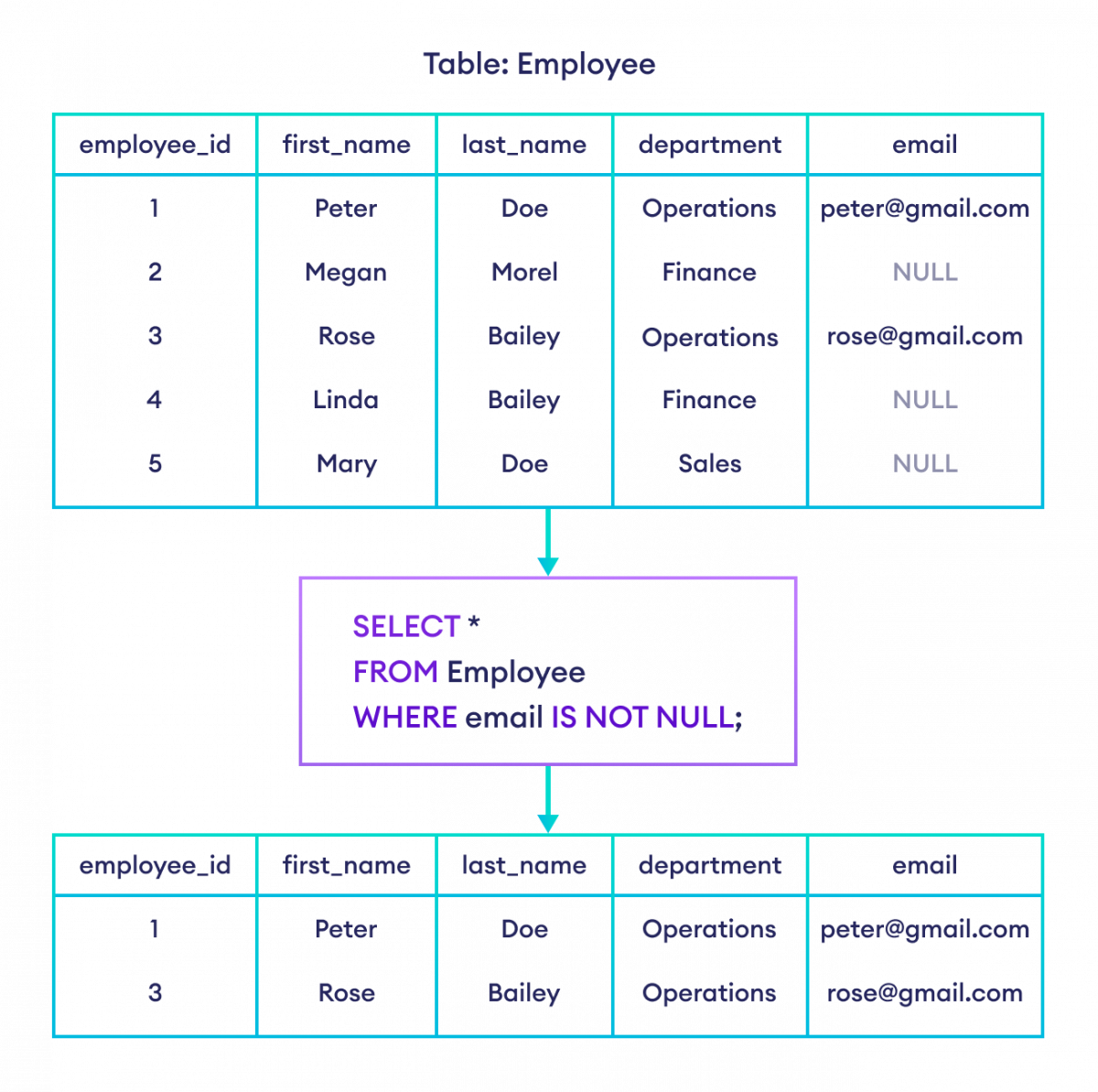
Please read the sections "IS NULL Syntax" and "IS NOT NULL". Focus on the example queries and the accompanying diagrams that show the result of filtering.
The image below, from the article you just reviewed, perfectly illustrates how IS NOT NULL filters the table to return only rows with complete data in the specified column.
4. Combining NULL Filters
You can easily combine IS NULL and IS NOT NULL with other conditions using AND and OR, just as you've done in previous lessons.
Example: Find users from the 'iOS' platform who have signed up but have not yet been assigned to an A/B test group.
SELECT
  user_id,
  signup_date
FROM
  users
WHERE
  platform = 'iOS'
  AND ab_test_group IS NULL;
This helps you isolate a specific segment of users (iOS users) who meet a certain data-completeness criterion (no A/B test group).
5. Practice Questions
Let's apply what you've learned. Imagine you are working with a user_activity table that has the following columns: user_id, event_name, device_platform ('iOS', 'Android', 'Web'), and session_duration_minutes.
Write a query for each scenario:
- Find all activity records where the session duration was not recorded.
- Find all activity records from 'Web' users that have a recorded session duration.
- Find all activity records where either the
device_platformis unknown or thesession_duration_minuteswas not recorded.
Click to see the answers
Answer 1:
This requires finding rows where session_duration_minutes is missing.
SELECT *
FROM user_activity
WHERE session_duration_minutes IS NULL;
Answer 2:
This requires combining a filter for the platform with a check for non-missing duration.
SELECT *
FROM user_activity
WHERE device_platform = 'Web'
  AND session_duration_minutes IS NOT NULL;
Answer 3:
This uses an OR condition to check for NULL in two different columns.
SELECT *
FROM user_activity
WHERE device_platform IS NULL
   OR session_duration_minutes IS NULL;
Conclusion
Well done! You now have the tools to handle one of the most common and important aspects of real-world data: missing values. Being able to explicitly include or exclude records with NULL values is fundamental to conducting accurate and meaningful analysis.
Key Takeaways:
- A
NULLvalue represents missing or unknown data. It is not the same as0or an empty string. - To test for
NULLvalues, you must use theIS NULLoperator. The standard=operator will not work. - To find rows that have data, use the
IS NOT NULLoperator. - These operators can be combined with
ANDandORto create powerful, specific filters for your analysis.
Next Lesson Preview:
So far, we've focused on filtering to get the right data. But in what order does that data appear? In our next lesson, we'll learn how to use ORDER BY to sort our results, enabling us to find things like the most recent signups, the most active users, or the highest-value orders.
Can't find a good explanation? Sign up and we'll make it for you
Sign up